
Evergreen Payments Northwest is the perfect solution for Hemp and high risk e-commerce.
Installation
↑ Back to topTo start using a product from WooCommerce.com, you can use the “Add to store” functionality on the order confirmation page or the My subscriptions section in your account.
- Navigate to My subscriptions.
- Find the Add to store button next to the product you’re planning to install.
- Follow the instructions on the screen, and the product will be automatically added to your store.
Alternative options and more information at:
Managing WooCommerce.com subscriptions.

Setup and Configuration
↑ Back to top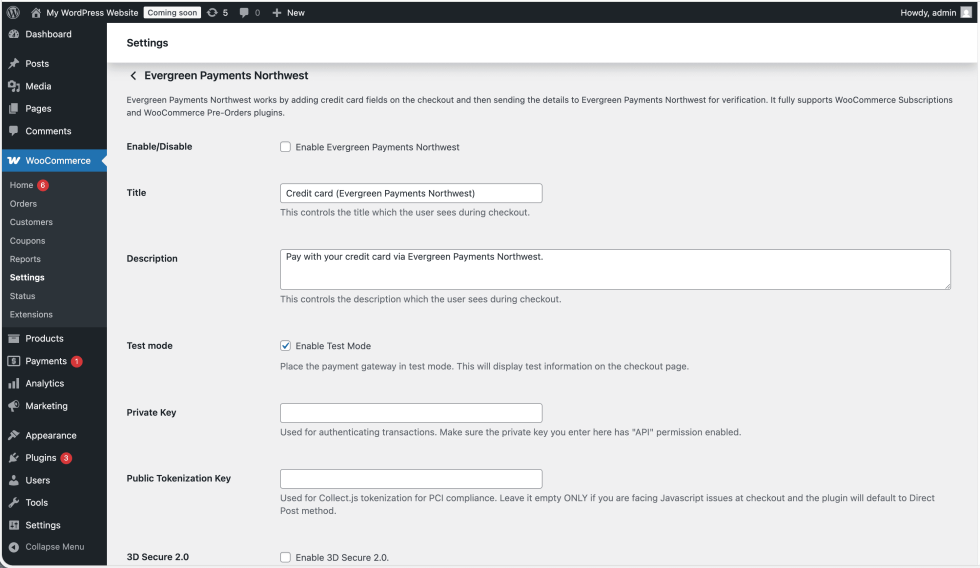
Getting started
↑ Back to topInstallation
↑ Back to topEasy steps to install the plugin:
- Upload
evergreen-payments-northwest-gateway-wcfolder/directory to the/wp-content/plugins/directory. - Activate the plugin (WordPress -> Plugins).
- Go to the WooCommerce settings page (WordPress -> WooCommerce -> Settings) and select the Payments tab.
- Under the Payments tab, you will find all the available payment methods. Find the ‘Evergreen Payments Northwest’ link in the list and click it.
- On this page you will find all the configuration options for this payment gateway.
- Enable the method by using the checkbox.
- Enter the Evergreen Payments Northwest API keys (Private Key and Public Tokenization Key).
That’s it! You are ready to accept credit cards with your Evergreen Payments Northwest gateway now connected to WooCommerce.
FAQs
↑ Back to topHelp customers by answering commonly asked questions.
Is SSL Required to use this plugin?
A valid SSL certificate is required to ensure your customer credit card details are safe and make your site PCI DSS compliant. This plugin does not store the customer credit card numbers or sensitive information on your website.

