
FacturaDirecta Integration allows you to connect your WooCommerce store with FacturaDirecta, the simple and cloud-based invoicing platform.
With this extension, invoices are automatically created in FacturaDirecta when WooCommerce orders reach the status you choose. Customers can download their invoices from My account, and store admins can access them from the WooCommerce Orders panel.
Unlike the official integration (which requires Zapier), this extension connects WooCommerce directly to FacturaDirecta, with no extra costs or complexity.
Installation
↑ Back to topTo start using a product from WooCommerce.com, you can use the “Add to store” functionality on the order confirmation page or the My subscriptions section in your account.
- Navigate to My subscriptions.
- Find the Add to store button next to the product you’re planning to install.
- Follow the instructions on the screen, and the product will be automatically added to your store.
Alternative options and more information at:
Managing WooCommerce.com subscriptions.

Setup and configuration
↑ Back to topGetting started
↑ Back to topTo set up your store with FacturaDirecta Integration, navigate to WooCommerce > FacturaDirecta in your store’s WP Admin dashboard.
Step 1: Connect to FacturaDirecta
↑ Back to topTo connect WooCommerce with your FacturaDirecta account, you’ll need your API Key and Company ID.
- Log in to your FacturaDirecta account.
- Navigate to Configuration > API and Integrations.
- Generate an API Key (select all permission options).
- Copy your Company ID.
- Back in your store’s WP Admin dashboard, paste both values into the extension settings under API Key and Company ID.
Step 2: General settings
↑ Back to top- Order status for invoice creation – choose when invoices are generated (e.g., “Processing” or “Completed”).
- Automatic email delivery. Enable or disable automatic sending of invoices directly from FacturaDirecta.
Step 3: Invoice preferences
↑ Back to top- Invoice Series. Define the numbering series for full invoices (invoices with fiscal ID).
- Simplified Invoice Series. Define a separate series for simplified invoices (invoices without fiscal ID).
- Refund Invoice Series. Define the numbering series used for refund invoices (credit notes).
- Fiscal-ID Threshold. Set the minimum order amount that requires a fiscal ID for generating a full invoice.
- Bank Account. Select the payment account from FacturaDirecta to mark invoices as paid.
- Invoice Template . Choose which PDF template FacturaDirecta should use.
Click Save Settings when done.
How it works
↑ Back to topWhen a WooCommerce order reaches the configured status, an invoice is automatically created in FacturaDirecta.
- The invoice uses your defined series, bank account, and PDF template.
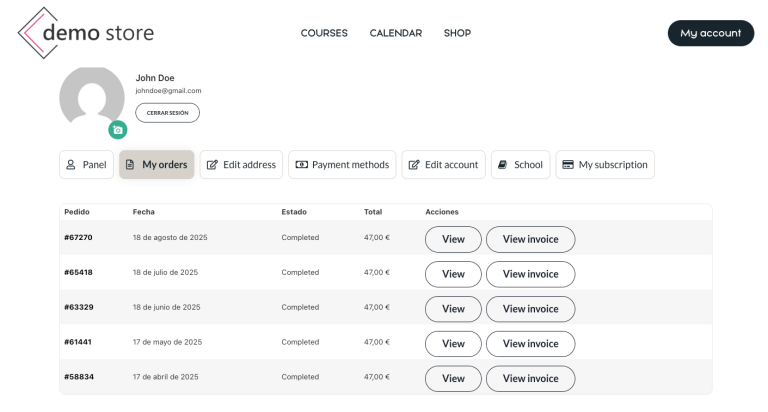
- Customers can download their invoices from My account > Orders.
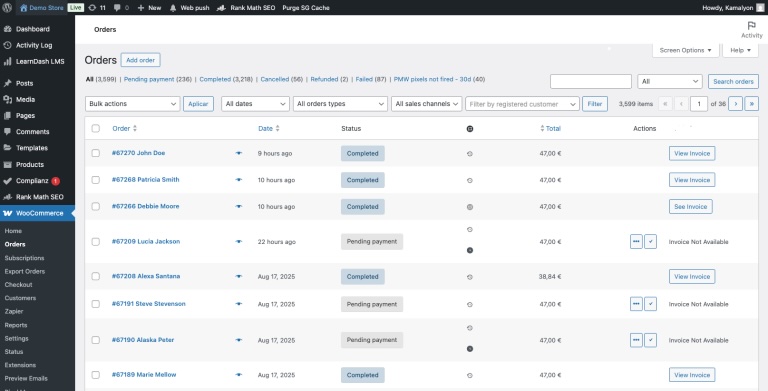
- Admins can view and access invoices directly from the WooCommerce Orders panel.
- Optionally, FacturaDirecta can email the invoice directly to the customer.
Usage
↑ Back to topCustomer View
↑ Back to topA View Invoice (FacturaDirecta) button appears in My Account > Orders once the invoice is created.
Admin View
↑ Back to topOn the WooCommerce Orders list and order detail pages, admins will see:
- View Invoice
- View Refund Invoice (when applicable)
- Regenerate Invoice
- Clear Invoice Reference
- Edit Invoice in FacturaDirecta
All actions include permission checks so only the order owner or shop managers/admins can access invoices.
- Automatic invoice creation in FacturaDirecta triggered by your selected order status.
- Support for full invoices, simplified invoices, and refund invoices.
- Independent numbering series for each invoice type.
- Automatic detection of invoice type based on fiscal ID and threshold rules.
- Email delivery of invoices directly via FacturaDirecta (optional).
- “View Invoice” buttons for both customers and admins.
- Clean, modern invoice management metabox in the order admin page.
- Secure access: only authorized users can download invoices.
- No Zapier required — direct integration between WooCommerce and FacturaDirecta.
Troubleshooting
↑ Back to topIf you encounter any issues, you can:
- Check your API Key and Company ID are correct.
- Verify your FacturaDirecta account has permissions enabled for API use.
- Review your WooCommerce order statuses configuration.
FAQs
↑ Back to top
Do I need a FacturaDirecta account?
Yes. An active FacturaDirecta subscription is required.
Is Zapier needed?
No. This extension connects WooCommerce to FacturaDirecta directly.
Can customers access their invoices?
Yes. Invoices appear in My account for customers and in the Orders panel for admins.

