
This page covers three features of KOMOJU Payments for WooCommerce: inline payment fields, which let certain payment methods collect card details directly on your checkout page instead of redirecting to KOMOJU, plus two tools for managing your connection settings.
Inline payments
↑ Back to topBy default, some KOMOJU payment methods let customers enter their payment details directly on your checkout page instead of being sent to KOMOJU’s hosted page. This keeps the customer on your site for the entire checkout process.
Step 1: Enable inline fields for a payment method
↑ Back to top- Go to WooCommerce → Settings → Payments
- Click on the payment method you want to configure
- Enable the inline payment fields option
- Click Save Changes

Reconnect button
↑ Back to topYou’ll find the Reconnect button under WooCommerce → Settings → KOMOJU → Payment Methods. Use it to reset your API connection with KOMOJU if orders aren’t updating correctly or payment methods aren’t showing up as expected.
1. Go to WooCommerce → Settings → KOMOJU → Payment Methods
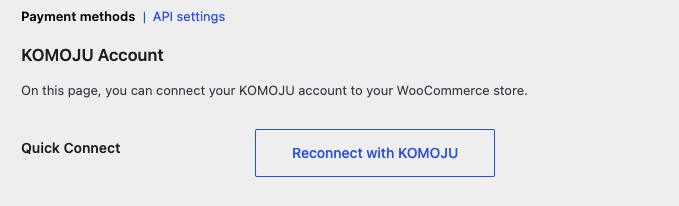
2. Click Reconnect
3. Follow the prompts to relink your KOMOJU account
API settings
↑ Back to topThe API settings tab holds the connection details between your store and KOMOJU, including webhook configuration. Under normal circumstances, the Reconnect button handles most connection issues without needing to open this tab.
If the Reconnect button doesn’t resolve a connection problem, use this tab to manually update your webhook settings as needed.
Locating the API settings tab
↑ Back to top- Go to WooCommerce → Settings → KOMOJU
- Click the API Settings tab