
Every WooCommerce order corresponds to one KOMOJU payment, but the two systems track different things.
WooCommerce manages order details like the customer, items purchased, shipping, and fulfillment, while KOMOJU processes the payment and holds the authoritative payment status.
When a payment completes, KOMOJU notifies WooCommerce via webhook, and the order status updates automatically to match.
Order statuses
↑ Back to topThe table below shows how KOMOJU payment statuses map to WooCommerce order statuses.
| KOMOJU Payment Status | WooCommerce Order Status |
|---|---|
| Authorized | Pending payment / On hold (if on-hold setting is enabled) |
| Captured | Processing / Completed (for virtual orders) |
| Pending | Pending payment |
| Expired | Cancelled |
| Refunded | Refunded |
| Failed | No change in status |
By default, an authorized payment sets the order to Pending payment. To hold authorized orders for review before processing, enable the on-hold setting on the KOMOJU API settings page in WooCommerce.

With this setting turned on, authorized payments set the order status to On hold instead.
Order IDs
↑ Back to topFinding the KOMOJU payment ID in WooCommerce
↑ Back to topTo look up a payment on the KOMOJU dashboard, start from the order page in WooCommerce.
- Go to the order in WooCommerce
- Check Order Details, Order Notes, or Custom Fields → komoju_payment_id for the payment ID
- Click View payment on KOMOJU under Order Details to open the payment directly on the KOMOJU dashboard
Finding a WooCommerce order in the KOMOJU dashboard
↑ Back to topTo find a WooCommerce order from within KOMOJU:
- From the KOMOJU dashboard, go to Payments
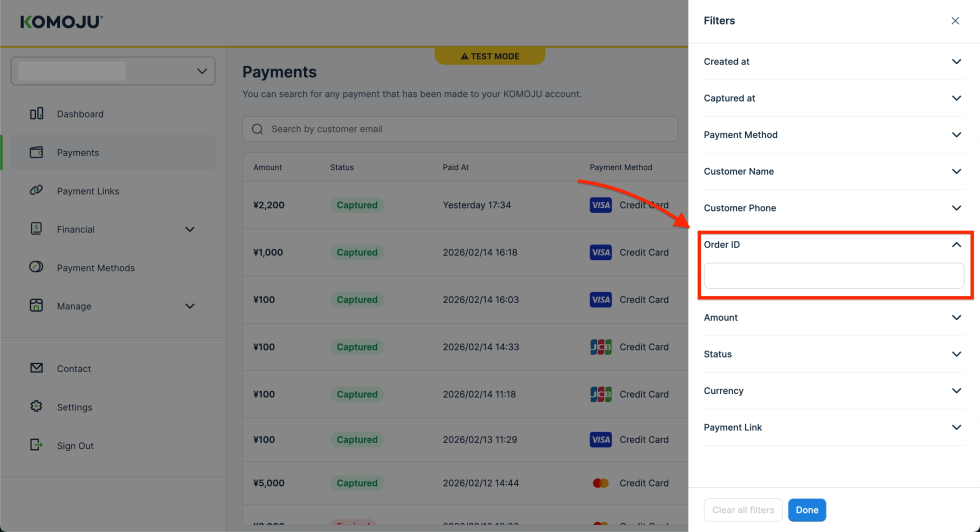
- Click Filter to open the search options
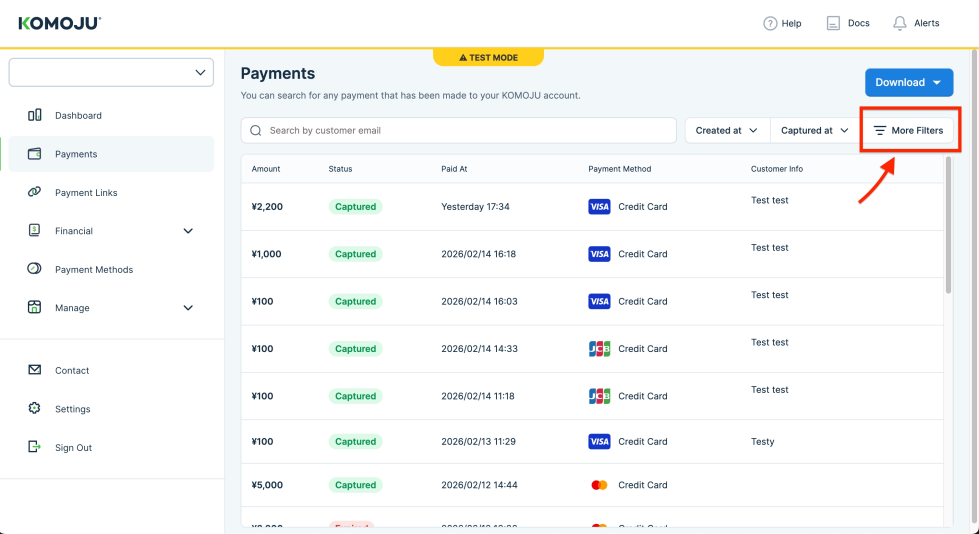
- Navigate to the Order ID field and enter your WooCommerce order ID
Order lifecycle
↑ Back to topHow an order moves through WooCommerce depends on the payment method the customer chose.
For payment methods that capture immediately, such as credit card, WooCommerce creates the order in Pending payment status as soon as checkout begins. Once the customer completes the payment, KOMOJU sends a captured payment webhook and the order updates to Processing or Completed.
Delayed payment methods, such as konbini or bank transfer, follow a slightly different path:
- WooCommerce creates the order in Pending payment status, or On hold if the on-hold setting is enabled
- The customer completes payment at a store or through their bank
- KOMOJU notifies WooCommerce via webhook and the order status updates to Processing or Completed
If the customer doesn’t complete the payment before it expires, the order status updates to Cancelled.