
Open Price for WooCommerce allows users to set a custom price for products, based on the pricing rules defined by the store owner. Whether it’s donation-based pricing, Name Your Price, or “Pay What You Want” options for specific products or categories, users have the freedom to choose a price within the shop’s customizable limits.
Installation
↑ Back to topTo start using a product from WooCommerce.com, you can use the “Add to store” functionality on the order confirmation page or the My subscriptions section in your account.
- Navigate to My subscriptions.
- Find the Add to store button next to the product you’re planning to install.
- Follow the instructions on the screen, and the product will be automatically added to your store.
Alternative options and more information at:
Managing WooCommerce.com subscriptions.

Configuring the Plugin:
↑ Back to topAfter activation, go to your WordPress Dashboard.
In the left sidebar, under the WooCommerce menu, you’ll see a new submenu called Open Price Rules.
Click on Open Price Rules.
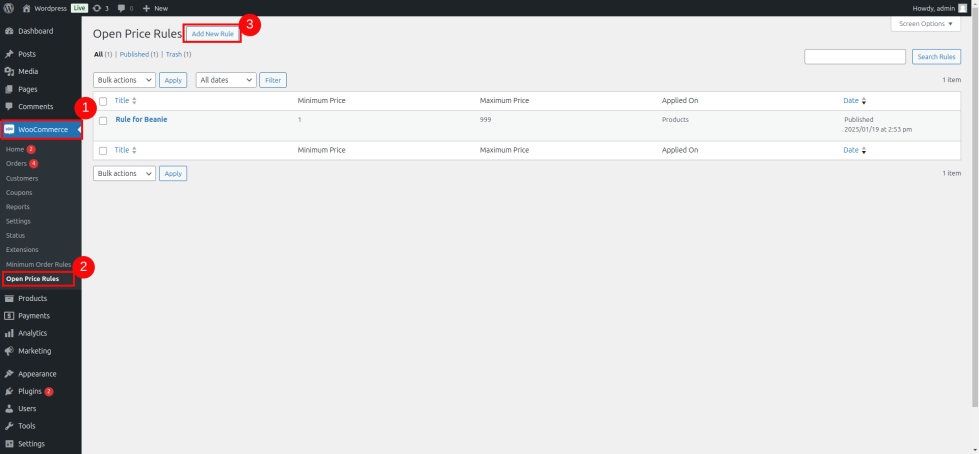
Creating a New Pricing Rule:
↑ Back to topOn the Open Price Rules page, click on the Add New Rule button at the top.
This will open a form where you can set up your rule. You can choose:
Which Products, Categories, or the Entire Shop the rule will apply to.
User Roles to specify if the rule applies to certain user roles (e.g., Guest Users, Registered Users, etc.).
Minimum and Maximum Price limits for user-entered prices.
Custom Label for displaying instead of the standard price.
Once you’ve set up your rule, click Save Rule to apply the settings.
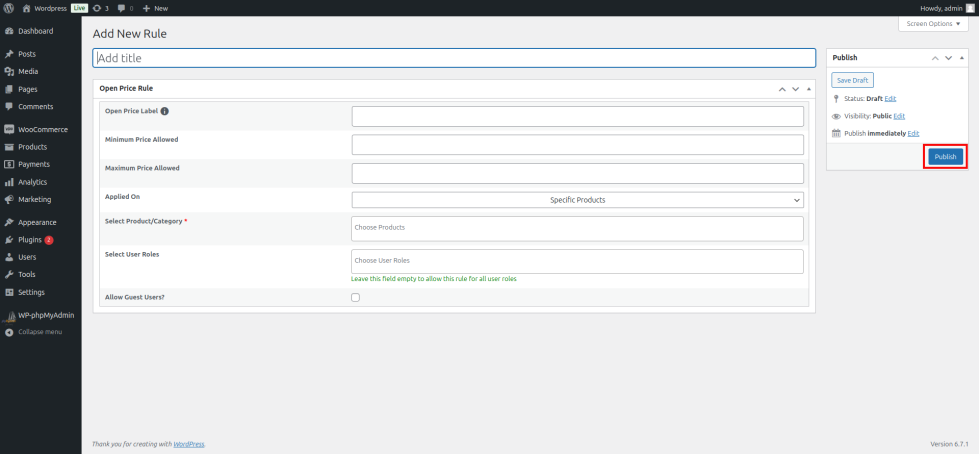
Using the Open Price Feature
↑ Back to topWhen the rule is active, customers will see the “Name Your Price” and “Enter Your Price” fields instead of the regular product price.
Customers can enter their desired price and proceed to the cart and checkout with their entered price.
Admins will be able to view the user-entered price in the cart, checkout, and order details within the admin panel.
That’s it! You’ve successfully installed, configured, and started using the “Open Price for WooCommerce” plugin to create dynamic, user-defined pricing on your store.
Questions and support
↑ Back to topDo you still have questions and need assistance?
- Get in touch with a Happiness Engineer via our Help Desk. We provide support for extensions developed by and/or sold on WooCommerce.com, and Jetpack/WordPress.com customers.
- If you are not a customer, we recommend finding help in the WooCommerce support forum or hiring a Woo Agency Partner. These are trusted agencies with a proven track record of building highly customized, scalable online stores. Learn more about Woo Agency Partners.

