
Overview
↑ Back to topAuto PDF Invoices and Packing Slip is a robust WooCommerce plugin designed to simplify order and billing management. It allows store owners to automatically generate professional PDF invoices, packing slips, delivery notes, shipping labels, and credit/refund notes.
The plugin also provides extensive customization options, enabling you to personalize document layouts, add company details such as business information, return policies, and branding elements, ensuring clear and professional communication with customers.
Installation
↑ Back to topTo start using a product from WooCommerce.com, you can use the “Add to store” functionality on the order confirmation page or the My subscriptions section in your account.
- Navigate to My subscriptions.
- Find the Add to store button next to the product you’re planning to install.
- Follow the instructions on the screen, and the product will be automatically added to your store.
Alternative options and more information at:
Managing WooCommerce.com subscriptions.

Setup and Configuration
↑ Back to topAfter activation, navigate to:
WooCommerce → PDF Suite
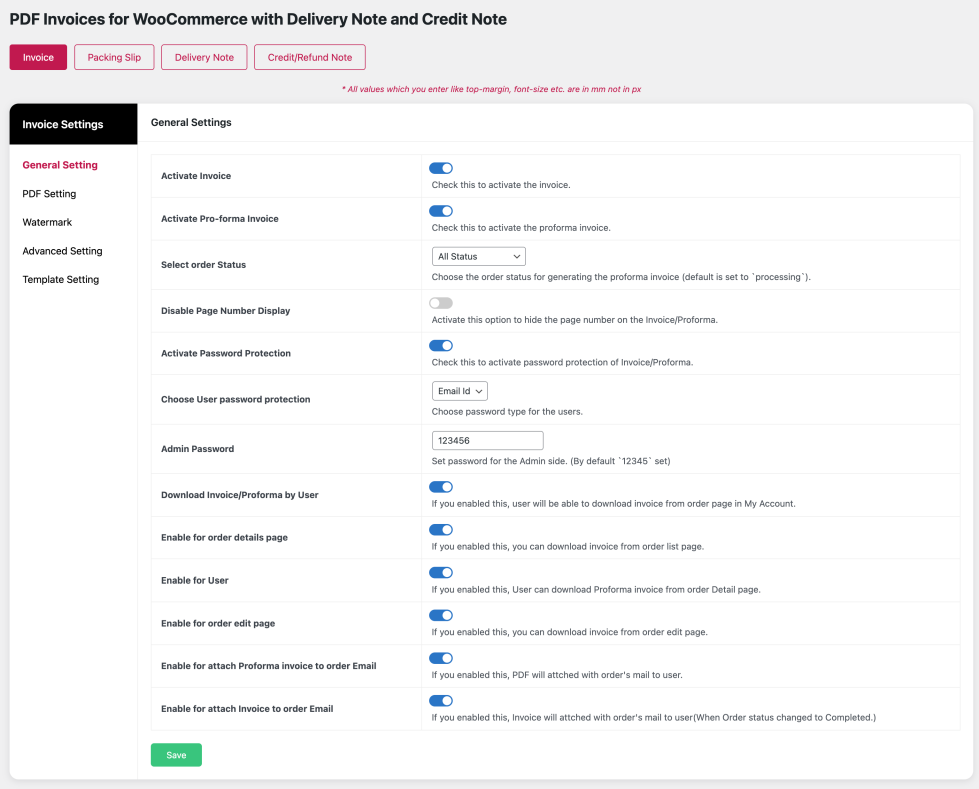
- Enable Invoice and Proforma Invoice options
- Select the order status for automatic invoice generation
- Configure default templates for invoices, delivery notes, and credit/refund notes
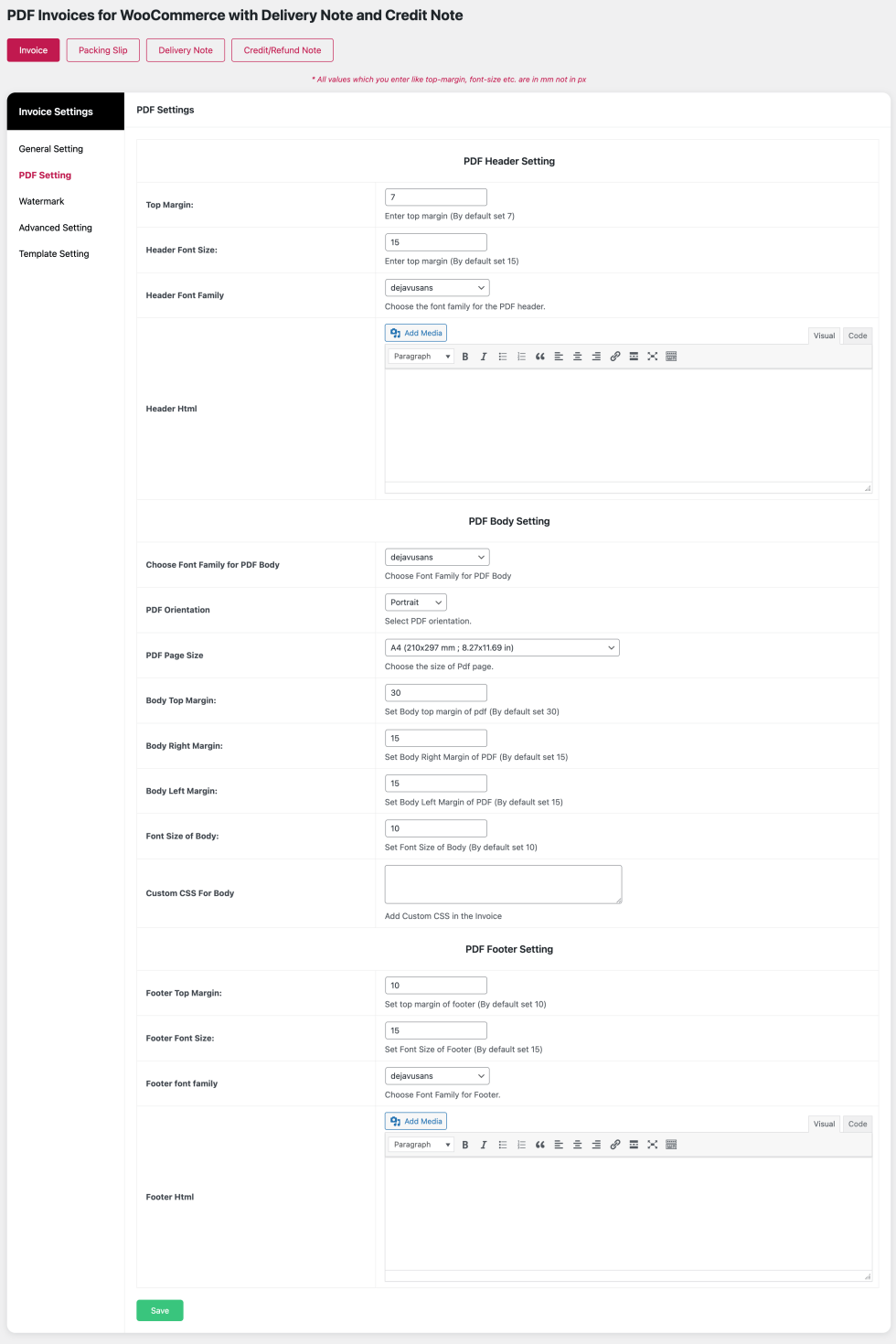
PDF Settings
↑ Back to topWooCommerce → PDF Suite → PDF Setting
PDF Settings allow you to control the appearance of all generated documents.
- Adjust margins for header, body, and footer
- Choose font family and font size
- Ensure documents match your brand style
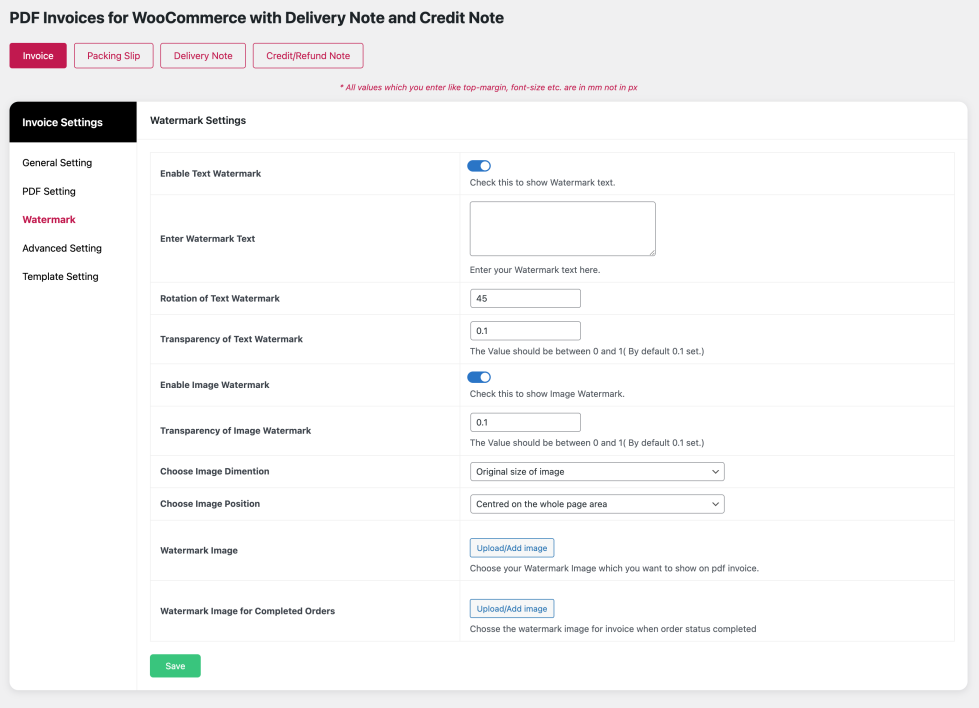
Watermark Settings
↑ Back to topWooCommerce → PDF Suite → Watermark
Text Watermark
↑ Back to topAdd custom text watermarks to protect and brand your documents.
- Set watermark text
- Adjust opacity for subtle or bold appearance
- Rotate watermark text to desired angle
Image Watermark
↑ Back to topUse image watermarks for added branding and security.
- Upload custom watermark image
- Control transparency
- Set image dimensions
- Position watermark anywhere on the PDF
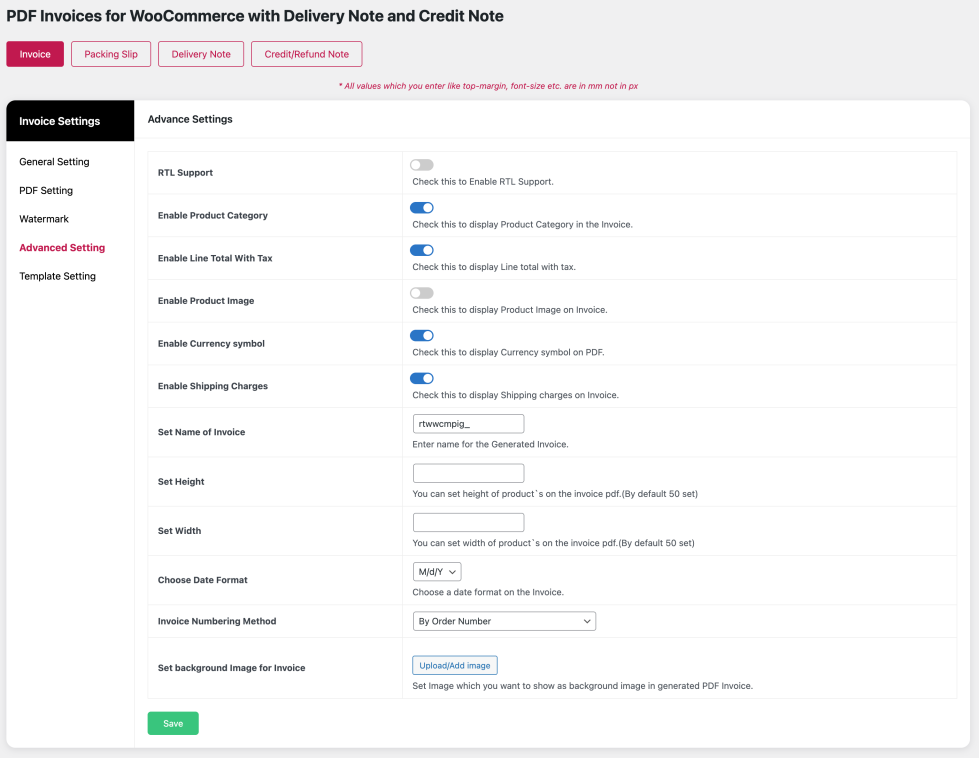
Advanced Settings
↑ Back to topWooCommerce → PDF Suite → Advance Setting
Advanced settings provide fine-grained control over invoice content.
- Show or hide product category
- Enable line total with tax
- Display product images
- Show or hide currency symbol
- Include shipping charges
- Adjust product image height and width
- Enable RTL (Right-to-Left) language support
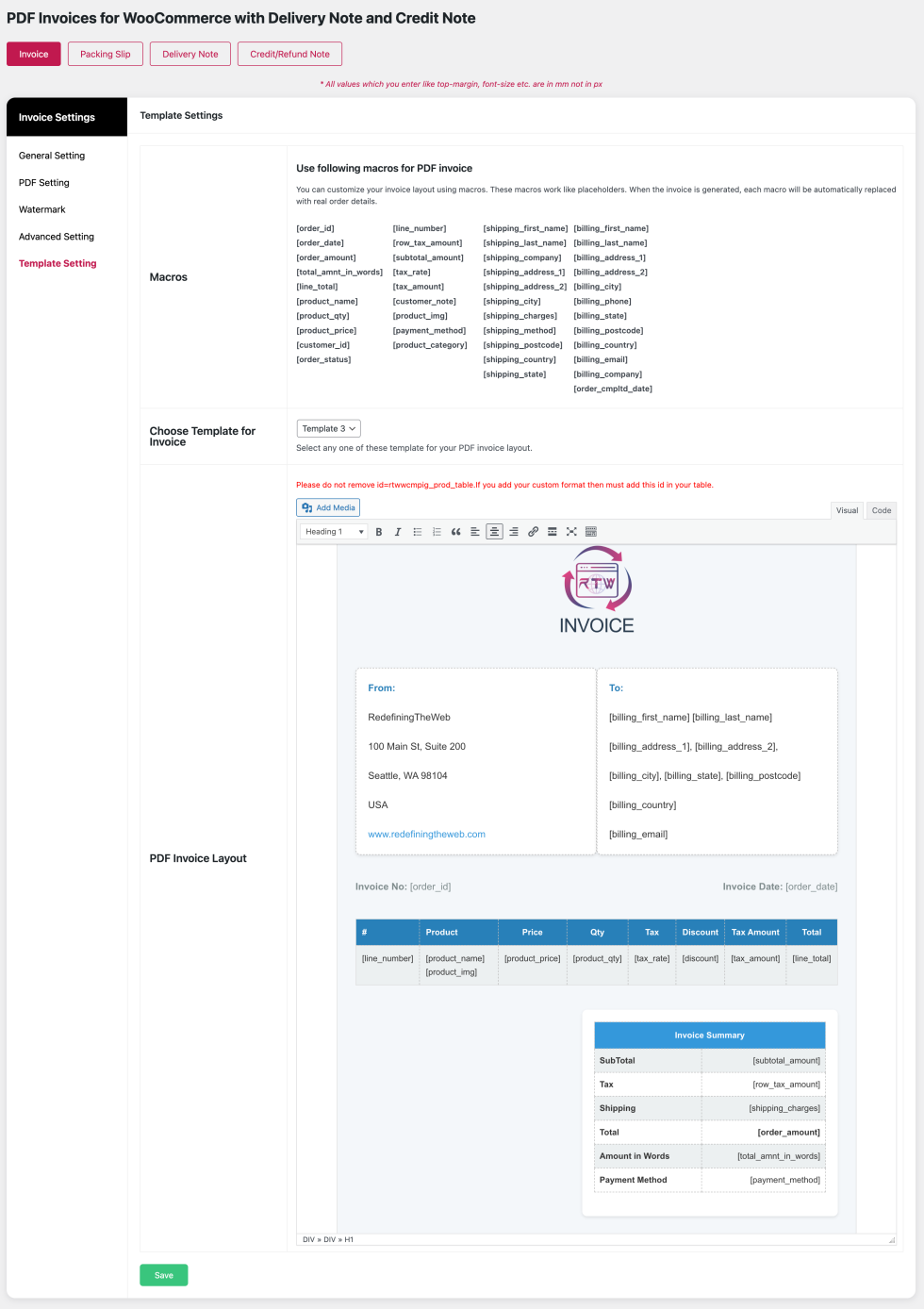
Template Settings
↑ Back to topWooCommerce → PDF Suite → Template Setting
Template Settings allow you to fully customize document layout and structure.
- Select from available PDF templates
- Customize layout and design
- Use dynamic macros to display order-specific data
- Modify content using the WordPress editor
Invoice Customization Options
↑ Back to topSet Invoice Name
↑ Back to topWooCommerce → PDF Suite → Advance Setting ->Set Name of Invoice
Customize the name of generated PDF invoices to match your business terminology.
Choose Date Format
↑ Back to topWooCommerce → PDF Suite → Advance Setting ->Choose Date Format
Select a preferred date format to match regional or business requirements.
Invoice Numbering Method
↑ Back to topWooCommerce → PDF Suite → Advance Setting ->Invoice Numbering Method
Control how invoice numbers are generated.
- Use WooCommerce order ID as invoice number
- Create custom numbering with prefix and suffix
- Define invoice number length
- Ensure audit-safe numbering with no duplication
Set Background Image
↑ Back to topWooCommerce → PDF Suite → Advance Setting ->Set background Image for Invoice
Add a custom background image to invoices to enhance branding and visual identity.
PDF Generation
↑ Back to topYou can generate documents directly from the WooCommerce order edit page.
- Meta boxes are available on the right side of the order edit screen
- Generate PDF invoices, packing slips, delivery notes, or credit notes
- Download documents instantly for printing or sharing
Note: Credit/Refund notes are generated only when an order status is changed to Refunded.
Bulk Actions
↑ Back to topManage documents for multiple orders efficiently using Bulk Actions.
- Download invoices in bulk
- Delete invoices for multiple orders
- Generate credit/refund notes for refunded orders
This feature helps maintain organized order records and saves time when handling large volumes of orders.
Feedback and Feature Requests
↑ Back to topWe welcome your feedback and feature suggestions.
Email us at: support@redefiningtheweb.com
Questions & Support
↑ Back to topNeed help before or after purchase?
Please raise a support ticket via our Help Desk:
https://redefiningtheweb.freshdesk.com/support/tickets/new
FAQs
↑ Back to topHelp customers by answering commonly asked questions.
Does the plugin automatically generate PDF invoices?
Yes. The plugin can automatically generate PDF invoices based on the order status you select in the settings. Once enabled, invoices are generated without any manual action.
What types of documents can I generate?
The plugin allows you to generate:
1. PDF Invoices (Normal & Proforma)
2. Packing Slips
3. Delivery Notes
4. Shipping Labels
5. Credit / Refund Notes
When is a credit or refund note generated?
A credit or refund note is generated automatically when an order status is changed to Refunded (fully refunded). This ensures accurate refund documentation.
Can I manually generate or regenerate invoices?
Yes. Admins can manually generate, delete, or regenerate invoices directly from the WooCommerce order edit page at any time.
Can customers download invoices from their account?
Yes. You can enable a download invoice option on the customer’s My Account page, allowing them to access their invoices easily.
Does the plugin attach invoices to WooCommerce emails?
Yes. Generated PDF invoices can be automatically attached to WooCommerce emails sent to customers or administrators.
Can I customize the invoice layout and design?
Yes. The plugin provides extensive customization options including:
1. Custom fonts and font sizes
2. Header and footer customization
3. Custom CSS
4. Background images
5. Watermark text or images
Can I add my company details and policies to invoices?
Yes. You can add company information such as business name, address, contact details, and return policies using the template editor.
Does the plugin support custom invoice numbering?
Yes. You can choose to use the WooCommerce order ID or create a custom invoice numbering format with prefixes, suffixes, and number length.
Invoice numbers are audit-safe and will not change when an invoice is regenerated.
Is tax information supported on invoices?
Yes. The plugin supports multiple tax classes and can display tax rates, tax amounts,
and totals with or without tax, depending on your configuration.

