
A Product Timer for WooCommerce helps create urgency by showing customers. exactly how much time is left for a product’s availability, sale, or special promotion.
Running limited-time offers is one of the most effective ways to increase conversions in an online store.
If you’re using WooCommerce, adding a product timer can significantly improve customer engagement and sales performance.
What is a Product Timer in WooCommerce?
↑ Back to topA product timer is a countdown system that controls product availability based on time. It can automatically allow or disappear products and shows a timer to customers.
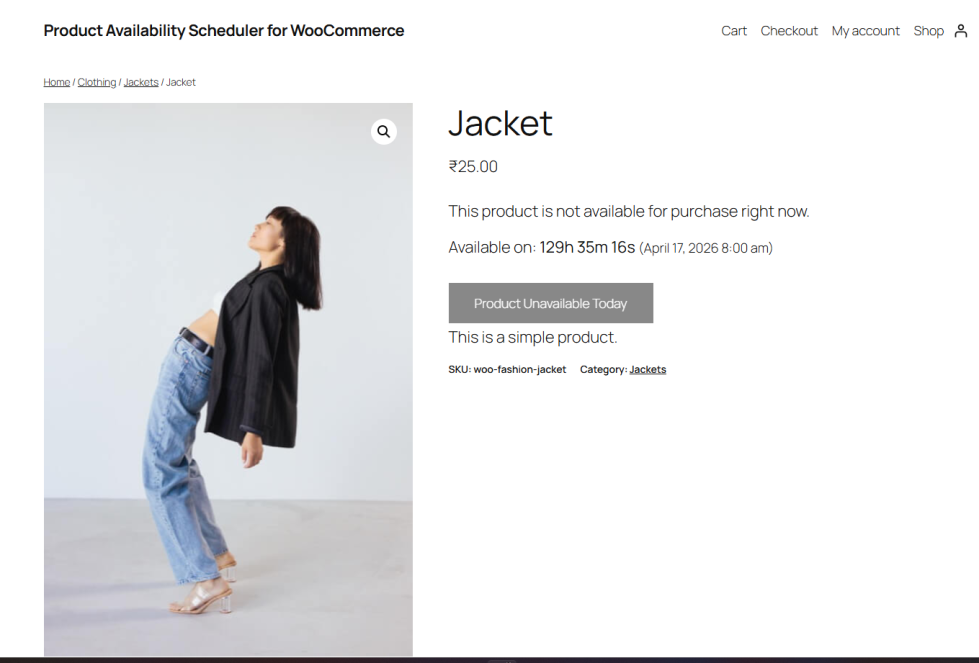
For example:
- Flash sale countdown timers
- Limited-time product availability
- Product availability countdown
- Daily deal timers
- Restaurant ordering time windows
Automate Product Availability with a Scheduler
↑ Back to topInstead of manually enabling or disabling products, you can automate the entire process using a scheduling plugin.
For example, the CG Product Availability Scheduler for WooCommerce let you to schedule product availability. control ordering time, and show timers to customers.
Using a scheduler with a timer helps store owners:
- Reduce manual work
- Avoid human errors
- Run automated promotions
- Manage time-based inventory
Benefits of Using a Product Timer
↑ Back to top
Increase Conversions
↑ Back to topProduct countdown timers create a sense of urgency that motivates customers to complete their purchases faster, helping reduce cart abandonment and improve conversion rates.
Run Flash Sales Easily
↑ Back to topSchedule and manage promotional campaigns effortlessly, including:
- Festival & holiday sales
- Weekend special deals
- Limited stock promotions
- Exclusive product launches
- Seasonal discount campaigns
- Time-sensitive offers & clearance sales
Improve Customer Engagement
↑ Back to topCountdown timers grab attention and encourage shoppers to take immediate action, increasing user interaction and purchase intent.
Create FOMO (Fear of Missing Out)
↑ Back to topLimited-time countdowns make customers feel they may miss a great deal, which can lead to faster buying decisions and higher sales performance.
Better Customer Communication
↑ Back to topCustomers clearly know:
- When a product becomes available
- When an offer ends
- How long they have to order
Best Use Cases for Product Timers
↑ Back to topA WooCommerce product timer works perfectly for:
- Flash sales
- Seasonal stores
- Food ordering websites
- Event-based products
- Limited-stock products
- Course enrollment deadlines
- Booking windows
Best Practices
↑ Back to topTo get the best results:
- Use timers only for real deadlines
- Keep the timer visible but simple
- Combine timers with discounts
- Avoid using timers on every product
- Test placement on product pages
FAQ’s
↑ Back to top
What is a product timer in WooCommerce?
A product timer is a countdown feature. allow how long a product or offer will available in your store.
Can WooCommerce schedule product availability?
Yes. With a product availability scheduler plugin, you can automatically allow or disappear products based on date and time.
Do countdown timers increase sales?
Yes. Countdown timers create urgency and FOMO (fear of missing out), which often improves conversion rates.
Can I set timers for specific products only?
Yes, timers can be applied to individual products, categories, or store-wide promotions.
Is a product timer mobile responsive?
Most WooCommerce timer plugins are fully responsive and work on mobile devices.

