
Restrict Checkout for WooCommerce sets cart restrictions on checkout to ensure compliance, streamline the user journey, and manage checkout conditions effectively.
Installation
↑ Back to topTo start using a product from WooCommerce.com, you can use the “Add to store” functionality on the order confirmation page or the My subscriptions section in your account.
- Navigate to My subscriptions.
- Find the Add to store button next to the product you’re planning to install.
- Follow the instructions on the screen, and the product will be automatically added to your store.
Alternative options and more information at:
Managing WooCommerce.com subscriptions.

Setup and Configuration
↑ Back to topOnce the Restrict Checkout For WooCommerce plugin is activated, you can access its settings under the WooCommerce Admin menu by clicking on “Restrict Checkout”
Create Restriction Rules
↑ Back to topThe extension allows to create unlimited cart conditions like cart items’ quantity, cart subtotal, cart products etc.
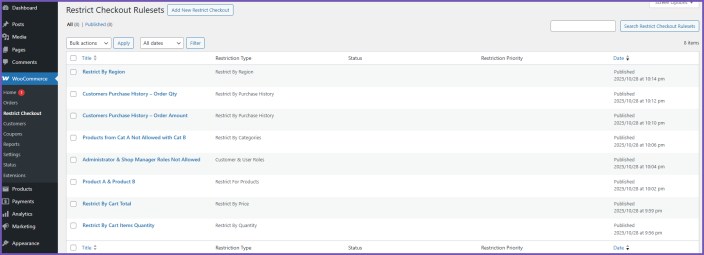
Click on Add New Restrict Checkout button to create the restriction rule.
- Provide a Title
Give a descriptive name for the new checkout restriction. - Choose the Ruleset Type
Available options:- Quantity
- Price
- Products
- Product Categories
- Purchase History
- Region
- Customer & User Rules
Restrict Checkout Rule Types
↑ Back to topThis plugin enables the creation of numerous restrictions on the checkout process, with custom prompts guiding users on how to meet the conditions.
Restrict by Cart Quantity
↑ Back to top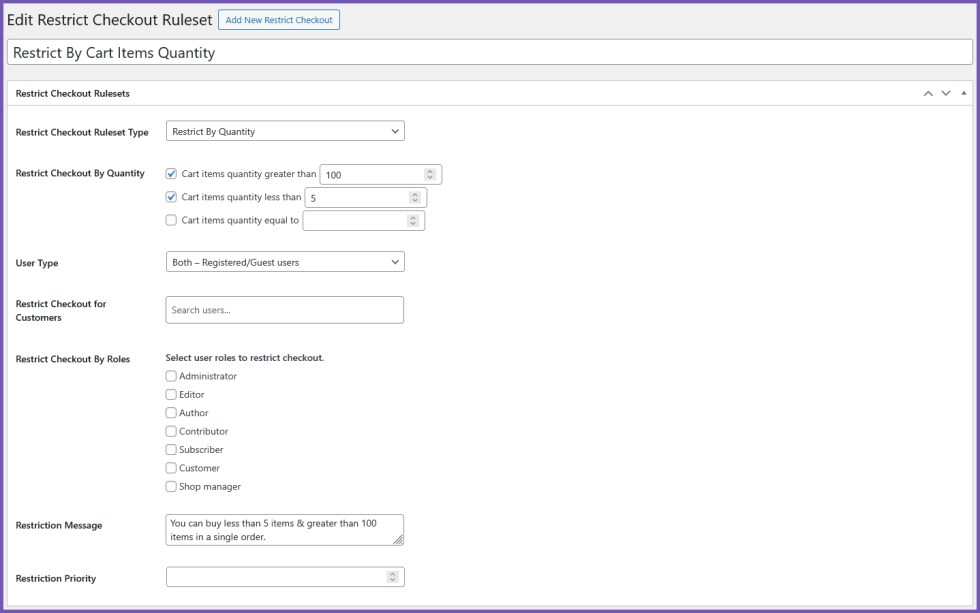
- Restrict checkout if the cart item count is greater than, less than, or equal to a defined number.
- Add custom restriction messages.
- Set rule priority.
- Specify user type: Registered, Guest, or Both.
- For registered users, optionally restrict checkout to specific customers or user roles.
Restrict by Cart Total (Price)
↑ Back to top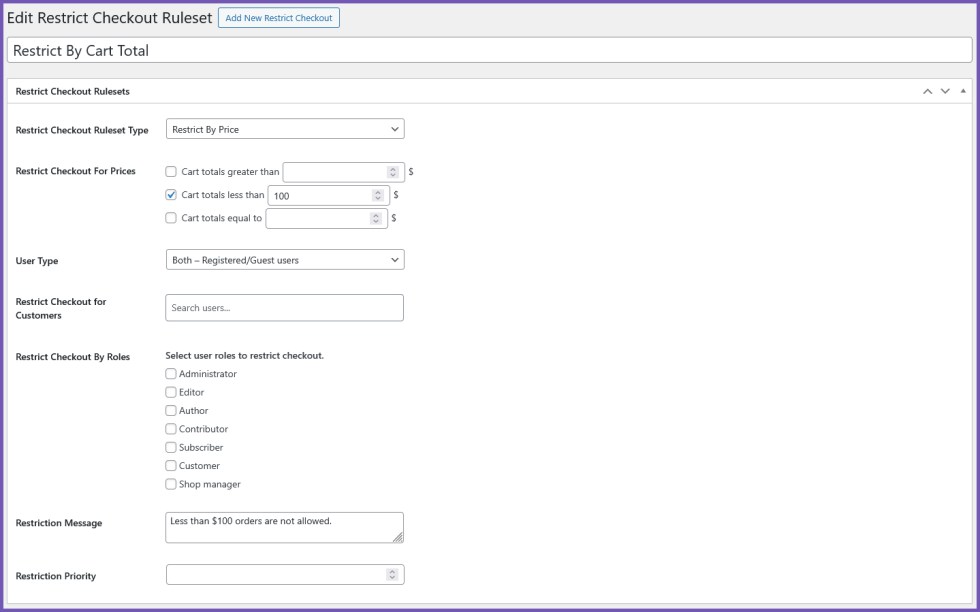
- Restrict checkout based on total cart value.
- Supports conditions: greater than, less than, equals.
- Add custom restriction messages.
- Set rule priority.
- Specify user type: Registered, Guest, or Both.
- For registered users, optionally restrict checkout to specific customers or user roles.
Restrict by Products
↑ Back to top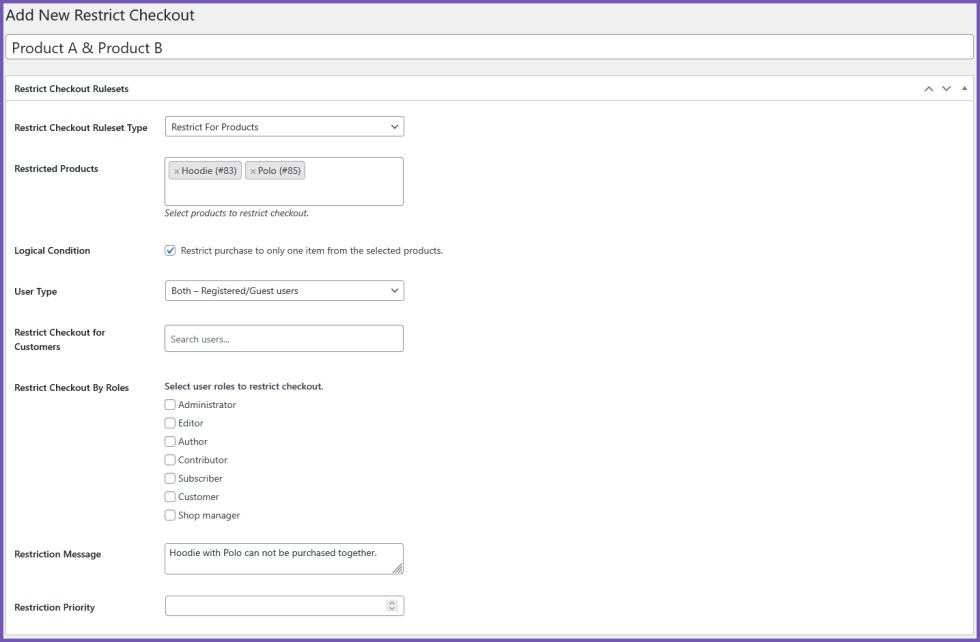
- Restrict checkout if selected products are in the cart.
- Logical Condition: Restrict purchase to only one item from selected products.
- Add custom restriction messages.
- Set rule priority.
- Specify user type: Registered, Guest, or Both.
- For registered users, optionally restrict checkout to specific customers or user roles.
Restrict by Categories
↑ Back to top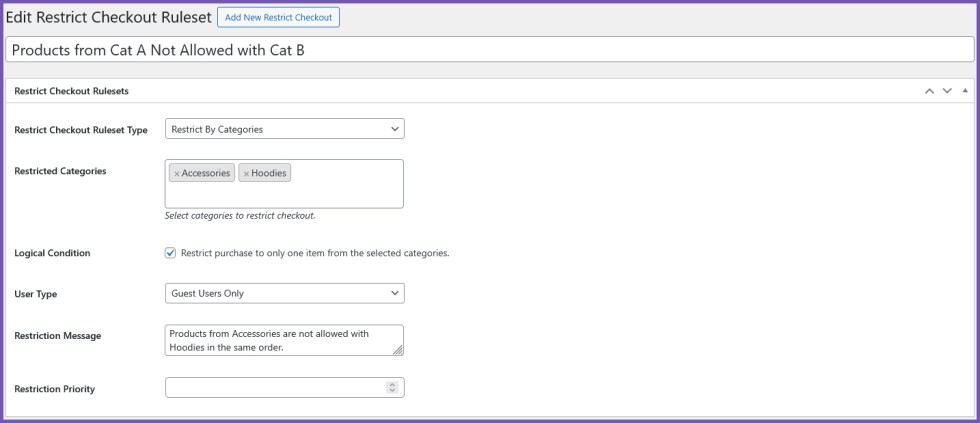
- Restrict checkout if products from selected categories are in the cart.
- Logical Condition: Restrict purchase to only one item from selected categories.
- Add custom restriction messages.
- Set rule priority.
- Specify user type: Registered, Guest, or Both.
- For registered users, optionally restrict checkout to specific customers or user roles.
Restrict by Purchase History
↑ Back to top
- Restrict checkout based on order amount, order quantity, or new buyers.
- Optionally retrieve all previous orders, or only the order with the highest amount or quantity.
- Conditional options for order amount or quantity comparisons appear if applicable.
- Add custom restriction messages.
- Set rule priority.
- Specify user type: Registered, Guest, or Both.
- For registered users, optionally restrict checkout to specific customers or user roles.

Restrict by Region
↑ Back to top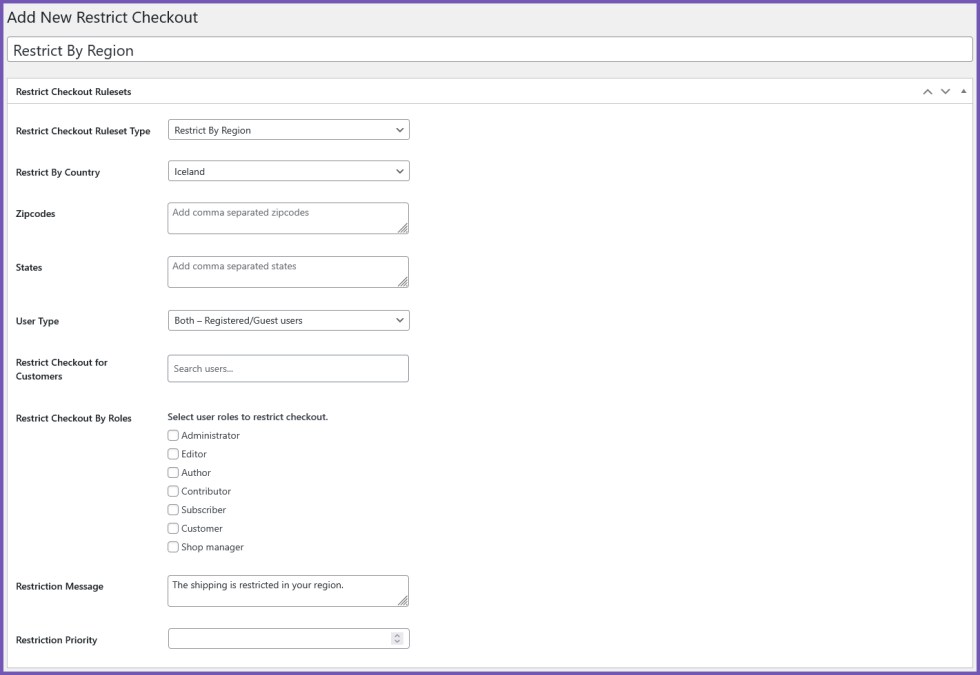
- Restrict checkout based on Country, State, or Zip Code.
- Add custom restriction messages.
- Set rule priority.
- Specify user type: Registered, Guest, or Both.
- For registered users, optionally restrict checkout to specific customers or user roles.
Customer & User Rules
↑ Back to top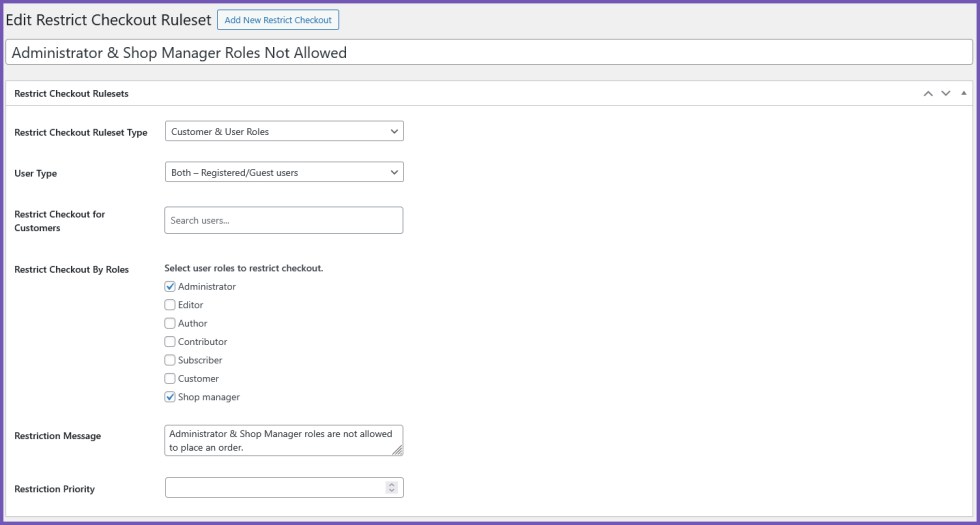
- Restrict checkout for specific customers or user roles.
- Add custom restriction messages.
- Set rule priority.
- Specify user type: Registered, Guest, or Both.
- For registered users, optionally restrict checkout to specific customers or user roles.
FAQs
↑ Back to top
What happens if multiple rules apply?
Rules are executed based on priority, with lower numbers taking precedence.
Will users see a message if checkout is restricted?
Yes. Each rule allows a custom restriction message. If multiple rules are triggered, the message with the highest priority (lowest number) is displayed.
Can I restrict checkout based on purchase history?
Yes. You can restrict by order amount, order quantity, or new buyers with conditional options.

