
Rotating Reviews automatically displays customer reviews in an attractive rotating slider on your WooCommerce product and shop pages. By keeping social proof visible and engaging, this plugin helps build customer trust and increase conversions. Works with your existing WooCommerce reviews – no coding required
- Display Reviews Automatically – Show customer reviews in a rotating slider
- Product & Shop Pages – Display on single product pages or shop listings
- Rating Filter – Show all reviews or filter by 1–5 stars
- Custom Interval – Control how quickly reviews rotate (1–60 seconds)
- Position Control – Place reviews before or after add-to-cart button
- Product/Category Targeting – Apply to all products, specific products, or categories
- Color Customization – Change background, text, and star colors
- Star Size Control – Adjust star size to match your design
- Lightweight & Fast – Optimized code that won’t slow your store
- HPOS Compatible – Works with WooCommerce High-Performance Order Storage
Installation
↑ Back to topTo start using a product from WooCommerce.com, you can use the “Add to store” functionality on the order confirmation page or the My subscriptions section in your account.
- Navigate to My subscriptions.
- Find the Add to store button next to the product you’re planning to install.
- Follow the instructions on the screen, and the product will be automatically added to your store.
Alternative options and more information at:
Managing WooCommerce.com subscriptions.

Setup and Configuration
↑ Back to topEnable the Plugin
↑ Back to top- Go to WooCommerce > Settings > Rotating Reviews
- Check the Enable checkbox
- The plugin will not display anything until enabled
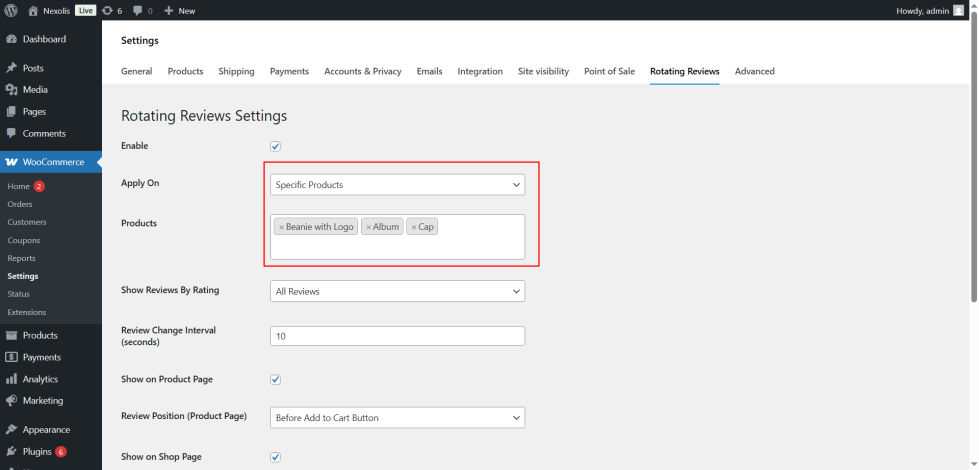
Choose Where to Apply
↑ Back to topSelect Apply On option:
- All Products – Display on every product (recommended for most stores)
- Specific Products – Select individual products manually
- Specific Categories – Display on all products in selected categories
If you select “Specific Products” or “Specific Categories”, use the dropdown that appears to choose items
Filter by Rating
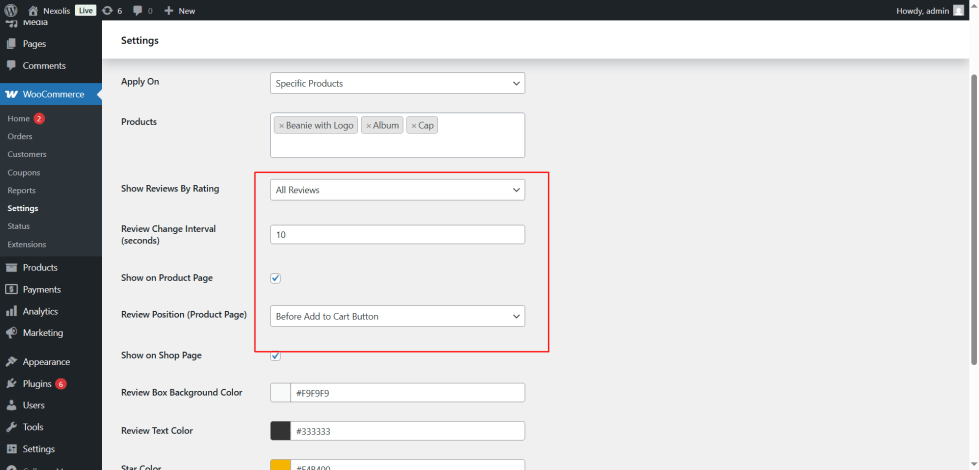
↑ Back to topChoose which reviews to display:
- All Reviews – Show all approved reviews
- 5 Star – Only 5-star reviews
- 4 Star – Only 4-star reviews
- 3 Star – Only 3-star reviews
- 2 Star – Only 2-star reviews
- 1 Star – Only 1-star reviews
Set Rotation Speed
↑ Back to topReview Change Interval (seconds) – Default is 10 seconds. Lower numbers = faster rotation. We recommend 5-10 seconds for readability.
Choose Display Locations
Show on Product Page – Check this to display reviews on individual product pages
- If enabled, choose Review Position:
- Before Add to Cart Button – Shows above the cart button
- After Add to Cart Button – Shows below the cart button
Show on Shop Page – Check this to display reviews on:
- Main shop page
- Category pages
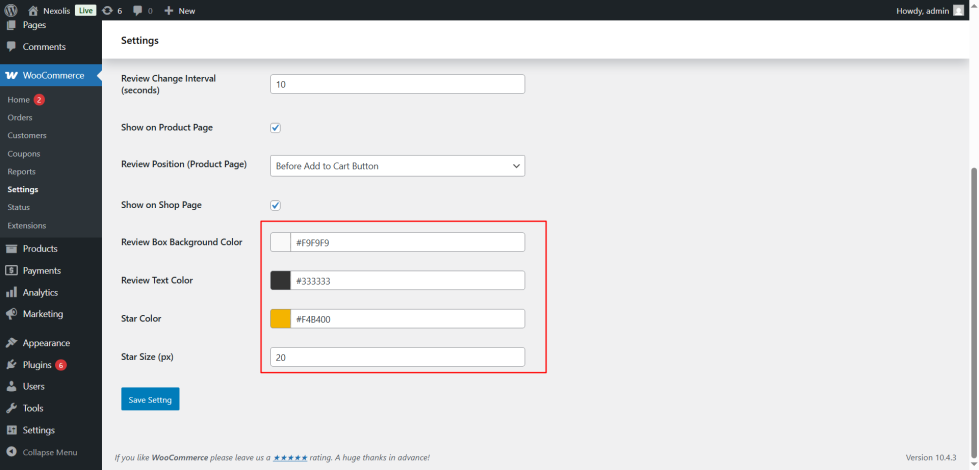
Customize Colors
↑ Back to topMake the rotating reviews blend perfectly with your WooCommerce store’s design using these color customization options.
Benefits of Using Rotating Reviews
↑ Back to top- Increase Conversion Rates – Displaying social proof through customer reviews can increase conversions by up to 15%. When visitors see real feedback from other customers, they’re more likely to trust your products and complete purchases.
- Build Customer Trust – Authentic reviews create credibility. New visitors feel more confident buying from your store when they see positive experiences shared by real customers.
- Save Space, Maximize Impact – Instead of displaying all reviews at once (which takes too much space), rotating reviews show one at a time – keeping your product pages clean while still showcasing feedback.
- Keep Content Fresh – Static content gets ignored. Rotating reviews creates movement on your page, drawing attention to customer feedback that might otherwise be overlooked.
- Highlight Your Best Reviews – Use the rating filter to display only 4 or 5-star reviews, putting your best testimonials front and center.
- Works with Existing Reviews – Automatically pulls from your WooCommerce reviews. No need to create new content or import anything.
FAQs
↑ Back to top
What is Rotating Reviews plugin?
Rotating Reviews automatically displays customer reviews in an attractive rotating slider on your WooCommerce product and shop pages. It helps build trust and increase conversions by keeping social proof visible and engaging.
Do I need coding skills to use this plugin?
No coding skills required! The plugin comes with a simple settings panel where you can configure everything using checkboxes, dropdowns, and color pickers. Just install, activate, and configure in minutes.
Will this plugin slow down my website?
No. The plugin is built with performance in mind – lightweight code, minimal database queries, and no external API calls. Your Google PageSpeed score won’t be affected.
Does it work with any WordPress theme?
Yes! Rotating Reviews works with any WordPress theme. The color customization options let you match your store’s design perfectly. The plugin uses standard WooCommerce hooks that all themes support.
Is this plugin compatible with HPOS?
Yes, Rotating Reviews is fully compatible with WooCommerce High-Performance Order Storage (HPOS).

