
TMV Selective Cart & Item Picker works with both WooCommerce Classic Cart and WooCommerce Block Cart, allowing customers to selectively include cart items in total calculations without removing them from the cart.
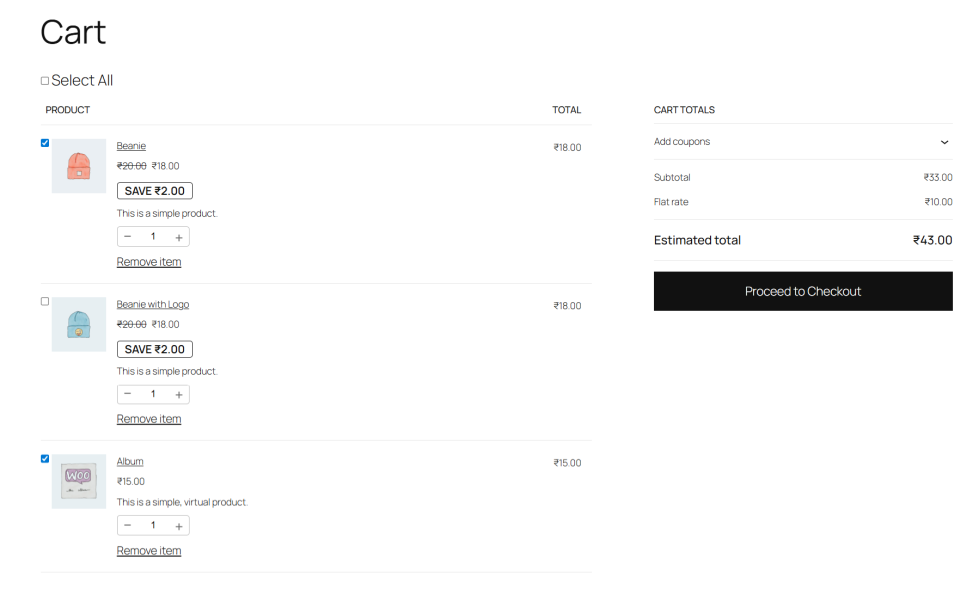
Customers can select or deselect individual cart items using checkboxes without removing products from the cart. Totals such as subtotal, shipping, discounts, and final amount are recalculated instantly via AJAX, while unselected items remain safely stored for later purchase.
Installation
↑ Back to topTo start using a product from WooCommerce.com, you can use the “Add to store” functionality on the order confirmation page or the My subscriptions section in your account.
- Navigate to My subscriptions.
- Find the Add to store button next to the product you’re planning to install.
- Follow the instructions on the screen, and the product will be automatically added to your store.
Alternative options and more information at:
Managing WooCommerce.com subscriptions.

Setup and Configuration
↑ Back to topGetting started
↑ Back to topTo set up your store with TMV Selective Cart & Item Picker:
- Go to Pages → Cart
- Ensure the Cart page uses WooCommerce Cart
- Add products to the cart on the front end
- Item selection checkboxes will appear automatically
There are no settings pages or manual configuration required.
Advanced configuration
↑ Back to topThis plugin does not include advanced configuration options.
It integrates automatically with both WooCommerce Classic Cart and Block Cart, without modifying core files or overriding templates.
Usage
↑ Back to topOn the Cart page (Classic and Block Cart), customers can select which items are
included in checkout totals using selection checkboxes.
Troubleshooting
↑ Back to topCheckboxes not visible
↑ Back to top- Confirm your Cart page uses WooCommerce Cart
- Ensure WooCommerce version is 8.0 or higher
Totals not updating
↑ Back to top- Check for JavaScript errors in the browser console
- Temporarily disable other checkout or cart plugins
- Ensure AJAX is not blocked by caching or security plugins
FAQs
↑ Back to topHelp customers by answering commonly asked questions.
Does it work with the Mini-Cart block?
Yes, the selection state is persisted across the Mini-Cart and the main Cart/Checkout blocks via AJAX.
Does this plugin work with Classic Cart & Checkout?
Yes. The plugin supports Classic Cart & Checkout.
Will unselected items be removed from the cart?
No. Unselected items remain safely in the cart and can be selected later without being removed.
Does the plugin support coupons and discounts?
Yes. Coupons are applied only to the selected cart items . Unselected items are excluded from discount calculations.
Will this plugin work with my theme?
The plugin is compatible with most modern WordPress themes that support WooCommerce Blocks. No theme file modifications are required.
Does this plugin affect site performance?
No. The plugin is lightweight and optimized to run only on Cart and Checkout pages.

