
Managing when products are available in your online store is just as important as managing the products themselves. A WooCommerce scheduler helps store owners control product availability based on time, date, location, or customer type.
This is especially useful for businesses that sell seasonal products, limited-time offers, wholesale items, or time-based services.
It let you to automate product availability without manually updating products every day.
What is a WooCommerce Scheduler?
↑ Back to topA WooCommerce scheduler is a system that lets you control when products can be viewed or purchased in your store.
With smart scheduling options, you can manage product availability based on:
- Date ranges
- Specific days of the week
- Custom time slots
- User roles & membership levels
- Countries or geographic regions
- Holiday & special event rules
This helps store owners automate product management.
Why Use a WooCommerce Scheduler?
↑ Back to topScheduling product availability improves both store control and customer experience.
Better Store Management
↑ Back to topAutomate when products appear or disappear from your WooCommerce store without manual effort. Easily control product visibility based on schedules, promotions, inventory status, or customer groups to keep your store organized and efficient.
Reduce Order Issues
↑ Back to topPrevent customers from placing orders outside your allowed business hours or delivery schedule. This helps reduce invalid orders, avoid operational confusion, and ensure smoother order management for your WooCommerce store.
Improve Customer Communication
↑ Back to topClearly inform customers about product availability, purchase timings, and scheduling rules. This improves transparency, reduces confusion, and creates a smoother shopping experience for your WooCommerce store visitors.
Save Time
↑ Back to topAutomate product scheduling and visibility rules to reduce manual work for store admins. Save valuable time by letting your WooCommerce store automatically manage product availability, promotions, and restrictions based on your predefined settings.
Global Product Scheduling
↑ Back to topA WooCommerce scheduler let you to apply rules across the entire store.
For example, you can:
- Allow scheduling globally
- Select available weekdays
- Set store hours
- Define start and end dates
- Show restriction messages
- Control Add to Cart button behavior
These global settings help manage availability consistently.
Calendar-Based Scheduling
↑ Back to topManage product availability with an intuitive calendar view that makes scheduling simple and organized. Easily plan product visibility, promotions, and time-based campaigns with a clear and user-friendly scheduling interface.
Store admins can:
- Block holiday dates
- Add exception dates
- Plan seasonal sales
- Visualize availability rules
This helps manage product schedules from one dashboard.
Product-Level Scheduling
↑ Back to topApply unique scheduling rules to individual products based on your business needs. Easily customize product availability, visibility, purchase timings, and restrictions for specific items without affecting the entire store.
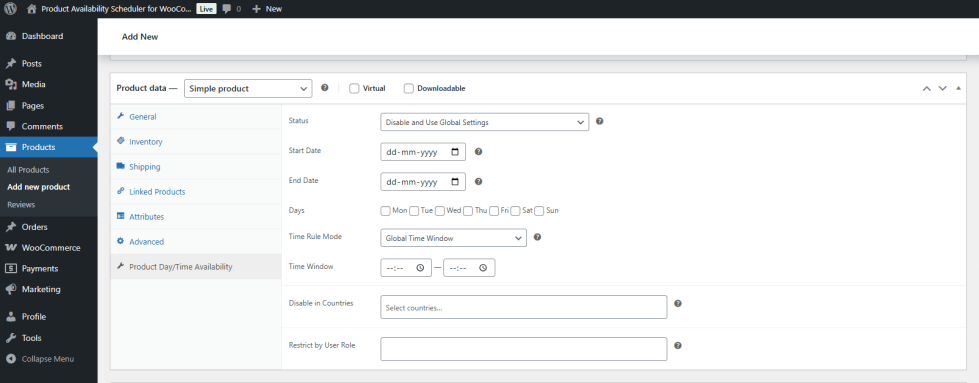
With product-level scheduling, you can:
- Allow products only on selected days
- Set custom time windows
- Restrict by country
- Restrict by user role
- Set product start and end dates
This gives full flexibility for product availability.
Category-Level Scheduling
↑ Back to topEasily apply scheduling and availability rules to entire product categories instead of configuring products one by one. This helps streamline store management and ensures consistent visibility settings across related products.
Examples include:
- Lunch menu available only during afternoon hours
- Weekend sale category available on Saturdays and Sundays
- Festival products available only during events
This saves time and keeps scheduling consistent.
Geo-Location Availability Rules
↑ Back to topControl product availability based on customers’ geographic locations. A WooCommerce Scheduler allows you to restrict or display products for specific countries, regions, or locations, helping you manage regional sales, shipping limitations, and location-based promotions more effectively.
For example:
- Block products in certain countries
- Show custom messages for restricted regions
- Allow region-specific products
This is useful for global stores.
User Role-Based Product Availability
↑ Back to topRestrict product visibility and purchasing access based on user roles. Show specific products only to selected customers such as wholesalers, members, subscribers, vendors, or logged-in users to create a personalized and controlled shopping experience.
Examples:
- Wholesale customers only
- Members-only products
- Logged-in users only
This feature is useful for B2B and membership stores.
Countdown Timer for Availability
↑ Back to top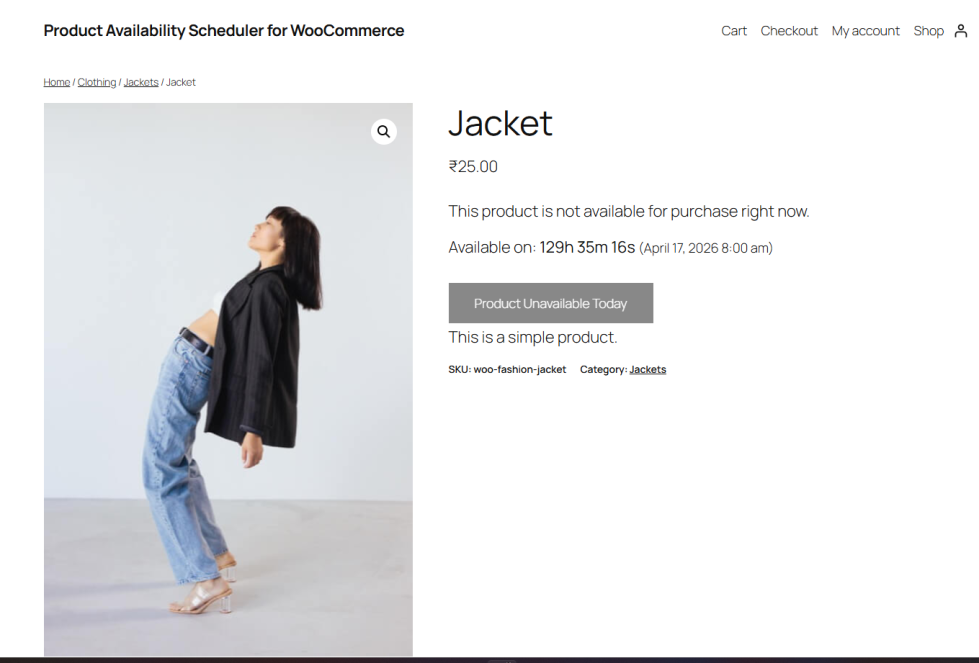
A scheduler can also show a countdown timer to tell customers when a product will be available again.
This improves transparency and creates urgency during promotions.
Real-Life Use Cases
↑ Back to topA WooCommerce scheduler is useful for many businesses.
Restaurants
Accept orders only during business hours.
Wholesale stores
Allow products only for wholesale users.
Seasonal stores
Allow products during festivals or sales.
Global stores
Restrict products by country.
Conclusion
↑ Back to topA WooCommerce scheduler helps store owners automate product availability and manage their store more efficiently.
By scheduling products based on date, day, time, location, category, or user role. you can create a better shopping experience and reduce manual work.
Using scheduling tools in WooCommerce makes product management smarter, easier, and more flexible.
What is a WooCommerce scheduler?
A WooCommerce scheduler is a tool that allows store owners to control when products are available for Buy. You can schedule product availability by date, day, time, location, or user role.
How do I schedule product availability in WooCommerce?
You can schedule product availability using a plugin like Product Availability Scheduler for WooCommerce. It lets you create global rules, product-level rules, and category-based availability settings.
Can I make products available only on specific days in WooCommerce?
Yes, a WooCommerce scheduler let you to select specific weekdays when products can be purchased. This is useful for businesses with limited operating days.
Can WooCommerce products be restricted by time?
Yes, you can set time windows so customers can only buy products during certain hours. like as store opening times or delivery hours.
Can I restrict WooCommerce products by country?
Yes, product availability can be controlled using Geo location rules. You can block or allow products for specific countries or regions.
Can WooCommerce products be available only for logged-in users?
Yes, a scheduler plugin let you to restrict products based on user roles, like as wholesale customers or members only.
Does scheduling product availability help reduce order issues?
Yes, scheduling prevents customers from ordering products outside allowed times, which reduces confusion and improves store management.
Can I schedule seasonal products in WooCommerce?
Yes, you can set start and end dates to make products available only during festivals, promotions, or seasonal events.

