
What is ZapBridge?
↑ Back to topZapBridge is a WordPress plugin for WooCommerce that automatically sends your store activity (like orders or customer actions) to any webhook URL. It works seamlessly with automation platforms like Zapier, Make.com, or custom endpoints.
Requirements
↑ Back to top- A WordPress website
- WooCommerce installed
- A webhook URL (provided by services like Zapier, Make.com, or your developer)
Installing ZapBridge
↑ Back to top- Go to your WordPress dashboard
- Click Plugins → Add New
- Upload the ZapBridge plugin file
- Click Install Now
- After installation, click Activate
Setup & Configuration
↑ Back to top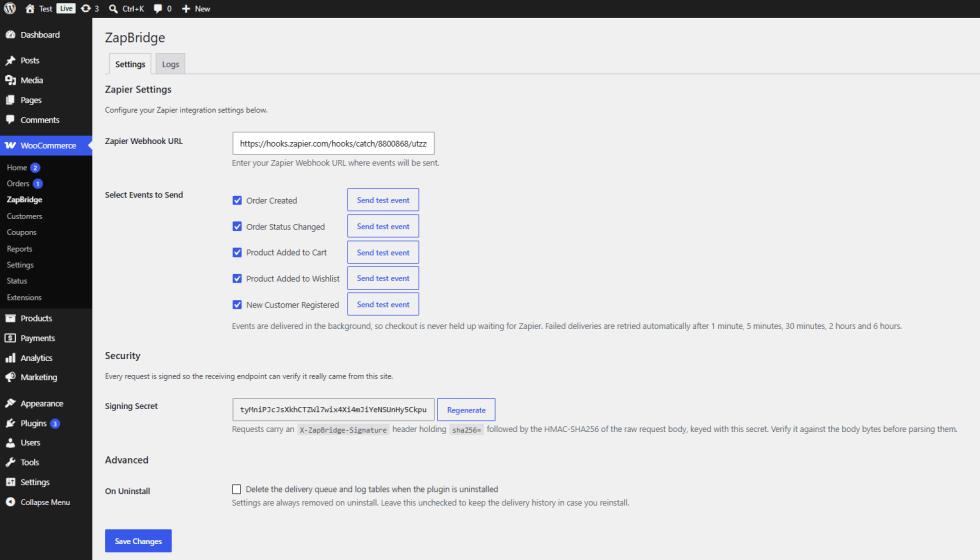
- Go to ZapBridge Settings in your WordPress admin menu
- Enter your Webhook URL in the provided field
- Optionally, note the Signing Secret – this is used to verify incoming requests (see Security section below)
- Click Save Settings
Usage
↑ Back to topOnce configured, ZapBridge runs in the background. Every selected event is automatically sent to your webhook – no manual intervention required.
Supported Events
↑ Back to top- Order Created – fires when a new order is placed (including block checkout, admin‑created, and REST API orders)
- Order Status Changed – triggers on status transitions (e.g., processing, completed, cancelled)
- Product Added to Cart – when a customer adds an item
- Product Added to Wishlist – when a wishlist action occurs
- New Customer Registered – when a user creates an account
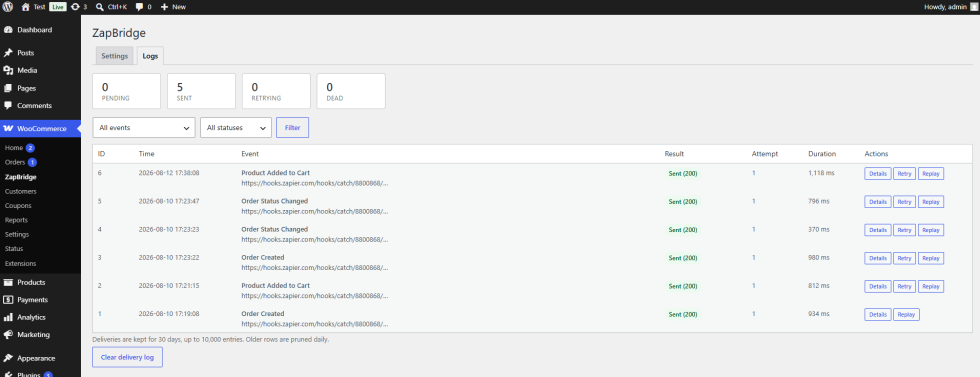
You can test each event directly from the Logs tab using the “Send test event” button – no real order required.
Delivery Logs & Automatic Retries
↑ Back to topAll deliveries are logged in a new Logs tab, showing every attempt with status, response body, duration, and retry history. You can manually Retry or Replay any failed delivery.
If a delivery fails, ZapBridge automatically retries using the following schedule:
- 1 minute
- 5 minutes
- 30 minutes
- 2 hours
- 6 hours
After all retries are exhausted, the delivery enters a dead‑letter state and can be retried manually via the logs. All failures are also written to the WooCommerce logger under the zapbridge source.
Security: HMAC‑SHA256 Signatures
↑ Back to topEvery request sent to your webhook includes an X‑ZapBridge‑Signature header, signed with a per‑site secret. You can find this secret on the Settings tab and regenerate it at any time. Use it to verify that incoming payloads are genuinely from ZapBridge.
Use Cases
↑ Back to top- Get instant order notifications in Slack
- Save orders automatically in Google Sheets
- Send customer data to your CRM
- Trigger email or SMS alerts
- Connect WooCommerce with Zapier or Make.com workflows
FAQ
↑ Back to topWhat data is sent in the payload?
Order payloads include line items with SKUs, billing/shipping addresses, coupons, currency, totals, tax, payment method, and customer name. Cart, wishlist, and customer payloads are enriched with product and customer details. All data is sent as application/json.
Why is nothing being sent?
- Verify the webhook URL is correct
- Ensure the plugin is activated
- Check that WooCommerce is functioning properly
- Review the Logs tab for error details
Do I need coding skills?
No. ZapBridge is designed for beginners – just paste your webhook URL and you’re done.
How long are logs kept?
Logs are automatically pruned daily, retaining the last 30 days or the latest 10,000 entries, whichever is reached first.
Can I customise the payload or add headers?
Yes. Developers can use the provided filters:
Available Filters
zapbridge_payload_{event}
zapbridge_outgoing_payload
zapbridge_sample_payload
zapbridge_request_headers
zapbridge_request_timeout
zapbridge_is_retryable
zapbridge_connections
zapbridge_log_retention_days
zapbridge_log_retention_rows
zapbridge_admin_capability
Available Actions
zapbridge_enqueued
zapbridge_delivery_succeeded
zapbridge_delivery_failed
zapbridge_installed
Developer Notes
↑ Back to topZapBridge is built with extensibility in mind. New actions and filters (listed in the changelog) allow you to modify behaviour, add custom connections, override timeouts, and more. The plugin is fully compatible with HPOS, Cart/Checkout blocks, and passes PHPStan level 5 and PHPCompatibility checks.
Uninstallation cleanly removes settings and optionally drops delivery tables if you choose. All hooks follow WordPress naming standards, and the plugin is translation‑ready.

