
Updating variation prices one by one is killing your productivity. Bulk Edit Variation Prices for WooCommerce lets you update, schedule, and automate price changes across all your WooCommerce product variations — in seconds, not hours.
Buy now30-day money-back guarantee · Instant download · 1 year of updates and support
If you manage variable products, you know this pain
↑ Back to top- You have 50 variations. You need to raise prices by 10%. That’s 50 individual edits — one by one.
- A flash sale starts tonight. You stay up late manually changing prices, then wake up early to reverse them.
- You miss the sale window because the manual update took too long and customers already checked out at the wrong price.
- Seasonal price changes mean hours of repetitive work every few months — work that adds zero value to your business.
- You need different prices for each size or colour variation but there is no way to set them all at once on a schedule.
Bulk update prices in seconds. Schedule sales in advance. Sleep soundly.
↑ Back to topBulk Edit Variation Prices for WooCommerce gives you complete control over your WooCommerce variation pricing — instantly or on a schedule — without writing a single line of code.
Everything you need to take back your time
↑ Back to top- Instant price updates — select any products, set a fixed or percentage price, click update. All variations update at once — no page reloads, no one-by-one editing.
- Per-variation price editor — need different prices for each variation? Enter a unique Regular Price and Sale Price per variation in an editable table, then apply instantly or schedule to go live on a future date.
- Scheduled price updates — schedule a sale to start automatically. Set it up once, walk away. The system applies prices on time, every time.
- Recurring schedules — set a schedule to repeat daily, weekly, or monthly. Promotional cycles run themselves — indefinitely.
- Price preview — see exactly what every variation price will look like before you apply changes. No surprises, no rollbacks, no mistakes.
- Price rounding — after a percentage change, round results to the nearest dollar, 0.50, or 0.05 so prices always look intentional.
- Exclude specific variations — skip individual variations from any bulk edit or schedule so their prices stay untouched.
- Filter by category — select a WooCommerce category and instantly load all its variable products into the editor.
- Email notifications — receive an automatic confirmation email every time a scheduled update runs.
- Audit log — every price change is recorded with timestamp, user, action, and variation count. Full visibility at all times.
- Automatic cleanup — completed schedules are deleted from your database. Your store stays clean and fast without any manual housekeeping.
- Easy schedule management — view, update, or delete all saved schedules from one intuitive interface. Full control, always up to date.
- Regular and sale price control — update both regular and sale prices independently. Apply by fixed amount or percentage — total flexibility to match any pricing strategy.
A closer look at what’s inside
↑ Back to topInstant price updates
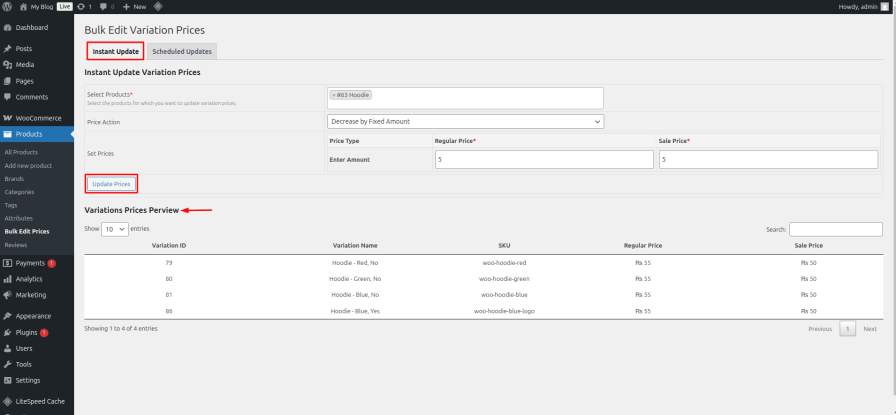
↑ Back to topStop wasting hours editing variation prices one by one. Bulk Edit Variation Prices for WooCommerce provides a one-click solution to immediately update all variation prices at once — saving you time and effort whether you are adjusting a handful or hundreds of variations.
Per-variation price editor
↑ Back to topNot every variation should cost the same. Switch to Per-Variation mode and an editable table loads showing every variation from your selected products — each row with its own New Regular Price and New Sale Price input. Leave a field blank to keep the current price unchanged. Apply the changes instantly or schedule them to go live on any future date and time. One action. All variations. Exactly the prices you set.
Scheduled price updates
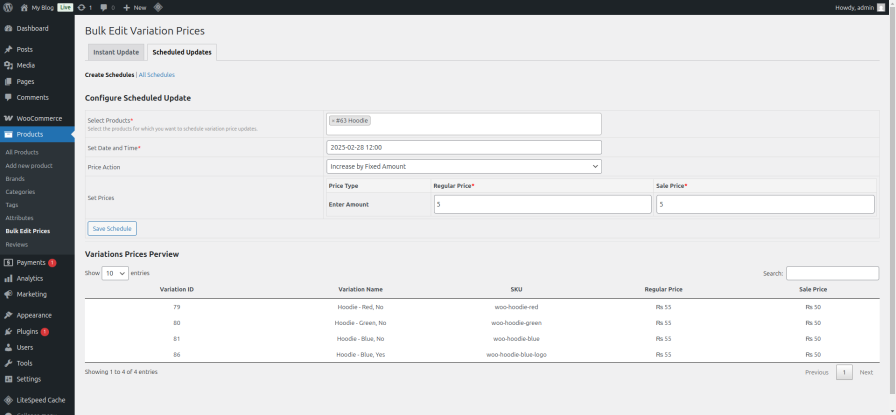
↑ Back to topPlan your pricing in advance. Schedule price updates to apply automatically at a specific date and time. The system applies prices based on the schedule — so you can plan promotions weeks ahead without lifting a finger on the day. Works with both bulk rule updates and per-variation individual prices.
Recurring schedules
↑ Back to topSet a schedule once and let it repeat automatically — daily, weekly, or monthly. The schedule advances to the next occurrence after each run. Perfect for rotating promotional cycles, seasonal markups, or any pricing pattern that repeats on a fixed cadence — with zero manual work after the initial setup.
Price preview
↑ Back to topVerify before you commit. The preview table shows you what every variation’s price will look like after your changes — before anything is applied. This ensures the correct prices are applied to the correct variations, every single time. No more costly mistakes.

Price rounding
↑ Back to topPercentage-based price changes often produce awkward results — $14.37 instead of $14.50. The built-in rounding option lets you round all results to the nearest dollar, nearest 0.50, or nearest 0.05 automatically — so your prices always look deliberate, not calculated.
Exclude specific variations
↑ Back to topNot every variation needs the same update. Select individual variations to exclude before applying any bulk edit or scheduled update. Those variations stay at their current price while everything else updates — precise control without a second workflow.
Filter products by category
↑ Back to topWorking across a large catalog? Select a WooCommerce product category and the plugin instantly loads all variable products in that category into the editor. No searching product by product. Select your category, load your products, apply your changes.
Email notifications
↑ Back to topEnable email notifications on any schedule and receive an automatic confirmation the moment it runs — showing which products were updated, how many variations were changed, and when the update fired. Stay informed even when you are completely offline.
Audit log
↑ Back to topEvery price update — instant or scheduled, bulk rule or per-variation — is recorded in a built-in audit log. Each entry shows the timestamp, the user who triggered it, the action applied, the products affected, and the number of variations updated. Full accountability over your entire pricing history at all times.
Automatic cleanup
↑ Back to topOnce a scheduled update completes, WordPress automatically deletes it from your system and clears the data from your database. Your store stays lean, fast, and clutter-free — with zero maintenance required from you.
Easy schedule management
↑ Back to topYou are always in control. The intuitive management interface lets you view all upcoming scheduled updates at a glance, update any schedule before it runs, and delete schedules you no longer need — all from one clean dashboard panel.
Stop editing prices one by one
↑ Back to topUpdate all your variation prices in seconds. Set individual prices per variation. Schedule sales weeks in advance. Automate everything.
Buy now30-day money-back guarantee · No questions asked
Up and running in under 5 minutes
↑ Back to topNo developer needed. No complicated configuration. Just install and start saving time.
- Download the plugin .zip — after purchase, download the .zip file from your WooCommerce account.
- Install via WordPress — go to Plugins → Add New → Upload Plugin. Select the .zip file and click Install Now.
- Activate the plugin — click Activate Plugin. You will see Bulk Edit Prices appear under Products in your admin sidebar.
- Start updating prices — go to Products → Bulk Edit Prices and start managing your variation prices instantly.
Configuring instant price updates — bulk rule
↑ Back to topApply one pricing rule across all selected variations in four steps:
- Go to Products → Bulk Edit Prices and make sure Bulk Rule mode is selected.
- Select products — search by name or filter by category. Optionally exclude specific variations.
- Set your rule — choose increase or decrease by fixed amount or percentage, or set a fixed price. Optionally set price rounding.
- Click Preview Changes to verify, then click Update Prices. All selected variations update instantly.
Configuring instant price updates — per-variation
↑ Back to topSet a unique price for each individual variation in four steps:
- Go to Products → Bulk Edit Prices and select Per-Variation Prices mode.
- Select products — the variation table loads automatically showing every variation with its current prices.
- Enter prices — type a new Regular Price and optional Sale Price on each row. Leave a field blank to keep the current price.
- Click Update Prices. Each variation updates to exactly the price you entered.
Configuring scheduled price updates
↑ Back to topPlan your promotions in advance — the plugin handles everything on schedule:
- Go to Products → Bulk Edit Prices and open the Scheduled Updates tab.
- Select your products and choose your edit mode — Bulk Rule or Per-Variation Prices.
- Enter your price values, set a date and time, and optionally choose a recurrence (daily, weekly, or monthly).
- Click Save Schedule. The plugin applies the price change automatically at the exact time specified — no further action needed.
Managing saved schedules
↑ Back to topYou are always in full control of every scheduled update.
- View all schedules — switch to the Scheduled Updates tab to see every upcoming price change at a glance, including its mode, recurrence, and scheduled date.
- Update a schedule — changed your mind on timing or price? Edit any saved schedule before it runs — update the date, time, prices, or recurrence without losing the original setup.
- Delete a schedule — cancel any scheduled update instantly. Selecting delete removes the schedule and ensures the price change will not be applied — clean, instant, no side effects.
Automatic cleanup of completed schedules
↑ Back to topOnce a schedule runs, WordPress automatically deletes it and clears its data from your database. Recurring schedules advance to the next occurrence automatically. You never need to manually clean up old schedules. Your store stays fast and your database stays lean — all on autopilot.
Honest answers before you buy
↑ Back to topCan I set a different price for each variation individually?
↑ Back to topYes. Switch to Per-Variation mode, enter a unique Regular Price and Sale Price for each variation in the editable table, then apply instantly or schedule it for a future date. All variations update in one action at your chosen time.
Will it slow down my store?
↑ Back to topNo. The plugin only runs when you use it inside the admin panel. There is zero impact on your storefront, product pages, or checkout speed.
Will it affect my existing orders?
↑ Back to topNever. Price changes only apply to the product listings going forward. All existing orders and their recorded prices are completely untouched.
What if a scheduled update runs while I am offline?
↑ Back to topThat is exactly the point. WordPress handles the scheduled update automatically — no need for you to be online or logged in when it runs. Enable email notifications on the schedule and you will receive a confirmation the moment it fires.
Can I preview prices before applying them?
↑ Back to topYes. The price preview table shows you every variation’s new price before you click Update — so you can catch any mistakes before they go live.
Can I exclude certain variations from a bulk update?
↑ Back to topYes. Select specific variations to skip and they will stay at their current price while everything else updates.
Can I repeat a scheduled update automatically?
↑ Back to topYes. Set any schedule to repeat daily, weekly, or monthly. It advances to the next date automatically after each run — no manual rescheduling needed.
What if it does not work for my store?
↑ Back to topYou are protected by a 30-day money-back guarantee. If it is not right for you, just ask for a refund — no questions asked, no hassle.
Everything this plugin does for you
↑ Back to top- Instant bulk price updates — select products, set a rule, and update all variations at once.
- Per-variation price editor — enter a unique price per variation and apply instantly or on a schedule.
- Scheduled updates — set prices, schedule a date and time, and let the plugin apply them automatically.
- Recurring schedules — daily, weekly, or monthly recurrence with automatic advancement.
- Price preview — verify every new price before saving a single change.
- Price rounding — round percentage results to the nearest dollar, 0.50, or 0.05.
- Exclude variations — skip specific variations from any update or schedule.
- Filter by category — load all variable products in a category with one click.
- Email notifications — automatic confirmation email when each schedule runs.
- Audit log — full history of every price change, instant and scheduled.
- Managing schedules — view, update, and delete saved schedules easily from one dashboard.
- Automatic cleanup — completed schedules are deleted automatically, keeping your database clean.
Your time is worth more than manual price editing
↑ Back to topGet Bulk Edit Variation Prices for WooCommerce and reclaim hours every month — starting today.
Buy now- 30-day money-back guarantee
- 1 year of updates and support
- Instant download

