
Product Manager for WooCommerce is an advanced bulk product editor designed to help store owners manage WooCommerce products more efficiently. It allows you to filter, view, and edit products and variations from a single interface, eliminating the need to open individual product edit screens.
The plugin supports inline editing, bulk actions, variation management, and AJAX-based saving to streamline product management workflows for stores of all sizes.
Comprehensive filtering – combine rules for categories, tags, attributes, product type, pricing, stock, and more.
- Inline editing – adjust pricing, inventory, descriptions, featured images, and gallery images without opening individual edit screens.
- Variation management – edit variations in-place with automatic grouping under parent products when “Include Variations” is enabled. Variations can have their own featured images.
- Column chooser – toggle any column on/off via “Screen Options”, and the plugin remembers your preferred layout per user.
- Screen Options – customize results per page (1-100) and column visibility in a familiar WordPress-style drawer.
- Bulk actions – “Apply to Selected” saves changes immediately, no need for a separate save step. Supports percentage price adjustments, stock increments/decrements, and quick status toggles.
- Product editor links – click any product name to open the standard WooCommerce product editor in a new tab.
- Smart notices – product count shows “X products and Y variations”.
- Local SelectWoo assets – no third-party CDNs are used; everything is bundled inside the plugin for consistent styling.
- Improved UX – dual pagination bars (top and bottom), and bulk action bars with “Save All Changes” buttons in both locations. Page position preserved after saving.
Installation
↑ Back to topTo start using a product from WooCommerce.com, you can use the “Add to store” functionality on the order confirmation page or the My subscriptions section in your account.
- Navigate to My subscriptions.
- Find the Add to store button next to the product you’re planning to install.
- Follow the instructions on the screen, and the product will be automatically added to your store.
Alternative options and more information at:
Managing WooCommerce.com subscriptions.

Setup and configuration
↑ Back to top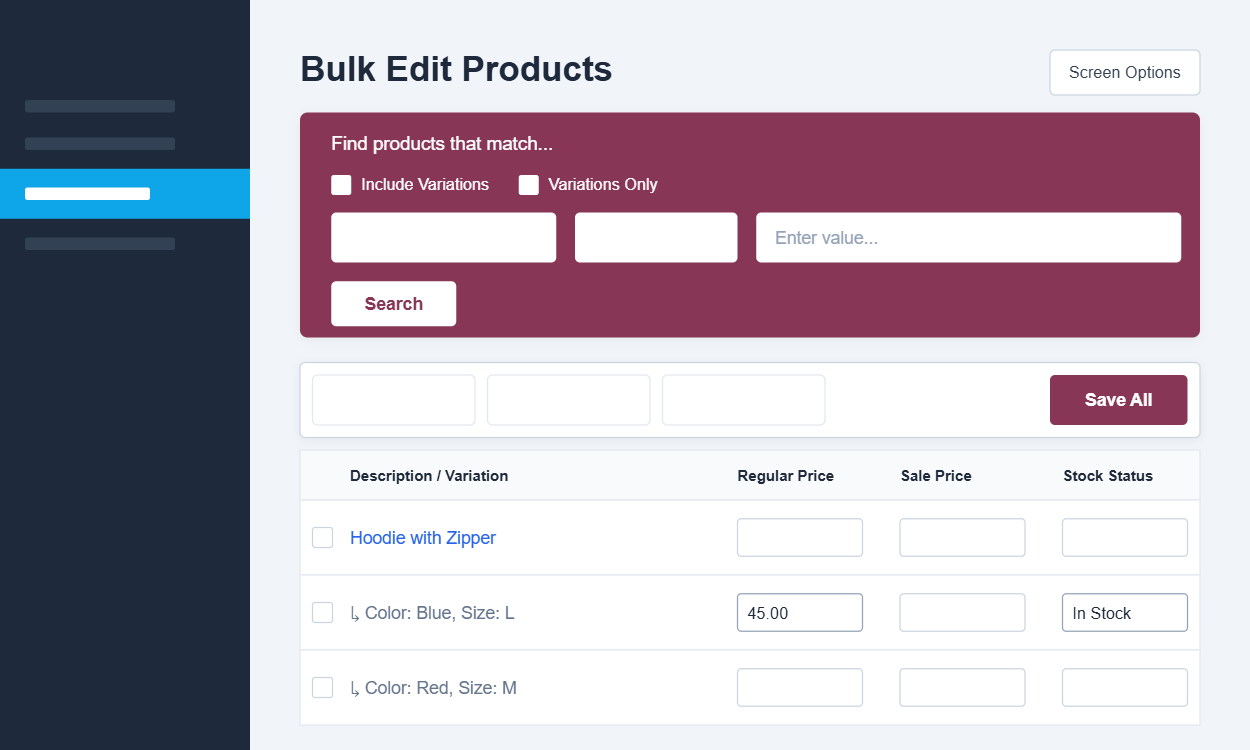
Accessing the bulk editor
↑ Back to topAfter activation:
- Go to WordPress Admin → Products → Bulk Edit.
- The Product Manager interface will load in the WooCommerce admin area (only users with the appropriate permissions can access this screen).
Understanding the interface
↑ Back to topProduct list table
↑ Back to topThe main table displays all matched products based on your filters. Each row represents a product or variation.
- Parent products appear above their variations.
- Variations are visually grouped under their parent product.
- Product names link to the standard WooCommerce product editor in a new tab.
Screen Options
↑ Back to topAt the top of the screen, click Screen Options to customize:
- Number of products displayed per page (1–100)
- Visible columns (price, stock, images, status, etc.)
Preferences are saved per user.
Filtering products
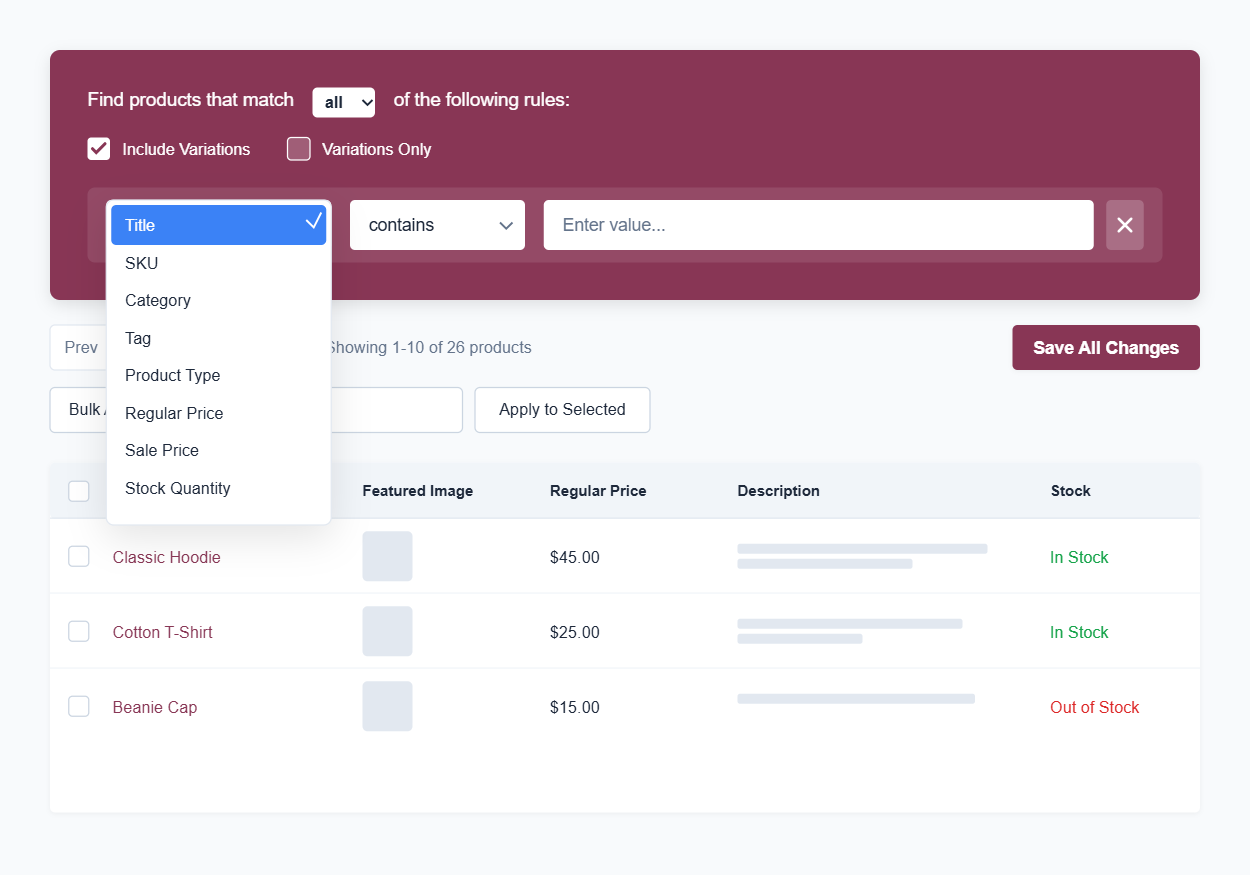
↑ Back to topProduct Manager includes an advanced filter builder to help you find exactly the products you want to edit.
You can filter by:
- Product categories and tags
- Product type
- Price ranges
- Stock status and stock quantity
- Attributes and visibility
- SKU and product status
Multiple rules can be combined to create precise queries.
Click Search to load matching products.
Inline editing products
↑ Back to topYou can edit product data directly within the table:
- Regular price and sale price
- Stock quantity and stock status
- Short and long descriptions
- Featured image and gallery images
- Product publish status
Changes are stored locally until you click Save All Changes.
Saving changes
↑ Back to top- Saves all inline edits via AJAX
- No page reload
- Scroll position and pagination are preserved
- Update notices display the number of updated products and variations
Apply to Selected
↑ Back to top- Used for bulk actions
- Saves immediately without an additional confirmation step
- Applies only to selected products
Bulk actions
↑ Back to topBulk actions allow you to update multiple products at once:
- Increase or decrease prices by value or percentage
- Increment or decrement stock quantities
- Manage Stock Management
Bulk actions affect only the selected products.
Managing product variations
↑ Back to topProduct variations are fully supported:
- Variations appear under their parent product
- Each variation can be edited individually
- Variation prices, stock, and images are editable
- Variations without attributes are labeled clearly
Use the Include Variations option to control whether variations appear in the editor.
Managing product images
↑ Back to topYou can manage product images directly from the bulk editor:
- Upload or replace featured images
- Add, remove, or reorder gallery images
- Assign unique featured images to variations
All image updates are saved via AJAX.

