
AI Auto Sales Booster for WooCommerce adds AI-assisted sales and product tools to your WooCommerce store. It helps with product recommendations, shopper chat, cart suggestions, exit-intent coupons, abandoned cart recovery, product SEO content, product images, and review replies.
You can choose which features to enable. Most AI features require a supported AI provider API key.
Installation
↑ Back to topTo start using a product from WooCommerce.com, you can use the “Add to store” functionality on the order confirmation page or the My subscriptions section in your account.
- Navigate to My subscriptions.
- Find the Add to store button next to the product you’re planning to install.
- Follow the instructions on the screen, and the product will be automatically added to your store.
Alternative options and more information at:
Managing WooCommerce.com subscriptions.

Requirements
↑ Back to top- WordPress 5.6 or newer.
- WooCommerce installed and active.
- PHP 7.4 or newer.
- Administrator or store manager access.
- A supported AI provider API key.
- Products already added to WooCommerce.
Setup and Configuration
↑ Back to topFirst install and activate the extension using the WooCommerce.com installation block above. After activation, configure your AI provider and feature settings.
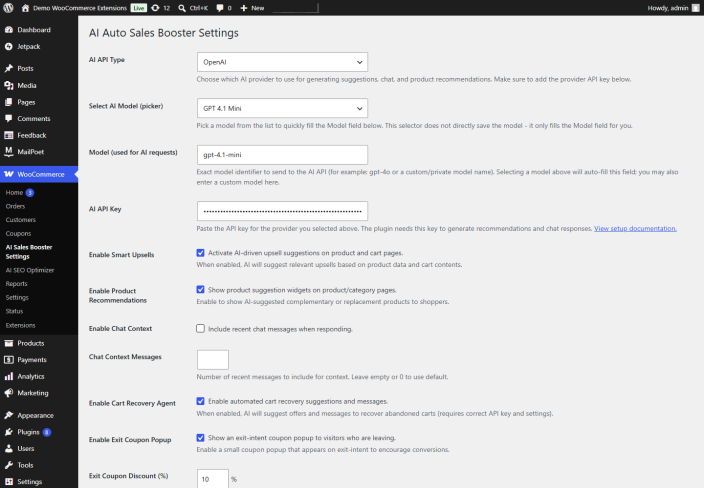
Configure AI settings
↑ Back to top- Go to WooCommerce > AI Sales Booster Settings.
- Choose your AI provider.
- Choose the model you want to use.
- Enter the API key from your provider.
- Save changes.
Enable features
↑ Back to topThe settings page includes feature toggles. Enable only the tools you want to use first, then test each workflow before enabling every automation on a live store.
- Product chat assistant.
- Cart product recommendations.
- Exit-intent coupon.
- Abandoned cart recovery.
- Product urgency messages.
- AI SEO optimizer.
- AI product image generation.
- Review reply assistance.
Usage
↑ Back to topProduct chat assistant
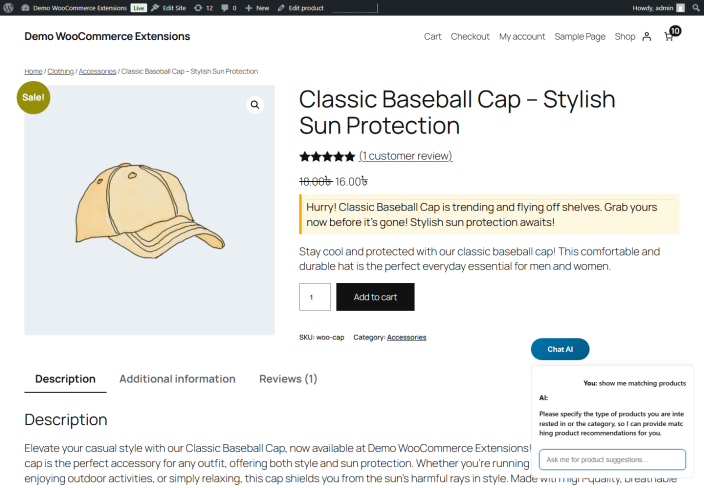
↑ Back to topThe product chat assistant appears on store pages when the feature is enabled. Shoppers can ask questions or request suggestions. The assistant can reply with helpful text and recommend relevant products from the store.
- Enable the chat assistant.
- Visit a product or shop page as a customer.
- Open the chat widget.
- Ask for product suggestions.
- Confirm that the reply and recommended products are relevant.
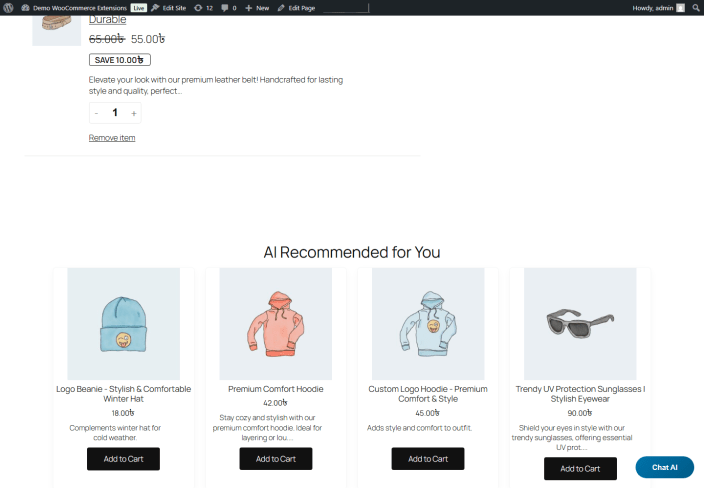
Cart recommendations
↑ Back to topCart recommendations suggest related or complementary products based on the customer’s cart.
- Enable cart recommendations.
- Add one or more products to the cart.
- Open the cart page.
- Review the AI suggestions.
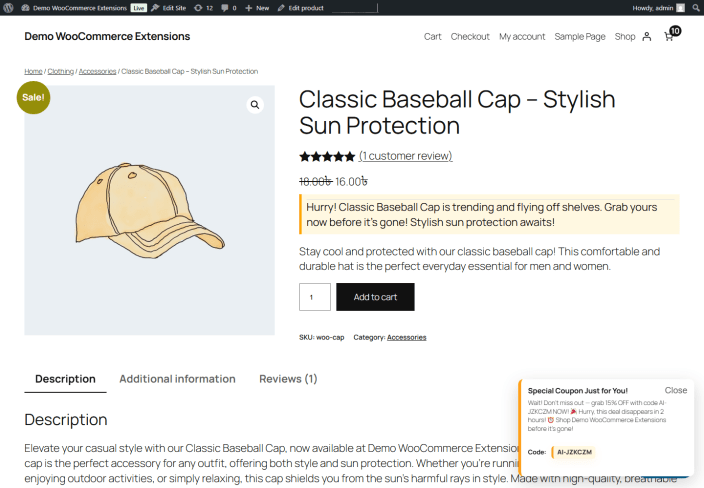
Exit-intent coupon
↑ Back to topThe exit-intent coupon can display a discount offer when a visitor appears ready to leave the store.
- Enable the exit-intent coupon feature.
- Set the coupon discount value.
- Save settings.
- Visit the storefront in a private browser window.
- Move the pointer toward the browser close area to test the popup.
Abandoned cart recovery
↑ Back to topThe abandoned cart feature can record cart snapshots and help send recovery messages.
- Confirm your WordPress email delivery is working.
- Test with a customer account you control.
- Add products to the cart.
- Leave the checkout without completing payment.
- Confirm the recovery workflow behaves as expected.
AI SEO optimizer
↑ Back to topThe AI SEO tools help generate or improve product content and metadata.
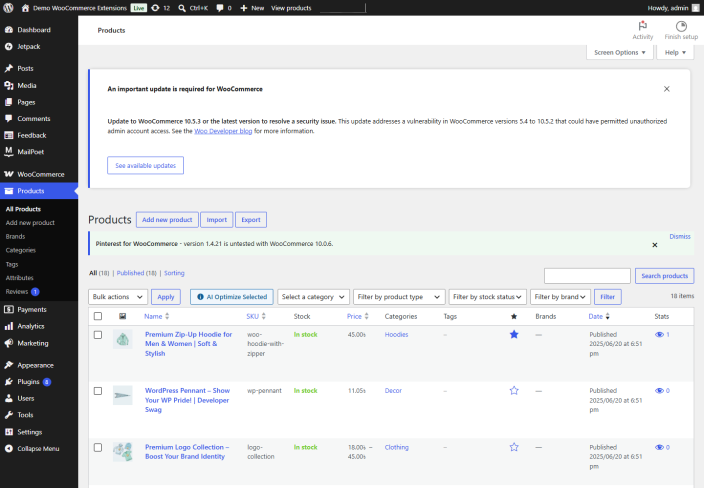
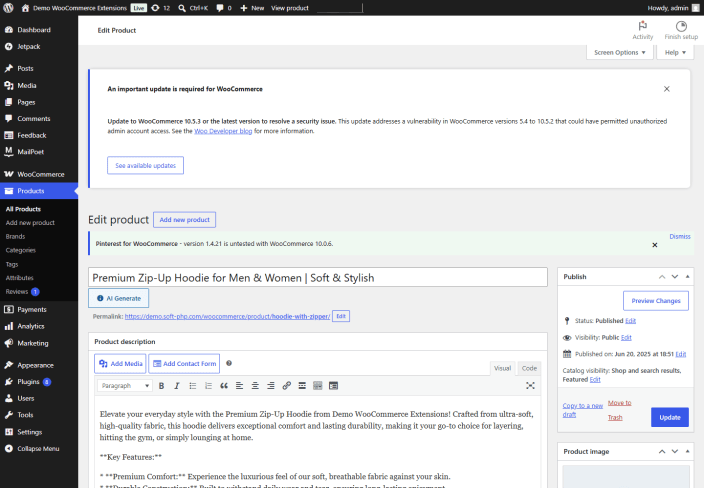
- Go to Products in WordPress admin.
- Edit a product, or select products from the Products list for bulk optimization.
- Use the AI buttons beside supported product fields, or open the AI SEO Optimizer screen.
- Review the generated title, description, meta title, meta description, or keywords.
- Edit the AI output if needed.
- Save or update the product.
Always review generated content before publishing.
AI product images
↑ Back to topWhen image generation is enabled and configured, the product edit screen can show an AI image action.
- Edit a WooCommerce product.
- Use the AI product image generation button.
- Review the generated image.
- Save the image only if it is accurate and suitable for the product.
Review image provider usage costs before using this feature heavily.
Review reply assistance
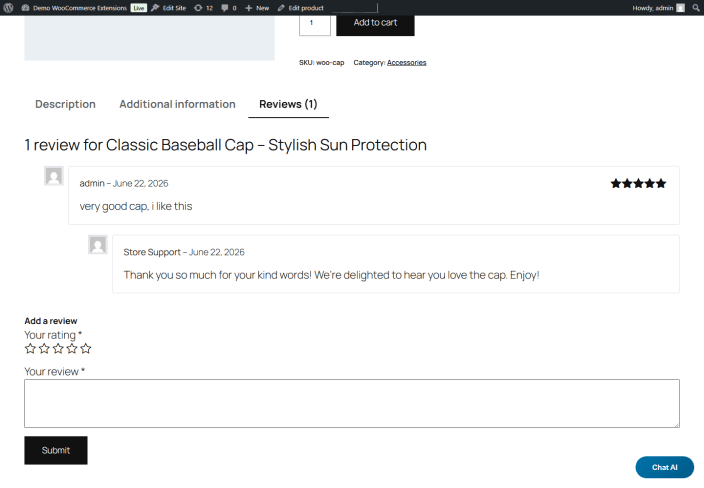
↑ Back to topThe review tool can generate replies for WooCommerce product reviews.
- Enable the review reply feature.
- Choose the preferred approval behavior.
- Test with a sample product review.
- Review AI replies before publishing if your store policy requires manual approval.
Use human review for sensitive, negative, legal, medical, or complaint-related messages.
Privacy notes
↑ Back to topAI Auto Sales Booster for WooCommerce sends prompts to the configured AI provider when an AI feature is used. Store owners should review the selected provider’s privacy and data retention policy, the store privacy policy, whether customer-facing notices should mention AI-assisted features, and local privacy or consent requirements.
Avoid entering sensitive personal information into prompts.
Updating the extension
↑ Back to top- Back up the WordPress site and database.
- Install the new version through the WooCommerce Marketplace update flow.
- Confirm that the extension is active.
- Open WooCommerce > AI Sales Booster Settings and review the settings.
- Test the main enabled features on a staging site or low-risk product first.
Troubleshooting
↑ Back to topThe extension says WooCommerce is required
↑ Back to topInstall and activate WooCommerce, then reload the WordPress admin page.
AI replies are not appearing
↑ Back to topCheck that the API key is saved, the selected provider and model are available, and the feature toggle is enabled.
Product recommendations are not relevant
↑ Back to topConfirm that your products have clear titles, descriptions, categories, and tags. More complete product data helps AI recommendations.
The chat widget does not appear
↑ Back to topCheck that the chat feature is enabled and clear any page cache. Test on a WooCommerce product or shop page.
Emails are not being delivered
↑ Back to topConfirm WordPress email delivery is working. Many stores use an SMTP plugin or transactional email provider for reliable delivery.
Generated content needs editing
↑ Back to topAI output should be reviewed before publishing. Edit product copy, SEO text, image selections, and review replies to match your brand and accuracy requirements.
Support and feedback
↑ Back to topSupport should be handled through the WooCommerce Marketplace support channel for this product. Do not share API keys, passwords, or private credentials in support requests.
Use customer feedback to improve the extension and documentation. Track recurring questions and update this documentation when customers ask about the same setup step, feature behavior, or troubleshooting issue more than once.
Developer and integration notes
↑ Back to topAI Auto Sales Booster for WooCommerce uses native WordPress and WooCommerce hooks for storefront, cart, product, review, and admin workflows. Developers should test custom themes and custom checkout or cart templates on a staging site before enabling all customer-facing features.
If a custom theme removes standard WooCommerce hooks, some storefront widgets or messages may not appear until the theme restores the expected hook location.
FAQs
↑ Back to top
Do I need an AI API key?
Yes. AI-powered features require an API key from a supported provider.
Can I choose which features to use?
Yes. Store owners can enable only the features they want, such as chat, recommendations, coupons, abandoned cart recovery, SEO tools, image generation, or review replies.
Will AI content publish automatically?
Some workflows can assist with generated content, but store owners should review AI-generated product copy, images, and review replies before publishing them.
Does it work with WooCommerce HPOS?
Yes. The extension declares compatibility with WooCommerce High-Performance Order Storage.
Is it translation-ready?
Yes. The extension uses WordPress translation functions and includes language file support.

