
Order Risk Radar for WooCommerce helps store owners review orders more confidently by automatically generating internal risk notes and a simple risk score for each order.
The plugin analyzes common order patterns, such as billing and shipping country mismatches, high-value orders, first-time customers, previous failed orders, refunded customer history, downloadable products, and more. It does not block, cancel, or modify orders – it simply provides additional context to help merchants make informed decisions.
Everything runs locally inside your WooCommerce store. No external APIs or third-party services are required.
Installation
↑ Back to topTo start using a product from WooCommerce.com, you can use the “Add to store” functionality on the order confirmation page or the My subscriptions section in your account.
- Navigate to My subscriptions.
- Find the Add to store button next to the product you’re planning to install.
- Follow the instructions on the screen, and the product will be automatically added to your store.
Alternative options and more information at:
Managing WooCommerce.com subscriptions.
Setup and Configuration
↑ Back to top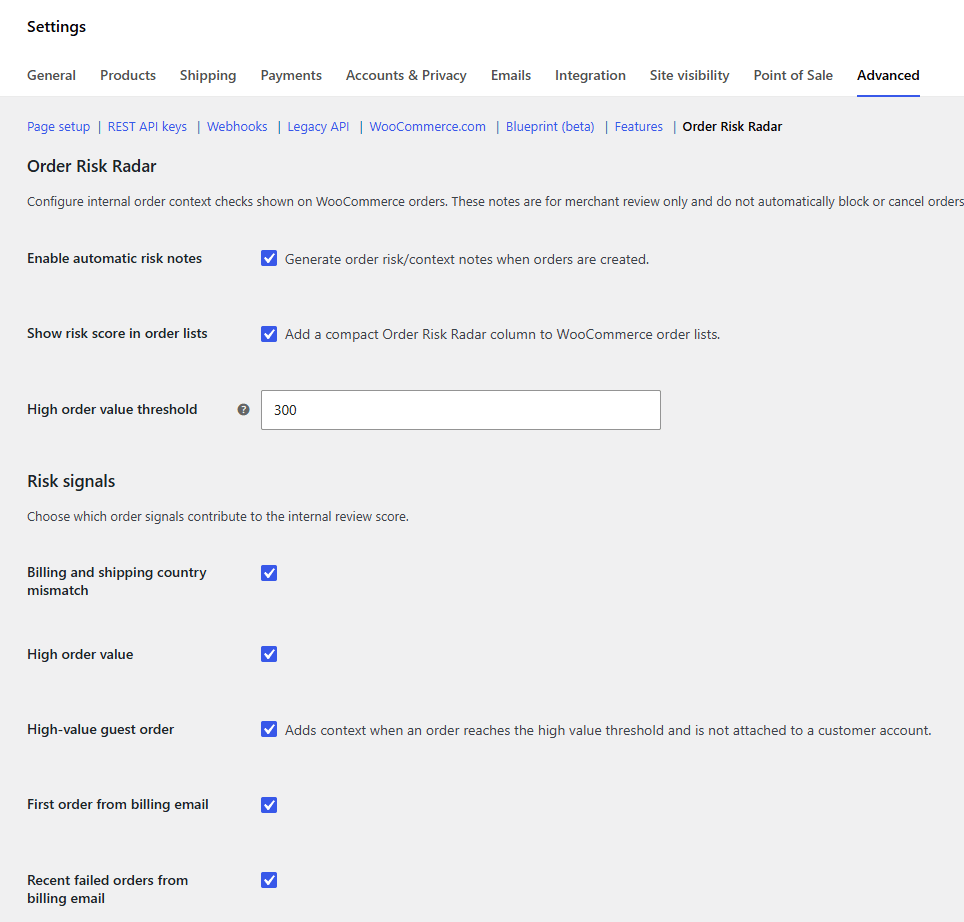
Getting started
↑ Back to topTo configure Order Risk Radar:
- Go to WooCommerce → Settings → Advanced → Order Risk Radar.
- Enable Automatic Risk Notes if you want new orders to be analyzed automatically.
- Configure the available settings:
- High Order Value Threshold
- Failed Order Lookback Days
- Failed Order Warning Count
- Click Save changes.
The plugin is now ready to use.
Available Settings
↑ Back to topEnable Automatic Risk Notes
↑ Back to topWhen enabled, the plugin automatically analyzes new WooCommerce orders and stores the generated risk notes.
High Order Value Threshold
↑ Back to topOrders with a total equal to or greater than this amount receive a High Order Value note.
Failed Order Lookback Days
↑ Back to topDefines how many days of previous failed or cancelled orders should be checked for the same billing email.
Failed Order Warning Count
↑ Back to topDetermines how many previous failed orders are required before a warning is generated.
Usage
↑ Back to topAfter an order is created, open it from WooCommerce → Orders.
The Order Risk Radar panel appears in the order sidebar.
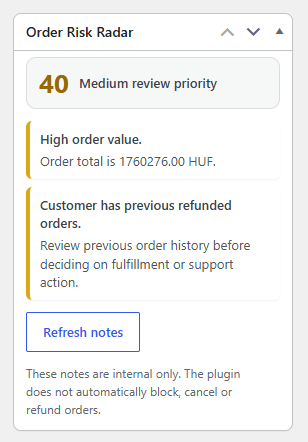
It displays:
- Overall Risk Score
- Individual risk notes
- Manual Refresh Notes button
The risk score is intended as a review aid only. It does not automatically approve, reject, refund, cancel, or hold orders.
If order information changes after creation, click Refresh Notes to regenerate the analysis.
Risk Signals
↑ Back to topDepending on the order, the plugin may report information such as:
- Billing and shipping countries are different
- High order value
- First order from this billing email
- Previous failed or cancelled orders
- Previous refunded orders
- Downloadable or virtual products
- Multiple product quantities
If no unusual conditions are detected, the plugin displays a message indicating that no obvious risk signals were found.
Performance
↑ Back to topOrder Risk Radar performs lightweight checks using WooCommerce data.
The generated notes are stored with the order so they can be displayed quickly without repeated analysis.
No external requests are made.
Compatibility
↑ Back to topOrder Risk Radar is compatible with:
- WooCommerce High-Performance Order Storage (HPOS)
- WordPress 6.4+
- WooCommerce 8.0+
Example Use Cases
↑ Back to topEvery WooCommerce store is different. Order Risk Radar is designed to provide useful context while allowing merchants to decide how they want to handle each order.
Physical goods store
↑ Back to topA store selling electronics may configure a higher High Order Value Threshold so only expensive purchases receive additional attention before shipment.
Digital products
↑ Back to topStores selling downloadable products can quickly identify first-time customers purchasing digital goods and decide whether any additional verification is appropriate before providing access.
Handmade or custom products
↑ Back to topBusinesses producing made-to-order items often invest time and materials before shipping. Risk notes help identify orders that may deserve a quick review before production begins.
Subscription businesses
↑ Back to topSubscription stores can use the plugin to spot customers with a history of failed payments or refunded orders before manually investigating support requests.
Small businesses
↑ Back to topMany smaller stores review every order manually. Order Risk Radar reduces the amount of information that needs to be checked by collecting relevant order context in one place.
The plugin does not replace merchant judgment. Instead, it helps prioritize which orders may deserve a closer look.
Troubleshooting
↑ Back to topNo risk notes are displayed
↑ Back to topVerify that:
- WooCommerce is active.
- Automatic Risk Notes are enabled, or click Refresh Notes manually.
- The order has been saved.
The risk score seems lower or higher than expected
↑ Back to topThe score is based on the combination of detected risk signals. It is intended to help prioritize manual review rather than determine whether an order is fraudulent.
Refresh Notes does not update anything
↑ Back to topIf the order data has not changed, the generated analysis may remain the same. This is expected behavior.
FAQs
↑ Back to top
Does the plugin block suspicious orders?
No. It only provides information to assist manual review.
Does the plugin contact external fraud services?
No. All analysis is performed locally inside your WooCommerce installation.
Can I analyze existing orders?
Yes. Open any WooCommerce order and click Refresh Notes.
Developer Filters
↑ Back to topOrder Risk Radar includes several WordPress filters that allow developers to customize its behavior without modifying the plugin itself.
orr_order_risk_notes
↑ Back to topThis filter allows developers to inspect, modify, remove, or add risk notes before they are stored with the order.
Parameters
↑ Back to top$notes(array) — Generated risk notes.$order(WC_Order) — The WooCommerce order.
Example
↑ Back to topA developer could add a custom warning when a customer purchases more than a certain quantity of a specific product, or when a custom checkout field contains a particular value.
add_filter( 'orr_order_risk_notes', function( $notes, $order ) {

    if ( $order->get_total() > 1000 ) {
        $notes[] = array(
            'level'   => 'high',
            'title'   => 'Large enterprise order',
            'message' => 'This order exceeds the custom review threshold.',
            'time'    => current_time( 'mysql' ),
        );
    }

    return $notes;

}, 10, 2 );
orr_order_risk_score
↑ Back to topAllows developers to modify the calculated risk score before it is displayed.
Parameters
↑ Back to top$score(int)$notes(array)
Example
↑ Back to topSome stores may want every order containing a custom “High Risk” note to automatically receive a score of at least 80.
add_filter( 'orr_order_risk_score', function( $score, $notes ) {

    foreach ( $notes as $note ) {
        if ( isset( $note['level'] ) && 'high' === $note['level'] ) {
            return max( 80, $score );
        }
    }

    return $score;

}, 10, 2 );
orr_setting_value
↑ Back to topAllows developers to override plugin settings programmatically.
Parameters
↑ Back to top$value$key$default
Example
↑ Back to topA store owner may want to use a different high-value threshold during seasonal sales or for specific environments without changing the settings in the dashboard.
add_filter( 'orr_setting_value', function( $value, $key ) {

    if ( 'high_value_threshold' === $key ) {
        return 500;
    }

    return $value;

}, 10, 2 );
This filter can also be used by agencies building custom WooCommerce solutions where plugin settings need to be managed centrally or controlled through custom business logic.

