
India GST Tax Suite for WooCommerce automates Indian Goods and Services Tax (GST) classification, Business-to-Business (B2B) tax identification checks, sequential PDF tax invoicing, refund credit notes, Harmonized System of Nomenclature (HSN) and Services Accounting Code (SAC) catalog mapping, and native reporting directly inside WordPress and WooCommerce.
Installation
↑ Back to topTo start using a product from WooCommerce.com, you can use the “Add to store” functionality on the order confirmation page or the My subscriptions section in your account.
- Navigate to My subscriptions.
- Find the Add to store button next to the product you’re planning to install.
- Follow the instructions on the screen, and the product will be automatically added to your store.
Alternative options and more information at:
Managing WooCommerce.com subscriptions.
Store location and currency behavior
↑ Back to topIf the base address in WooCommerce > Settings > General > Store Address sits outside India (for example, the United Kingdom using GBP), India GST Tax Suite for WooCommerce displays a non-blocking Store Location Notice inside Settings. Indian GST compliance rules govern businesses registered in India; however, the extension preserves multi-currency support so Indian merchants billing international export orders can issue GST-aware records cleanly.
Guided setup wizard
↑ Back to topOpen WooCommerce > Settings > India GST after activation to complete the eight-step onboarding wizard. Administrators can click any numbered step in the left sidebar to switch sections immediately without full-page reloads.
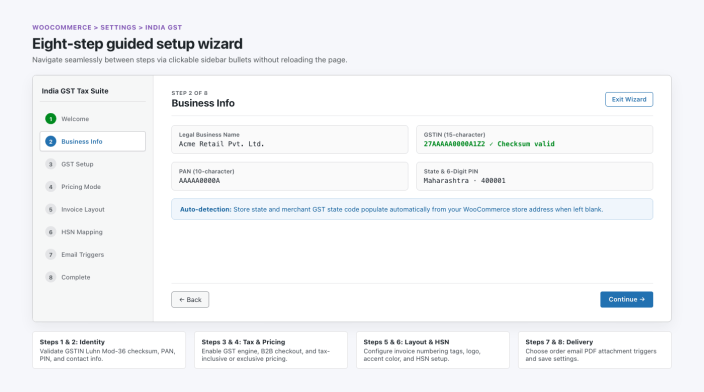
The guided setup wizard displays completed, active, and upcoming steps across a fixed left navigation rail while validating statutory Indian business identifiers inline.
- Welcome: Reviews core extension capabilities including Tax Invoices and Credit Notes, HSN/SAC Management, GSTR Reports and Exports, and Status Compliance Auditing.
- Business Info: Configures legal business name, 15-character Goods and Services Tax Identification Number (GSTIN), 10-character Permanent Account Number (PAN), street address, Indian state, six-digit Postal Index Number (PIN), business email, and phone number. When store state fields are blank, the extension populates state details automatically from the WooCommerce store address.
- GST Setup: Controls Enable GST Engine, Show B2B Fields at Checkout, and Display HSN/SAC on Products.
- Pricing Mode: Selects Prices Include GST, Prices Exclude GST, or Mixed / Per Product.
- Invoice Layout: Sets invoice and credit note prefixes, number formatting patterns, April 1 financial-year reset behavior, logo visibility, PDF accent color, and custom footer notes.
- HSN Mapping: Offers immediate navigation to catalog HSN setup or skipping to finish onboarding first.
- Email Triggers: Configures invoice PDF delivery on Order Processing, Order Completed, or both emails, plus automatic Credit Note PDF attachments on refund emails.
- Complete: Click Go to Settings to persist onboarding state and access the full configuration workspace.
Click Relaunch Setup Wizard in the Settings tab at any time to rerun onboarding. Click Save Changes at the bottom of Settings to save modifications across Business Information, Invoice Customization, and GST Configuration in a single request.
Tax engine and checkout
↑ Back to topThe tax engine relies on WooCommerce’s native tax calculations as the single source of truth so order subtotals and grand totals never drift across payment gateways.
Business information validation
↑ Back to topBoth client-side scripts and REST API handlers in src/Admin/RestController.php validate statutory identifiers before saving indiagst_settings:
- GSTIN: Verifies the 15-character pattern (
^[0-9]{2}[A-Z]{5}[0-9]{4}[A-Z][1-9A-Z]Z[0-9A-Z]$) and checks the final character using India’s statutory Luhn Mod-36 checksum. Entering a 10-character PAN prompts a sample GSTIN with a valid checksum for reference. - PAN: Enforces the 10-character alphanumeric format (
^[A-Z]{5}[0-9]{4}[A-Z]$). - PIN code, state, email, and phone: Validates six-digit Indian postal codes (
110001–855117), Indian state mapping, email syntax, and telephone numbers.
Why strict validation matters: Saving an invalid GSTIN or mismatched state code causes downstream checkout splits and B2B tax invoices to carry non-compliant tax IDs.
Place of supply and tax split logic
↑ Back to topOnce WooCommerce computes order taxes, src/GST/TaxEngine.php resolves the customer state according to Calculate Tax Based On (shipping or billing) and splits order taxes without changing the final order total.
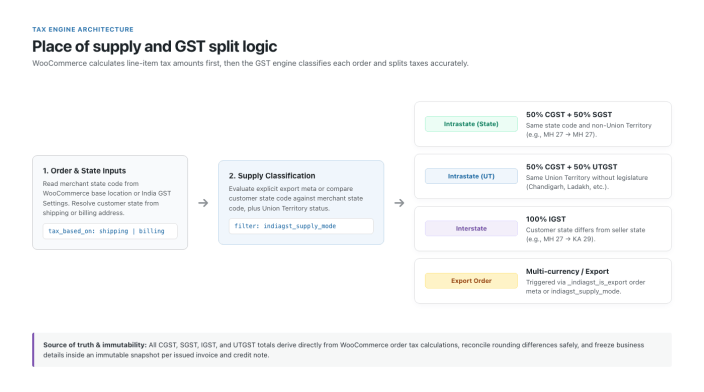
TaxEngine classifies each order into intrastate state, intrastate Union Territory, interstate, or export mode and reconciles rounding precision against WooCommerce’s calculated tax total.
- Intrastate (State): When merchant and customer states match in a standard state, total tax splits equally into Central GST (CGST) and State GST (SGST).
- Intrastate (Union Territory): When merchant and customer states match in a Union Territory without a legislature (
04Chandigarh,26Dadra and Nagar Haveli and Daman and Diu,31Lakshadweep,35Andaman and Nicobar Islands, and38Ladakh), total tax splits equally into CGST and Union Territory GST (UTGST). - Interstate: When customer and merchant state codes differ, 100% of total GST allocates to Integrated GST (IGST).
- Export: Orders carrying
_indiagst_is_exportmetadata or filtered throughindiagst_supply_moderecord asexport.
Click Sync WooCommerce Tax Rates in Settings to populate standard Indian GST slabs (0%, 5%, 12%, 18%, and 28%) plus custom catalog GST rates into WooCommerce’s native tax tables.
Classic Checkout and Checkout Blocks B2B fields
↑ Back to topEnabling Show B2B Fields at Checkout collects commercial buyer information across both legacy shortcode checkouts and block-based WooCommerce checkouts:
- WooCommerce Checkout Blocks: Registers conditional contact fields (
indiagst/business-purchase,indiagst/gstin,indiagst/business-name, andindiagst/po-number). Buyer GSTIN, Registered Business Name, and Purchase Order (PO) Number inputs appear only when the buyer enables I am purchasing for a registered business (B2B). - Classic Checkout: Displays matching conditional fields beneath billing inputs.
- Checkout validation and storage: Rejects invalid buyer GSTIN checksums before order creation, persists B2B fields onto WooCommerce High-Performance Order Storage (HPOS) metadata, and caches verified buyer tax profiles inside
wp_indiagst_customer_gstin.
Tax invoices and credit notes
↑ Back to topIndia GST Tax Suite for WooCommerce renders single-page A4 PDF 1.4 documents natively in pure PHP (src/PDF/InvoicePDF.php), removing dependencies on external PDF binaries.
Sequential numbering and placeholders
↑ Back to topConfigure independent formatting patterns and counters for Tax Invoices and Credit Notes under WooCommerce > Settings > India GST:
- Supported pattern tags:
{prefix},{number},{number:N}(padded toNdigits),{fy}(short financial year, such as26-27),{fy_long}(2026-27),{financial_year},{year}/{yyyy},{yy},{month}/{mm}, and{separator}. Clicking placeholder pills inserts tags directly into the active format field while updating the live preview. - April 1 financial-year reset: Enable Reset numbering each financial year (1st April) to reset invoice and credit note counters at the start of every Indian financial year (April 1 through March 31).
- Concurrency safety: Advisory locks (
indiagst_order_inv_*andindiagst_refund_*) serialize simultaneous gateway webhooks and admin actions so invoices never receive duplicate numbers or skipped sequences.
A4 PDF invoice anatomy
↑ Back to topEvery generated tax invoice and credit note stores an immutable snapshot of business details, customization settings, buyer details, HSN codes, and GST splits inside wp_indiagst_invoices and wp_indiagst_credit_notes. Updating store settings later never alters previously issued PDF documents.
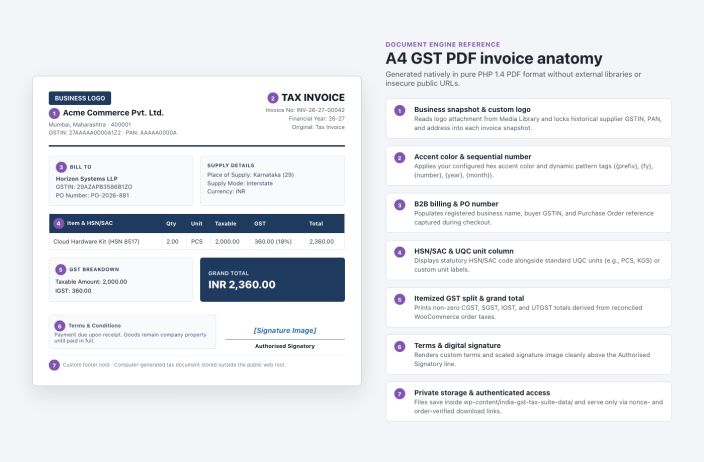
Numbered callouts map every section of the generated PDF invoice: supplier logo and GSTIN snapshot (1), accent rule and dynamic sequence metadata (2), buyer billing and PO box (3), HSN/UQC line items (4), split GST summary and grand total (5), terms and signature image (6), and footer notes with protected storage (7).
Click Preview Invoice or Preview Credit Note under Invoice Customization in Settings to preview typography, accent hex colors, uploaded logos, signature images, and footer text before issuing customer documents.
Credit notes, email attachments, and downloads
↑ Back to top- Refund-driven credit notes: Processing a full or partial refund triggers
woocommerce_refund_created, generating a sequential GST Credit Note that references the parent invoice number and date while calculating taxes strictly from actual refund line items (preserving mixed-rate accuracy). - Transactional email attachments: Attaches Tax Invoice PDFs to WooCommerce Customer Processing Order, Customer Completed Order, or both emails, and attaches Credit Note PDFs to customer refund emails.
- Authenticated document delivery: PDFs save inside
wp-content/india-gst-tax-suite-data/, outside the public web root. Administrators download via nonce-checked admin links and logged-in buyers download from My Account > Orders via HMAC-signed URLs (indiagst_download=invoice|credit_note), preventing unauthorized public enumeration of customer invoices.
HSN and catalog management
↑ Back to topAssign statutory Harmonized System of Nomenclature (HSN) codes, Services Accounting Code (SAC) numbers, Unit Quantity Codes (UQC), and GST slabs individually or in timeout-safe category batches.
Individual product and bulk edit fields
↑ Back to topOpen any simple or variable item under Products > All Products and select Product data > General to set:
- HSN/SAC code (
_indiagst_hsn) - Unit Quantity Code (UQC) (
_indiagst_uqc) choosing from 23 GST standard units (PCS,NOS,BOX,KGS,GMS,MTR,CMS,LTR,MLT,SET,PRS,BAG,BTL,CAN,CTN,DOZ,PAC,ROL,SQF,SQM,TON,UNT, andOTH) - Custom Unit Label (
_indiagst_custom_uqc), which prints on PDF invoices in place of the three-letter UQC when specified - GST rate (%) (
_indiagst_gst_rate) - GST category (
_indiagst_tax_category:Standard rated,Zero-rated,Exempt, orNon-GST)
Store managers can also update these fields across selected products using WooCommerce’s native Products > All Products > Bulk actions > Edit panel.
Batched category bulk updater
↑ Back to topFor large catalogs, open the HSN Manager tab under WooCommerce > Settings > India GST.
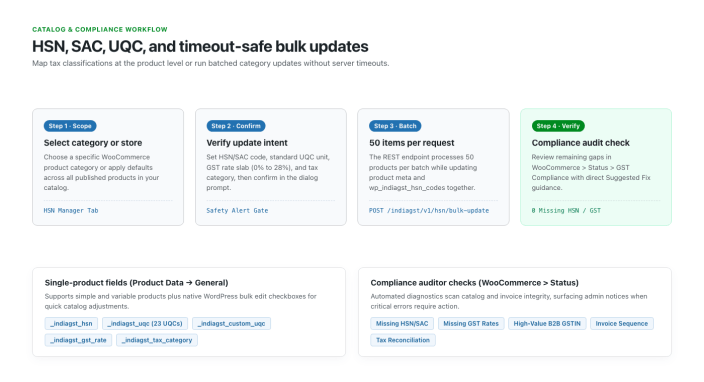
The HSN Manager verifies bulk intent with a confirmation dialog, updates 50 products per REST API request with a live progress bar, and feeds directly into System Status compliance checks.
- Select a product category or choose All Store Products.
- Enter an HSN/SAC code, select a UQC unit, click a quick GST rate slab (
0%,5%,12%,18%, or28%) or type a custom percentage, and choose a GST category. - Click Run Bulk Category Update and confirm the warning alert.
Why batching matters: Updating thousands of WooCommerce products in one HTTP request can exceed PHP
max_execution_timeand leave partial tax metadata out of sync. Processing 50 products per AJAX batch keeps product metadata andwp_indiagst_hsn_codessynchronized cleanly with zero timeouts.
Analytics, compliance status, and exports
↑ Back to topReporting and store diagnostics live in native WooCommerce admin sections alongside searchable tools inside Settings.
GST Analytics (Analytics > GST Analytics)
↑ Back to topNavigate to Analytics > GST Analytics (or click the link inside WooCommerce > Settings > India GST > Reports) to inspect:
- Custom date pickers and quick financial-year presets (Current Financial Year, Previous Financial Year, Current Month, All Time)
- KPI summary cards showing Total Sales, Taxable Sales, Total GST Collected, CGST, SGST / UTGST, IGST, Invoices, and Credit Notes
- Period invoice table with PDF download actions and date-filtered Comma-Separated Values (CSV) export
System Status compliance audit (WooCommerce > Status > GST Compliance)
↑ Back to topNavigate to WooCommerce > Status > GST Compliance to scan catalog and invoice integrity across six automated checks (missing_hsn, missing_gst_rates, missing_gstin, invoice_sequence, tax_mismatches, and wc_tax_reconciliation).
- Every non-passing check displays a dedicated Suggested Fix column explaining exact remediation steps and linking to affected products or settings.
- Unresolved critical issues trigger a top-level dismissible WordPress admin notice alerting store managers immediately.
Searchable invoice registry and gated CSV exports
↑ Back to top- Invoice Registry (
WooCommerce > Settings > India GST > Invoices): Search invoices live by invoice number, customer name, or GSTIN; filter by financial year; sort numeric and date columns; and step across paginated results. - CSV Exports (
WooCommerce > Settings > India GST > Reports): Generate CSV summaries for Sales Report, HSN Summary, State-wise Report, Customer GST Summary, Product GST Report, and GSTR return summaries. When zero GST invoices exist, export cards disable cleanly with aNo datastatus so stores never download empty CSV files.
Developer reference
↑ Back to topDevelopers can extend calculations, numbering, PDF unit formatting, email attachments, reports, and REST integrations using standard WordPress hooks and APIs.
Action hooks
↑ Back to top| Hook | Arguments | Description |
|---|---|---|
indiagst_loaded | string $version | Fires after plugin services boot and register (src/API/DeveloperHooks.php). |
indiagst_invoice_generated | int $invoice_id, WC_Order $order | Fires after a tax invoice and line items save to custom tables (src/Invoice/InvoiceService.php). |
indiagst_credit_note_generated | int $cn_id, WC_Order_Refund $refund, WC_Order $order | Fires after a refund generates a credit note record (src/Invoice/CreditNotes.php). |
Filter hooks
↑ Back to top| Filter | Signature & Returns | Purpose |
|---|---|---|
indiagst_supply_mode | (string $mode, WC_Order $order, string $customer_state, string $merchant_state): string | Overrides Place of Supply classification (intrastate, interstate, or export). |
indiagst_tax_breakdown | (array $breakdown, WC_Order $order): array | Filters calculated GST items and totals before saving an invoice. |
indiagst_document_number | (string $number, string $type, string $fy): string | Filters formatted invoice or credit note document numbers ($type is 'invoice' or 'credit_note'). |
indiagst_item_unit_label | (string $unit_label, array $item): string | Customizes printed item UQC/unit strings on rendered PDFs. |
indiagst_email_attachments | (array $attachments, string $email_id, WC_Order $order): array | Filters PDF file paths attached to WooCommerce transactional emails. |
indiagst_report_rows | (array $data, string $type): array | Modifies report payloads returned by /wp-json/indiagst/v1/reports/{type}. |
indiagst_audit_results | (array $checks): array | Filters System Status compliance scan rows returned by Auditor::run(). |
Example override forcing export mode for non-Indian billing countries:
add_filter(
    'indiagst_supply_mode',
    static function ( string $mode, WC_Order $order ): string {
        if ( 'IN' !== $order->get_billing_country() ) {
            return 'export';
        }
        return $mode;
    },
    10,
    2
);
REST API endpoints (indiagst/v1)
↑ Back to topAll REST endpoints require administrative WooCommerce privileges (manage_woocommerce) verified by IndiaGST\Utils\Security::rest_permission():
GET,POST/wp-json/indiagst/v1/settings— Read or validate and persistindiagst_settingsGET/wp-json/indiagst/v1/overview— Retrieve dashboard settings, invoices, credit notes, categories, HSN entries, audit checks, and report countsPOST/wp-json/indiagst/v1/onboarding/complete— Mark the setup wizard completedGET/wp-json/indiagst/v1/sample-invoice&/wp-json/indiagst/v1/sample-credit-note— Render preview PDFs using current configurationGET/wp-json/indiagst/v1/categories— List WooCommerce categories and published product countsGET/wp-json/indiagst/v1/hsn— Retrieve synced HSN catalog recordsPOST/wp-json/indiagst/v1/hsn/bulk-update— Process batched 50-product category HSN/rate updatesPOST/wp-json/indiagst/v1/audit/run— Execute an immediate compliance scanPOST/wp-json/indiagst/v1/sync-tax-rates— Sync GST slabs into WooCommerce tax tablesGET/wp-json/indiagst/v1/reports/{type}— Query report data (sales,hsn,state,customer,product,gstr1,gstr3b)
Database schema and meta keys
↑ Back to topTables created under $wpdb->prefix . 'indiagst_' keep statutory records HPOS-safe:
invoices,invoice_items,credit_notes,customer_gstin,hsn_codes,report_cache, andaudit_logs
Order, refund, and product meta keys read and written via WooCommerce CRUD APIs:
- Order & refund meta:
_indiagst_invoice_id,_indiagst_invoice_number,_indiagst_credit_note_id,_indiagst_business_purchase,_indiagst_gstin,_indiagst_business_name,_indiagst_po_number, and_indiagst_is_export - Product meta:
_indiagst_hsn,_indiagst_uqc,_indiagst_custom_uqc,_indiagst_gst_rate, and_indiagst_tax_category - Uninstall cleanup (
uninstall.php): Statutory tables andindiagst_settingsremain intact after uninstallation unlessindiagst_delete_data_on_uninstallis set totrue.
Troubleshooting and FAQs
Why are CSV report buttons disabled in Settings?
CSV download cards display `No data` and remain disabled until at least one GST invoice exists. This safeguard prevents merchants from generating blank CSV files before orders are billed.Why are PDF links inaccessible directly over HTTP?
Generated invoices reside inside `wp-content/india-gst-tax-suite-data/` outside public upload URLs, preventing unauthenticated visitors from guessing sequential document paths. If PDF generation fails, confirm `wp-content/` write permissions and inspect logs under WooCommerce > Status > Logs (`india-gst-tax-suite`).Why does buyer GSTIN validation fail at checkout?
Checkout validation enforces India’s 15-character structure and statutory Luhn Mod-36 checksum on the 15th character. Confirm the buyer entered a full 15-character GSTIN rather than a 10-character PAN and verified the two-digit state code and final checksum digit.Will uninstalling delete historical GST invoices?
No. `uninstall.php` keeps custom database tables and `indiagst_settings` intact by default to protect statutory financial records. Only sites with option `indiagst_delete_data_on_uninstall` set to `true` drop tables and remove plugin options upon deletion. By default, past invoices will still be accessible once you re-install the plugin.Does India GST Tax Suite for WooCommerce support High-Performance Order Storage (HPOS)?
Yes. The main plugin file declares explicit compatibility for both `custom_order_tables` (HPOS) and `cart_checkout_blocks`. Order handlers interact exclusively through WooCommerce CRUD methods while tax records live inside dedicated `wp_indiagst_*` database tables.

