
Update Cart on Checkout for WooCommerce enables your customers to remove or change the product quantity on the checkout page. The extension also offers a variety of button icons and options to customize the Remove Product icon color to match it with your site’s theme.
Installation
↑ Back to topTo start using a product from WooCommerce.com, you can use the “Add to store” functionality on the order confirmation page or the My subscriptions section in your account.
- Navigate to My subscriptions.
- Find the Add to store button next to the product you’re planning to install.
- Follow the instructions on the screen, and the product will be automatically added to your store.
Alternative options and more information at:
Managing WooCommerce.com subscriptions.
Configuration
↑ Back to topAfter plugin installation, go to WooCommerce > Settings and click the Update Cart on Checkout tab to configure the settings of this extension.
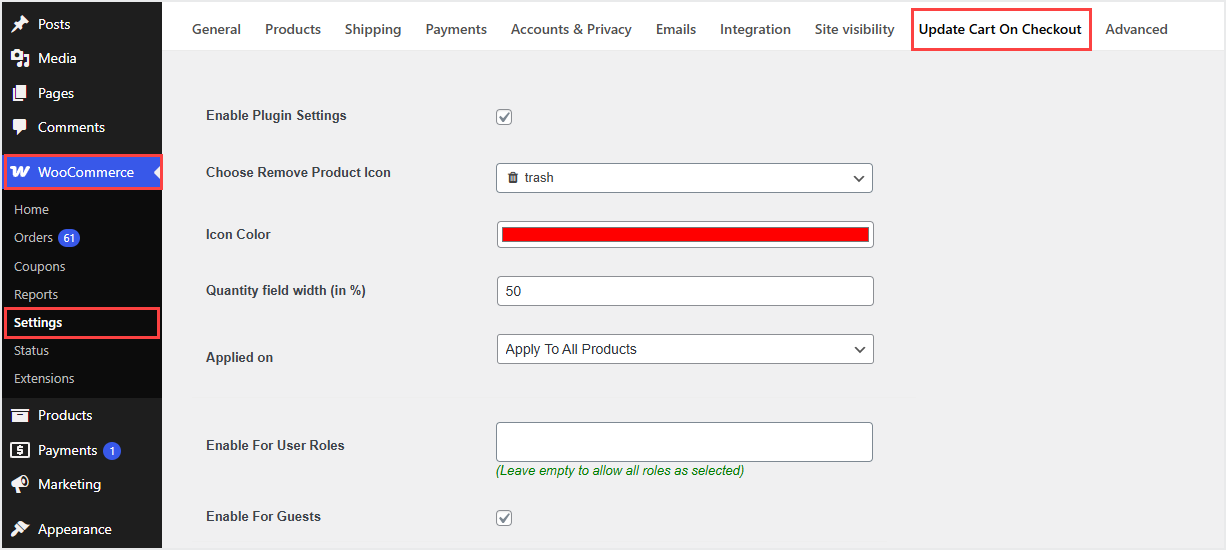
From here, you can enable the extension and choose the icon for the Remove Product Icon on the checkout page.
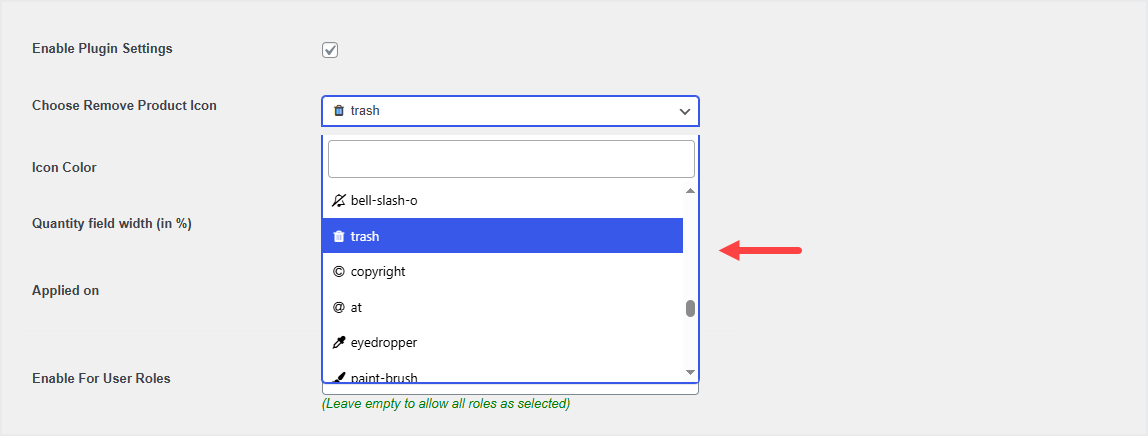
Select the color of the Remove Product Icon and select the products or categories to apply the Remove Product icon. You can also choose to apply the functionality to the whole store.

You can restrict plugin functionality to specific user roles and guest users as well.

You also have option to redirect customers to shop, product or any custom page once the cart page gets empty.


