
BayX Importer allows you to search, import, and automatically sync eBay products into your WooCommerce store. It’s perfect for affiliate marketers, dropshippers, and anyone looking to expand their product catalog with eBay’s vast marketplace.
Installation
↑ Back to topTo start using a product from WooCommerce.com, you can use the “Add to store” functionality on the order confirmation page or the My subscriptions section in your account.
- Navigate to My subscriptions.
- Find the Add to store button next to the product you’re planning to install.
- Follow the instructions on the screen, and the product will be automatically added to your store.
Alternative options and more information at:
Managing WooCommerce.com subscriptions.

Getting Started with BayX Importer
↑ Back to topFollow the steps below to connect your eBay account, import products into WooCommerce, and optionally enable affiliate tracking.
After activation, find the “WooCommerce > eBay Importer” menu in your WordPress admin sidebar.
Step 1: Connect to eBay API
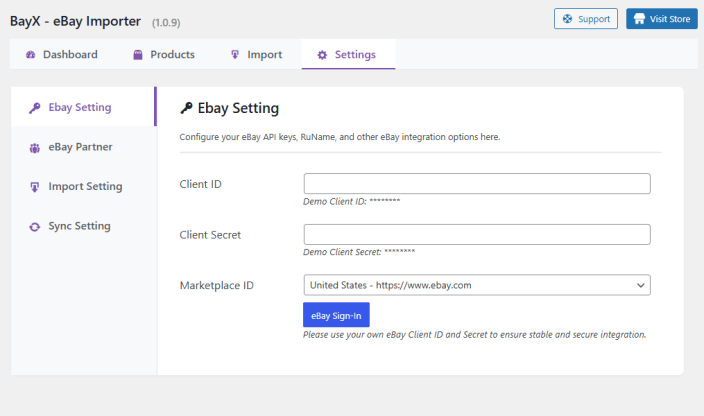
↑ Back to top- Go to the Settings > eBay Setting tab.
- Enter your eBay API Client ID, Client Secret.
(You can create these from your eBay Developer Account.)
Step 2: Import Products from eBay
↑ Back to top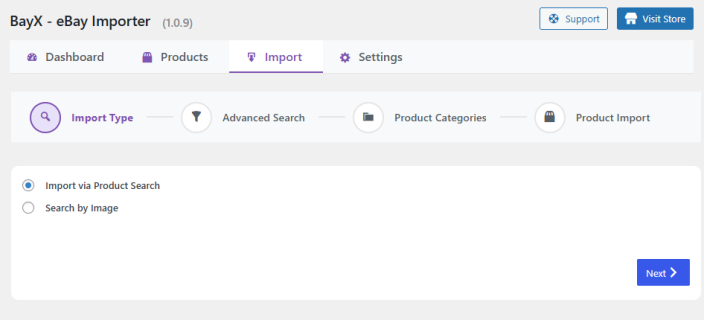
- Go to the Import tab.
- Search for products using keywords, categories, or image search.
- Wait for eBay to return search results, then select the products you want to import.
- Click Import – products will be added to your WooCommerce store.
Note: The import process may take time depending on the number of items and eBay API response time.
Step 3: Configure Import Settings
↑ Back to top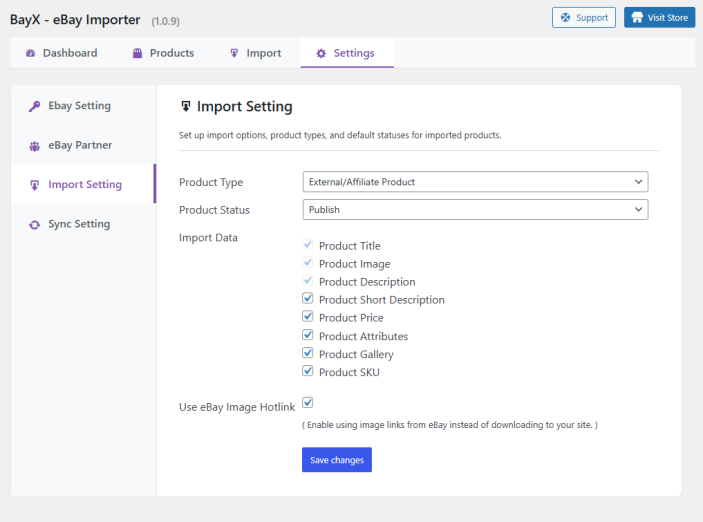
Go to Settings > Import Settings tab to configure:
- Product Type: Simple or External
- Product Status: Draft, Pending, or Published
- Import data: Title, Image, Description, etc.
Step 4: Sync Settings
↑ Back to top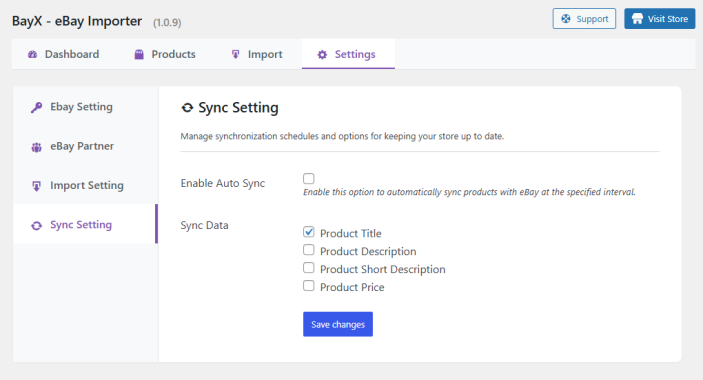
The Settings > Sync Settings tab lets you enable automatic product updates from eBay:
- Automatically sync product title, price, and description
- You can schedule automatic syncs (daily, weekly, monthly)
- You can also trigger manual syncs from the dashboard at any time.
Optional: Affiliate Integration
↑ Back to top1. Add eBay Partner Network (EPN) Campaign ID
↑ Back to top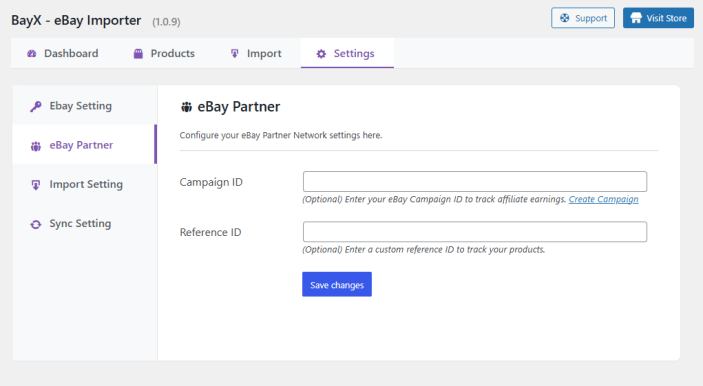
- In Settings > eBay Partner tab, enter your eBay EPN Campaign ID.
- This will enable affiliate links to track commissions through the eBay Partner Network.
Imported products will automatically use your affiliate links, so you earn commission on every sale.
2. Verify Affiliate Links
↑ Back to topAfter importing and syncing, visit a product page on your site.
- The “Buy on eBay” or product link will contain your affiliate tracking ID.
- You can confirm this by hovering the link and checking the URL structure.
Getting eBay API Credentials
↑ Back to top1. Get Your eBay Client ID & Client Secret
↑ Back to top- Go to the eBay Developer Program.
- Sign in or create a developer account.
- Create a new application to obtain your Client ID and Client Secret.
- Enter these credentials in the plugin settings.
2. Get Your eBay Partner Network Campaign ID & Reference ID (for Affiliate)
↑ Back to top- Log in to your eBay Partner Network account.
- Go to the “Campaigns” section to find your Campaign ID.
- Your Reference ID is optional and can be found or created in your affiliate dashboard.
- Enter these values in the plugin settings to enable affiliate tracking.
Migration from Other Plugins
↑ Back to topIf you previously used another importer/plugin and want BayX Importer to manage existing products, add two meta fields to each product so BayX can recognise and sync them:
- _product_imported =
ebay - _bayx_sku = eBay Item ID / SKU (required for API sync)
Two quick ways to apply these changes:
Method 1 — SQL
↑ Back to topFastest for large catalogs. Run the queries below in phpMyAdmin or your DB tool. Always backup your database first.
-- Backup (optional)
CREATE TABLE wp_postmeta_backup AS SELECT * FROM wp_postmeta;

-- Mark products as imported from eBay
INSERT INTO wp_postmeta (post_id, meta_key, meta_value)
SELECT ID, '_product_imported', 'ebay'
FROM wp_posts
WHERE post_type = 'product' AND post_status = 'publish'
ON DUPLICATE KEY UPDATE meta_value = VALUES(meta_value);

-- Copy existing WooCommerce SKU (_sku) to _bayx_sku
INSERT INTO wp_postmeta (post_id, meta_key, meta_value)
SELECT pm.post_id, '_bayx_sku', pm.meta_value
FROM wp_postmeta pm
WHERE pm.meta_key = '_sku' AND pm.meta_value != ''
  AND pm.post_id IN (SELECT ID FROM wp_posts WHERE post_type='product' AND post_status='publish')
ON DUPLICATE KEY UPDATE meta_value = VALUES(meta_value);
Verify with simple SELECT queries to ensure meta keys were added.
Method 2 — CSV Import (UI)
↑ Back to topUse WooCommerce product importer if you prefer a UI. Create a CSV with these columns and import with “Update existing products” checked:
ID,_product_imported,_bayx_sku
123,ebay,EBAY-SKU-001
124,ebay,EBAY-SKU-002
125,ebay,EBAY-SKU-003
How to identify the eBay SKU (_bayx_sku)
For existing eBay products, _bayx_sku follows this format:
v1|ITEM_NUMBER|VARIATION_IDExample:
- Ebay: ebay.com/itm/305506890300
- And the product has no variations
Then the value will be:
_bayx_sku = v1|305506890300|0This is the value you should use in the CSV column _bayx_sku.
Alternative way to verify the eBay SKU
You can also check this via Seller Hub:
- Go to eBay → Seller Hub → Listings → Active
- Open the listing
- You can confirm the Item ID and variation information there
Import steps:
- Go to: WooCommerce → Products → Import
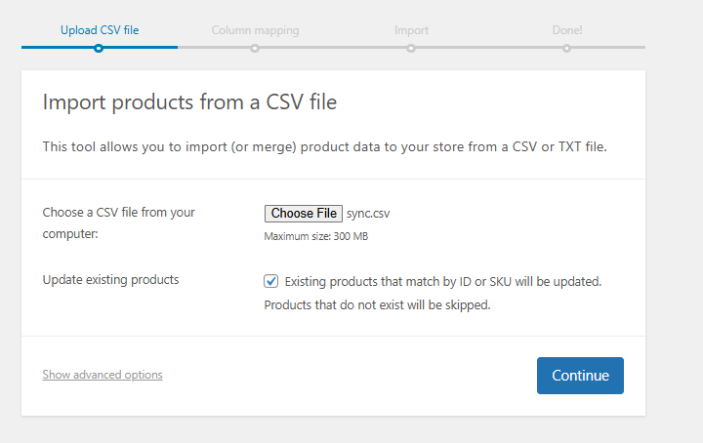
URL: /wp-admin/edit.php?post_type=product&page=product_importer - Upload CSV file (make sure “Update existing products” is checked)
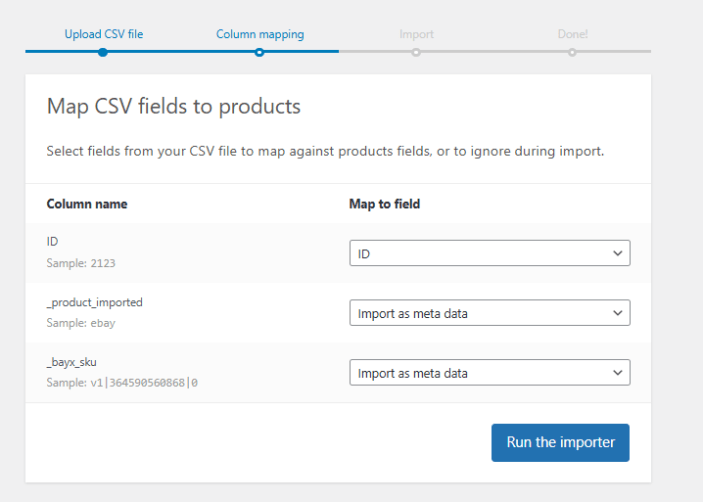
3. Map columns:
ID→ Post ID
_product_imported→ Custom meta
_bayx_sku→ Custom meta
4. Click Run the importer
After import, open a few products to confirm the meta keys were added. Then enable BayX sync settings and test syncing a single product before running batch syncs.
FAQs
↑ Back to topHelp customers by answering commonly asked questions.
Do I need an eBay developer account?
Yes, you need an eBay developer account to obtain your API credentials.
Can I use this plugin for affiliate marketing?
Yes! Enter your eBay Partner Network details to earn commissions on sales.
How often does the plugin sync products?
You can schedule automatic syncs (daily, weekly, etc.) or sync manually anytime.
Are images stored locally or hotlinks?
You can choose either option in the settings.

