
Google Business Reviews for WooCommerce lets you fetch real reviews from your Google Business Profile using the official Google API and display them anywhere on your store with flexible layouts like list, grid, or carousel. With advanced sorting and filtering, customizable display elements, full design controls, built-in caching, and automatic review syncing, the plugin gives you complete control over how reviews look and perform while keeping your site fast and trustworthy.
Installation
↑ Back to topTo start using a product from WooCommerce.com, you can use the “Add to store” functionality on the order confirmation page or the My subscriptions section in your account.
- Navigate to My subscriptions.
- Find the Add to store button next to the product you’re planning to install.
- Follow the instructions on the screen, and the product will be automatically added to your store.
Alternative options and more information at:
Managing WooCommerce.com subscriptions.

Configuration
↑ Back to topGo to WooCommerce > Settings > Google Reviews
Here, you will find all the configuration settings for the Google Business Reviews plugin.
API Configuration
↑ Back to topConfigure Google API settings to connect your Google Business Profile and fetch real customer reviews
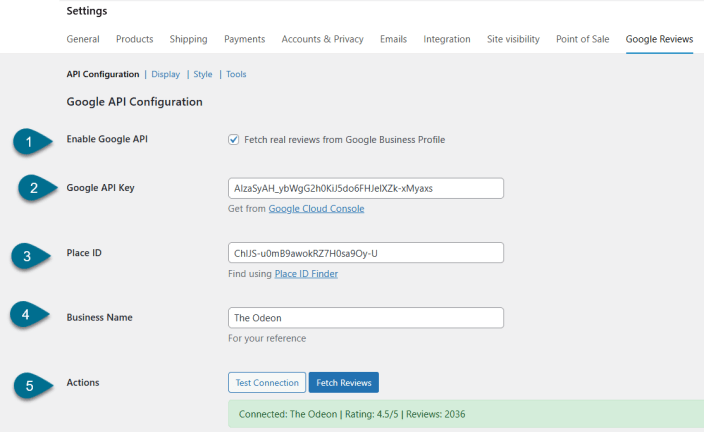
- Enable Google API – Enable to fetch real reviews from Google Business Profile
- Google API Key – Add Google API Key. Get from Google Cloud Console
- Place ID – Add Google Place ID. Find using Place ID Finder
- Business Name – Add Google Business Name
- Actions – Test & Fetch Reviews
- Test Connection – Test connection to verify if the Google API is working correctly
- Fetch Reviews – Click to fetch reviews from Google Business Profile
- Setup Guide – Follow these steps to get the Google API key and Place ID
- Go to Google Cloud Console
- Create a project and enable Places API
- Create an API key
- Find your Place ID using Place ID Finder
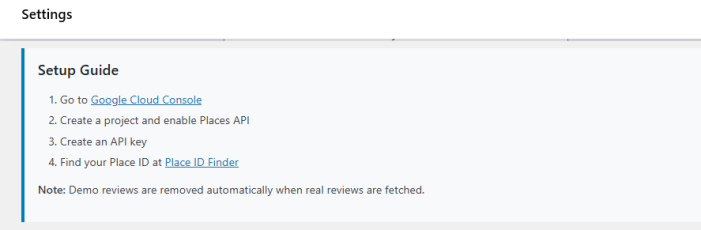
Note – Demo reviews are removed automatically when real reviews are fetched
Display Settings
↑ Back to topCustomize how Google Reviews are displayed on the frontend
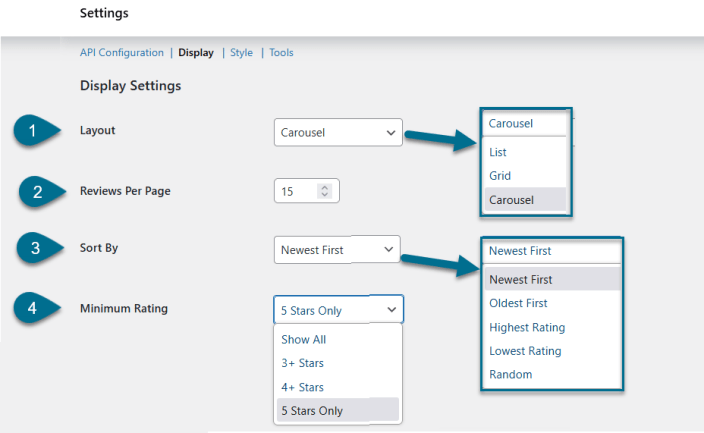
- Layout – Choose layout type:
- List
- Carousal
- Grid
- Reviews Per Page – Set the number of reviews per page using the up/down button
- Sort By – Sort reviews by
- Newest first
- Oldest first
- Highest rating
- Lowest rating
- Random
- Minimum Rating – Filter and show reviews
- 5-star only
- 4+ stars
- 3+ stars
- Show all
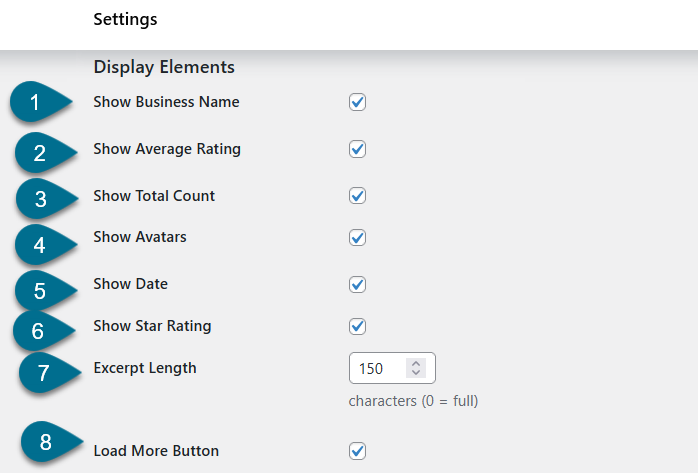
- Display Elements – Enable or disable the following display options
- Show Business Name
- Show Average Rating
- Show Total Count
- Show Avatars
- Show Date
- Show Star Rating
- Excerpt Length – Set review excerpt length in characters (0 = full review)
- Load More Button – Enable the button to load more reviews
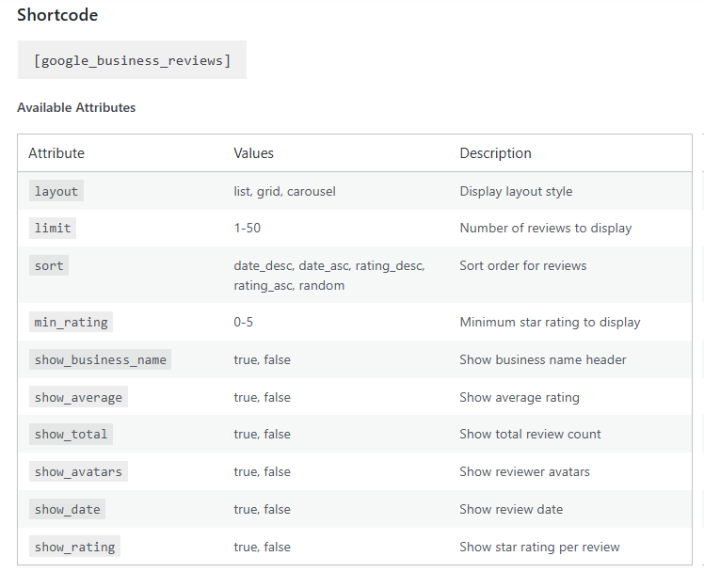
- Shortcode – Use shortcode to display reviews anywhere on your site:
- [google_business_reviews].
- Available Attributes – Customize the shortcode output using the following attributes
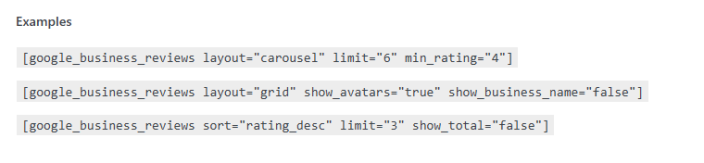
Shortcode Examples:
Style Settings
↑ Back to topCustomize the appearance of reviews to match your website design
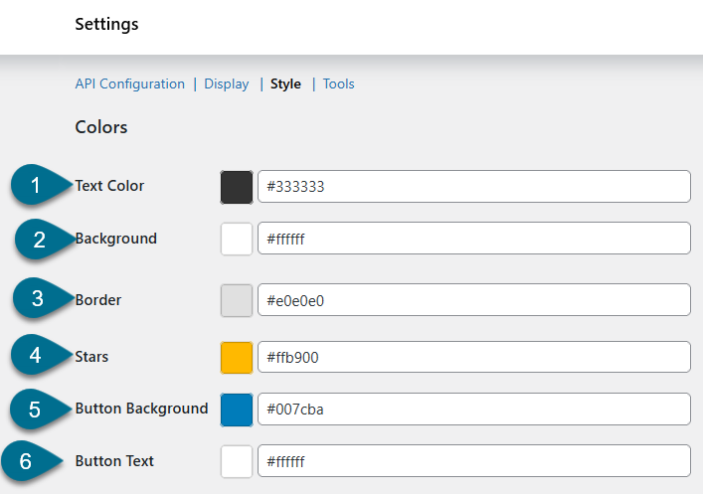
Colors
- Text Color – Set the color of review text
- Background – Set the background color of the review container
- Border – Set the border color of review boxes
- Stars – Set the color of star ratings
- Button Background – Set the background color of the load more button
- Button Text – Set the text color of the load more button
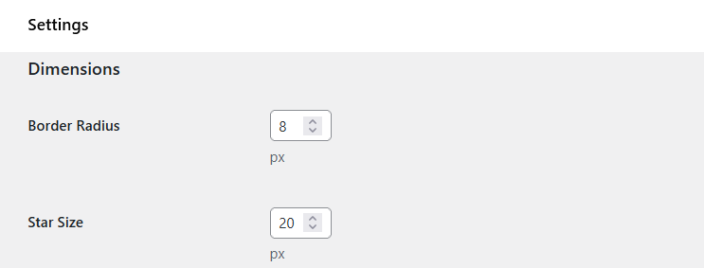
Dimensions
- Border Radius – Set border radius in px
- Star Size – Set the size of star icons
Tools
↑ Back to topManage synchronization, caching, and maintenance settings
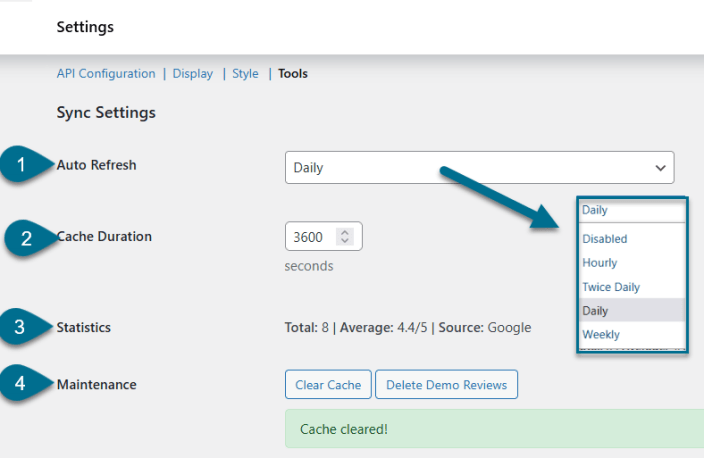
Sync Settings
- Auto Refresh – Automatically sync reviews at selected intervals
- Hourly
- Twice Daily
- Daily
- Weekly
- Disabled
- Cache Duration – Set cache duration in seconds
- Statistics – Shows statistics regarding reviews featuring:
- Total – Total number of reviews
- Average – Average review rating
- Source – Review source (Google)
- Maintenance
- Clear Cache – Clear stored review cache
- Delete Demo Reviews – Delete default demo reviews
Note: Using the Places API, a maximum of 5 reviews can be fetched as mentioned in Google Places document.

