
User Roles Based Price is a powerful WooCommerce extension that allows store owners to set different product prices for each user role. Perfect for B2B, wholesale stores, membership-based shops, or any scenario where different customer segments need tailored pricing.
With this plugin, you can manage fixed prices, percentage-based discounts, and role-specific sales — all directly within the WooCommerce product editor. Customers automatically see the right price based on their assigned role.
Key Features
↑ Back to top- Role-Based Pricing: Set custom prices for each WordPress user role (Administrator, Customer, Editor, etc.)
- Flexible Pricing Options:
- Fixed Prices: Custom regular and sale prices per role
- Percentage Discounts: Apply additional discounts on top of existing prices
- Smart Price Display:
- Shows sale price with regular price strikethrough
- Displays discount percentage badges
- Supports 2 decimal places for accurate pricing
- Accordion Interface: Easy-to-use collapsible interface in product edit pages for managing role prices
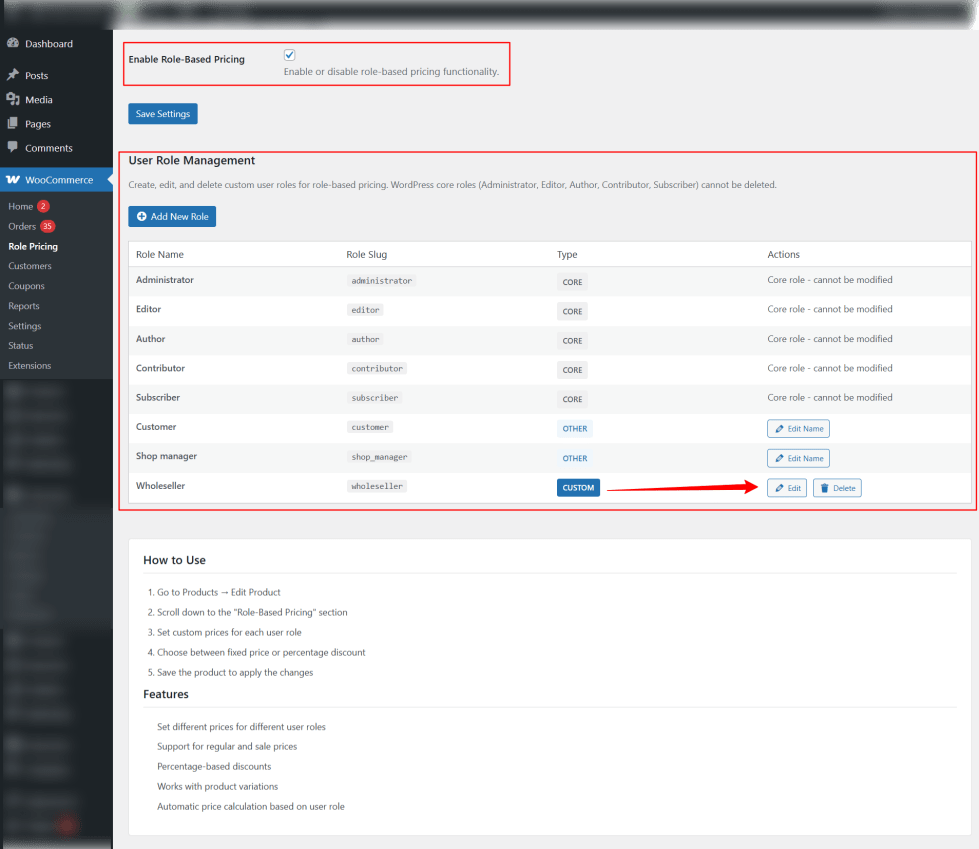
- Role Management: Create, edit, and delete custom user roles directly from the settings page
- Validation: Ensures sale prices are always lower than regular prices
- Cart & Checkout Integration: Automatically applies role-based prices in cart, checkout, and order summary
- WooCommerce Block Theme Compatible: Works seamlessly with modern WooCommerce block-based themes
- Product Variations Support: Full support for variable products and individual variation pricing
Installation
↑ Back to topTo start using a product from WooCommerce.com, you can use the “Add to store” functionality on the order confirmation page or the My subscriptions section in your account.
- Navigate to My subscriptions.
- Find the Add to store button next to the product you’re planning to install.
- Follow the instructions on the screen, and the product will be automatically added to your store.
Alternative options and more information at:
Managing WooCommerce.com subscriptions.

Setup and Configuration
↑ Back to topAutomatic Installation
↑ Back to top- Log in to your WordPress admin dashboard
- Navigate to Plugins → Add New
- Search for User Roles Based Price
- Click Install Now, then Activate
Manual Installation
↑ Back to top- Upload the
user-roles-based-pricefolder to the/wp-content/plugins/directory - Activate the plugin through the Plugins menu in WordPress
- After activation, the plugin adds a new menu item under WooCommerce → Role Pricing
Initial Setup
↑ Back to top- Go to WooCommerce → Role Pricing
- Enable Role-Based Pricing by checking the option
- Configure any global settings (optional), such as:
- Default price display format
- Role management permissions
4. Managing User Roles
↑ Back to top- Navigate to WooCommerce → Role Pricing
- Options available:
- Add New Role: Create a custom user role (e.g., VIP, Wholesale)
- Edit Role: Modify existing roles
- Delete Role: Remove unused roles
- Only administrators can manage user roles and assign role-based prices
Setting Role-Based Prices for Products
↑ Back to topFor Simple Products
↑ Back to top- Open any product in the WordPress admin (Products → Edit Product)
- Click on the Role Pricing tab
- For each role, select a Pricing Type:
- Fixed Price: Enter a role-specific regular and sale price
- Percentage Discount: Enter a discount percentage to apply on regular or sale price
- Save or update the product

For Variable Products
↑ Back to top- Open a variable product
- Click the Role Pricing tab
- Select a variation and assign role-based prices individually
- Repeat for all variations as needed
- Save or update the product

Frontend Display
↑ Back to top- Role-based prices are automatically displayed to logged-in users based on their role
- Sale prices are shown with the regular price strikethrough
- Discount percentage badges are displayed if applicable
- Customers without a role-specific price see the default product price

Cart Page
↑ Back to top
Best Practices
↑ Back to top- Regularly review role-based pricing to ensure accuracy
- Test role pricing by logging in with different user accounts
- For complex pricing structures, plan role hierarchy and discount logic in advance
- Keep WooCommerce and the plugin updated to maintain compatibility
This setup guide ensures your plugin is fully functional and your store is ready to deliver accurate role-based pricing.
If you want, I can create a visual step-by-step setup guide with screenshots for each step to make it easier for non-technical users to follow.
Support
↑ Back to topIf you encounter any issues, need assistance with configuration, or want to request new features, you can contact the official WooCommerce support team:
WooCommerce Support: https://woocommerce.com/my-account/contact-support/

