
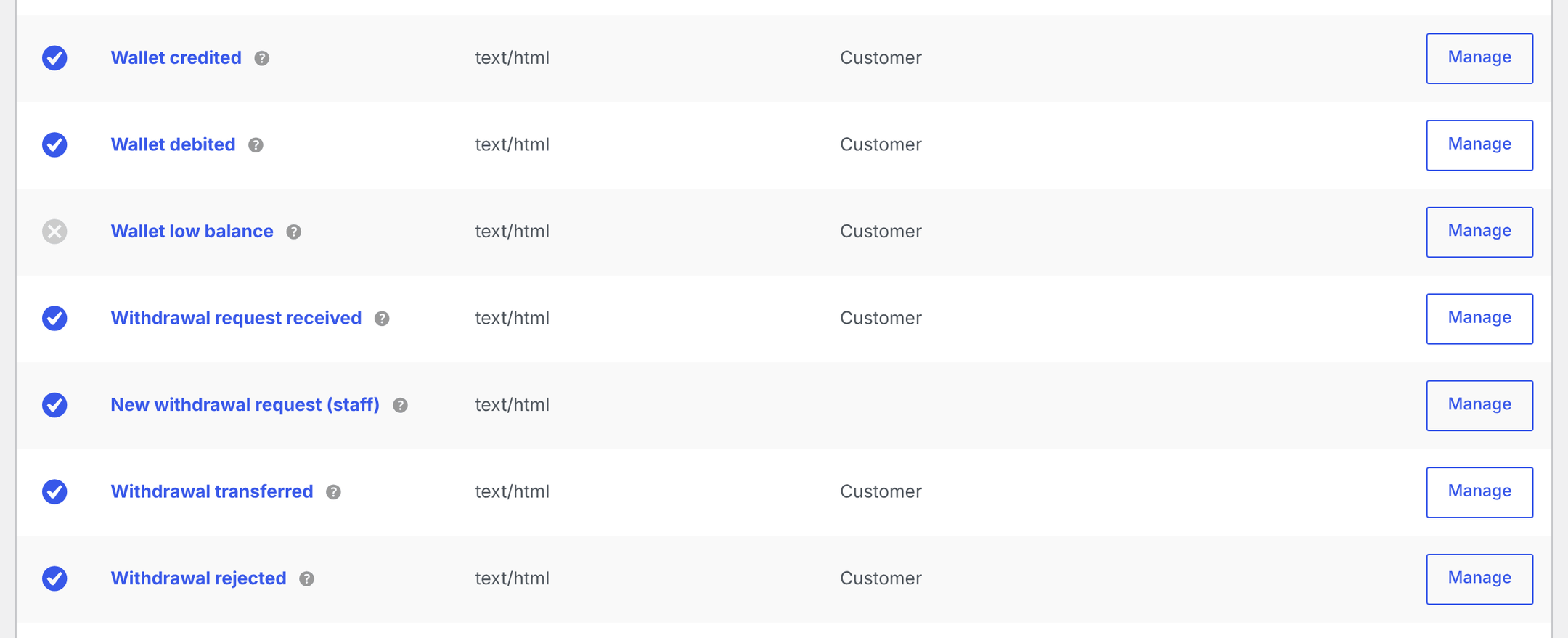
Elite Balance adds seven emails to WooCommerce: three about wallet balances and four about withdrawals. This page lists each one, who receives it, exactly when it is sent and when it is not, and how to change its text. It is for store owners and shop managers; template overrides for developers are at the end.
The seven emails
↑ Back to top| Recipient | Enabled by default | Sent when | |
|---|---|---|---|
| Wallet credited | The customer | Yes | Funds are added to the wallet. |
| Wallet debited | The customer | Yes | Funds are removed from the wallet by an adjustment or a reward reversal. |
| Wallet low balance | The customer | No | A debit takes the balance below your threshold. |
| Withdrawal request received | The customer | Yes | The customer opens a withdrawal request. |
| New withdrawal request (staff) | Your team (Recipient(s), default: the site admin email) | Yes | A customer opens a withdrawal request. |
| Withdrawal transferred | The customer | Yes | Staff mark a withdrawal request transferred. |
| Withdrawal rejected | The customer | Yes | Staff reject a withdrawal request. |
The four withdrawal emails only matter once withdrawals are enabled. See Withdrawals.
Edit an email
↑ Back to top- Go to WooCommerce > Settings > Emails.
- Find the email by its title (for example Wallet credited) and open it.
- Change the settings you need, then click Save changes.
The three wallet emails are also linked from WooCommerce > Settings > Elite Balance > General, in the Emails section.
Each email has WooCommerce’s standard settings (the enable switch, subject, email heading, additional content, and email type) plus these Elite Balance fields:
| Setting | Default | What it does |
|---|---|---|
| Email body | The built-in text for that email (see below) | The main message, placed right under the heading. Supports the placeholders listed below. Leave it empty to use the built-in text. |
| From name (optional) | Empty | Sender name for this email only. Empty uses the store’s sender name. |
| From address (optional) | Empty | Sender address for this email only. Empty uses the store’s sender address. |
| Recipient(s) | The site admin email | Only on New withdrawal request (staff). Comma-separated addresses. |
| Balance threshold | 10 | Only on Wallet low balance. The email is sent when a debit takes the balance below this amount. An empty, zero, or invalid value uses 10. |
Placeholders
↑ Back to topPlaceholders work in the subject, the heading, and the email body.
| Placeholder | Available in | Replaced with |
|---|---|---|
{site_title} | All emails | Your site title. |
{amount} | All emails | Wallet emails: the amount added or removed. Withdrawal emails: the requested amount. |
{balance} | Wallet credited, Wallet debited, Wallet low balance | The balance right after the transaction. |
{method} | All withdrawal emails | The payout method’s title. |
{customer} | New withdrawal request (staff) | The customer’s display name. |
{net}, {fee}, {reference} | Withdrawal transferred | The amount you sent, the fee, and the transfer reference. |
{reason} | Withdrawal rejected | The rejection reason you chose. |
Built-in text
↑ Back to top| Default subject | Default heading | Default body | |
|---|---|---|---|
| Wallet credited | Funds were added to your wallet at {site_title} | Funds added to your wallet | Good news: {amount} was added to your wallet. Your balance is now {balance}. |
| Wallet debited | Funds were deducted from your wallet at {site_title} | Funds deducted from your wallet | {amount} was deducted from your wallet. Your balance is now {balance}. |
| Wallet low balance | Your wallet balance is running low at {site_title} | Your wallet balance is low | Just a heads up: your wallet balance is down to {balance}. |
| Withdrawal request received | We received your withdrawal request at {site_title} | Withdrawal request received | We received your request to withdraw {amount} via {method}. The amount is reserved from your wallet while we process it, and we will email you as soon as it is done. |
| New withdrawal request (staff) | [{site_title}] New withdrawal request: {amount} | New withdrawal request | {customer} requested a withdrawal of {amount} via {method}. The funds are reserved; review the request and complete or reject it from the withdrawals queue. |
| Withdrawal transferred | Your withdrawal from {site_title} is on its way | Withdrawal completed | Your withdrawal of {amount} via {method} is done. We sent {net} after a fee of {fee}. The transfer reference is {reference}. |
| Withdrawal rejected | About your withdrawal request at {site_title} | Withdrawal request rejected | Your withdrawal request for {amount} via {method} was not completed, and the full amount is available in your wallet again. Reason: {reason} |
Under the body, every email has a link: View your wallet on the wallet emails and the customer withdrawal emails (to My Account > Wallet, or its Withdraw tab), View your wallet and add funds on the low balance email, and Open the withdrawals queue on the staff email (to the request in wp-admin).
The Wallet credited and Wallet debited emails also show the transaction’s note when it was written by the system, such as “Top-up via order #60” or “Cashback on order #38”. Notes and reasons typed by staff are never included.
When each email is sent
↑ Back to topWallet credited
↑ Back to topSent for every credit to a customer’s wallet:
- Manual credits from the wallet screen or the Edit user screen, when Email the customer (when the wallet emails are enabled) is ticked (it is ticked by default).
- Bulk credits and CSV imports, when Notify the customers by email (when the wallet emails are enabled) is ticked (it is unticked by default).
- Refunds to the wallet and top-ups.
- Cashback and rewards from earning rules, when the rule’s Send the wallet-credited email for each award box is ticked. With a release delay, the email is sent when the cashback is added to the wallet, not when the order is placed.
- Credits made with WP-CLI or the developer API.
Wallet debited
↑ Back to topSent for debits that are not order payments or withdrawals:
- Manual debits from the wallet screen or the Edit user screen, when Email the customer is ticked.
- Bulk debits and CSV import debits, when Notify the customers by email is ticked.
- Reward reversals (cashback taken back after a refund or cancellation), when the earning rule’s email box is ticked.
- Debits made with WP-CLI or the developer API.
Wallet low balance
↑ Back to topOff by default. Turn it on and set the Balance threshold on its email screen. It is sent when a debit crosses the threshold: the balance was at or above the threshold before the debit and is below it after. A customer whose balance stays below the threshold is not emailed again on each purchase; they get another email only after their balance goes back above the threshold and drops below it again.
Unlike the debited email, it considers every kind of debit, including wallet payments at checkout and withdrawals, because spending is when balances run low. It is not sent for a debit made with the email box unticked.
Withdrawal emails
↑ Back to top- Withdrawal request received and New withdrawal request (staff): both sent when a customer submits a request.
- Withdrawal transferred: sent when staff mark the request transferred, in the admin or with WP-CLI.
- Withdrawal rejected: sent when staff reject the request, in the admin or with WP-CLI.
- No email is sent when a request is moved to processing or when the customer cancels it.
- Payout details are never included in any email, including the staff notification. Staff read them on the request’s screen.
When no email is sent
↑ Back to top- Order payments: paying an order fully or partly from the wallet never sends Wallet debited. WooCommerce’s own order emails already cover the purchase.
- Migrations: importing balances from another wallet plugin never emails customers.
- Withdrawals: the debit made when a withdrawal is transferred does not send Wallet debited; the Withdrawal transferred email, with fee, net amount, and reference, replaces it.
- Unticked notify boxes: an adjustment, bulk operation, or CSV import with the email box unticked sends no wallet email at all, low balance included.
- Repeats: a repeated action (a double click, a refreshed form, a retried background task) never sends a second email, because the transaction or request change only happens once.
- Disabled emails: an email switched off in its settings is never sent, and customers without a valid email address on their account receive nothing.
Tip: If emails seem to be missing, first check that the email is enabled, then check the email box on the action you took. If both are fine, test your site’s mail delivery with an email log plugin, since Elite Balance sends through WooCommerce’s normal mailer.
Template overrides
↑ Back to topFor layout changes beyond the editable text, copy a template from the plugin’s templates/emails/ folder into your theme. The theme copy wins.
| Template | Used by | Copy to | Version |
|---|---|---|---|
emails/wallet-credited.php | Wallet credited (HTML) | yourtheme/woocommerce/emails/wallet-credited.php | 0.5.0 |
emails/plain/wallet-credited.php | Wallet credited (plain text) | yourtheme/woocommerce/emails/plain/wallet-credited.php | 0.5.0 |
emails/wallet-debited.php | Wallet debited (HTML) | yourtheme/woocommerce/emails/wallet-debited.php | 0.5.0 |
emails/plain/wallet-debited.php | Wallet debited (plain text) | yourtheme/woocommerce/emails/plain/wallet-debited.php | 0.5.0 |
emails/low-balance.php | Wallet low balance (HTML) | yourtheme/woocommerce/emails/low-balance.php | 0.5.0 |
emails/plain/low-balance.php | Wallet low balance (plain text) | yourtheme/woocommerce/emails/plain/low-balance.php | 0.5.0 |
emails/withdrawal-notification.php | All four withdrawal emails (HTML) | yourtheme/woocommerce/emails/withdrawal-notification.php | 0.8.0 |
emails/plain/withdrawal-notification.php | All four withdrawal emails (plain text) | yourtheme/woocommerce/emails/plain/withdrawal-notification.php | 0.8.0 |
The email templates live in the woocommerce/emails/ folder of your theme, like WooCommerce’s own emails. The plugin’s other templates (the wallet page, the withdraw form) use yourtheme/elite-balance/ instead; see Customer Wallet Page, Block and Shortcode.
The four withdrawal emails share one template. To give one of them different markup, branch on $email->id in your copy. The variables each template receives:
- Wallet templates:
$email_heading,$body(placeholders already applied),$amount_display,$balance_display,$note(the customer-visible note),$wallet_url,$additional_content,$sent_to_admin,$plain_text,$email. - Withdrawal template:
$email_heading,$body,$action_url,$action_label,$additional_content,$sent_to_admin,$plain_text,$email.
Note: Each template has a version in its header comment. After updating Elite Balance, compare your copies with the bundled templates.
For developers
↑ Back to topThe emails are standard WC_Email classes in the RoundBorders\EliteBalance\Emails namespace, registered through woocommerce_email_classes. Use the ID to link straight to an email’s settings: admin.php?page=wc-settings&tab=email§ion=<id>.
| Class | Mailer key | Email ID |
|---|---|---|
WalletCredited | RB_Elbal_Wallet_Credited | rb_elbal_wallet_credited |
WalletDebited | RB_Elbal_Wallet_Debited | rb_elbal_wallet_debited |
LowBalance | RB_Elbal_Low_Balance | rb_elbal_low_balance |
WithdrawalRequested | RB_Elbal_Withdrawal_Requested | rb_elbal_withdrawal_requested |
NewWithdrawalRequest | RB_Elbal_New_Withdrawal_Request | rb_elbal_new_withdrawal_request |
WithdrawalTransferred | RB_Elbal_Withdrawal_Transferred | rb_elbal_withdrawal_transferred |
WithdrawalRejected | RB_Elbal_Withdrawal_Rejected | rb_elbal_withdrawal_rejected |
- The wallet emails extend
WalletEmailand are sent from therb_elite_balance_transaction_createdaction. The withdrawal emails extendWithdrawalEmailand are sent fromrb_elite_balance_withdrawal_requested,rb_elite_balance_withdrawal_transferred, andrb_elite_balance_withdrawal_rejected. rb_elite_balance_email_skipped_typesfilters the transaction types that never send Wallet credited or Wallet debited (defaulthold_capture,migration,withdrawal).- A transaction whose meta contains
notifyset tonosends no wallet email. rb_elite_balance_customer_note_typesandrb_elite_balance_customer_notecontrol which notes reach customers, including in these emails.
See Developer Reference.