
Banners give your affiliates ready-made ad creatives for your products. In Affiliate and Referral Program for WooCommerce, an affiliate picks one of your products on their dashboard, styles a banner for it and copies the embed code — the banner’s button already carries their referral link. This guide covers building, styling and placing a product banner. Part of the Affiliate and Referral for WooCommerce documentation.
Build a product banner
↑ Back to top- On their dashboard, the affiliate opens Banner > Create Banner.
- They type a product name into Search Products, optionally choose a category, and search.
- On the product they want, they click Create banner. The Product Banner dialog opens with a preview: the product image, name, price and a Buy Now button.
- Under Set banner Style from here, they adjust the look, then click copy HTML.
- They paste the code into their website or blog where the banner should appear.
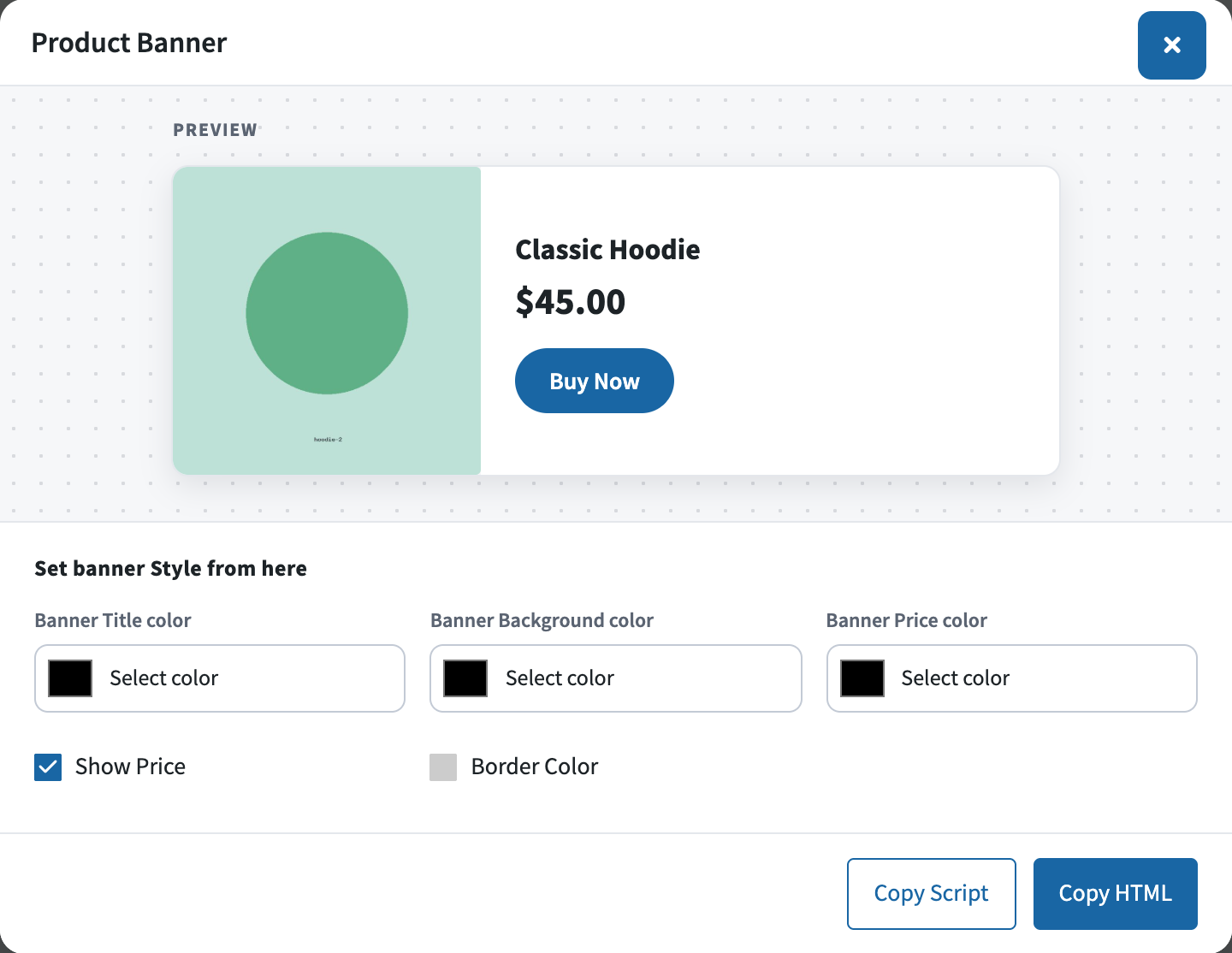
Style options
↑ Back to top- Banner Title color, Banner Background color and Banner Price color – color pickers for the product name, the card and the price.
- Show Price – shows or hides the price; on by default.
- Border Color – despite its name, a checkbox that adds a thin border around the banner.
The preview updates as the affiliate changes each option, so what they copy is what they see.
How banner clicks are credited
↑ Back to topThe banner’s Buy Now button links to the product page with the affiliate’s referral link, so a click tracks exactly like a click on any of their links and credits the sale in the usual way. There is no separate counter per banner: judge a banner’s pull from the affiliate’s traffic and referrals. See How Referral Tracking and Attribution Work.
For a plain text link to the same product instead of a banner, the Get link button beside Create banner gives it straight away; see How to Create and Share Referral Links.
FAQ
↑ Back to topDo I need to design artwork for each product?
↑ Back to topNo. The banner uses the product’s own image, name and price from your catalog, so every product is ready for a banner as soon as it is published.
Where does a product banner link to?
↑ Back to topTo that product’s page, with the affiliate’s referral code attached. To send visitors to another page, such as a category or a sale page, affiliates use Generate Link instead.
Does a banner update when I change the product’s price?
↑ Back to topNo. The copied code is a snapshot of the banner at the moment it was copied. After a price or image change, affiliates should create the banner again and replace the code on their site. More questions are answered in the Affiliate and Referral Program: FAQ.

