
Referral tracking decides which affiliate is credited for an order, and for how long after a click that credit lasts. This page explains how Affiliate and Referral Program for WooCommerce records clicks, how long a referral lasts, and the exact order of precedence when a link, a coupon and a checkout code point at different affiliates. Part of the Affiliate and Referral for WooCommerce documentation.
What happens when a link is clicked
↑ Back to topWhen a visitor opens a referral link, the click is counted against that link and the visitor’s browser receives a referral cookie naming the affiliate. While the cookie is present, the pages they open are logged as visits, except the cart and checkout. You can see both per affiliate on the Affiliates screen: the Total Visitors card counts the clicks, and the Traffic tab lists the visits. That makes it your first stop when someone asks whether their link “worked”; see Troubleshooting: Referrals Not Tracking.
The click is recorded by a small script in the visitor’s browser. Disabled JavaScript, an aggressive content blocker, or an optimization plugin that delays or removes scripts can stop a click from registering, and nothing else records it. Factor that into how you read affiliate traffic numbers.
How long the credit lasts
↑ Back to topGo to: WooCommerce > Affiliate & Referral > Advanced Features > General and enter a number of days in Cookie Expiration. Left empty or set to 0, a referral lasts 30 days.

A referral can end earlier. The cookie is cleared when the customer reaches the order confirmation page, so one referral credits one order unless lifetime commission keeps the customer with the affiliate; see How to Set Up Lifetime Commissions for Affiliates. A click on a different affiliate’s link replaces the cookie, so among links the latest click wins.
Who wins when signals disagree
↑ Back to topWhen an order is placed, the program looks for an affiliate in a fixed order and stops at the first match:
- The customer’s lifetime affiliate. With lifetime commission on, a signed-in customer who is tied to an affiliate credits that affiliate, whatever they clicked or entered.
- An affiliate coupon on the order. The coupon’s owner is credited, even if the customer clicked another affiliate’s link before or after applying it. The owner must be an active affiliate. See How to Track Affiliate Sales with Coupon Codes.
- The referral link cookie. The affiliate from the latest link click, while the cookie lasts.
- A referral code typed at checkout. Used only when none of the above applies.
With none of these, the order pays no commission. Because the decision is made from the finished order, the order in which the customer clicked and applied a coupon does not change the result. Guest checkouts are credited by coupons, links and codes like anyone else; only the lifetime pairing needs a signed-in customer.
The checkout code field
↑ Back to topAffiliates can also be credited by a code the customer types at checkout — useful when the click happened on another device, or the referral has expired. Go to: WooCommerce > Affiliate & Referral > Bonuses > Bonus settings and turn on Enable checkout referral field. The checkout then gains an optional Affiliate Referral Code field.

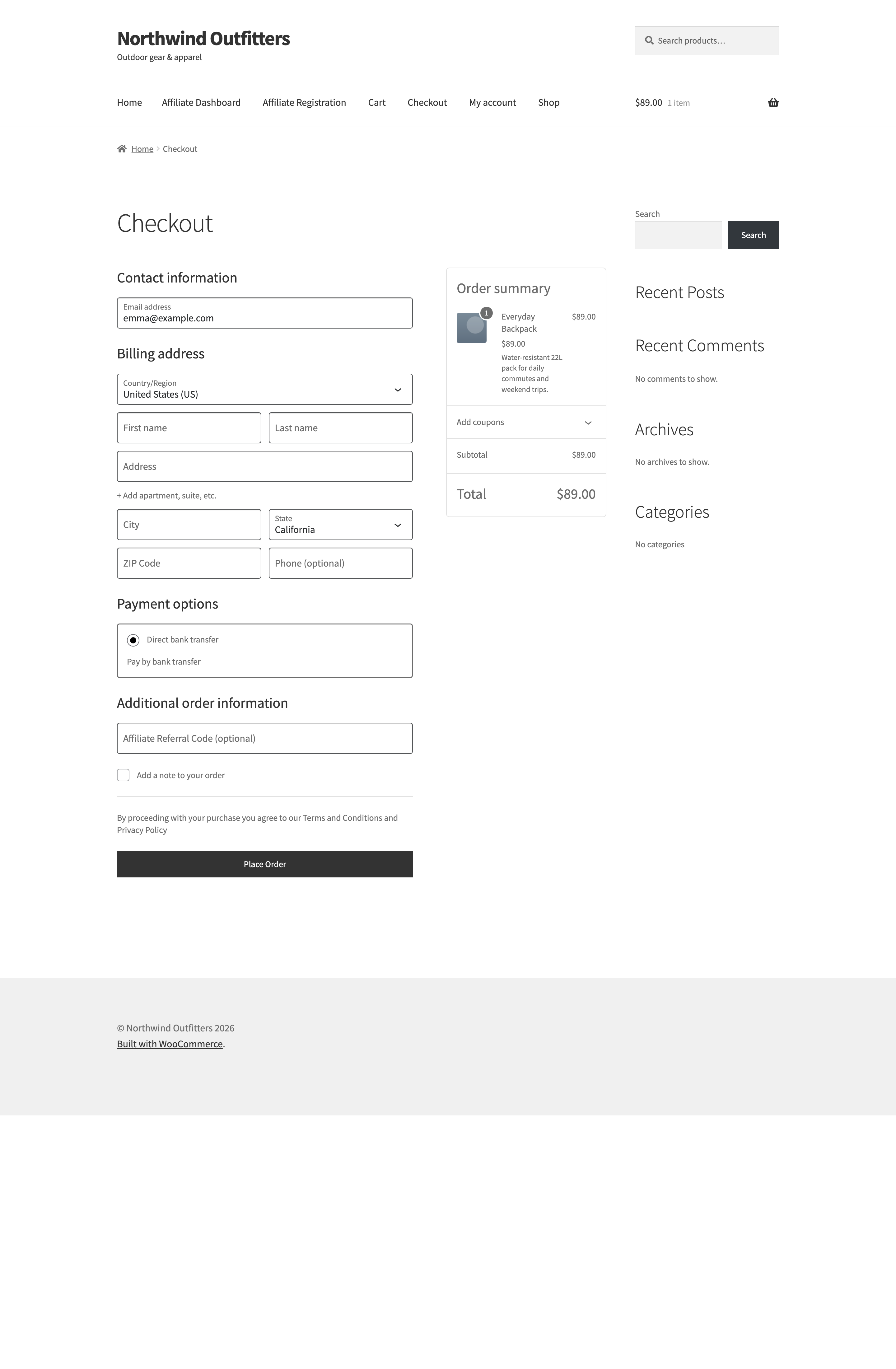
The field appears on the block checkout, the default in current WooCommerce. The classic shortcode checkout does not have it — on a classic checkout, rely on links and coupons instead.
FAQ
↑ Back to topIs attribution first-click or last-click?
↑ Back to topLast-click among referral links: each click on another affiliate’s link replaces the cookie. An affiliate coupon on the order outranks any link, and lifetime commission is the exception to both — the first affiliate to refer a signed-in customer keeps them.
Does tracking work for guests who never sign in?
↑ Back to topYes. Links, coupons and the checkout code all credit guest orders. Only the lifetime pairing needs a signed-in customer, because it is stored against their account.
Can an affiliate be credited without any click at all?
↑ Back to topYes, two ways: their affiliate coupon, or their referral code typed into the checkout field. Both work with no earlier visit. More questions are answered in the Affiliate and Referral Program: FAQ.

