
A sale came in through an affiliate and no commission appeared — this page is the checklist for finding out why. Work through it from the top: first confirm whether Affiliate and Referral Program for WooCommerce recorded the click, then find where the credit went, then check which rule paid the order. Part of the Affiliate and Referral for WooCommerce documentation.
Step 1: Was the click recorded?
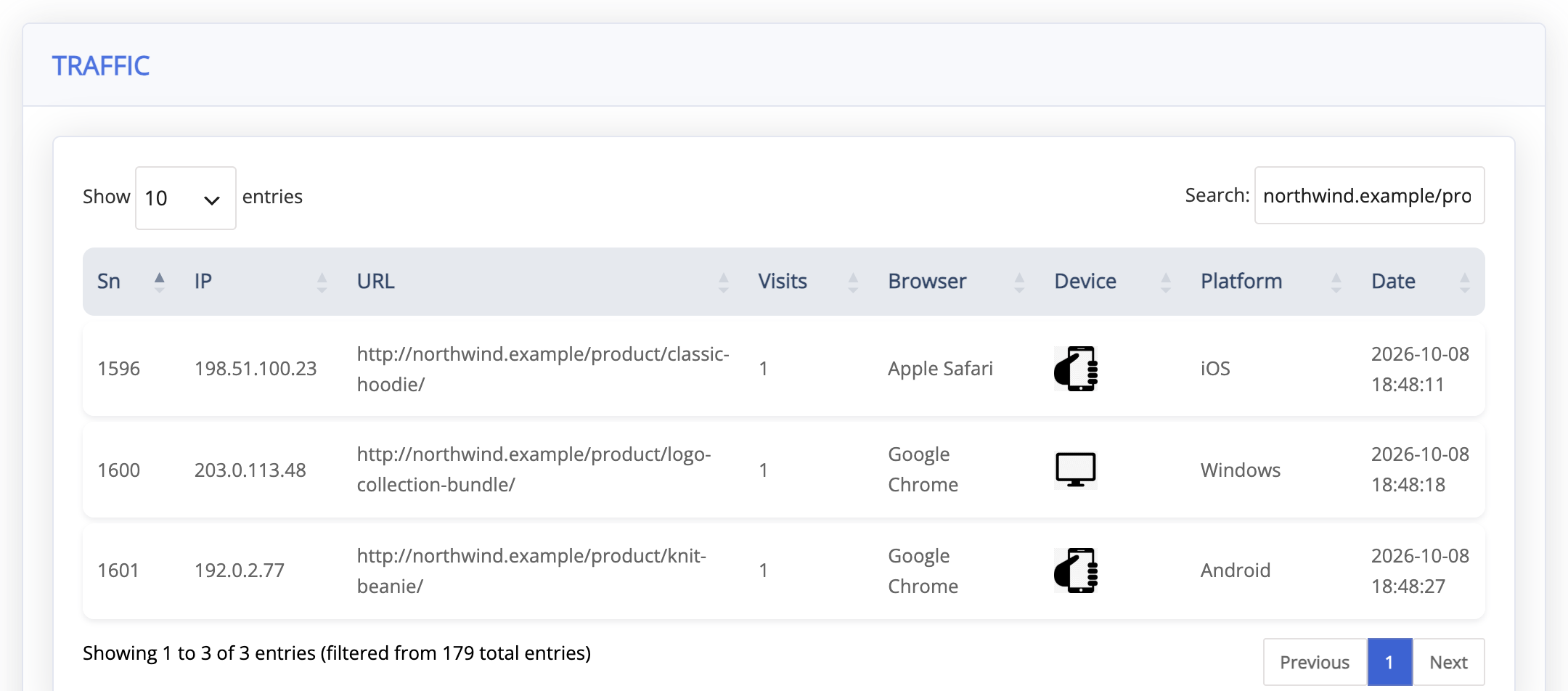
↑ Back to topGo to: WooCommerce > Affiliate & Referral > Affiliates and click the affiliate’s row. The Total Visitors card counts every time one of their referral links was opened and recorded. The Traffic tab then lists the pages those visitors browsed with the referral attached, with IP, URL, Visits, Browser, Device, Platform and Date.
If the count went up when the promotion ran, tracking worked and the problem is attribution: continue to step 3. If nothing was recorded, the click never registered: step 2.
Step 2: Why a click never registers
↑ Back to top- The link was not copied from the dashboard. Tracking looks up the affiliate’s referral code in the link. A hand-built address with a username or a guessed parameter opens the page but credits nobody. Affiliates should copy their links from the affiliate dashboard; see How to Create and Share Referral Links.
- The link parameter changed after the links were shared. Links that carry the old value of Slug in Affiliate Link are no longer recognized.
- Scripts were blocked. The click is recorded by a small script that runs when the page loads. Content blockers, optimizers that delay or remove scripts, and disabled JavaScript all stop it, and nothing else records the click.
- The page came from a cache that changed its scripts. Since version 3.1.0 the script is on every page and needs no security token, so a page served from a page cache still records the click. It can still be lost when an optimizer delays, combines or removes scripts — exclude this plugin’s scripts from those features.
- Cookies were refused. Private windows and cookie blockers discard the referral cookie, so the click can be counted while the later purchase carries no referral.
Step 3: The click recorded, but no commission
↑ Back to top- The referral had expired. The purchase came later than Cookie Expiration allows. See How Referral Tracking and Attribution Work for the timing rules.
- Someone else was credited. A later click on another affiliate’s link replaces the earlier one, and another affiliate’s coupon on the order beats any link. With lifetime commission on, a signed-in customer tied to an affiliate is credited to that affiliate whatever they clicked.
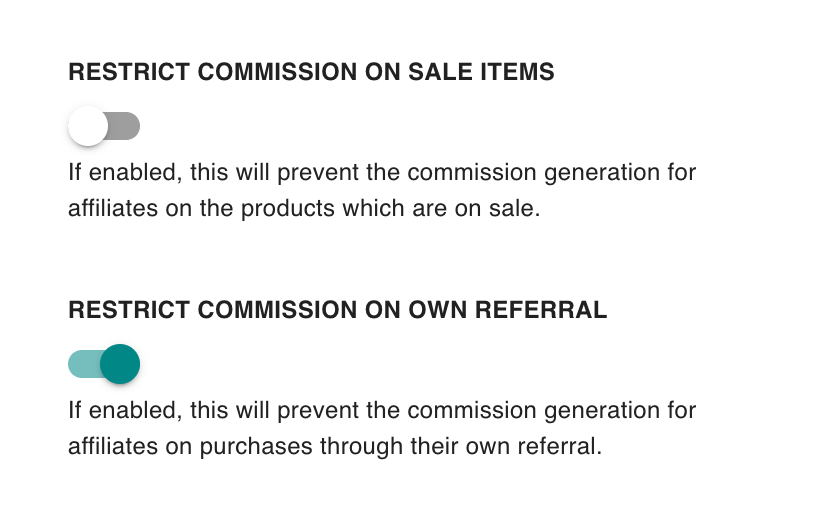
- It was a self-purchase. With Restrict commission on own referral on, an affiliate buying through their own link earns nothing. This is the usual reason a signed-in affiliate’s test order shows no commission.
- The products were not eligible. Products on sale pay nothing while Restrict commission on sale items is on. With Commission for only the URL opened? on, a link shared from a product page pays only on that product, unless the matching rule has Pays even when the affiliate shared a different product link ticked.
- The commission came to zero. A rule that pays nothing creates no commission record at all. Step 4 shows which rule that was.
Both restriction switches are on the Settings tab of the Commission screen, under Enable/ Disable settings.
Step 4: Which rule matched?
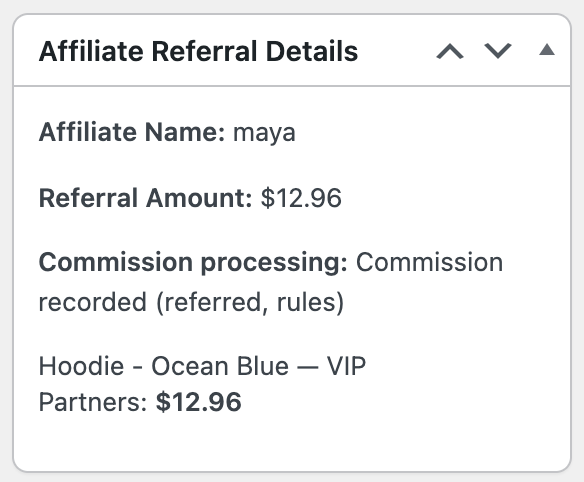
↑ Back to topOpen the order under WooCommerce > Orders. The Affiliate Referral Details box shows the outcome after Commission processing: — Commission recorded, No commission or Incomplete — needs retry — and, for each product, the rule that paid it and the amount, or no rule matched. When the monthly limit reduced the amount, a line says so.
- A zero rule sits above the rule you expected. Rules are checked from the top, and the first match pays, even when it pays nothing. Move the rule you want higher, or narrow the zero rule.
- The rule is switched off. An inactive rule is skipped, so a rule further down — often Store default — pays instead.
- The schedule did not cover the order. A rule with a Start or End applies only to orders created inside that window, in store time.
- Processing did not finish. Click Retry commission processing in the box. It appears only while processing is incomplete.
To check a fix without placing an order, use Test rules on the Commission screen: choose the affiliate, the order kind and the date, add the products and click Calculate. See How to Test Affiliate Commission Rules in WooCommerce.
Step 5: The commission exists but was never paid
↑ Back to topIf the record is on the Manage Referrals screen, tracking was never the problem. A Pending record has not been approved yet: the Affiliate Referral Automation status may not have been reached, or a return period is still holding it. A Refunded record was reversed by Commission handling on refund, and a Capped one went over the monthly limit. See Approve, Reject and Manage Referrals and Refunds, Return Periods and Commission Recovery.
FAQ
↑ Back to topWhy does my own test order never earn a commission?
↑ Back to topUsually because you are signed in as the affiliate whose link you clicked and Restrict commission on own referral is on. Test with a separate customer account in a private window instead.
Can a customer be credited if they type the store address later?
↑ Back to topYes, while the referral cookie from the earlier click has not expired — they do not need to arrive through the link a second time. After it expires, only an affiliate coupon, a referral code at checkout or a lifetime pairing can credit the sale.
Does Signup Bonus Type switch off link tracking?
↑ Back to topNo. Signup Bonus Type under Bonuses > Bonus settings only decides how a referred signup is recognized, for the signup bonus and for placing new affiliates in a multi-tier network. Links, coupons and checkout codes keep crediting commission on orders, whatever the note beside the setting says. See Signup, Click, Sharing and Lead Bonuses for Affiliates.
A caching plugin is on my store — does it break tracking?
↑ Back to topPage caching on its own no longer does: since version 3.1.0 the click is recorded by a separate request that is never cached and needs nothing from the cached page. Script optimization can, so exclude this plugin’s scripts from features that delay, combine or remove scripts. More questions are answered in the Affiliate and Referral Program: FAQ.

