
Every commission in Affiliate and Referral Program for WooCommerce starts as a referral record waiting for your decision. This guide covers the Manage Referrals screen, what each status means, approving and rejecting singly or in bulk, automatic approval, and adding a referral by hand. Part of the Affiliate and Referral for WooCommerce documentation.
The Manage Referrals screen
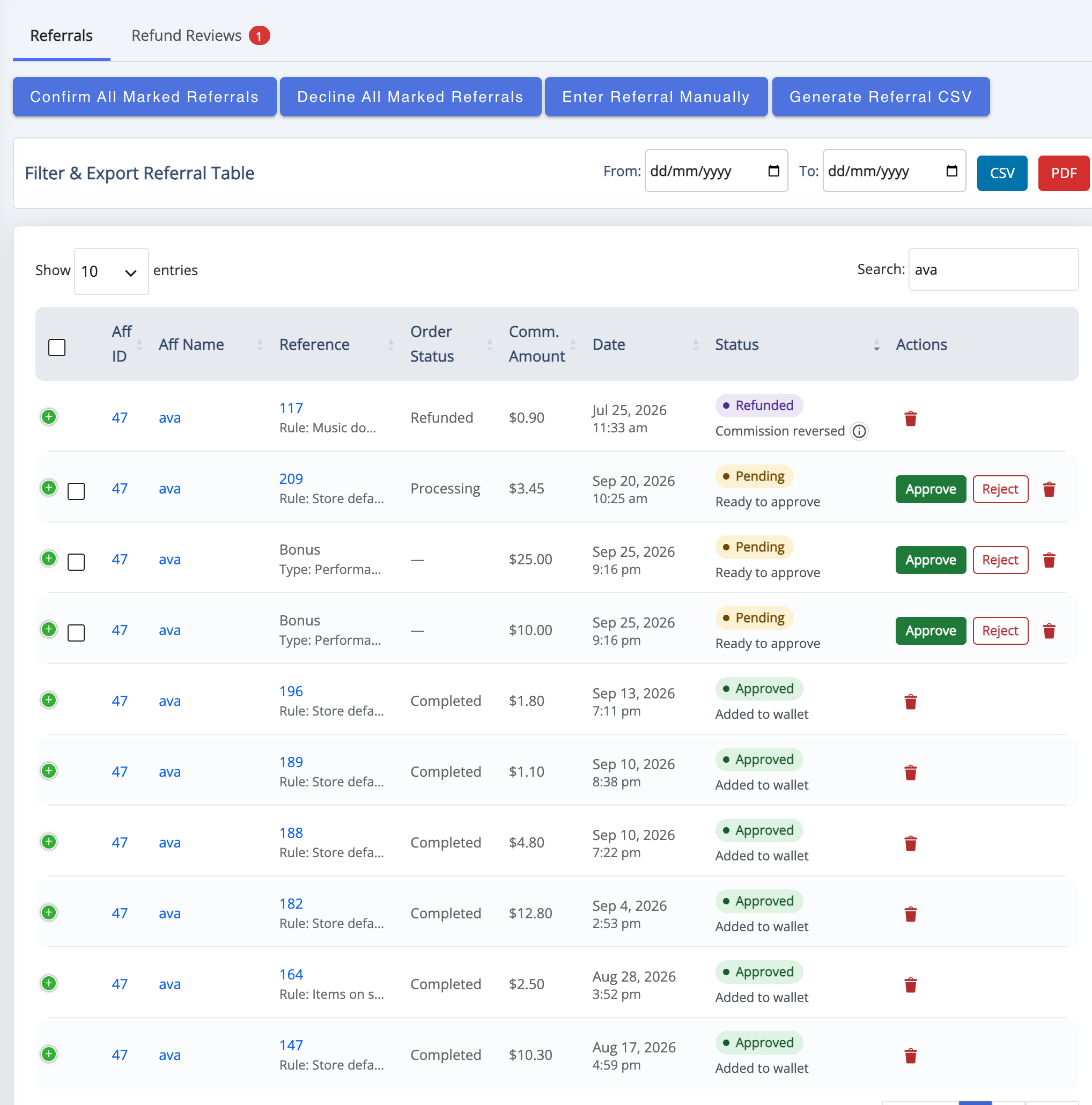
↑ Back to topGo to: WooCommerce > Affiliate & Referral > Manage Referrals. The Referrals tab lists one commission record per row: Aff ID and Aff Name, Reference (the order), Order Status, Comm. Amount, Sale Amount, Customer Name, Date, Status and Actions. Direct sales, multi-tier commission and bonuses all land here. The Refund Reviews tab beside it holds refunds waiting for your decision.
What each status means
↑ Back to topEach status badge carries a short line saying what happens next:
- Pending – recorded but not yet owed. It reads Ready to approve, or Approve after and a date while a return period holds it.
- Approved – Added to wallet: the amount is in the affiliate’s wallet, ready for withdrawal. See Pay Affiliates with Store Credit and Wallets.
- Paid – recorded as already paid through Enter Referral Manually; no wallet credit is added.
- Rejected – declined, with the reason you entered. The affiliate can read it on their dashboard.
- Refunded – Commission reversed: the order was refunded and the commission taken back. It is kept apart from a rejection so it can be restored exactly if the refund is removed.
- Capped – Over the monthly limit: recorded, but not paid, because it went over the affiliate’s monthly commission limit.
Approve or reject referrals
↑ Back to topA pending row that is ready carries Approve and Reject in its Actions column. Approving credits the affiliate’s wallet on the spot. Rejecting opens the Enter Your Reject Reason box, so the affiliate knows why. For a batch, mark the rows and click Confirm All Marked Referrals or Decline All Marked Referrals. Deleting a record cannot be undone.
Only pending records can be approved or rejected. Approval moves money, so approve when you consider the sale final. If an order is refunded after approval, Commission handling on refund decides what happens — see Refunds, Return Periods and Commission Recovery.
Approve automatically
↑ Back to topTo skip manual review for straightforward sales, go to: WooCommerce > Affiliate & Referral > Commission, open the Settings tab and set Affiliate Referral Automation to Processing or Completed. When a referred order reaches that status, its commission is approved for you.
- The automation approves one pending record per order. When an order also created multi-tier commission, review the remaining rows here; bulk approval makes that quick.
- A return period, if you set one, is respected: nothing is approved before it ends. The period can also approve commission by itself once it has passed — see Refunds, Return Periods and Commission Recovery.
- Bonuses are always approved by hand.
Add a referral by hand
↑ Back to topFor a commission that did not track — a phone order, a make-good, a promotion you ran outside the store — click Enter Referral Manually:
- Pick the affiliate under Select Affiliate.
- Enter the Amount — the commission itself, not a sale to calculate from.
- Choose the Referral Status: Pending to approve later, Approve to credit the wallet now, or Paid for a commission you settled outside the plugin.
- Click Save Changes.
A manual referral is not linked to an order, so it shows without an order reference.
FAQ
↑ Back to topCan I reject a commission that is already approved?
↑ Back to topNo. Only pending records can be rejected. To take back approved commission after a refund, use Commission handling on refund and Refund Reviews.
Why did only one of an order’s commissions approve automatically?
↑ Back to topBecause the automation approves one record per order. Orders that also create multi-tier commission or bonuses leave those rows pending for your review; approve them in bulk from this screen.
Can affiliates see why a referral was rejected?
↑ Back to topYes. The reason you type can be opened from the rejected row in their dashboard’s referral table. More questions are answered in the Affiliate and Referral Program: FAQ.

