
When a referred order is refunded, Affiliate and Referral Program for WooCommerce can leave the affiliate’s commission alone, take back the affected amount automatically, or list the refund for your decision. A return period can also hold approval until an order has stayed in a status — such as Completed — for a set number of days. This guide covers both. Part of the Affiliate and Referral for WooCommerce documentation.
Choose how refunds affect commission
↑ Back to topGo to: WooCommerce > Affiliate & Referral > Commission, open the Settings tab and choose Commission handling on refund:
- Off – a refund changes nothing – commission stays as it is; handle refunds yourself.
- Automatic – recover the affected commission – the plugin works out and applies the change straight away, and sends only what it cannot pin to the returned items to Refund Reviews.
- Manual – list it for me to review – every refund waits in Refund Reviews, and nothing is deducted until you decide.
Click Save Changes.
How the amount is worked out
↑ Back to top- The share comes from the items that came back and the amounts recorded when the commission was earned, never from today’s rates. A part refund affects only the part that was returned, and each refund is handled on its own.
- Commission still waiting for approval is never deducted from a wallet: the amount that can still be approved comes down instead.
- Commission already in a wallet is taken back from that wallet — for multi-tier commission, from each recipient separately.
- A wallet is never driven below zero. Whatever it cannot cover is recorded as owed and settled from that affiliate’s later commission before they can withdraw it or turn it into a coupon.
- Signup, sharing and performance bonuses are never touched by a refund.
On Manual, one case is settled for you: a refund that covers a commission you have not approved yet simply retires it, because there is no wallet to take from and nothing left to approve. The commission then shows as Refunded on Manage Referrals.
Decide a refund in Refund Reviews
↑ Back to topGo to: WooCommerce > Affiliate & Referral > Manage Referrals and open the Refund Reviews tab, which shows how many refunds are waiting for a decision. Each refund is listed with the Order, the Affiliate, the Commission earned, the Suggested adjustment, what is Already applied, its Status, and Your decision. The same refund also appears on the order it came from.
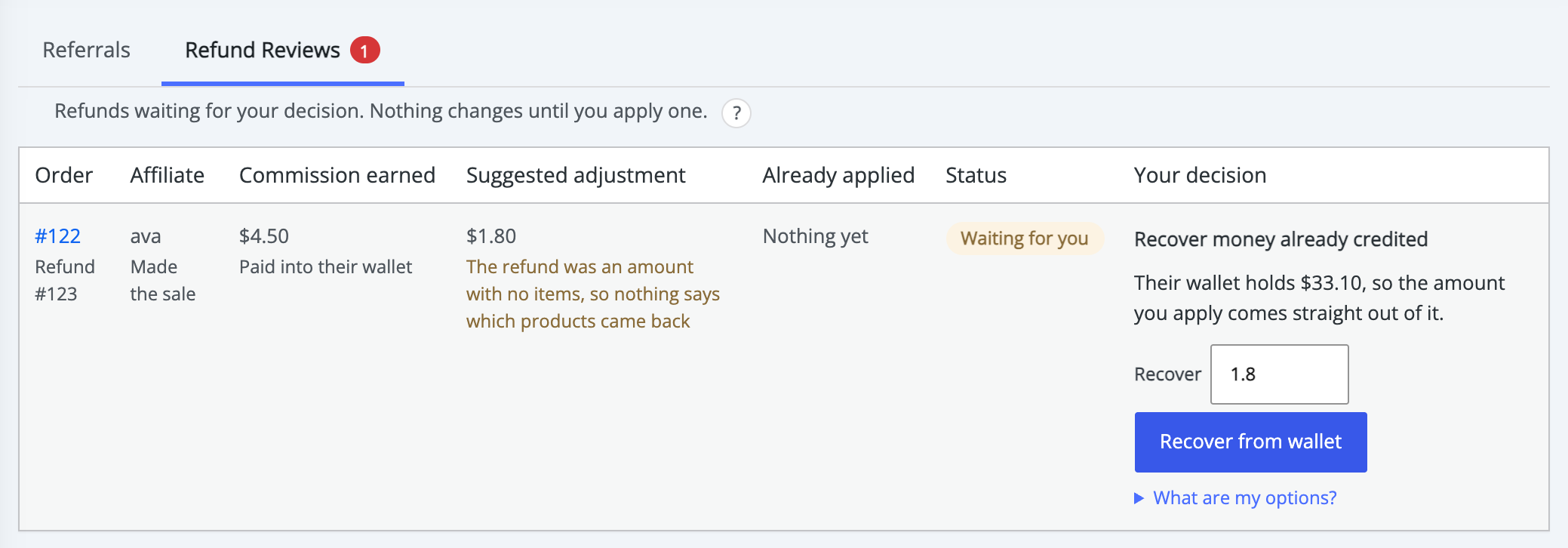
There are two kinds of decision:
- Reduce pending commission – the commission has not been approved yet. Enter the amount under Reduce by and click Reduce commission. This lowers what can still be approved and touches no wallet.
- Recover money already credited – the commission is already in the wallet. Enter the amount under Recover and click Recover from wallet. The card says beforehand how much the wallet holds and what would be recorded as owed.
The suggested amount is filled in for you; you can enter anything from nothing up to the amount shown under What are my options?. Entering nothing closes the refund without taking anything back — a pending commission then stays fully approvable. Afterwards the status shows Recovered or Nothing recovered.
When a refund record is deleted
↑ Back to topDeleting a refund in WooCommerce does not put the commission back by itself, because a deleted record is not proof the customer paid again. It is listed in Refund Reviews as a correction for you to confirm: choose Give the commission back to restore what was recovered, or Keep the recovery. A restored commission shows as Put back.
Hold approval for a return period
↑ Back to topA return period stops commission being approved before your returns window closes. On the Settings tab of the Commission screen:
- Under Return period, enter the Days to wait and choose the order status they are Counted from this order status — usually Completed.
- Under Enable/ Disable settings, turn on Hold approval until the return period ends.
- Optionally turn on Approve automatically once the period has passed.
- Click Save Changes.
Both switches are off by default. While the hold is on, commission cannot be approved until the order has sat in your chosen status for the whole period, and Manage Referrals shows when it can be: Approve after and the date. When the period is over the badge reads Ready to approve.
- The clock starts when the order enters the chosen status. If it leaves that status the clock is cleared, and it starts again if the order returns.
- Orders already in that status before you switched the hold on have no recorded start time, so approve them by hand rather than have the plugin guess a date.
- The hold does not prevent a later refund; a refund after approval is handled by Commission handling on refund.
Automatic approval after the period
↑ Back to topWith Approve automatically once the period has passed on, WordPress approves the commission shortly after the period ends. Eligibility, order status, refund state and any waiting refund decision are all checked again first, and a refund still waiting for your decision always blocks it. It covers commission earned on orders only; signup, performance and rank bonuses are always approved by hand.
Scheduled work in WordPress runs when someone visits the site, so on a quiet store an automatic approval can happen later than the exact minute the period ends.
Customer referral rewards
↑ Back to topRewards from the customer refer-a-friend program follow the same return period: a reward is added to the referrer’s store credit only after the friend’s order has spent the period in the chosen status. With Customer Referral Automation on, that happens automatically once the period ends; approving a reward by hand is held until then. When the friend’s order is cancelled, fails or is fully refunded first, the pending reward is rejected and the customer sees why in My Account > Refer & Earn. A partial refund leaves the reward pending, and a reward already added to store credit is not taken back — the refund options above apply to affiliate commission only. See Set Up a Refer a Friend Program in WooCommerce.
Stores updated from an earlier version
↑ Back to topA store that had the old refund switch on starts on Automatic, and one that had it off starts on Off. Automatic also recovers commission already in a wallet, so check the setting after updating. See Upgrading to Version 3.0.0 and Converting to Commission Rules.
FAQ
↑ Back to topWhat if the affiliate has already withdrawn the commission?
↑ Back to topWhatever their wallet cannot cover is recorded as owed and settled from their next commission. Nothing is taken twice, and the wallet never goes below zero.
Does a part refund take back the whole commission?
↑ Back to topNo. Only the share for the items that came back is affected, using the amounts recorded when the commission was earned.
Do refunds affect bonuses?
↑ Back to topNo. Signup, sharing and performance bonuses are never touched by a refund.
Why was a commission not approved automatically after the return period?
↑ Back to topUsually one of four reasons: Approve automatically once the period has passed is off, a refund decision is still waiting, the order reached its status before the hold was switched on, or the store has had no visitors since the period ended.
Approving and rejecting commission is covered in Approve, Reject and Manage Referrals, and wallet balances in Pay Affiliates with Store Credit and Wallets.

