
To set up a refer a friend program in WooCommerce, Affiliate and Referral Program for WooCommerce includes a complete customer referral module: ordinary customers share a personal link, the friend gets a discount at checkout, and the referrer earns store credit they can turn into coupons. It runs alongside your affiliate program but is a separate system with its own settings, rewards and dashboard — affiliates use the affiliate program; everyone else can refer friends. Part of the Affiliate and Referral for WooCommerce documentation.
Turn the program on
↑ Back to top- Go to: WooCommerce > Affiliate & Referral > Customer Referral > Settings.
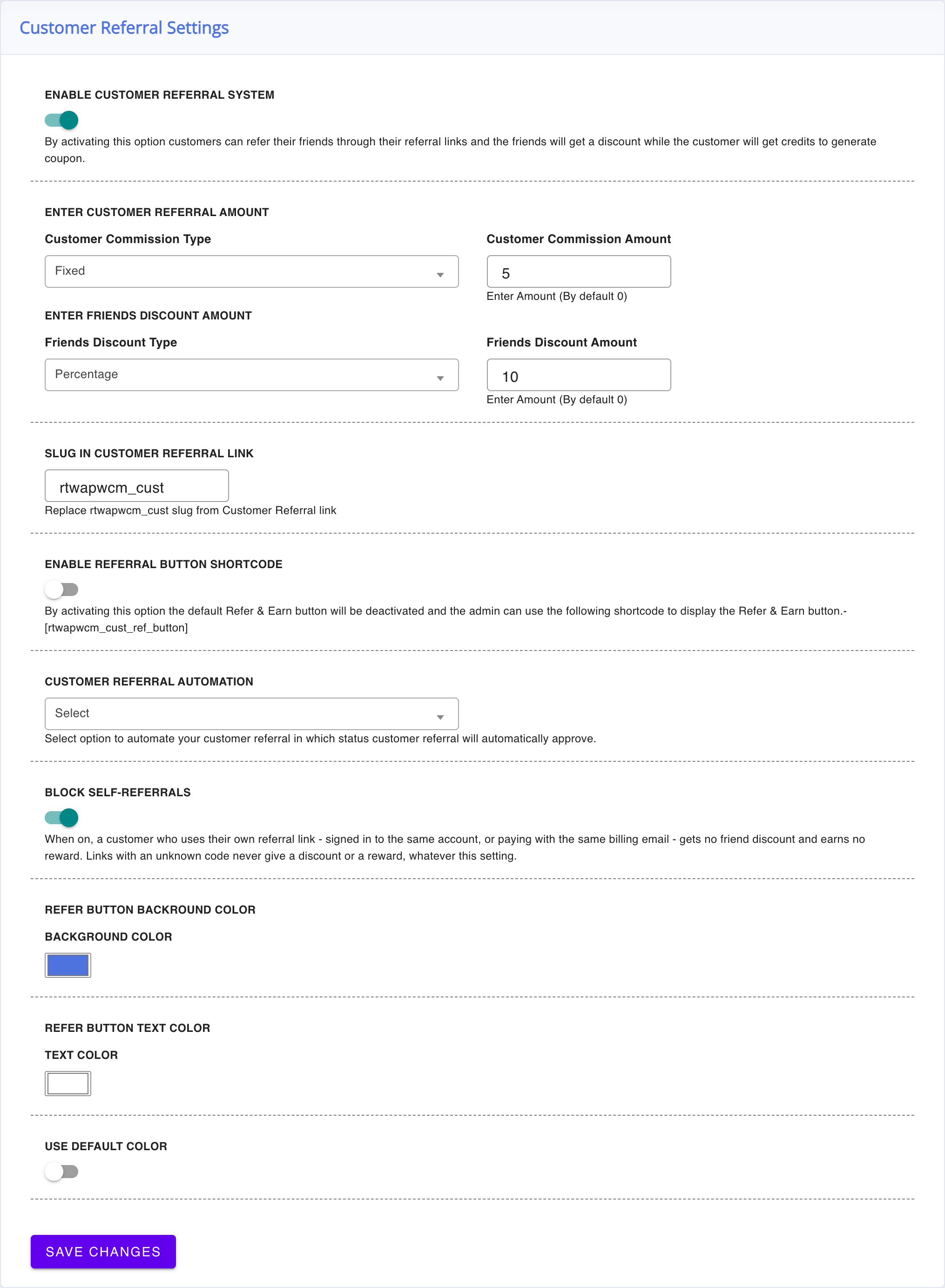
- Turn on Enable Customer Referral System.
- Set the two rewards (next section), decide on Block self-referrals (below) and Save Changes.
A floating Refer & Earn button now appears on your storefront for every visitor who is not an affiliate — logged in or not. Prefer to place the button yourself? Turn on Enable Referral button shortcode — the floating button is replaced by the [rtwapwcm_cust_ref_button] shortcode, which you can put on any page. The button’s colors are set on the same screen with Refer Button Backround Color (the plugin’s own spelling) and Refer Button Text Color; Use default color puts them back.
Set the two-sided rewards
↑ Back to top- Customer Commission Type and Customer Commission Amount – what the referrer earns as store credit for a referred friend’s order, once the reward is approved (by you or by Customer Referral Automation). Percentage or Fixed, calculated on the friend’s order total.
- Friends Discount Type and Friends Discount Amount – the discount the friend gets at checkout for arriving through a referral link. Percentage or Fixed, applied to the cart’s product subtotal.
The two rewards use different bases: the referrer’s credit is calculated on the friend’s order total, while the friend’s discount applies to the cart subtotal — keep that in mind when you balance the two amounts.
What your customers see
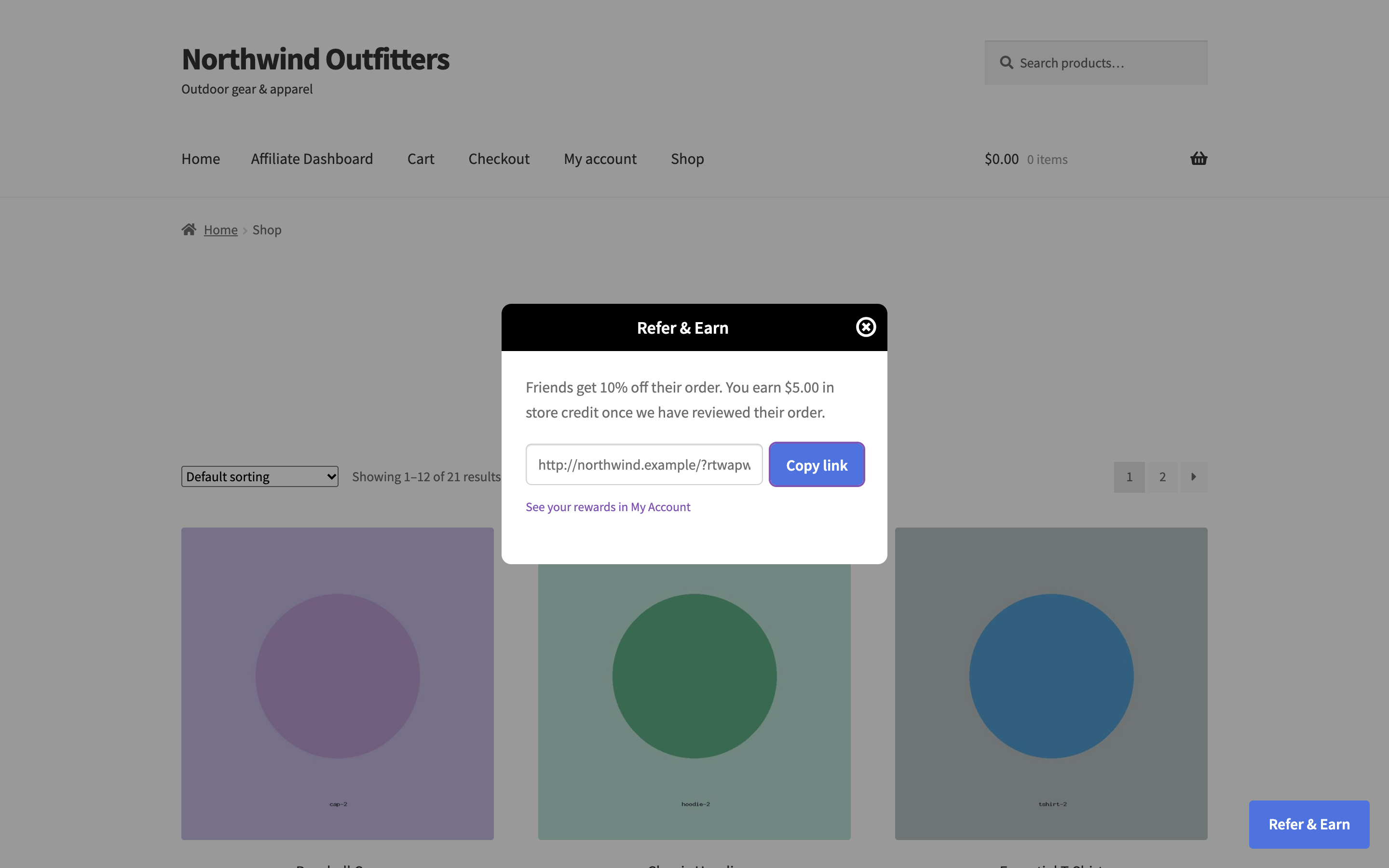
↑ Back to topClicking Refer & Earn opens a small panel. A signed-in customer sees their personal referral link straight away (or one Get my referral link button the first time), with Copy link and, on phones and browsers that have one, a Share button. A visitor who is not signed in enters an email address and the link is sent to that address — it is never shown in the page. For an address without an account, a WooCommerce customer account is created, WooCommerce sends its own account email, and the customer always gets a way to set a password so they can sign in and spend their credit later. The panel gives the same answer whether or not the address already has an account.
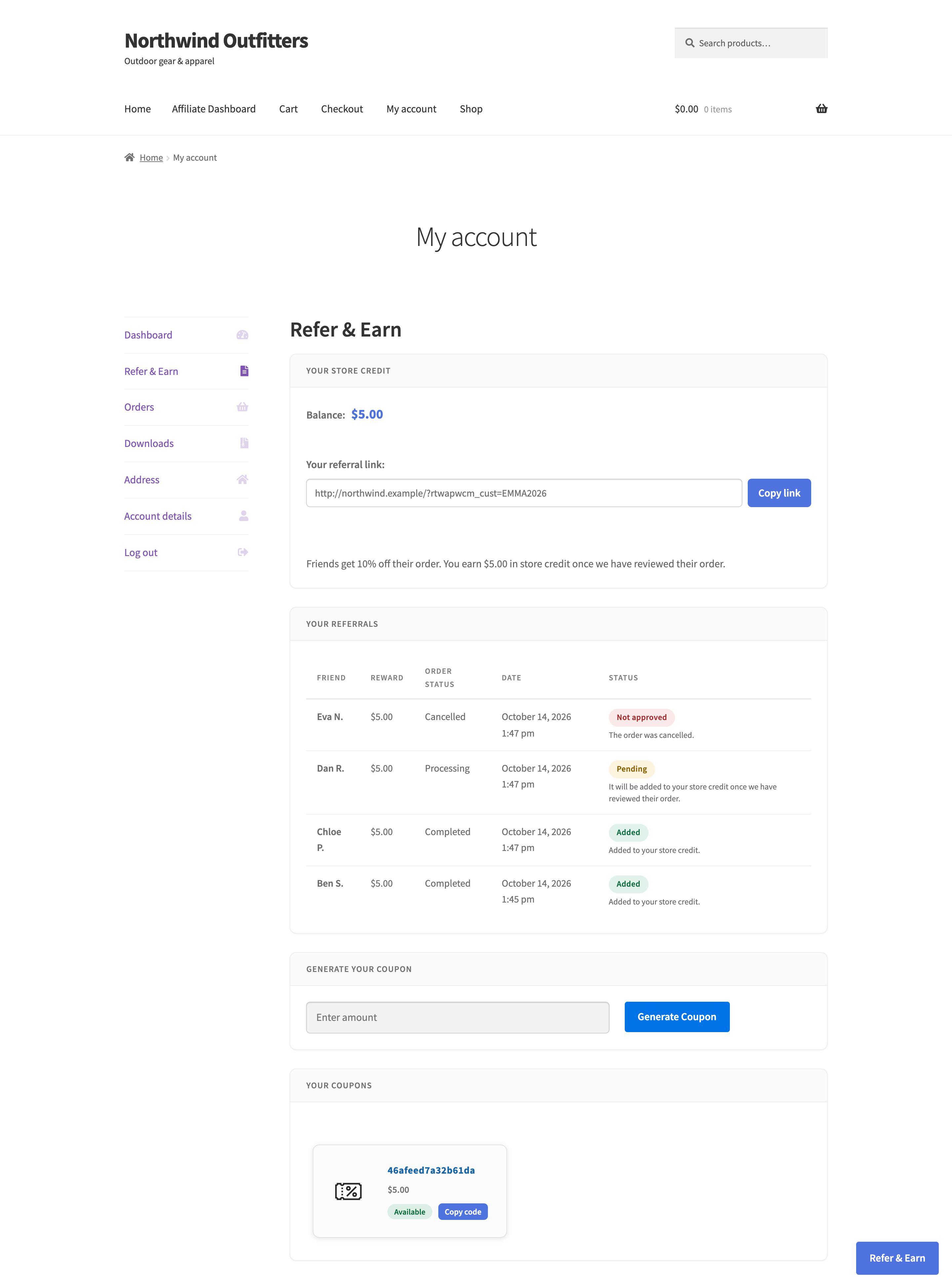
The friend opens the link and sees a welcome popup with their discount — only for a real referral link; a mistyped or made-up link shows nothing and gives no discount. The discount appears in their cart as Friend Discount. The referrer follows everything in My Account > Refer & Earn: the credit balance in your store’s currency format, the referral link with Copy and Share, each referral with the friend’s first name and initial, the reward and a plain sentence on its status (when a pending reward will be added, or why one was not approved), the coupon generator, and their coupons marked Available or Used.
Approve referral rewards
↑ Back to topReferred orders appear under WooCommerce > Affiliate & Referral > Customer Referral > Customer Referrals, where you approve or decline each reward, or mark several and use Confirm Marked Customer Referrals or Decline Marked Customer Referrals. To skip the manual step, set Customer Referral Automation to Completed or Processing — rewards then approve themselves when the friend’s order reaches that status, however it gets there (a payment, a gateway, the WooCommerce app or a scheduled job). Each reward is added to store credit exactly once, even if it is approved from two places at the same moment.
If you use a return period (Refunds, Return Periods and Commission Recovery), customer rewards follow it too: a reward is credited only after the order has spent the period in the chosen status — automatically when automation is on, and a manual approval is held until then. Cancelled, failed and fully refunded orders reject their pending reward, and the customer sees why. A partial refund leaves the reward pending, and a reward already added to store credit is not taken back.
From store credit to a coupon
↑ Back to topReferrers spend their balance by generating a coupon from the referral dashboard. The coupon’s value is deducted from their balance when it is created. It is locked to the customer’s own email address, has no expiry date and can be used once. If an order uses less than the coupon’s value, the unused part goes back to the customer’s store credit once the order is paid, so nothing is lost.
Keep it separate from your affiliate program
↑ Back to topThe separation is enforced by the plugin: affiliates do not see the Refer & Earn button, customer store credit is a separate balance from the affiliate wallet (see Pay Affiliates with Store Credit and Wallets), and the customer program’s referral link uses its own slug (Slug in Customer Referral Link, default rtwapwcm_cust). If you are looking for the feature where the affiliate’s referred customer gets a checkout discount, that is the Affiliate Referral Discount for Referred Customers — part of the affiliate program, not this module.
The customer program has no minimum-order requirement and no reward cap. Self-referral is blocked while Block self-referrals is on: a customer buying through their own link — signed in to the same account or paying with the same billing email — gets no friend discount and earns no reward. It is on for new stores; a store updated from version 3.0 keeps its previous behaviour (self-referrals rewarded) until you switch it on.
FAQ
↑ Back to topCan a customer be in both programs?
↑ Back to topNo. A customer who becomes an affiliate switches tracks: they use the affiliate dashboard and earn commissions, and the Refer & Earn button no longer shows for them. Their referral rewards do not merge with affiliate earnings.
When does the referrer receive their credit?
↑ Back to topWhen you approve the referral — or, with Customer Referral Automation on, as soon as the friend’s order reaches the chosen status. With a return period, once the period has passed.
Which emails do customers receive?
↑ Back to topThree, each sent once: their referral link, “a friend just ordered with your link” when the friend’s order is paid (the reward is still pending), and “reward added” when the credit arrives, with the new balance. You can edit, switch off, reset and test each of them — see Customize Affiliate and Referral Emails.
Can customers spend credit directly at checkout?
↑ Back to topNo — credit is spent by generating a coupon from the referral dashboard and applying that coupon to an order. More questions are answered in the Affiliate and Referral Program: FAQ.

