
The affiliate program sends its own notifications — a welcome message when someone signs up, a confirmation when they are approved, a note when they earn a commission, and an alert to you when an affiliate asks to be paid — and the customer refer-a-friend program emails customers about their link and their rewards. Affiliate and Referral Program for WooCommerce lets you rewrite the subject and the wording of each one, personalize it with placeholders, switch any of them off, put the default text back and send yourself a test. This guide covers the email screen, what each message is for, and who receives it. Part of the Affiliate and Referral for WooCommerce documentation.
Where the emails are managed
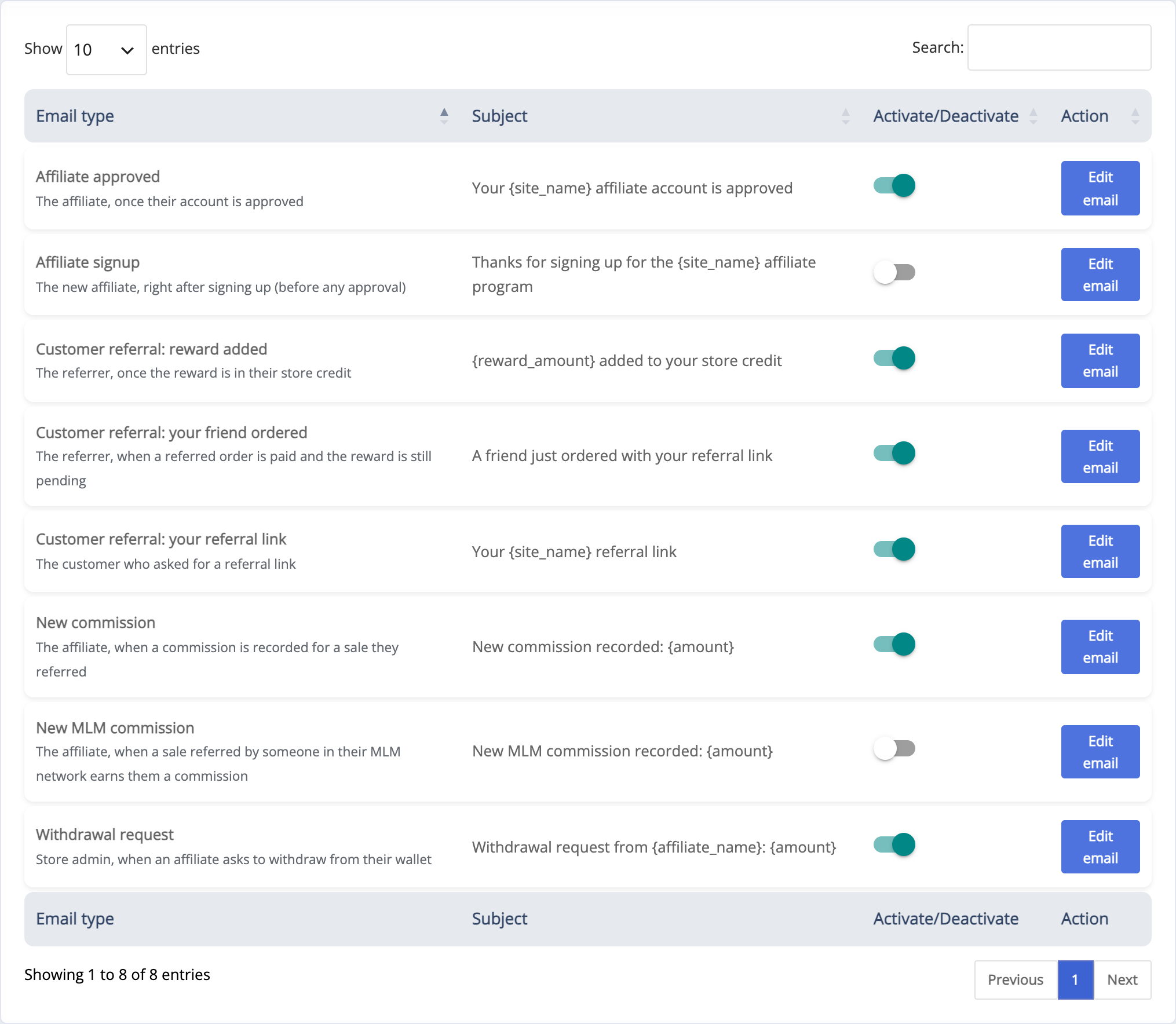
↑ Back to topGo to: WooCommerce > Affiliate & Referral > Email Setting. All eight messages the program can send are listed with their Email type and who receives them, their current Subject, an Activate/Deactivate switch and an Action column.
Edit a message
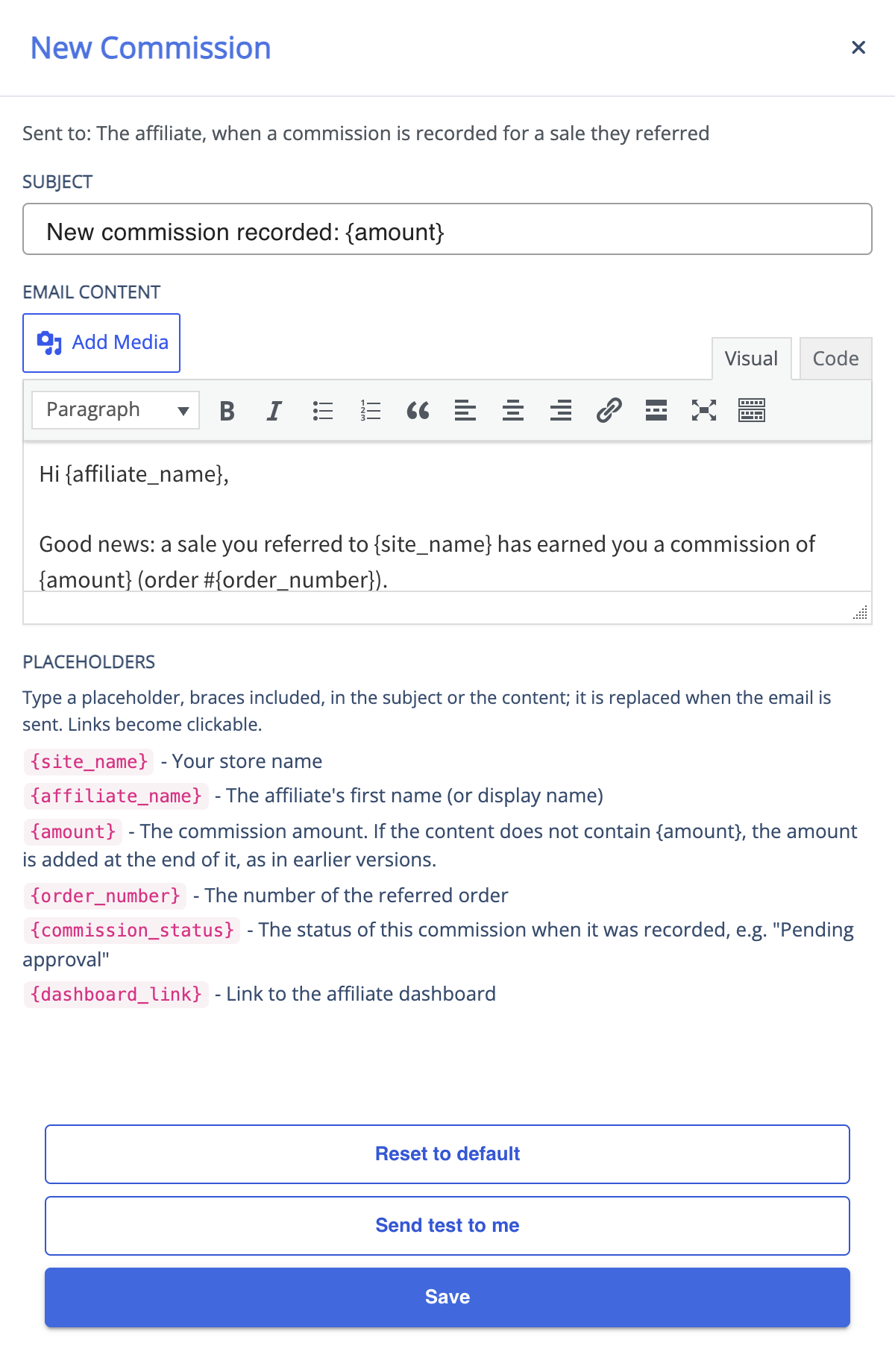
↑ Back to top- Press Edit email on the row you want to change. The dialog shows the message’s name and who receives it.
- Set the Subject.
- Write the message in Email Content — the familiar WordPress editor, so you can format text, add links and insert media. Under the editor, Placeholders lists the ones this message supports.
- Save.
The same dialog has two more buttons. Send test to me sends the subject and content currently in the dialog — saved or not — to your own email address only, with example values in the placeholders, so you see exactly what a recipient would receive; nothing is saved and nobody else gets it. Reset to default replaces the message’s subject and wording with the current default text, in your site’s language; its switch stays as it is.
Your edits are kept when the plugin is deactivated and activated again, and when it is updated. An update also keeps the wording your store already has for a message you never edited; press Reset to default on that message to use the newer default text.
What each message is for
↑ Back to top- Affiliate signup – welcomes someone who has just registered through your affiliate signup form. It is sent before any approval, so the default text does not say the account is approved. Goes to the new member.
- Affiliate approved – tells an affiliate their account is approved, with their referral link and the next step. Sent when you approve an application, or straight away when someone joins and you do not review applications. Goes to the affiliate. While it is switched on and Affiliate Verification is on, you also get a short fixed notice that an application is waiting.
- Withdrawal request – tells you that an affiliate has asked to be paid, with the amount and the payout method they chose (by name only, never their account details). Nothing has been paid at that point: the request waits for you on the Payouts screen. Goes to your store’s admin address.
- New commission – tells an affiliate that a sale they referred has earned a commission, with the amount, the order number and its status. A new commission is pending: it reaches the affiliate’s wallet only once you approve it. See “Commission notifications” below.
- New MLM commission – the same for a commission earned from a sale in an affiliate’s multi-tier network, with how far down the network the sale came from; see How to Set Up MLM in Your Affiliate Program.
- Customer referral: your referral link – sends a customer their referral link from the Refer & Earn button, with what friends get and what the customer earns. A new customer’s message also carries a link to set a password when WooCommerce’s own account email does not. Goes to the customer.
- Customer referral: your friend ordered – tells the referrer that a friend’s order using their link has been paid and the reward is pending, and when it will be added. Sent once per order, and not if the reward was added in the same step. Goes to the referrer.
- Customer referral: reward added – confirms the reward is in the referrer’s store credit, with the new balance. Sent once per reward, however it was approved. Goes to the referrer.
Use the Activate/Deactivate switch on any row to stop that message being sent. Switching a message off never affects the commission or the reward itself — earnings are recorded and approved exactly the same way. Withdrawal request and the three customer referral messages are on until you switch them off; the other affiliate messages are off until you switch them on.
Placeholders
↑ Back to topType a placeholder, braces included, in the subject or the content; it is replaced with the details of the event that sent the message. The dialog lists the ones each message supports. Links become clickable in the content and stay plain addresses in the subject, amounts use your store’s currency format, and names are shown as text, never as formatting. A placeholder that belongs to a different message is left empty, and a word in braces that is not a placeholder is left as typed.
- Affiliate signup – {site_name}, {affiliate_name} (first name, or display name), {username}, {dashboard_link}.
- Affiliate approved – {site_name}, {affiliate_name}, {username}, {referral_link} (the affiliate’s own link), {dashboard_link}.
- Withdrawal request – {site_name}, {affiliate_name}, {affiliate_email}, {amount} (the amount requested), {payment_method}, {request_date}, {payouts_link} (your Payouts screen).
- New commission – {site_name}, {affiliate_name}, {amount}, {order_number}, {commission_status} (for example “Pending approval”), {dashboard_link}.
- New MLM commission – the same, plus {mlm_depth}: how far down the affiliate’s network the sale came from (1 = an affiliate they recruited, 2 = one recruited by that affiliate, and so on). It has nothing to do with Performance-Based Affiliate Levels.
- Customer referral messages – {site_name}, {customer_name}, {referral_link}, {my_account_url} (My Account > Refer & Earn); {friend_discount} and {referrer_reward} from your Customer Referral settings; {reward_timing} – when credit arrives, worded from your automation and return-period settings; {reward_amount} and {credit_balance} – this reward and the balance after it; {set_password_link} – only filled for a customer the Refer & Earn button has just given an account.
Messages written before placeholders existed keep working: when the content of Withdrawal request, New commission or New MLM commission has no {amount}, the amount is still added at the end, as before. Once you use {amount}, it appears only where you put it.
Commission notifications
↑ Back to topWhile New commission (and, for network earnings, New MLM commission) is switched on, the affiliate who earned the commission receives your message each time one is recorded. To be told as well, turn on Mail to Admin at WooCommerce > Affiliate & Referral > Advanced Features > General: you then receive a short message with the same subject and the commission amount.
This is one email per commission, sent as the order is processed. On a busy store, consider leaving Mail to Admin off and reviewing earnings on the Manage Referrals screen instead.
Withdrawal requests
↑ Back to topWhen an affiliate submits a withdrawal request from their dashboard, they can tick Activate referral emails alongside it, which sends you the Withdrawal request message — as long as that message is switched on here. Switch it off and no withdrawal email is sent, whatever the affiliate ticks. It comes from your store’s email sender (the “From” name and address under WooCommerce > Settings > Emails, or what your SMTP plugin sets) with the affiliate as the reply-to address, so replying reaches them directly. The amount is held from the affiliate’s wallet until you pay or reject the request; see Pay Affiliates via PayPal, Stripe and Bank.
How these emails are delivered
↑ Back to topThe three customer referral messages go to shoppers, so they use your WooCommerce email design — header, footer and colours from WooCommerce > Settings > Emails. The five affiliate messages are sent by WordPress itself and arrive as plain messages without that design. None of the eight is listed under WooCommerce > Settings > Emails; they are all managed on this screen.
Messages are sent immediately by your site. If your store has trouble with email delivery generally, an SMTP plugin fixes it for these messages just as it does for WooCommerce’s own.
FAQ
↑ Back to topCan I use the affiliate’s name in a message?
↑ Back to topYes — type {affiliate_name} in any of the five affiliate messages, or {customer_name} in a customer referral message. The dialog lists every placeholder the message supports.
Do these emails look like my other WooCommerce emails?
↑ Back to topThe customer referral messages do. The affiliate messages are sent outside WooCommerce’s templating and arrive as plain messages without your store header and footer.
Does switching an email off stop the commission?
↑ Back to topNo. The switches control notifications only. Commissions are still calculated, recorded and approved as usual.
Can I restore the original wording?
↑ Back to topYes — open the message and press Reset to default. You get the current default text, in your site’s language. More questions are answered in the Affiliate and Referral Program: FAQ.

