
Multi-tier mode in Affiliate and Referral Program for WooCommerce turns the plugin into WooCommerce MLM software: your affiliates recruit affiliates, and when a recruit makes a sale, the people above them in the network also earn a commission, at rates you set per level. This guide covers enabling MLM, how the commission chain pays, the plan types, and the genealogy tree both you and your affiliates see. Part of the Affiliate and Referral for WooCommerce documentation.
Enable and configure multi-tier commissions
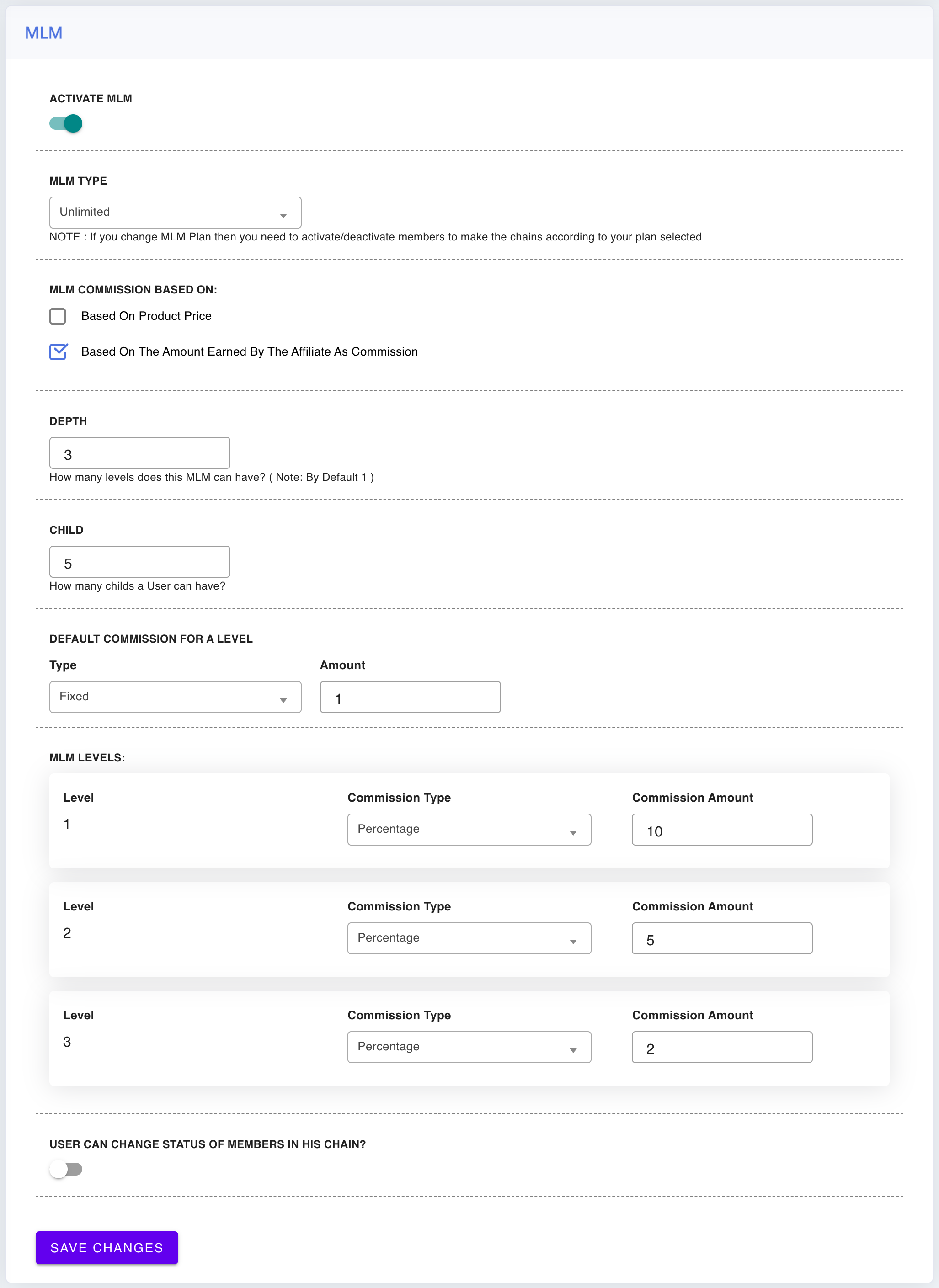
↑ Back to topGo to: WooCommerce > Affiliate & Referral > Multi-tier( MLM ).
- Activate MLM – the master switch for the whole feature.
- MLM Type – Binary, Forced Matrix, Unilevel or Unlimited. See “Choose a plan type” below for what each one changes.
- Depth – how many levels of the network can earn from one sale. Each level gets its own rate row under MLM Levels.
- Child – how many direct recruits one affiliate can have. The plan type presets this number.
- MLM Commission Based On: – Based on product price pays each level its rate on the order’s product total; Based on the amount earned by the affiliate as commission (the default) pays each level its rate on the selling affiliate’s own commission.
- MLM Levels – one row per level with its Commission Type (Percentage or Fixed) and Commission Amount. Level 1 is the seller’s direct parent. A Default Commission for a Level fills in for levels without a row of their own.
- User can change status of members in his chain? – lets affiliates activate or deactivate members of their own downline from the dashboard tree. Read the warning under “The genealogy tree” before enabling this.
- Save Changes.
How the commission chain pays
↑ Back to topWhen a referred order creates a commission for the selling affiliate, the plugin walks up the network one parent at a time — one hop per configured level. Each qualifying member earns their level’s own rate; nothing compounds, and no one’s earnings are taken from anyone else. An example with Based on the amount earned by the affiliate as commission, example rates of 15% for level 1 and 10% for level 2, and a seller who just earned $20: the seller’s recruiter earns $3.00, and the recruiter’s recruiter earns $2.00.
Network commission is paid only to affiliates who are active and approved; a removed or not-yet-approved member earns nothing from the chain.
The width requirement — when a member earns from the chain
↑ Back to topA member earns upline commission once all of their recruit slots are filled with active recruits — the Child value sets how many direct-recruit slots each member has. The affiliate dashboard states this as “Number of Childs to start earning commission”. While slots remain open, that member does not yet earn from the chain. The Unlimited plan type has no slot requirement at all — see “Choose a plan type” below.
Only active recruits count toward filled slots. Deactivating one member of a chain stops that member’s branch from paying upward — and can stop the member’s parent earning from the chain too, because one of the parent’s slots is no longer active. A deactivated recruit still occupies their position in the structure, so the slot cannot be given to someone else; reactivating them is how the parent’s eligibility comes back. Treat deactivation as a commission switch, not a cosmetic hide.
Choose a plan type
↑ Back to topThe plan type sets the shape of the network by presetting the Child width, plus one behavioral difference for Unlimited:
For a fuller comparison of the four plans — and what changing plan later involves — see MLM Plan Types: Binary, Unilevel and Forced Matrix.
- Binary – two direct-recruit slots per member; both slots must hold active recruits before that member earns from the chain.
- Forced Matrix – you choose the width; every member gets the same fixed number of recruit slots, and all of them must hold active recruits to earn from the chain.
- Unilevel – one direct-recruit slot per member, forming a single chain; the slot must hold an active recruit to earn from the chain.
- Unlimited – no slot requirement: a qualifying downline sale pays the upline levels regardless of how many recruits each member has — even one.
Changing the plan — or the Child width — after the network exists does not rearrange it. The settings screen notes it directly: after a plan change you need to activate/deactivate members so the chains match the new plan.
How the network is built
↑ Back to topA new affiliate joins the network under the affiliate whose referral brought them — signing up through a referral link places the newcomer under that recruiter automatically, as long as the recruiter has an open slot. If a recruiter’s slots are full, a self-serve signup is declined with a message naming the limit.
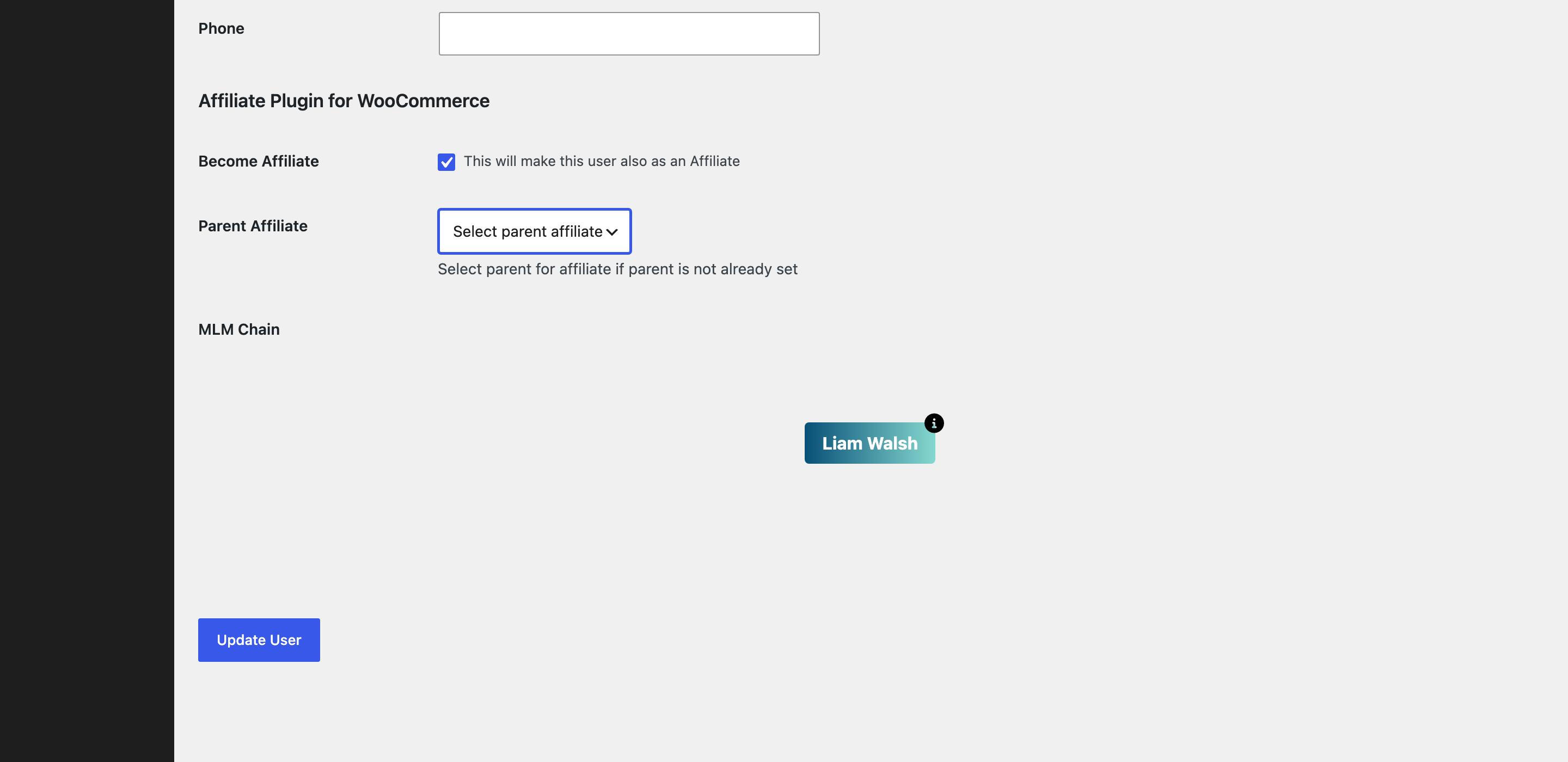
You can also place affiliates yourself: open the affiliate’s WordPress user profile and use Select parent for affiliate if parent is not already set. The plugin blocks placements that would break the tree — a full parent, an already-set parent, or a loop — with a clear message. A parent cannot be changed once set, so place carefully.
The genealogy tree
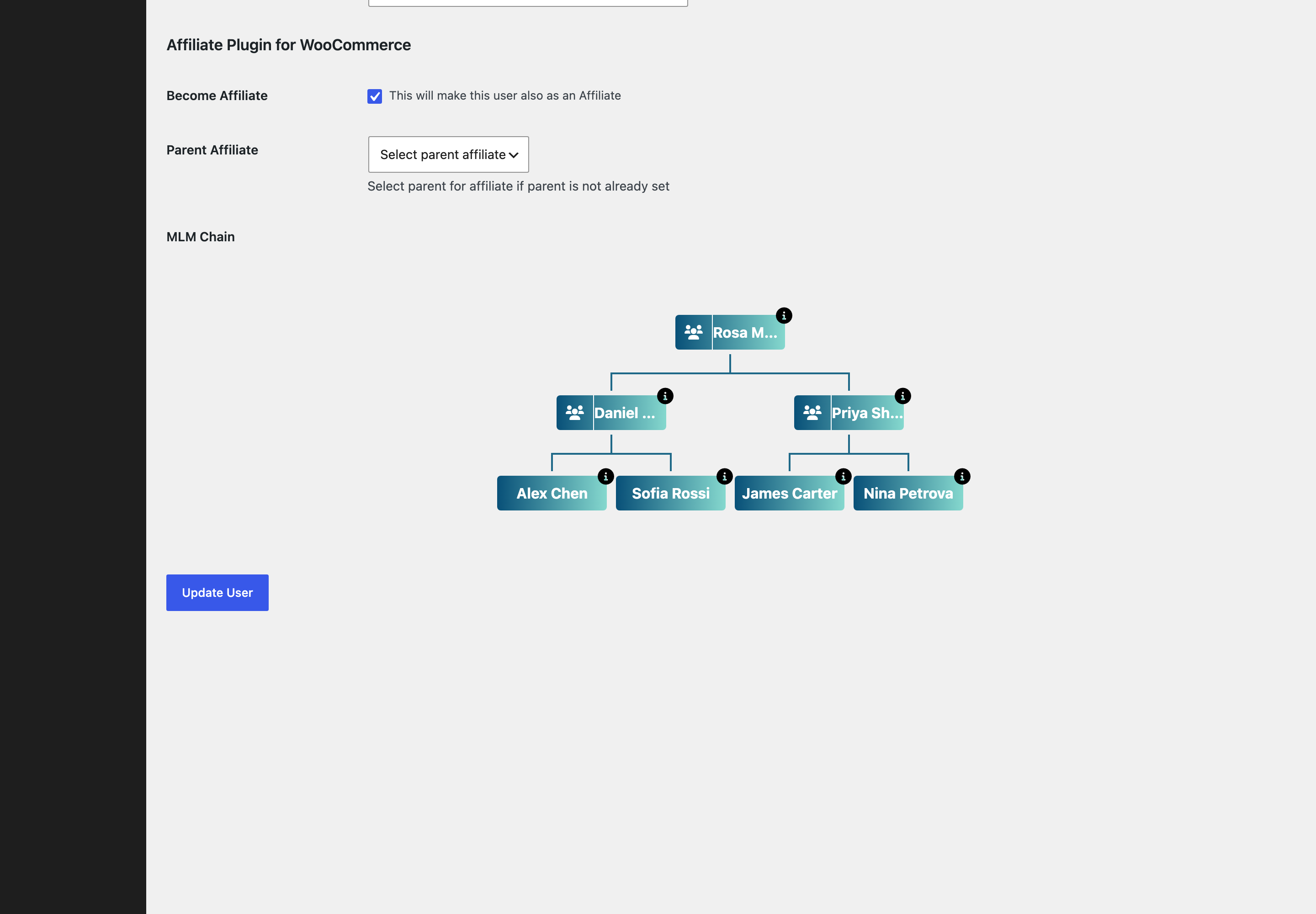
↑ Back to topYour view: open an affiliate’s WordPress user profile (the Show MLM Chain tab on the Affiliates screen takes you there) and the MLM Chain section renders the affiliate’s network as an organization chart. Hovering a member offers Activate / Deactivate for that position.
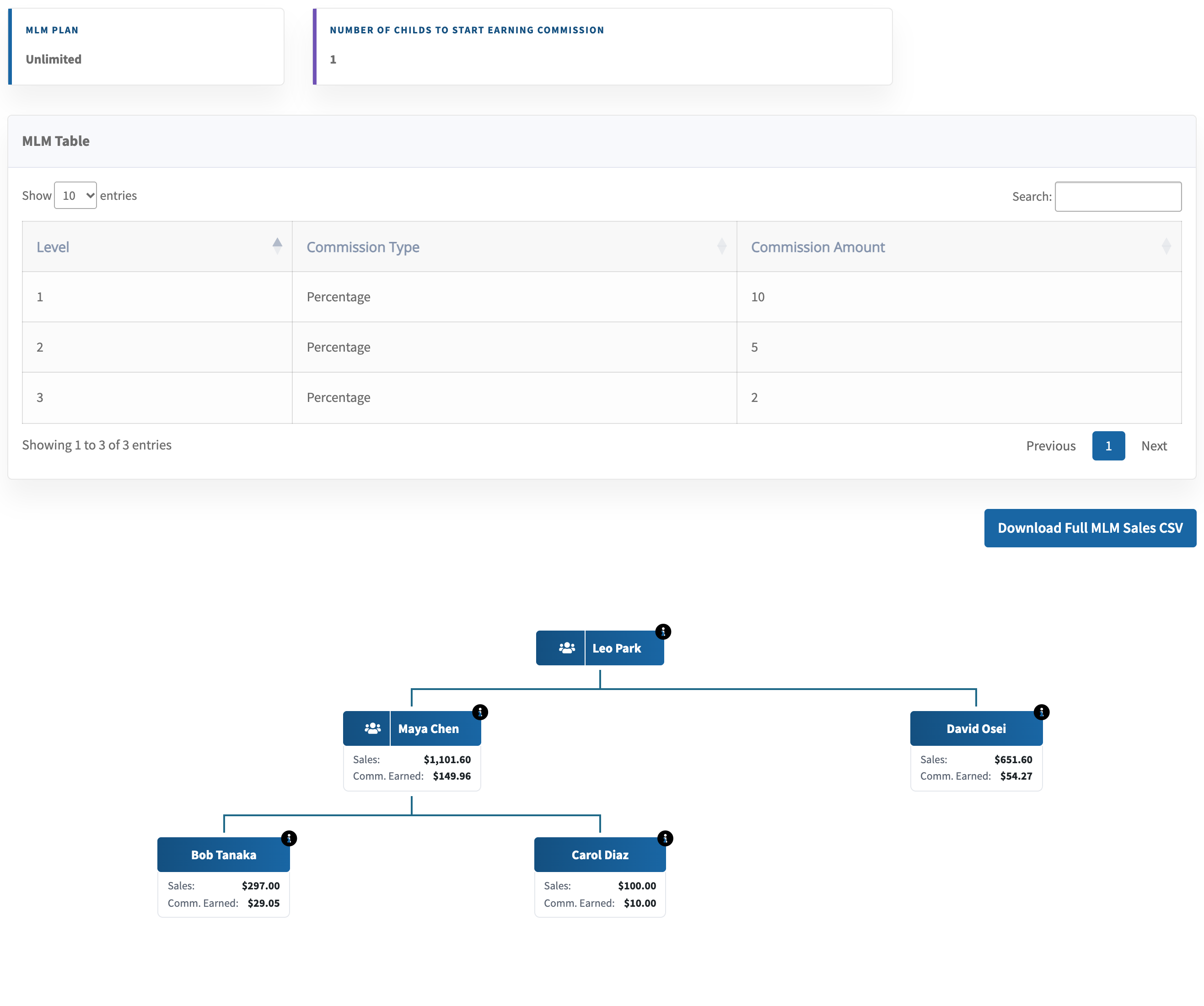
Your affiliates’ view: the dashboard’s Multi-tier( MLM ) tab shows each member’s own network. Every downline card carries that member’s Sales and Comm. Earned figures, so recruiters can see which branches perform. Above the tree, the dashboard shows the current MLM Plan and the Number of Childs to start earning commission. If you enabled User can change status of members in his chain?, affiliates get the same Activate/Deactivate controls for their own branch — with the same commission consequences described above.
Export downline sales
↑ Back to topFrom the same dashboard tab, affiliates can download their downline as a CSV — Download Full MLM Sales CSV — listing each downline member’s Affiliate ID, Affiliate Name, Total Sales Amount and Total Commission Earned, to the configured network depth.
FAQ
↑ Back to topDo level commissions come out of the seller’s commission?
↑ Back to topNo. The seller keeps their full commission; each upline level is paid additionally, at that level’s own rate, by the store.
Why is a member with recruits not earning from the chain?
↑ Back to topCheck three things: all of the member’s recruit slots must hold active recruits (the Child value — the Unlimited plan has no slot requirement); the sale must have happened within the configured Depth below them; and every link between the seller and the member must be active — one deactivated position breaks the chain at that point.
Can I limit how much MLM commission one affiliate collects?
↑ Back to topYes — the monthly cap can include upline earnings when you enable Include MLM commission in monthly cap on the Settings tab of the Commission screen; see How to Set Up Referral Commission Rules. By default MLM earnings are not capped.
Can Affiliate Levels and performance bonuses use the network?
↑ Back to topYes. Affiliate Levels and performance bonuses can use team conditions (marked “Requires MLM”) that read this network. See Performance-Based Affiliate Commission with Affiliate Levels and Performance Bonuses and Rank Rewards for Affiliates.

