
A performance bonus in Affiliate and Referral Program for WooCommerce pays an affiliate a one-time amount when they reach a target — their tenth approved referral, $1,000 in referred sales, or a chosen level. It is paid once per affiliate, on top of the commission on their orders. This guide covers creating bonuses, the conditions you can use, how bonuses are awarded and approved, and where affiliates follow their progress. Part of the Affiliate and Referral for WooCommerce documentation.
How performance bonuses work
↑ Back to top- A bonus is awarded the first time an affiliate meets its conditions, and only once per affiliate.
- It never replaces the commission on an order; it is paid on top.
- A bonus never changes a commission rate. Commission rules can give different rates to different Affiliate Levels, so a level provides an ongoing rate on every order as you configure it; a bonus can use a level as one of its conditions.
- Sales, counts and earnings count once a referral is approved.
- Recurring rewards — the signup, click, sharing and lead bonuses — live on the Bonus settings tab instead; see Signup, Click, Sharing and Lead Bonuses for Affiliates.
Add a performance bonus
↑ Back to top- Go to: WooCommerce > Affiliate & Referral > Bonuses and open the Performance bonuses tab.
- Click + Add New Bonus.
- Enter a Bonus name affiliates will recognize and the Amount.
- Under Conditions, click + Add condition for each target. With several, choose under Match whether all or any of them must be met.
- Add Notes (optional) for yourself, and click Save bonus.
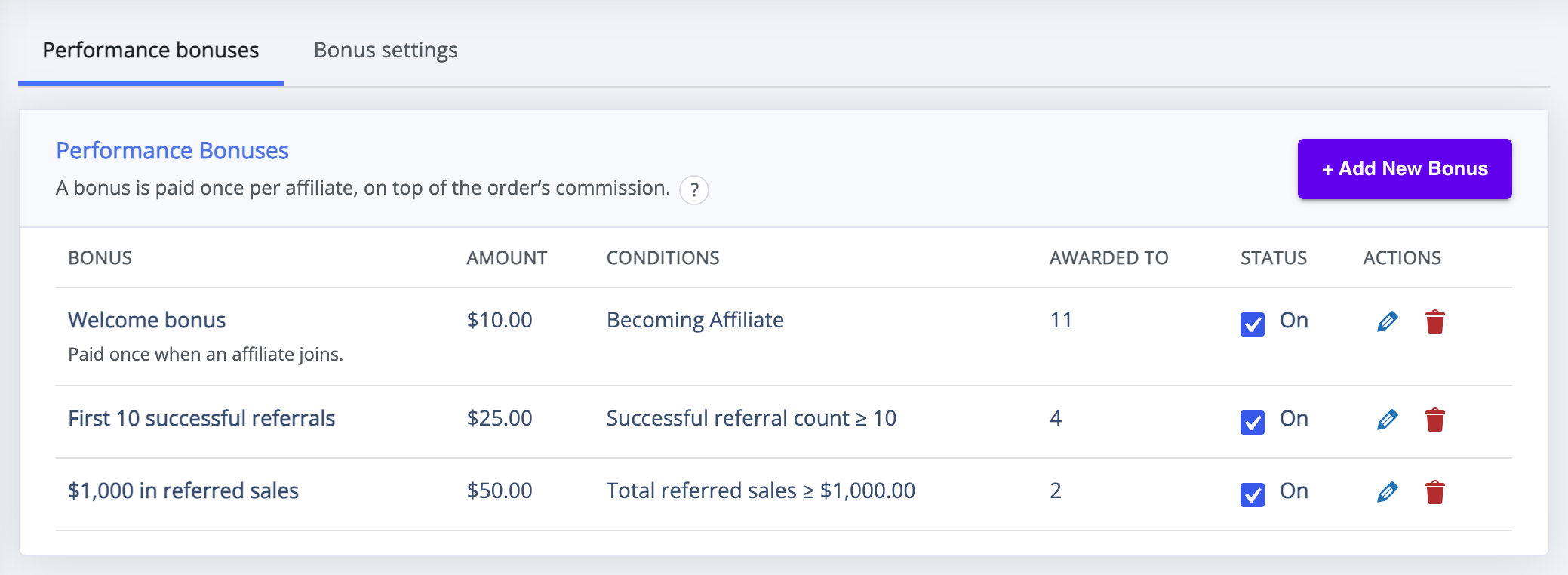
The list shows each bonus with its Amount, Conditions, how many affiliates it has been Awarded to, and a Status switch.
Conditions you can use
↑ Back to top- Becoming Affiliate – a welcome bonus for joining.
- Total referred sales, Successful referral count and Total earned commissions – targets based on the affiliate’s approved results.
- Affiliate holds level – rewards reaching a level, such as Gold, without changing how levels are earned. See Performance-Based Affiliate Commission with Affiliate Levels.
- Has received bonus – builds a sequence, so one bonus can follow another.
Conditions marked Requires MLM count an affiliate’s team, such as recruited affiliates or team sales. They are offered only while Multi-tier (MLM) is switched on; when it is off, team conditions saved earlier stay visible and count as not met.
How bonuses are awarded and approved
↑ Back to top- A bonus whose only condition is Becoming Affiliate is awarded when the affiliate joins. Every other bonus is awarded the first time its conditions are met after a commission is approved or the affiliate’s team changes.
- The award appears as a pending earning on Manage Referrals, marked as a performance bonus.
- Approve it there. Bonuses are always approved by hand: automatic approval by order status and the return period apply to commission earned on orders only.
- Once approved, the amount is added to the affiliate’s wallet like any other earning.
See Approve, Reject and Manage Referrals. A refund on a referred order never takes back a bonus already awarded.
Where affiliates see their bonuses
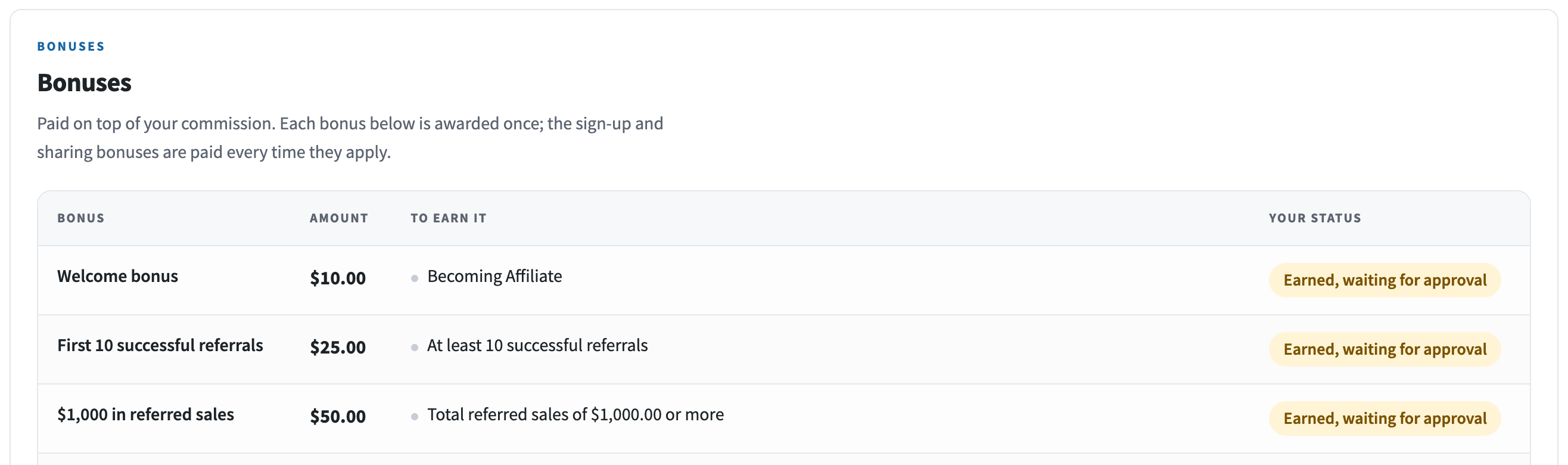
↑ Back to topThe Bonuses block on the Commissions tab of the affiliate dashboard lists each bonus with its Amount, what it takes (To earn it) and the affiliate’s progress (Your status).
Edit, switch off or delete a bonus
↑ Back to top- Status – switch a bonus off to stop new awards; awards already made stay.
- Edit – change the name, amount or conditions. Affiliates who already received the bonus are not awarded it again.
- Delete – removes the bonus; bonuses already awarded keep their earning rows.
Ranks from earlier versions
↑ Back to topStores updated from an earlier version had a Rank Setting screen. Its ranks, and the sales-threshold performance bonuses from the old bonus settings, are transferred into the Performance bonuses list automatically, with the awards already made, so nobody receives a reward twice.
- Until the transfer completes, the list shows a notice and a Retry transfer button, and the previous bonus paths keep working.
- Anything the transfer could not decide on its own is listed under Please review the transferred award history:. A rank whose requirement could not be matched is transferred switched off, with its requirements kept as saved.
- Transferred ranks keep their original requirement as a condition, such as Team members currently holding a rank (2.5.0 rule).
- An affiliate who held a rank may still see it in their dashboard header, labelled Rank:.
FAQ
↑ Back to topDoes a bonus replace the commission on the order?
↑ Back to topNo. A performance bonus is paid in addition to the commission the affiliate earns on their orders.
Can an affiliate earn the same bonus twice?
↑ Back to topNo. Each performance bonus is awarded once per affiliate. For a reward that repeats, use the signup, click or sharing bonuses on the Bonus settings tab.
Are bonuses approved automatically?
↑ Back to topNo. A bonus waits as a pending earning on Manage Referrals until you approve it, even when commission on orders is approved automatically.
What is the difference between a level and a performance bonus?
↑ Back to topA level pays a different rate on every order from then on, through the commission rule that targets it. A performance bonus is a single payment for reaching a target. You can combine them — for example a bonus with the condition Affiliate holds level set to Gold.

