
Test rules in Affiliate and Referral Program for WooCommerce shows what an order would pay an affiliate before a real order comes in. You choose the affiliate, the order date and the products, and it works out the commission product by product with your saved rules — which rule wins and how much — without saving anything. This guide covers when to test, how to read the result and what a test cannot simulate. Part of the Affiliate and Referral for WooCommerce documentation.
What Test rules does
↑ Back to topA test builds a sample order that is never saved and runs the same calculation a real referred order gets. For each product it shows the first rule that matches — the winning rule — and the commission that rule pays, then the order total and what your monthly limit would do to it. It calculates direct commission: what the affiliate earns on their own referred order.
When to use it
↑ Back to top- After adding a rule or changing the order of your rules, to confirm the right one wins.
- Before a dated promotion starts, with a date inside its Schedule.
- After converting from an earlier version, to check orders whose commission you already know.
- When an affiliate asks why an order paid what it did — recreate the order for that affiliate.
- Before changing the rate for a group or a level, with an affiliate who belongs to it.
Open Test rules
↑ Back to topGo to: WooCommerce > Affiliate & Referral > Commission. On the Rules tab, click Test rules. The panel opens below the rules list, and Close hides it again.
A test uses your rules as they are saved, in their current order. Click Save rule before you test a new or changed rule. Rules that are switched off are left out, just as they are at checkout.
Test rules is part of commission rules. A store updated from an earlier version has it only after the one-time conversion — see Upgrading to Version 3.0.0 and Converting to Commission Rules.
Enter a test scenario
↑ Back to top- Affiliate – start typing a name, username or email and pick the affiliate the order would be credited to. Rules for Specific affiliates, Affiliate groups or Affiliate levels match only when this affiliate belongs to them.
- Order kind – Referred order, Lifetime repeat order or Subscription renewal. It matters only for rules with an Order kind condition.
- Order date (store time) – starts at the current store time. The date decides whether a rule’s Start and End include the order, so use it to test a promotion before or after it runs.
- Shared product link (optional) – shown only when Commission for only the URL opened? is switched on, on the Settings tab. Choose the product whose link the affiliate shared: other products then earn only through a rule that has Pays even when the affiliate shared a different product link ticked.
- Products – choose a product and enter its quantity. + Add product adds another line, and the × beside a line removes it. For a variable product, choose the exact variation so the line uses its price.
Run the test
↑ Back to top- Fill in the scenario.
- Click Calculate. Without a product, the panel asks you to Add at least one product.
- To compare, change the affiliate, the date or the products and click Calculate again. Each run replaces the previous result.
Read the result
↑ Back to topThe result is a table with one row per product:
- Product – the product and its quantity.
- Line total – the product’s current price, excluding tax, times the quantity. A percentage rule is calculated on this amount.
- Winning rule – the rule that decided the product’s commission. A smaller line under it lists the rules checked for that product, in order, ending with the winner. It shows rule names only; it does not say why an earlier rule was passed over.
- Commission – what the product pays.
Below the table, Total: adds the commission up, and one line reports the limit set in Maximum commission to an Affiliate in a month:
- No monthly limit is set. – no limit applies.
- This order would be paid in full. – the total fits under the limit. The figures after it are the commission already recorded for the affiliate this month, and the limit.
- This order would be reduced to … – only part of the total fits under the limit, and the sentence gives the amount that would be paid.
- This affiliate is already at the monthly limit – the order would be recorded as capped and pay nothing.
The limit line always counts the commission already recorded for the affiliate in the current calendar month, whatever order date you enter.
Example: a campaign rule and a product rule
↑ Back to topA store has these two rules at the top of its list, with a Store default of 10% at the bottom:
- Holiday campaign: hoodies – all affiliates, Percentage of item total of 20% on the Hoodies category, active from 15 October to 30 November.
- Logo Collection bundle – all affiliates, Fixed amount per unit of $12.00 on the Logo Collection Bundle product.
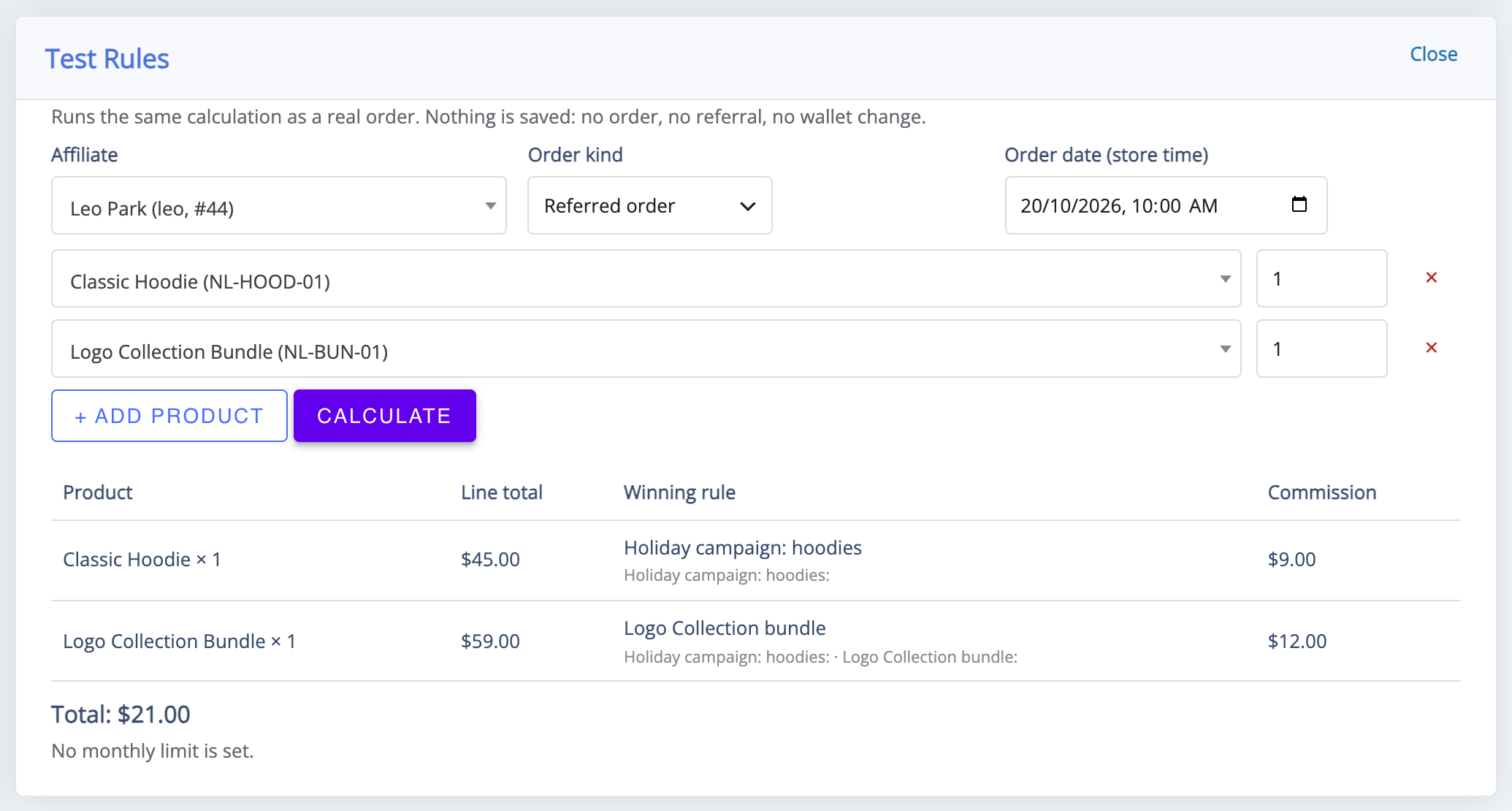
The test uses the affiliate Leo Park, Referred order, an order date of 20 October 2026 at 10:00, and two products: one Classic Hoodie at $45.00 and one Logo Collection Bundle at $59.00. Calculate shows:
- Classic Hoodie – the date is inside the campaign, so Holiday campaign: hoodies wins: 20% of $45.00 = $9.00.
- Logo Collection Bundle – the campaign rule is checked first and passed over, because the bundle is not in the Hoodies category. Logo Collection bundle wins: $12.00 × 1 = $12.00.
- Total: $21.00, with No monthly limit is set.
Move the order date to 1 December 2026 and calculate again: the campaign has ended, so the hoodie falls through to the next rule that matches it and pays that rule’s rate instead. The bundle still pays $12.00, because its rule has no dates.
When a result looks wrong
↑ Back to top- A rule higher in the list matched first. The first matching rule wins and rates never stack. Move the rule you expected higher, or narrow the rule above it — see How to Set Up Referral Commission Rules.
- The rule is not saved, or is switched off. Save it, and check its switch in the rules list.
- The date is outside the rule’s schedule. Compare Order date (store time) with the rule’s Start and End.
- The affiliate is not in the rule’s group or level. Check the affiliate’s groups and level on the Affiliates screen, or test with an affiliate who belongs to them.
- A product shows no rule matched and pays nothing. It is on sale, and Restrict commission on sale items is switched on, on the Settings tab.
- A second product pays 0 under the same rule. A Fixed amount per order rule pays once per order, on the first product it matches.
- The rule depends on something a test cannot simulate. See the next section.
What a test cannot simulate
↑ Back to top- Coupons, shipping and tax. Each line total is the product’s current price excluding tax. On a real order, commission is worked out from the line total after discounts, so a coupon lowers it.
- Coupon orders. A test always counts as an order through a referral link, so a rule with Referral medium set to Coupon does not match.
- The buyer. The test buyer is a guest placing their first order. Rules that need Customer’s first order set to no, or a Customer role (the buyer) other than Guest (no account), do not match.
- Other kinds of earnings. Only direct commission is calculated. Multi-tier (MLM) network commission and bonuses are not part of a test.
Affiliate conditions — Affiliate total referred sales, Affiliate successful referral count and Affiliate role — use the chosen affiliate’s real role and their approved and paid history, as a real order would.
Testing changes nothing in your store
↑ Back to topA test does not create an order, a referral or a commission record, and it does not change any affiliate’s wallet balance or any rule. It only reads your saved rules, your products and the chosen affiliate’s history, so you can test on a live store as often as you like.
FAQ
↑ Back to topDo I have to save a rule before testing it?
↑ Back to topYes. Test rules uses the rules as they are saved and switched on, in their current order. Click Save rule first, then calculate.
Can I test a promotion before it starts?
↑ Back to topYes. Set Order date (store time) to a date inside the rule’s Start and End. Dates use your store’s time.
Why does a real order pay less than my test?
↑ Back to topMost often because of a coupon: a test has no discounts, while a real order’s commission is worked out after them. The monthly limit, or a condition a test cannot simulate, can also make the difference.
Does a test show multi-tier commission?
↑ Back to topNo. It calculates the affiliate’s direct commission only. Network commission is set up separately — see How to Set Up MLM in Your Affiliate Program.
Who can use Test rules?
↑ Back to topAnyone who can manage WooCommerce, which by default means administrators and shop managers. Affiliates never see it. More questions are answered in the Affiliate and Referral Program: FAQ.

