
Two PricePulse rule types work on the basket as a whole rather than on particular products: Cart, which adds a cart discount once the basket reaches a threshold you set — spend $100, save $10 — and Least amount product discount, which gives a cheapest item discount on the lowest-priced product in the basket, or on the cheapest items of every group for repeating deals such as three for two. Both are ways to raise average order value without marking down your catalog.
The fields every rule shares are described in Discount Rule Fields.
Cart
↑ Back to topAdds a discount line to the basket when it meets a condition — spend $200, save $20. Nothing on your shop pages changes: the discount is a line in the cart totals, not a new price on the product, which is what makes it a spend threshold rather than a sale.
- Discount based on – Percentage discount takes a percentage of the basket; Fixed discount takes that amount off the basket once; Flat discount takes that amount off for each item in the basket.
- Discount Label (shown at cart & checkout) – the wording next to the discount line. Leave blank to use the default, Cart offer Discount.
- Conditions – Cart Total Quantity or Cart Total Value, with a Minimum and a Maximum. This is what turns the rule into a threshold.
To set one up:
- Go to: WooCommerce > PricePulse > Dynamic Rules and choose +Add New Rule.
- Rule type: choose Cart.
- Discount based on: choose Fixed discount and enter 20 in How much.
- Discount Label: type the name shoppers should see, such as Spring Sale Discount.
- Conditions: choose Cart Total Value and set Minimum to 200.
- Publish your rule.
Example. With that rule live, a basket holding one $100 Premium Hoodie shows no discount at all — it has not reached $200. Add a second and the subtotal reaches $200.00, a line reading Spring Sale Discount −$20.00 appears, and with $10 delivery the total is $190.00. The product lines stay at $100.00 throughout; only the totals change.
Percentage instead. A Percentage discount of 10 gives the same −$20.00 on a $200 basket, but grows with the order: $300 saves $30. Adding a Maximum Discount of 5 cuts the line to −$5.00 however large the basket gets.
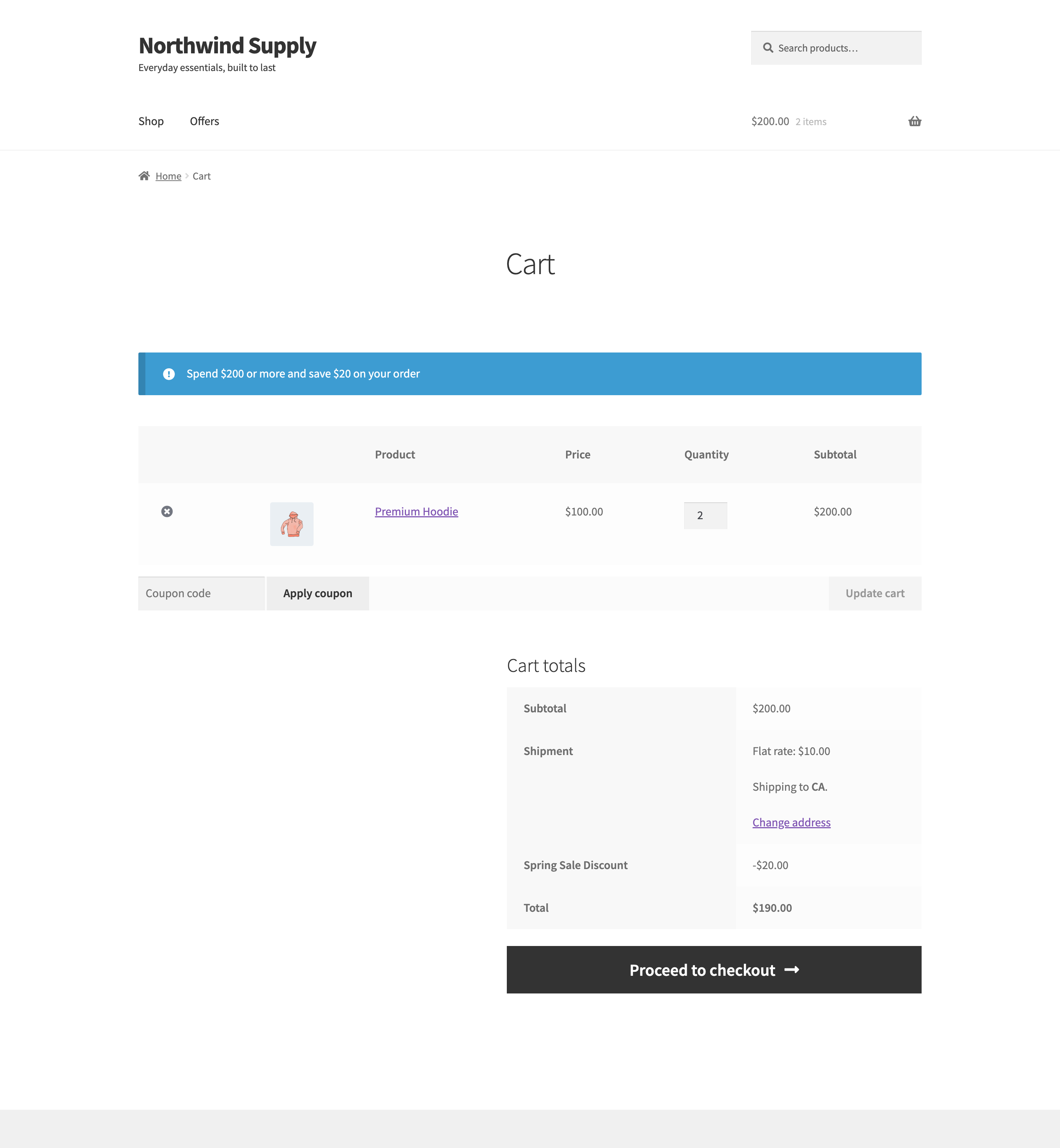
What the shopper sees. Shop and product pages are untouched — a cart rule never changes a shelf price. In the cart and at checkout the discount is its own line, named by your Discount Label. If you enable the offer message it appears above the cart table, which is a good place to say how much more is needed to qualify.
Because a cart rule is a line in the totals rather than a price change, it can only appear once there is a cart. Shoppers browsing the catalog see nothing until they start filling a basket — so put the threshold in the offer message, or advertise it on the offers page.
Cheapest Item Discount (Least Amount Product)
↑ Back to topReduces the cheapest item in the basket by a percentage you choose — the classic “three for two”, where the cheapest of the three is free. The plugin works out which item is cheapest every time the basket changes, so the discount follows the basket rather than a product you nominate.
- Discount for (Product/ Category) – Any product considers the whole basket; Category narrows it to one category, so the cheapest qualifying item is found only among those products.
- Select category – shown when you choose Category.
- Discount on the cheapest item – 100% for Free (%) – the percentage taken off that item. Required. Enter 100 to give it away.
- Apply the discount to – The single cheapest item in the cart, the default and how every rule created before version 2.1.0 behaves, or The cheapest items of every group of N, repeating as the cart grows, described in Repeating Cheapest Item Deals.
- Minimum product purchase to apply rule – how many items must be in the basket before the offer starts. For a three-for-two, enter 3.
- Minimum amount spent (subtotal amount) – a spend threshold instead of, or as well as, a quantity one.
- Minimum order done by customer – restricts the offer to customers who have already placed at least this many orders.
- Offer Notice – a short line shown with the offer.
Example. A rule taking 20% off the cheapest item, with a $100 Premium Hoodie, a $30 Wool Beanie and a $20 Baseball Cap in the basket, reduces the cap — the cheapest — to $16.00 and leaves the other two alone. Remove the cap and the discount moves to the beanie, which becomes $24.00, with nothing edited in your admin. Set Minimum amount spent to 500 and none of them is discounted, because the basket never reaches the threshold.
For a true three-for-two, set the percentage to 100 and Minimum product purchase to apply rule to 3. Three items in the basket, and the cheapest costs nothing. To give one item free in every three, however many the customer buys, use a repeating deal.
What the shopper sees. One line in the cart with its price struck through and reduced, the others unchanged, and the same figures at checkout. Because the target is recalculated on every basket change, adding a cheaper item moves the discount onto it.
Repeating Cheapest Item Deals
↑ Back to topSet Apply the discount to to The cheapest items of every group of N, repeating as the cart grows and a Least amount product discount rule keeps paying out as the basket grows. PricePulse lines up every item in the basket from the most to the least expensive, splits them into groups of N, and takes your percentage off the X cheapest items of each complete group. Items left over that do not make a complete group pay full price.
- Group size (N): every N items form a group – 2 for a buy-two deal, 3 for three for two.
- Discounted items per group (X): the X cheapest of each group – how many items in each group are discounted. It is always fewer than the group size.
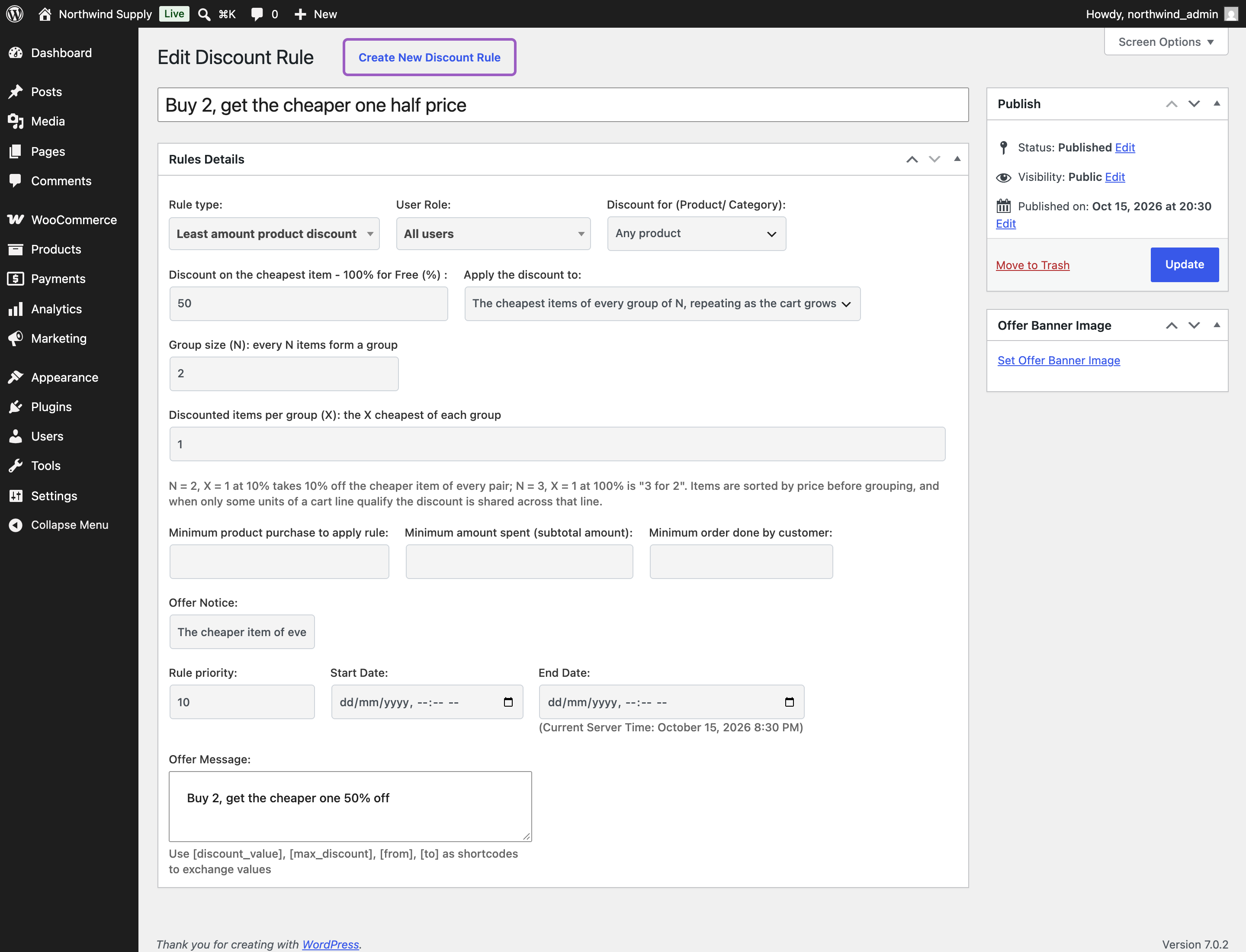
To set up buy 2, get the cheaper one half price:
- Go to: WooCommerce > PricePulse > Dynamic Rules and choose +Add New Rule.
- Rule type: choose Least amount product discount.
- Discount on the cheapest item – 100% for Free (%): enter 50.
- Apply the discount to: choose The cheapest items of every group of N, repeating as the cart grows.
- Group size (N): enter 2. Discounted items per group (X): enter 1.
- Publish your rule.
Example. With that rule, a basket holding a $100 Premium Hoodie, a $30 Wool Beanie and a $20 Baseball Cap pairs the hoodie with the beanie, so the beanie is half price at $15.00. The cap has no partner, so it stays at $20.00.
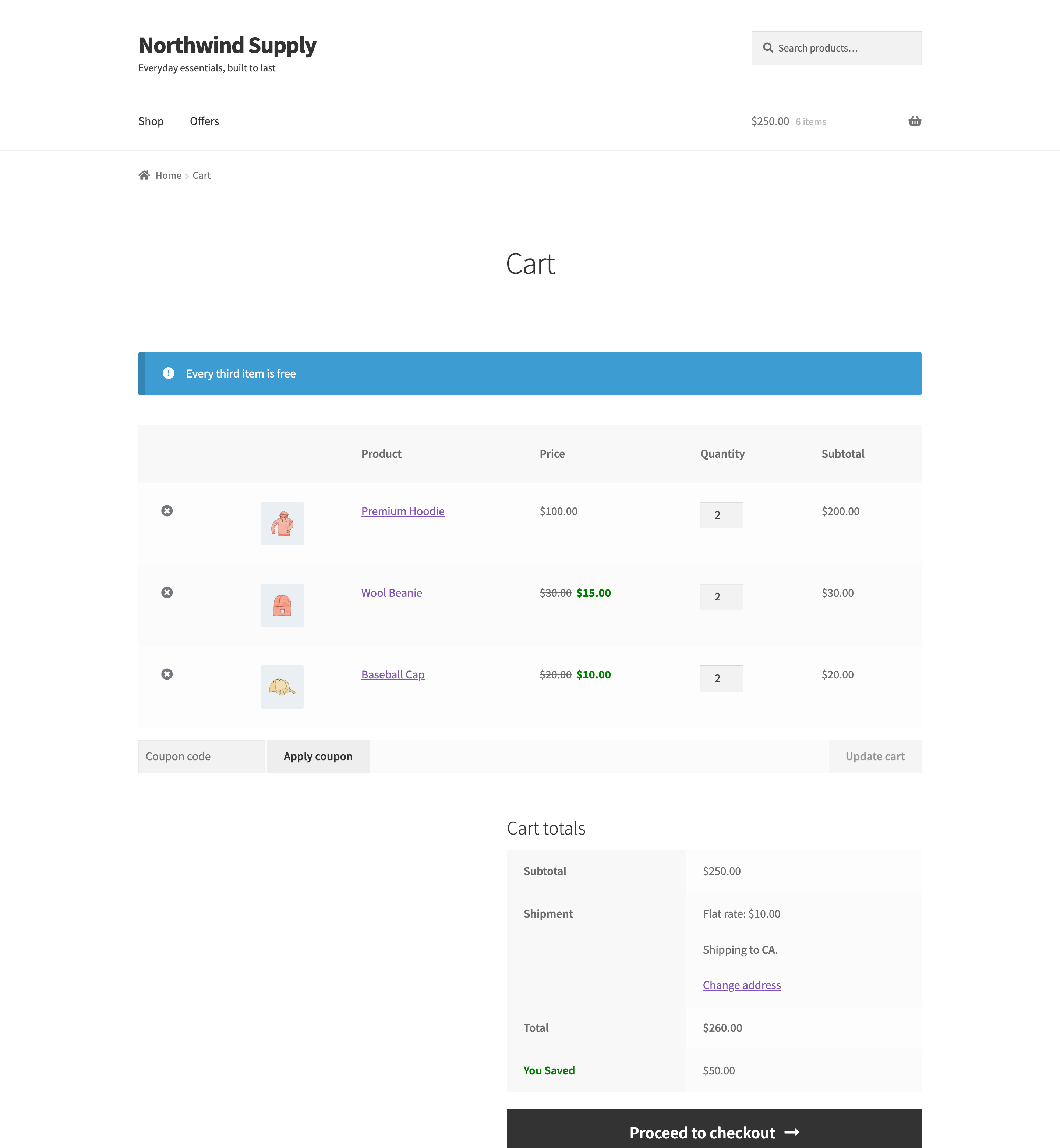
Three for two, repeating. Set the percentage to 100, Group size (N) to 3 and Discounted items per group (X) to 1. Two Premium Hoodies, two Wool Beanies and two Baseball Caps make two groups — hoodie, hoodie, beanie and beanie, cap, cap — so one beanie and one cap are free. When only one of two identical items is free, the saving is shared across that line, so the beanies show $15.00 each and the caps $10.00 each, and the basket comes to $250.00 instead of $300.00.
The minimum purchase, minimum spend and minimum order fields apply in this mode too: the deal starts only once the basket and the customer meet them. With Category chosen in Discount for (Product/ Category), only items from that category are grouped.
What the shopper sees. The discounted lines with their prices struck through and reduced, in the cart and at checkout. On the offers page a repeating rule describes itself — Buy 2, get the cheapest 1 at 50% off, or Buy 3, get the cheapest 1 free.
Can the cheapest-item discount repeat for every two or three items?
↑ Back to topYes. That is what Apply the discount to set to The cheapest items of every group of N, repeating as the cart grows does. A group size of 2 with one discounted item gives the cheaper item of every pair the discount; a group size of 3 at 100% is three for two. Items that do not complete a group pay full price, and rules created before version 2.1.0 keep discounting the single cheapest item until you change the setting.
Which One to Reach For
↑ Back to topUse Cart when the offer is about how much someone spends and you want the saving stated as a single figure in the totals. Use the cheapest item discount (Least amount product discount in the rule type menu) when the offer is about how many items they buy and you want the saving attached to a product line. A cart rule is easier to explain in a banner; a cheapest-item rule is more persuasive in the basket, because the shopper can see which item became free. For a deal that keeps paying out as the basket grows — every second item half price, every third free — use the cheapest-item rule’s repeating mode. To give a particular product away rather than the cheapest one, use a BOGO rule instead: see How to Setup BOGO for WooCommerce.
If a rule does not behave as you expect, the PricePulse FAQ lists the usual causes.

