
Discontinued Products Manager for WooCommerce adds a Discontinued stock status to your store. Use it for products you have stopped selling for good, so customers see a clear explanation and a few alternatives instead of an “Out of stock” label that suggests the item will come back.
Overview
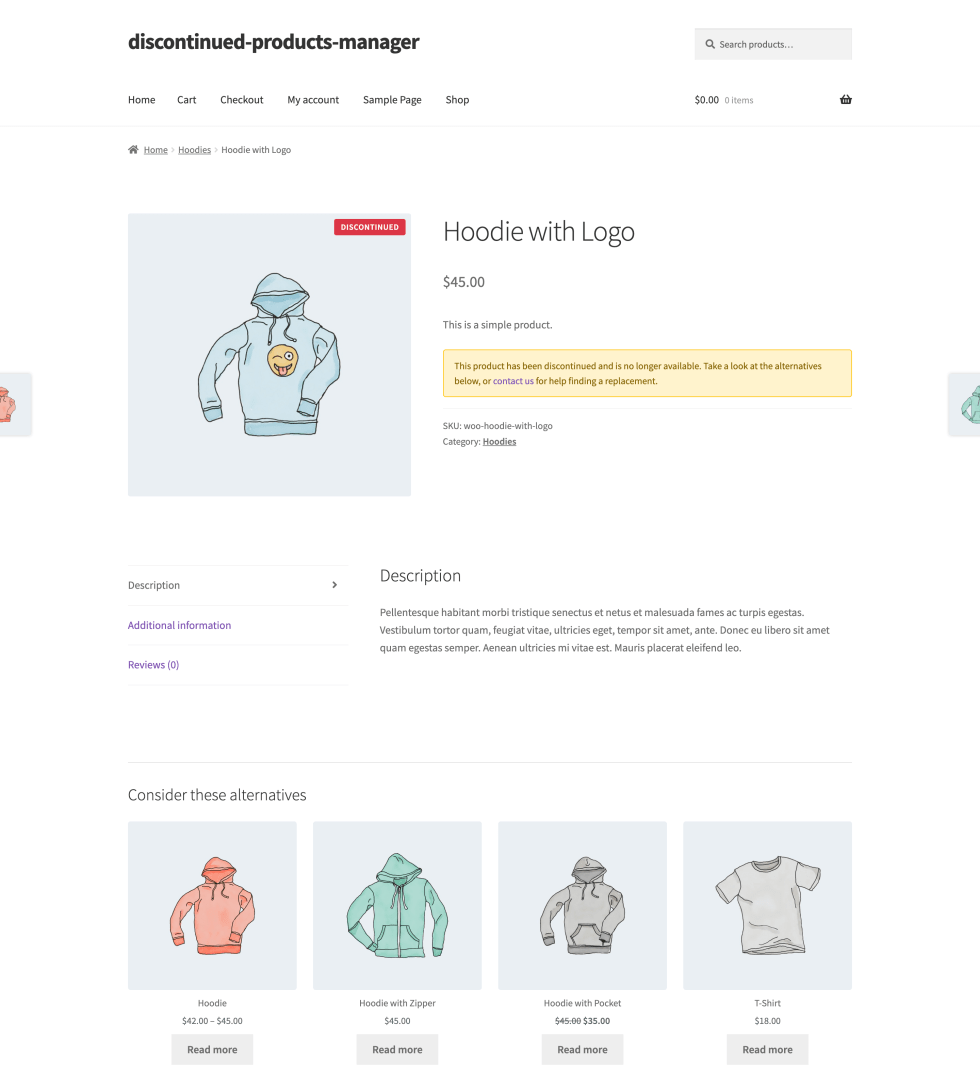
↑ Back to topDiscontinued Products Manager registers “Discontinued” as a stock status next to WooCommerce’s In stock, Out of stock, and On backorder. You can set it on a product or variation in the product editor, apply it to many products at once from the products list, or have it applied automatically when a product’s stock reaches zero. Customers can’t add a discontinued product to the cart, but its product page stays online and can show a badge, a message, and a grid of alternative products. You choose whether discontinued products also appear in your shop pages, search results, product widgets, and sitemaps, and whether visitors get redirected to a replacement.
Requirements
↑ Back to topTo use Discontinued Products Manager, you need:
- WordPress 6.4 or later
- PHP 7.4 or later
- WooCommerce 8.0 or later, installed and active
The extension doesn’t need any external account, API key, or third-party service.
Optional, and only needed if you want to manage discontinued products through an AI assistant:
- Discontinued Products Manager 1.1.0 or later, which adds the assistant tools
- The WordPress Abilities API, which ships with WordPress 6.9 and later
- A connector that exposes those tools to your assistant, such as MCP (Model Context Protocol)
- Enable Discontinued Products Manager turned on, since the tools are only registered while it is
Without these, everything else works exactly as described here.
The extension declares compatibility with High-Performance Order Storage (HPOS) and with the WooCommerce Cart and Checkout blocks.
Installation
↑ Back to topTo start using a product from WooCommerce.com, you can use the “Add to store” functionality on the order confirmation page or the My subscriptions section in your account.
- Navigate to My subscriptions.
- Find the Add to store button next to the product you’re planning to install.
- Follow the instructions on the screen, and the product will be automatically added to your store.
Alternative options and more information at:
Managing WooCommerce.com subscriptions.

Turn the extension on
↑ Back to topDiscontinued Products Manager is switched off when you first activate it, so nothing changes in your store until you’re ready.
- In the WordPress Admin dashboard (WP Admin), go to WooCommerce > Settings > Products > Discontinued Products. You can also select Settings under the extension’s name on the Plugins screen.
- On the General tab, turn on Enable Discontinued Products Manager.
- Select Save Changes.
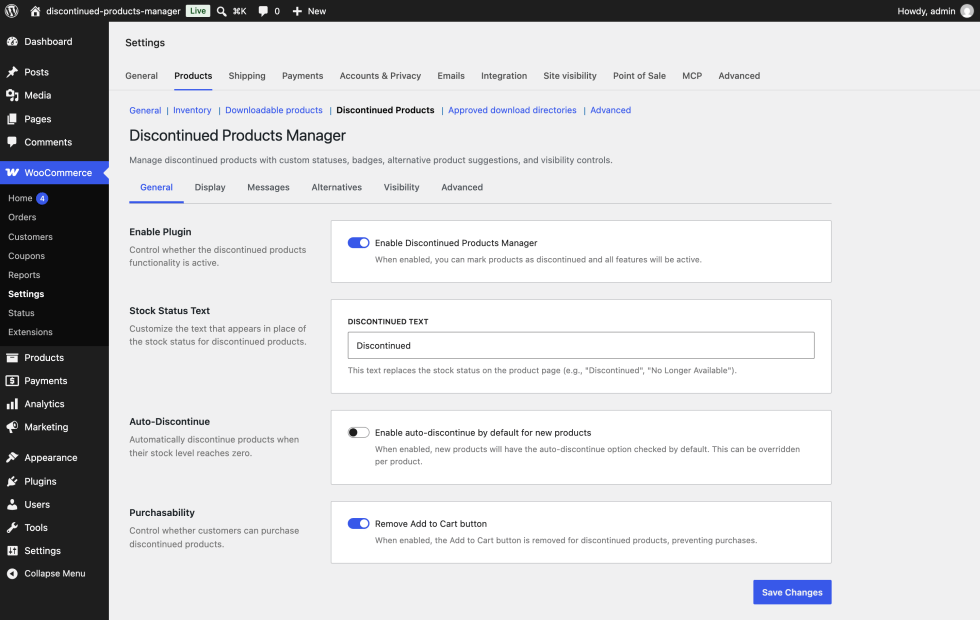
Once it’s on, you’ll find the Discontinued option in the product editor’s stock status field, a new Discontinued tab in the Product data panel, two new bulk actions on the products list, and a Discontinued Products widget on your WP Admin dashboard.
Usage
↑ Back to topThis section walks through every setting, then covers the day-to-day tasks: marking products as discontinued, setting per-product options, and restoring products.
Find the settings
↑ Back to topGo to WooCommerce > Settings > Products > Discontinued Products. The settings are split across six tabs: General, Display, Messages, Alternatives, Visibility, and Advanced.
You can move between tabs before saving. Save Changes, at the bottom of each tab, saves the settings from all six tabs at once. The settings screen stays available while the extension is switched off, so you can configure everything before you turn it on.
General tab
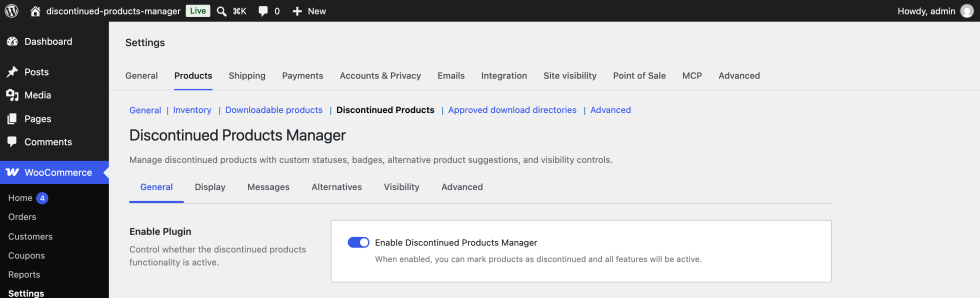
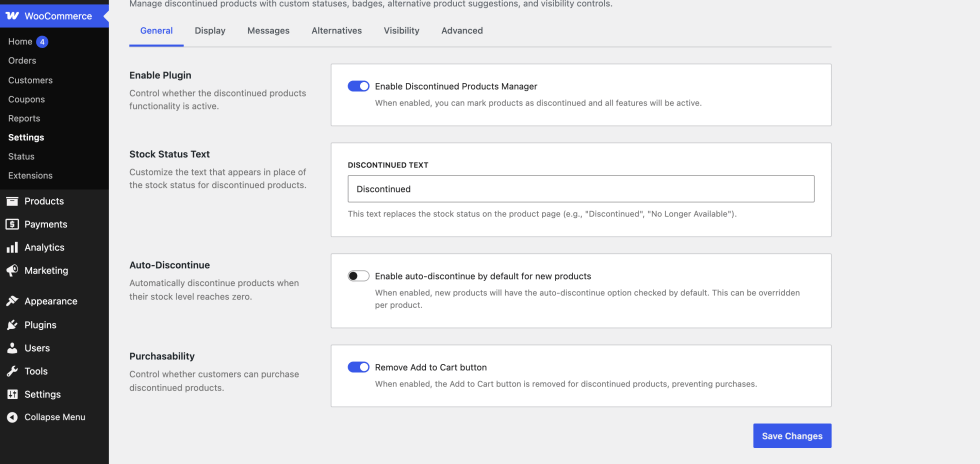
↑ Back to topEnable Discontinued Products Manager is the main switch for the extension. When it’s on, WooCommerce recognizes the Discontinued status and every feature on the other tabs works. When it’s off, the extension doesn’t change your storefront or product editor at all. It’s off by default.
Discontinued text is the label customers see where WooCommerce normally shows stock availability on the product page, such as “In stock” or “Out of stock”. The same text appears in the Stock column of your products list. The default is “Discontinued”. Change it if another phrase fits your store better, for example “No longer available” or “Retired”. If you clear the field, the extension falls back to “Discontinued”.
Remove Add to Cart button stops customers from buying discontinued products. When it’s on, discontinued products and discontinued variations can’t be added to the cart, and the Add to Cart button doesn’t appear on their product pages. It’s on by default, and most stores should leave it that way. If you turn it off, customers can buy discontinued products like any other product. WooCommerce’s normal stock checks still apply to products that track stock. This setting applies to every discontinued product in your store.
Display tab
↑ Back to topThe Display tab controls how discontinued products look on your storefront.
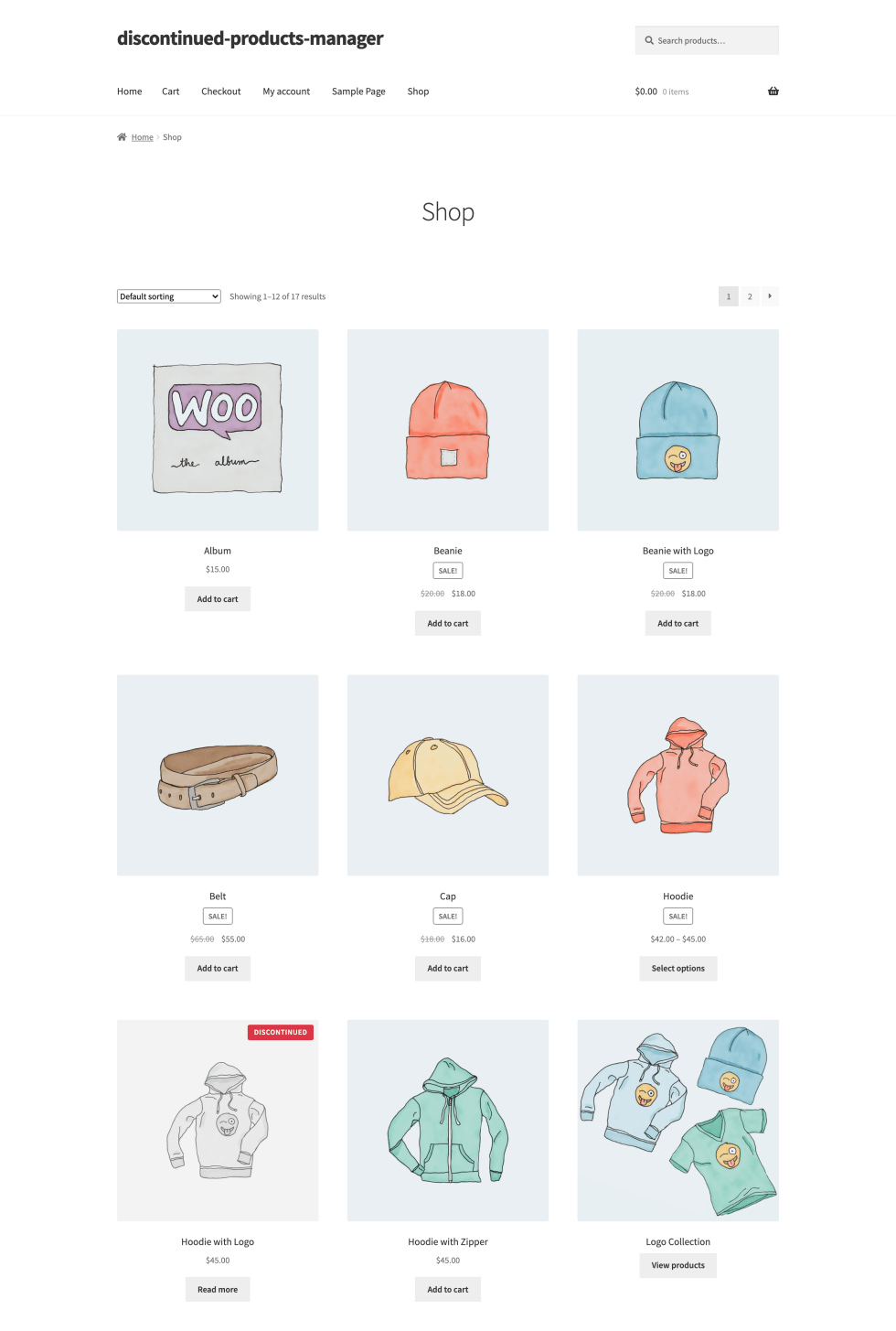
Show discontinued badge adds a small label on top of the product image. The badge appears in the product image gallery on the product page and on product cards in shop listings. It’s on by default. The four badge settings below only appear while this toggle is on.
Keep in mind that Hide from shop and category pages on the Visibility tab is also on by default. With both defaults in place, discontinued products don’t show up in shop listings, so you’ll mainly see the badge on the product page itself.
Badge text is the word or short phrase inside the badge. The default is “Discontinued”. The badge always displays in capital letters, so short text works best.
Badge position sets which corner of the image the badge sits in: Top Right, Top Left, Bottom Right, or Bottom Left. The default is Top Right. Pick a corner that doesn’t cover a sale flash or another label your theme adds.
Background color and Text color set the badge colors. The defaults are red (#dc3545) with white text (#ffffff). Choose a pair with strong contrast so the badge stays readable for everyone.
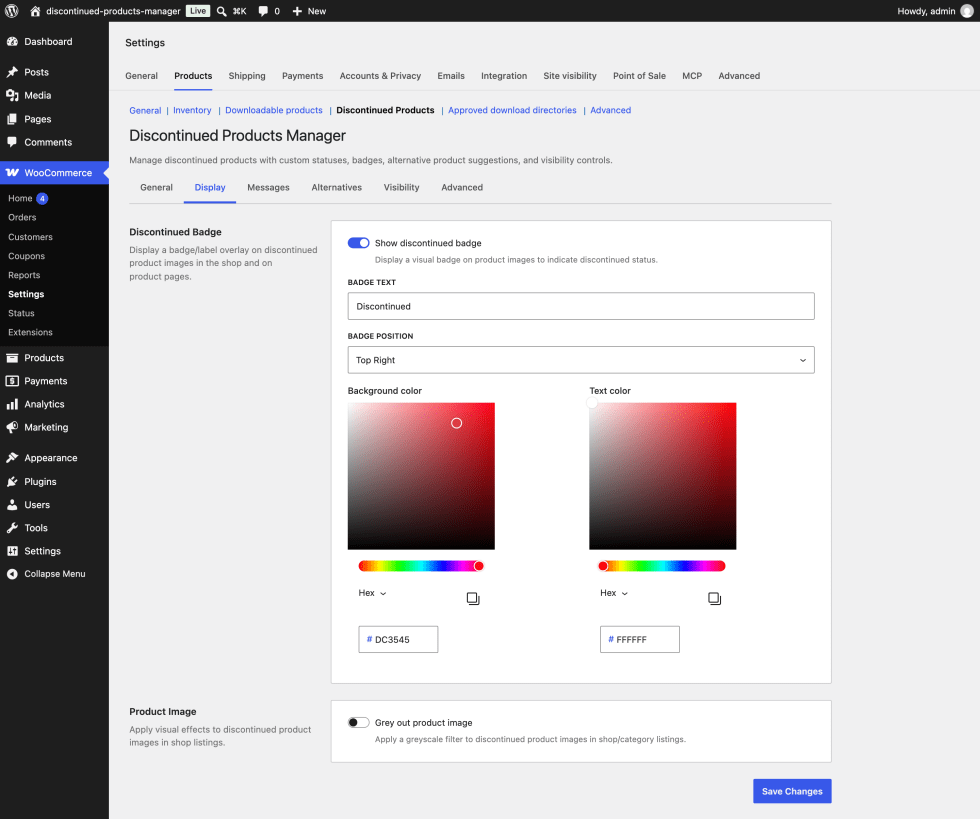
Grey out product image turns discontinued product images grayscale and slightly faded, which signals at a glance that the product is no longer for sale. It applies to product cards in shop listings and to the image gallery on the product page. Hovering over the image brings back some of the color. It’s off by default.
Messages tab
↑ Back to topThe Messages tab sets the message box shown on discontinued product pages.
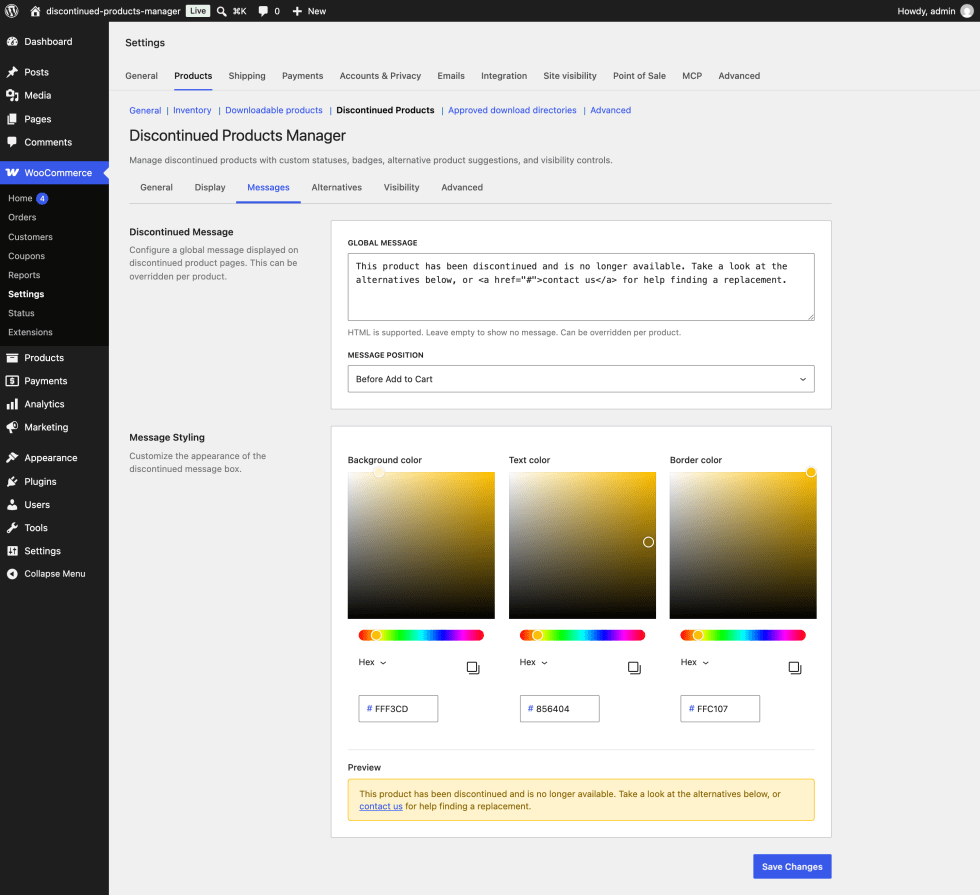
Global message is the text shown on every discontinued product page. Use it to explain what happened and what customers can do next, for example “This product has been discontinued. Take a look at the alternatives below, or contact us for help finding a replacement.” You can use basic HTML such as links, bold text, and paragraphs. Unsafe markup, like scripts, is removed when the page displays. The field is empty by default, and while it’s empty no message box appears. You can override this message on individual products from their Discontinued tab.
Message position sets where the message box appears in the product summary:
- Before Add to Cart (default) places it below the short description, where the Add to Cart button normally sits.
- After Title places it directly below the product name.
- After Price places it directly below the price.
Background color, Text color, and Border color style the message box. The defaults create a soft yellow notice: background #fff3cd, text #856404, and border #ffc107. Once the Global message field has text, a preview of the styled box appears below the color pickers.
Alternatives tab
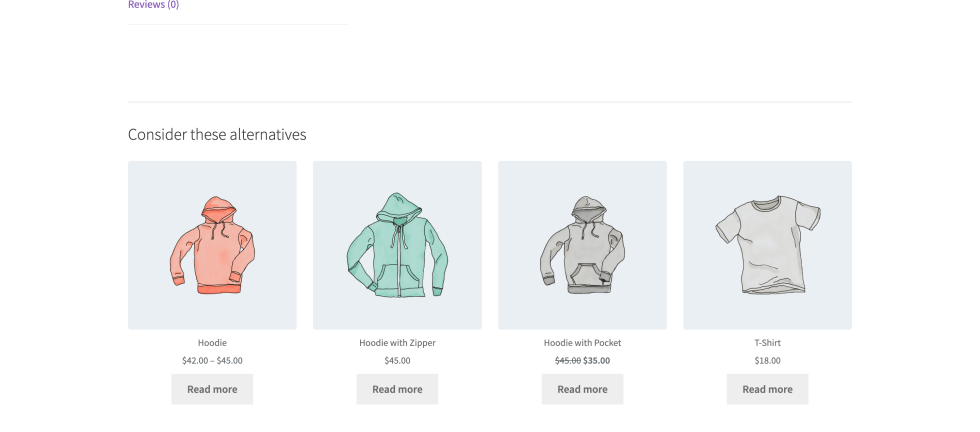
↑ Back to topThe Alternatives tab controls the grid of suggested products on discontinued product pages. Suggesting a replacement gives customers who land on a retired product a clear next step.
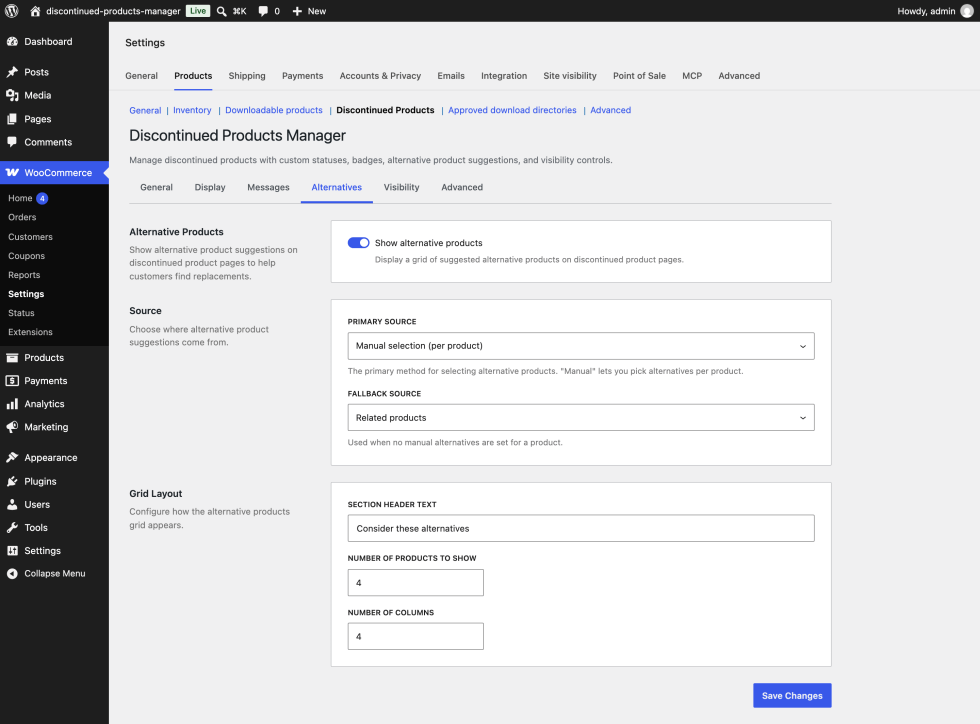
Show alternative products turns the grid on or off. The grid appears below the product details on discontinued product pages. It’s on by default, and the other settings on this tab only appear while it’s on. If no alternatives can be found for a product, the section doesn’t appear at all.
Primary source decides where suggestions come from:
- Manual selection (per product) (default) uses the products you pick in the Alternative products field on each product’s Discontinued tab. They show in the order you added them. The extension doesn’t re-check these picks, so if one of them is later discontinued or unpublished, update the list.
- Related products uses WooCommerce’s related products, which are based on shared categories and tags. Read more in Set up related products, up-sells, and cross-sells.
- Upsell products and Cross-sell products use the products listed on the Linked Products tab of the discontinued product.
- Same category picks a random selection of published products from the same categories as the discontinued product.
The automatic sources (everything except Manual selection) leave out other discontinued products.
Fallback source only appears when Primary source is Manual selection. It’s used for any discontinued product that has no manual picks, so you don’t need to fill in alternatives on every single product. The options are Related products (default), Upsell products, Cross-sell products, and Same category.
Section header text is the heading above the grid. The default is “Consider these alternatives”. If you clear the field, the grid appears without a heading.
Number of products to show sets the maximum number of suggestions, from 1 to 12. The default is 4. The limit applies to manual picks too.
Number of columns sets the grid layout on larger screens, from 1 to 6 columns. The default is 4. On tablets, grids with 4 or more columns switch to 2 columns, and on phones the grid shows one product per row.
Visibility tab
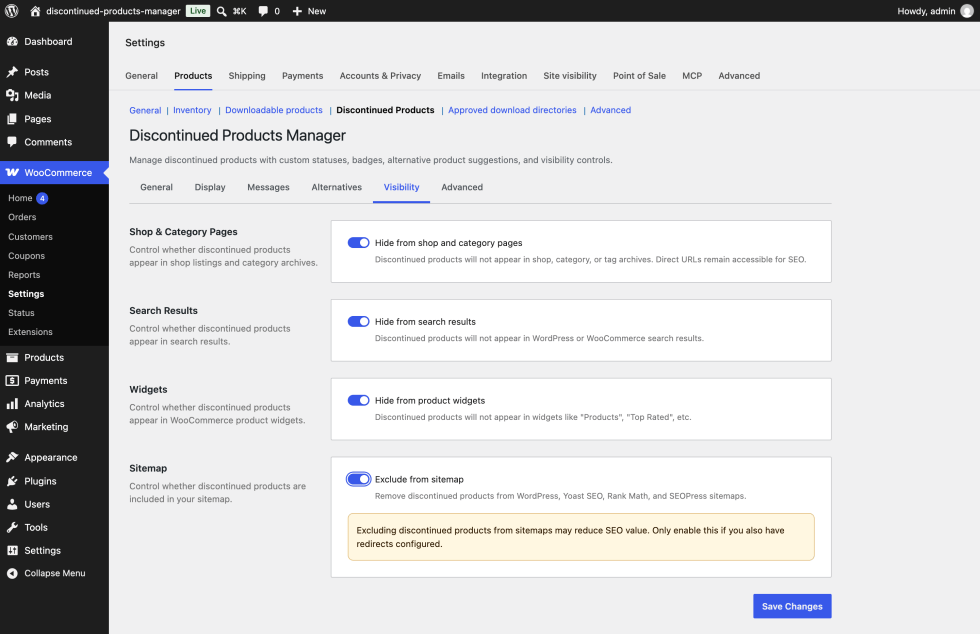
↑ Back to topThe Visibility tab decides where discontinued products can still be found. None of these settings take the product page offline. Anyone with the link, including search engines, can still reach it, which protects the search engine optimization (SEO) value the page has built up.
Hide from shop and category pages removes discontinued products from your shop page and from product category and tag archives. It’s on by default. Turn it off if you want discontinued products to stay in your catalog, for example as an archive of past collections.
Hide from search results removes discontinued products from your store’s search results. It’s on by default.
Hide from product widgets removes discontinued products from the classic WooCommerce Products widget. It’s on by default.
Exclude from sitemap removes discontinued products from the XML sitemaps generated by WordPress, Yoast SEO, Rank Math, and SEOPress. It’s off by default. Search engines use sitemaps to discover pages, so excluding pages you still want indexed can cost you traffic. A warning appears when you turn this on. It makes most sense when you also redirect discontinued products to replacements.
The extension keeps a list of discontinued products to hide, and refreshes it whenever you save a product, change settings, or use a bulk action. If your site uses page caching, clear the cache after discontinuing products so visitors see the change.
Advanced tab
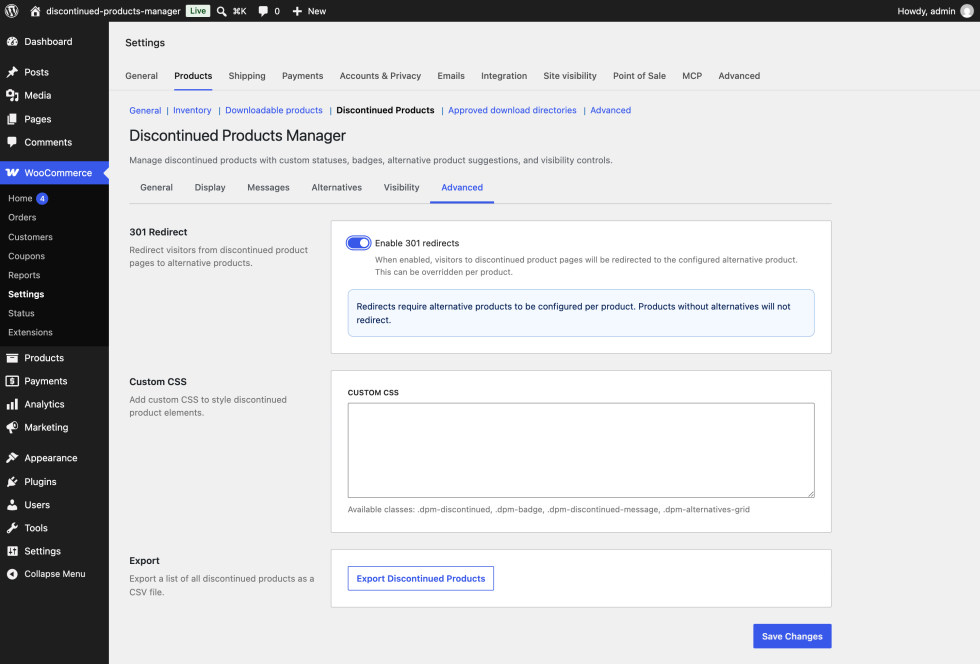
↑ Back to topEnable 301 redirects sends visitors who open a discontinued product page straight to another product, using a permanent (301) redirect. Search engines treat a 301 redirect as a sign that the old page has moved, so ranking signals pass to the new page over time. It’s off by default.
Redirects need two things. First, turn on this setting. Second, on each product you want to redirect, tick Enable redirect on its Discontinued tab. Once a product has been saved with that box unticked, it doesn’t redirect, even with this setting on.
The visitor goes to the product entered in Redirect to product ID on the product’s Discontinued tab. If that field is empty, they go to the first product in its Alternative products list. The target must be a published product. If there’s no valid target, there’s no redirect and the discontinued product page displays as usual. Automatic alternative sources, like Related products, are never used as redirect targets. A reminder about this appears below the toggle when you turn it on.
Custom CSS lets you add your own styles for discontinued product elements. Your CSS loads on product pages, the shop page, and product category and tag archives. The main classes are .dpm-discontinued (on each discontinued product), .dpm-badge, .dpm-discontinued-message, and .dpm-alternatives-grid. For badge and message colors, the settings on the Display and Messages tabs are the easier route.
Export Discontinued Products downloads a comma-separated values (CSV) file of every discontinued product, ready to open in a spreadsheet. The file is named with today’s date and includes these columns: ID, Name, SKU, Stock Status, Discontinued Date, Discontinued By (the ID of the user who made the change), and Alternative Products (product IDs separated by semicolons).
Mark a product as discontinued
↑ Back to topYou can mark products as discontinued in three ways. Whichever you use, the extension records the change in its activity log along with who made it and when.
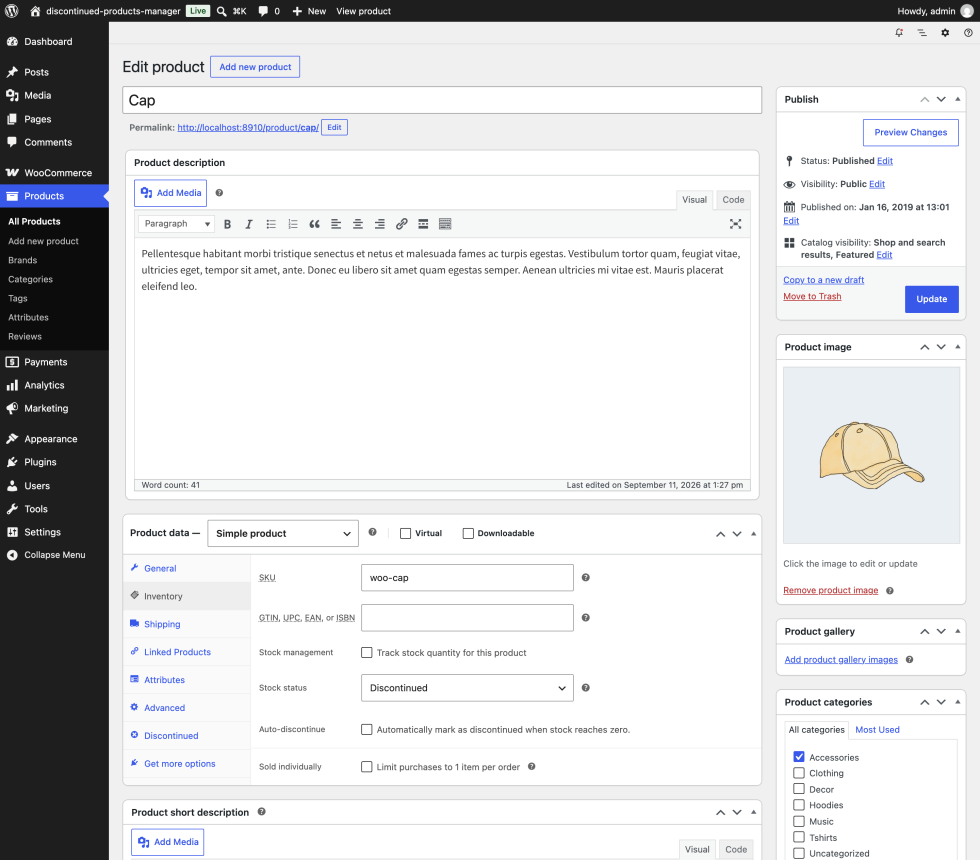
In the product editor. Go to Products > All Products and edit the product. In the Product data panel, open the Inventory tab, set Stock status to Discontinued, and select Update. WooCommerce only shows the stock status field when stock tracking is turned off for the product. For products that track stock, use the bulk action below. Adding and managing products explains the Inventory tab in more detail.
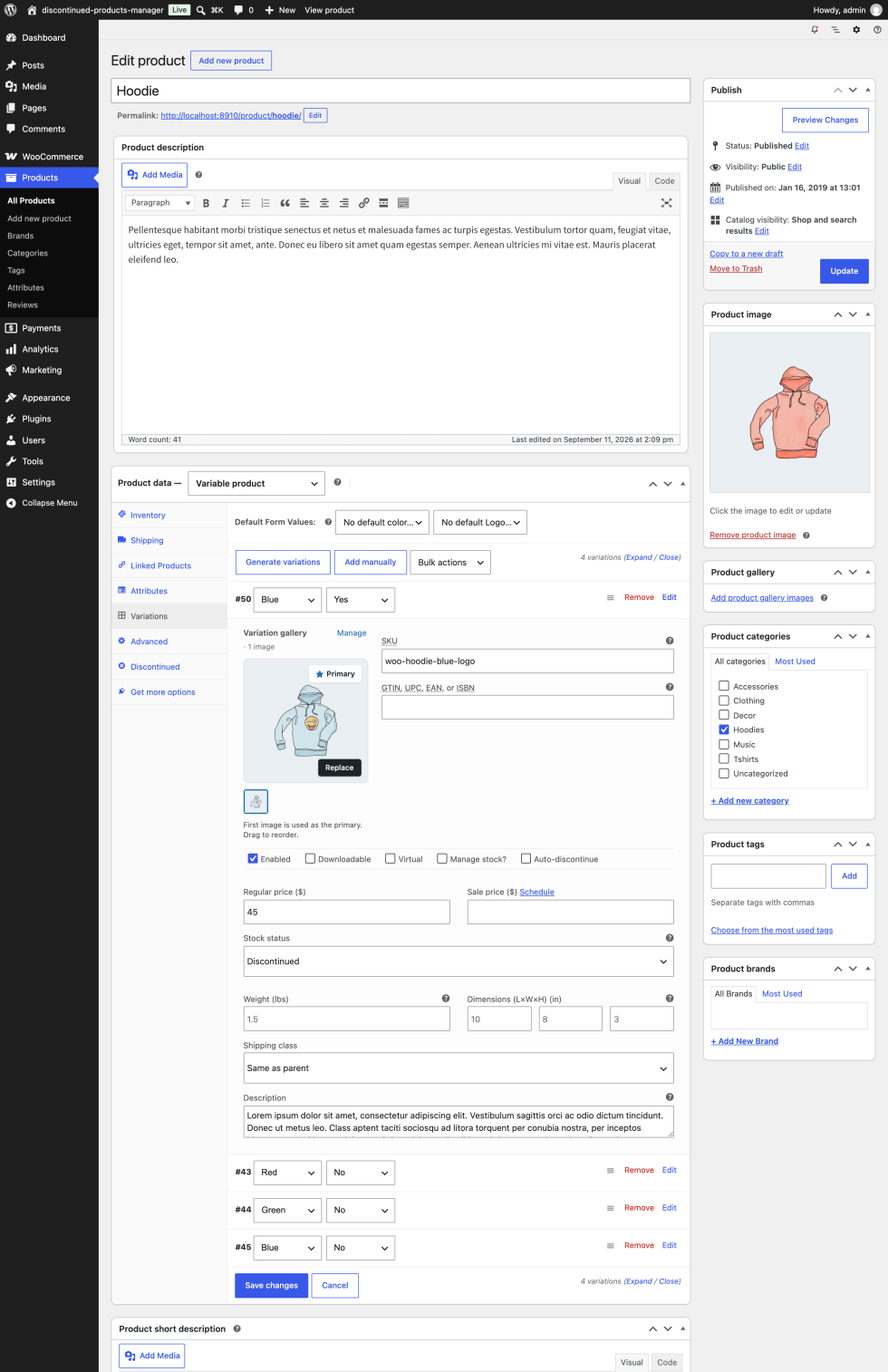
For a single variation. Edit the variable product, open the Variations tab, and expand the variation. Set its Stock status to Discontinued and select Save changes. As with simple products, the stock status field appears when Manage stock is unticked for that variation. When every variation of a product is discontinued, the parent product shows as Discontinued too.
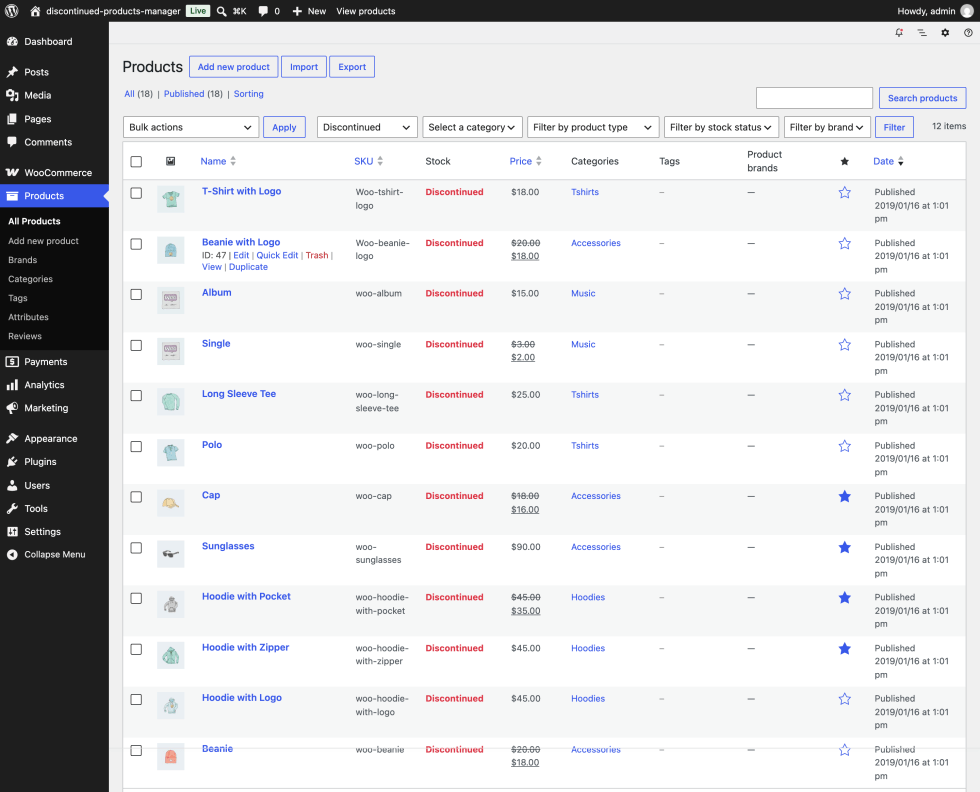
In bulk. Go to Products > All Products, tick the products you want, choose Mark as Discontinued from the Bulk actions menu, and select Apply. A notice confirms how many products changed. This works for products that track stock as well as those that don’t. Products that are already discontinued are skipped.
Once a product is discontinued, customers can’t add it to the cart (unless you’ve turned off Remove Add to Cart button), and the display, message, alternatives, visibility, and redirect settings apply to it.
Discontinue products automatically when stock runs out
↑ Back to topAuto-discontinue is useful when you’re selling off the last units of a product you won’t restock. The product sells normally until it runs out, then switches to Discontinued on its own.
To set it up, edit the product and open the Inventory tab. Make sure the product tracks stock with a quantity, then tick Auto-discontinue and select Update. For a variation, tick the Auto-discontinue checkbox in that variation’s options row on the Variations tab, then select Save changes.
From then on, whenever the stock quantity changes and lands at zero or below, the product switches to Discontinued. That covers stock reduced by an order and stock you edit by hand. A few things to know:
- The extension remembers the status the product had just before, so a later restore can put it back.
- Auto-discontinue ignores backorder settings. A product that allows backorders still switches to Discontinued at zero stock.
- Ticking the box on a product that’s already at zero doesn’t change it straight away. The switch happens the next time the stock quantity changes.
- The activity log records these changes as “Auto discontinued”, so you can tell them apart from manual changes.
Set per-product options on the Discontinued tab
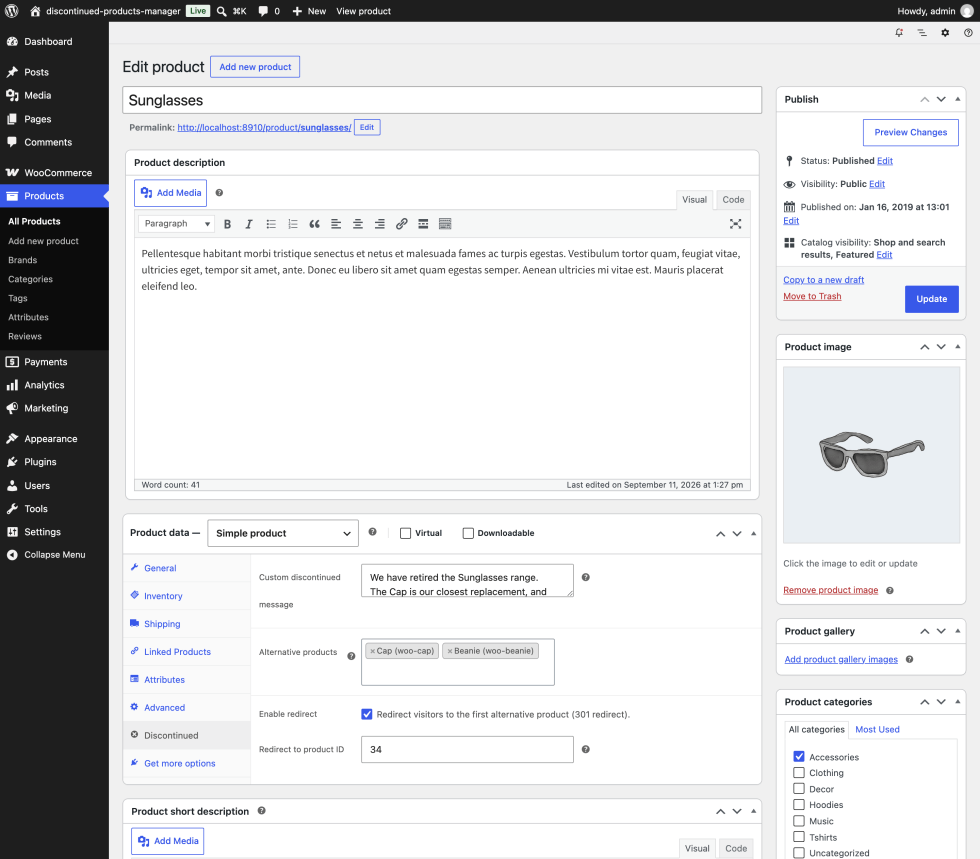
↑ Back to topEvery product gets a Discontinued tab in the Product data panel. You can fill it in before or after you discontinue the product. The options only take effect while the product is discontinued.
Custom discontinued message replaces the global message for this product only. Use it for details that only apply here, like the name of the replacement model or how long spare parts will stay available. HTML is allowed. Leave it empty to use the global message from the Messages tab.
Alternative products is where you pick suggestions for this product. Start typing a product name and choose from the list. You can pick products and individual variations. These picks are used when Primary source is Manual selection, and the first one is the redirect target when Redirect to product ID is empty.
Enable redirect turns on the 301 redirect for this product. It only works when Enable 301 redirects is also on in the Advanced tab.
Redirect to product ID is the ID of a specific product to send visitors to. To find a product’s ID, hover over its name in Products > All Products. Leave it empty to redirect to the first product in Alternative products.
Restore a discontinued product
↑ Back to topIf you bring a product back, you can restore it in two ways.
In the product editor. Open the Inventory tab, choose another stock status such as In stock, and select Update. This works for products that don’t track stock, where the stock status field is visible.
In bulk. Go to Products > All Products, tick the products, choose Restore from Discontinued from the Bulk actions menu, and select Apply. Each product goes back to the stock status it had before it was discontinued, or to In stock if that isn’t known. For products that track stock, WooCommerce then sets the status from the stock quantity as usual.
When a product is restored, the badge, message, alternatives, and visibility rules stop applying to it, and the activity log records a Restored entry. Its Discontinued tab options stay saved in case you need them again.
Products list tools
↑ Back to topOn Products > All Products, the extension adds a few helpers:
- The Stock column shows your Discontinued text in red for discontinued products.
- A stock status dropdown next to the other list filters lets you choose Discontinued and select Filter to see only discontinued products.
- The Mark as Discontinued and Restore from Discontinued bulk actions described above.
Dashboard widget
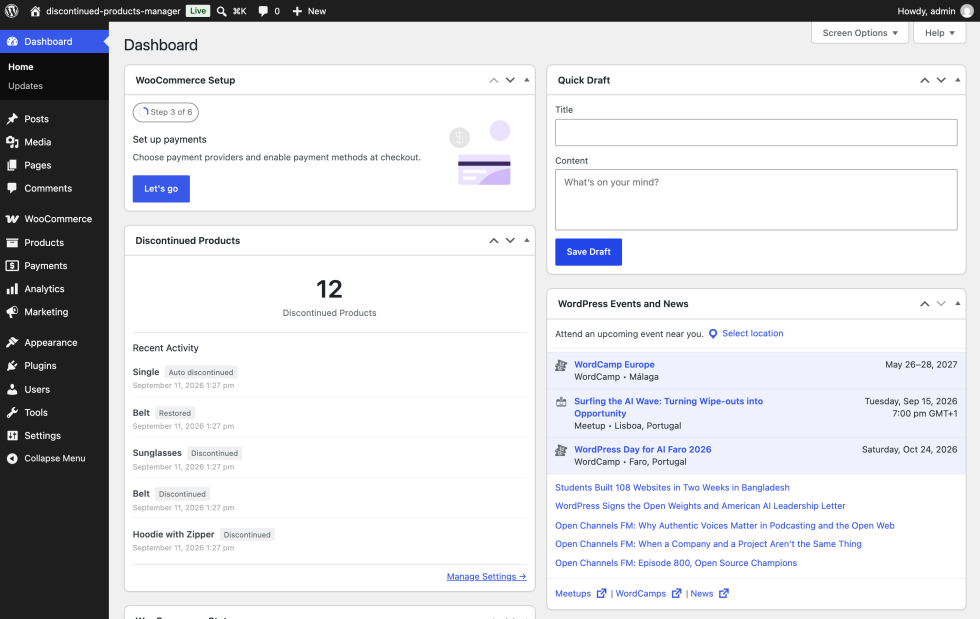
↑ Back to topThe Discontinued Products widget on your WP Admin dashboard gives you a quick overview. It shows the total number of discontinued products and the five most recent changes, each with the product name, the action (Discontinued, Restored, or Auto discontinued), and the date. A Manage Settings link takes you to the settings screen. The widget is visible to users who can manage WooCommerce, such as Administrators and Shop managers.
Use an AI assistant
↑ Back to topFrom version 1.1.0, Discontinued Products Manager publishes its tools through the WordPress Abilities API. That lets an AI assistant such as Claude or ChatGPT work with your discontinued products in plain language. The extension doesn’t talk to the assistant itself. It publishes the tools, and a connector makes them available.
MCP (Model Context Protocol) is the W7S connector for this. Install it, go to WooCommerce > Settings > MCP, and connect Claude or ChatGPT from the Connection tab. The Add tools tab lists the tools this extension publishes; add the ones you want your assistant to use. Each connection runs under a WooCommerce API key, and the key’s permission is enforced on every call. An assistant using a read-only key can look things up but can’t change anything, so start with one and create a key with write access when you want the assistant to make changes.
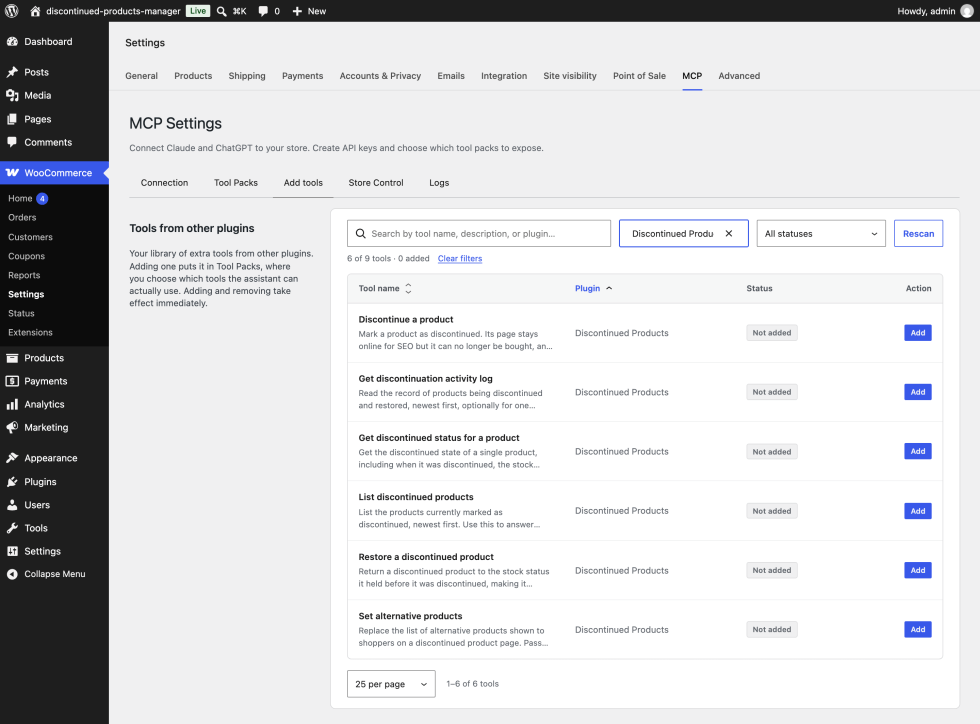
A few things apply to every tool:
- The tools only exist while Enable Discontinued Products Manager is on. Switch it off and the assistant no longer sees them.
- They only work for users who can manage WooCommerce, such as Administrators and Shop managers. The WooCommerce API key your connector uses needs to belong to one of those users.
- They’re grouped in a category called Discontinued Products.
- They identify products by ID. When you refer to a product by name, the assistant needs another way to find its ID, such as the product tools in MCP (Model Context Protocol).
Tools that look things up
These three tools only read. They never change your store.
List discontinued products returns the products that are currently discontinued, up to 100 at a time, sorted by product date with the newest first. For each one it gives the name, SKU, product type, stock status, product page address, when it was discontinued, the stock status it would go back to if restored, and the IDs of its alternative products. Try asking “Which products are discontinued right now?” or “How many discontinued products do I have?”
Get discontinued status for a product returns the same details for a single product, whether or not it’s discontinued. Assistants use it to check a product’s current state before changing it. Try asking “Is product 123 discontinued, and what does it suggest instead?”
Get discontinuation activity log reads the most recent entries from the activity log, newest first, up to 100 at a time. It covers every product or just one. Each entry shows the product, the action (discontinued, restored, or auto discontinued), the stock status before and after, the note recorded with the change, and when it happened. Try asking “What have we discontinued this month, and what notes were left?”
Tools that make changes
These three tools change your store, so they need an API key with write access.
Discontinue a product marks a product as discontinued, with the same result as the Mark as Discontinued bulk action. It works for products that track stock too, and it remembers the product’s previous stock status so it can be restored later. In the same step, the assistant can set the product’s alternative products, which replaces any list already there, and add a note to the activity log. Without a note, the log entry reads “Discontinued via an AI client.” If the product is already discontinued, the status doesn’t change and no second log entry is written, though any alternatives passed along are still saved. Try asking “Discontinue product 123, suggest products 456 and 789 instead, and note that it was replaced by the 2027 model.”
Restore a discontinued product returns a product to the stock status it had before it was discontinued, or to In stock if none was recorded. For products that track stock, WooCommerce then sets the status from the stock quantity as usual. The assistant can add a note, and without one the log entry reads “Restored via an AI client.” If the product isn’t discontinued, nothing changes. Try asking “Restore product 123. We’re bringing it back for the holidays.”
Set alternative products replaces the Alternative products list on a product, the same list you see on its Discontinued tab. It works on any product, so you can set up alternatives before discontinuing something. Every ID has to be an existing product other than the product itself. If any ID fails that check, nothing is saved and the assistant is told which IDs were the problem. An empty list clears the alternatives. With Primary source set to Manual selection, the product page then uses your Fallback source instead. Try asking “Set the alternatives for product 123 to products 456, 789, and 1011.”
Every change made through these tools shows up in the Discontinued Products dashboard widget and the activity log, just like changes made in WP Admin.
Deactivate and reactivate the extension
↑ Back to topWhen you deactivate Discontinued Products Manager from the Plugins screen, it moves every discontinued product to Out of stock, so nothing becomes purchasable while the extension is off. It also keeps a list of those products.
When you activate it again, products on that list that are still Out of stock go back to Discontinued. If you changed a product’s status while the extension was off, your change stays. Messages, alternatives, and redirect settings are kept throughout. The only thing that doesn’t survive the round trip is the Discontinued Date for those products, which will be blank in exports afterward.
Use cases
↑ Back to topRetire a product that has a direct replacement
↑ Back to topA kitchenware store replaces its Classic kettle with a new model. The store wants anyone who finds the old kettle to see the new one straight away, without losing the old page.
- Edit the Classic kettle. On its Discontinued tab, add the new kettle under Alternative products and write a Custom discontinued message such as “The Classic kettle has been replaced by the Classic 2. It has the same design with a faster boil time.”
- On the Inventory tab, set Stock status to Discontinued, or use the Mark as Discontinued bulk action if the kettle tracks stock.
- In the settings, keep the defaults: Remove Add to Cart button on, Primary source set to Manual selection, and Hide from shop and category pages and Hide from search results on.
The old page stays online with the message and the new kettle right below it, while the shop and search results only show products customers can buy.
Sell the last units, then switch automatically
↑ Back to topA clothing boutique is clearing out a line of knitwear it won’t reorder. It wants to keep selling what’s left without checking stock every day.
- On each knitwear product (or each variation), make sure stock is tracked with a quantity and tick Auto-discontinue.
- On the Messages tab, set a Global message such as “This style has sold out and won’t be restocked. You might like one of these instead.”
- On the Alternatives tab, set Primary source to Same category so suggestions come from the rest of the knitwear range.
Each item sells normally until the last unit goes. At that point it switches to Discontinued, disappears from the shop, and its page points customers to similar styles.
Keep an archive of past limited editions
↑ Back to topAn art print shop releases numbered limited editions. Once an edition sells out, the shop wants it to stay in the catalog as a portfolio piece rather than vanish.
- On the General tab, set Discontinued text to “Edition sold out” and leave Remove Add to Cart button on.
- On the Display tab, set Badge text to “Sold out” and turn on Grey out product image.
- On the Visibility tab, turn off Hide from shop and category pages and Hide from search results.
- On the Alternatives tab, set Primary source to Related products.
Past editions stay in the shop with a gray image and a badge, so visitors can browse the full body of work, and each page suggests prints that are still available.
Discontinue one size or color of a variable product
↑ Back to topA shoe store stops making its running shoe in size 13 but keeps every other size.
- Edit the running shoe and open the Variations tab.
- Expand the size 13 variation. If it doesn’t track stock, set its Stock status to Discontinued. If it does track stock, tick Auto-discontinue so it switches when the last pair sells.
- Select Save changes.
The rest of the product stays on sale. When a customer picks size 13, they see your Discontinued text and can’t add it to the cart. The badge, message, and alternatives grid only appear once every variation of the product is discontinued.
Point search traffic to a successor product
↑ Back to topAn electronics store has an old headphone model whose page still gets a lot of search traffic. The store wants that traffic to land on the current model.
- On the Advanced tab, turn on Enable 301 redirects.
- Edit the old headphones. On the Discontinued tab, tick Enable redirect and enter the new model’s ID in Redirect to product ID.
- Mark the old headphones as discontinued.
- Optionally, on the Visibility tab, turn on Exclude from sitemap so search engines stop being pointed at the old address.
Visitors and search engines that open the old page go straight to the new model.
Working with other W7S extensions
↑ Back to topDiscontinued Products Manager handles what happens to a product once you stop selling it. These combinations from the W7S catalog cover the jobs around that moment: telling a temporary gap apart from a permanent one, winning over customers who wanted the old product, and keeping the rest of the catalog tidy. None of them need special setup between the extensions. Each one works side by side with the settings described above.
Give loyal customers a reason to switch. Customers who liked a product are the ones most likely to leave when it disappears. Smartlink Discount URLs creates links that add products to the cart and apply a discount in one click. Build a smartlink that adds the replacement product with a returning-customer discount, then paste it as a link into the Custom discontinued message on the old product’s Discontinued tab, which accepts HTML. Anyone who lands on the retired page from a bookmark, an old email, or a search result gets a direct route to the new product with an incentive attached. Smartlink analytics then show how many took it up. The same link works in an email to past buyers of the old product.
Pause the store for a week, retire a product for good. Not every gap is permanent, and treating a temporary one as permanent hides products you’ll want back. Store Vacation Mode switches off purchasing across the whole store while every page stays online, which suits holidays and restocking breaks. Use it for those pauses, keep Out of stock for individual items you’ll restock, and save Discontinued for products that won’t return. The difference matters because the Visibility tab defaults remove discontinued products from your shop and search results, and Auto-discontinue switches products over the moment their stock hits zero. Both extensions leave product pages online, so your search rankings are safe either way.
Delete what’s dead, keep what still earns traffic. A catalog clean-up is a good time to decide which old products to remove and which to retire. Shop Cleaner finds and removes stale products in bulk, filtered by status, stock status, category, tag, and date, and can run on a schedule. Use it for drafts, duplicates, and products nobody ever visited. Use Discontinued Products Manager for retired products whose pages still get visits or links, so that traffic lands on a message and alternatives instead of a 404. Before you deactivate Discontinued Products Manager, pause any scheduled Shop Cleaner product clean-up that targets Out of stock products, because deactivation moves every discontinued product to Out of stock.
Keep a browsable archive in order. If you keep discontinued products visible as an archive, as in the limited editions use case above, you’ll want current products to come first. Sort Product Catalog adds drag-and-drop ordering for the shop, categories, and tags, plus default sorting rules per category. With Hide from shop and category pages turned off, drag your current products to the top of each category, or set a category rule for an archive category, so shoppers see what they can buy before what they can only browse.
Retire one size without confusing shoppers. When you discontinue a single size of a variable product, the size guide on that product can still point customers at it. Product Size Charts & Guides adds size charts and guides to product pages. After you set the variation’s stock status to Discontinued, or after Auto-discontinue switches it over, update the chart so it stops recommending a size customers can’t add to the cart.
Explain a price change on the replacement. Successor products often cost more than the model they replace, and customers arriving from the alternatives grid or a redirect notice. RRP / MSRP Product Pricing shows a recommended or manufacturer’s suggested retail price label on product pages. Add the RRP to the products you list under Alternative products, so the new price reads as a saving against the manufacturer’s price rather than a jump from the old one.
Find what to retire, then retire it. Deciding which products to discontinue usually starts with sales and stock data. MCP (Model Context Protocol) connects Claude or ChatGPT to your store with tools for products, orders, and reports, alongside the Discontinued Products Manager tools described in Use an AI assistant. That puts the whole job in one conversation. Ask which products are selling slowest, decide which ones you won’t restock, and have the assistant discontinue them, suggest alternatives from your best sellers, and leave a note in the activity log explaining why. For products with units left to sell, tick Auto-discontinue instead, so each one switches over when the last unit goes.
FAQ
↑ Back to topWhat’s the difference between Out of stock and Discontinued?
↑ Back to topOut of stock tells customers a product isn’t available right now and suggests it might come back. Discontinued tells them it’s gone for good. Discontinued products also get features Out of stock products don’t, like a message, alternative product suggestions, visibility controls, and optional redirects.
Can customers still reach a discontinued product’s page?
↑ Back to topYes. The Visibility settings remove discontinued products from listings, search, widgets, and sitemaps, but the product page itself stays online at its usual address. The only exception is a product you’ve set up to redirect to another product.
What happens if I switch off Enable Discontinued Products Manager?
↑ Back to topWooCommerce stops recognizing the Discontinued status, so your discontinued products are treated as in stock and customers can buy them. The badge, message, alternatives, and visibility rules also stop. If you want to take the extension out of use, deactivate it from the Plugins screen instead, which moves discontinued products to Out of stock first.
What happens when I deactivate or delete the extension?
↑ Back to topDeactivating moves every discontinued product to Out of stock and remembers which products they were. Reactivating turns those products back into Discontinued, as long as you haven’t changed their status in the meantime. Deleting the extension doesn’t remove its data: the settings, the per-product options, and the activity log stay in your database.
Can I discontinue a single variation?
↑ Back to topYes. Set the variation’s stock status to Discontinued, or tick Auto-discontinue on the variation so it switches when its stock runs out. The rest of the product stays on sale.
I ticked Auto-discontinue, but a product with zero stock didn’t change. Why?
↑ Back to topAuto-discontinue reacts to changes in the stock quantity. If the product was already at zero when you ticked the box, it switches the next time its stock quantity changes. To discontinue it right away, use the Mark as Discontinued bulk action.
Does Auto-discontinue respect backorders?
↑ Back to topNo. A product with Auto-discontinue ticked switches to Discontinued when its stock reaches zero, even if it allows backorders. Leave Auto-discontinue unticked on products you want to keep selling on backorder.
A discontinued product still shows in Related products on another product page. Why?
↑ Back to topHide from shop and category pages covers your shop, category, and tag pages, but it doesn’t apply on individual product pages. That means a discontinued product can still appear in the related products or upsells section of another product. For upsells, remove it from that product’s Linked Products tab. Related products are chosen automatically by WooCommerce based on shared categories and tags.
Where can I see a history of changes?
↑ Back to topThe Discontinued Products widget on your WP Admin dashboard shows the five most recent changes. The full activity log is stored in your database. An AI assistant can read it with the Get discontinuation activity log tool, and developers can read it through the REST API described below. The CSV export on the Advanced tab also includes the date each product was discontinued and the ID of the user who made the change.
Can I change the badge or message design beyond the color settings?
↑ Back to topYes. Use the Custom CSS field on the Advanced tab. The main classes are .dpm-badge, .dpm-discontinued-message, and .dpm-alternatives-grid. Because the badge and message colors are applied directly to the elements, your CSS may need !important to override them. Developers can also change the badge markup or override the alternatives grid template, as described in the developer documentation.
Do I need an AI assistant to use the extension?
↑ Back to topNo. Everything in this documentation works from WP Admin. The AI assistant tools added in version 1.1.0 are optional, and they need the WordPress Abilities API and a connector such as MCP (Model Context Protocol).
Is the extension translation-ready?
↑ Back to topYes. All text uses the discontinued-products-manager text domain, and a translation template file is included in languages/.
Where do I get help?
↑ Back to topOpen a ticket from your WooCommerce.com account.
Developer documentation
↑ Back to topThis section is for developers extending or integrating with Discontinued Products Manager. Hooks, options, and meta keys use the dpm_ prefix, and classes use the DPM_ prefix.
How the status is stored
↑ Back to topThe extension adds discontinued to wc_get_product_stock_status_options() via woocommerce_product_stock_status_options, so it’s stored like any core stock status in _stock_status and wc_product_meta_lookup.
WooCommerce’s WC_Product::validate_props() recalculates the stock status of stock-managed products on every save, which would overwrite discontinued. The extension counters this with a guard on woocommerce_before_product_object_save and woocommerce_variable_product_sync_data. The guard re-applies discontinued when the post meta flag _dpm_is_discontinued is yes, or when the product ID has been marked as pending for the current request.
These hooks are only registered while the Enable setting is on. With it off, set_stock_status( 'discontinued' ) fails validation and WooCommerce falls back to instock.
To discontinue a product programmatically, mark it as pending before saving:
$product = wc_get_product( 123 );

if ( $product && class_exists( 'DPM_Stock_Status' ) ) {
	DPM_Stock_Status::mark_pending_discontinued( $product->get_id() );
	$product->set_stock_status( 'discontinued' );
	$product->save();
}
To restore one, clear the flag before saving so the guard doesn’t re-apply the status:
$product = wc_get_product( 123 );

if ( $product ) {
	$previous = get_post_meta( $product->get_id(), '_dpm_pre_discontinued_status', true );

	update_post_meta( $product->get_id(), '_dpm_is_discontinued', 'no' );
	$product->set_stock_status( $previous ? $previous : 'instock' );
	$product->save();
}
DPM_Main::is_discontinued( $product ) accepts a product ID or WC_Product and returns a boolean (filterable, see below). DPM_Main::get_settings() returns the merged settings array.
Action hooks
↑ Back to topAll four actions fire from DPM_Product_Handler::on_stock_status_change(), hooked to woocommerce_product_set_stock_status and woocommerce_variation_set_stock_status. WooCommerce fires those after the new stock status has been written, so both the “before” and “after” actions run after the status change is persisted. The “before” actions run before the extension writes its own meta and activity log row. The “after” actions run once both are written.
The actions only fire on a genuine transition into or out of discontinued, never on a re-save of an already discontinued product. They fire for variations too, in which case $product is a WC_Product_Variation. The restore actions also fire when deactivating the extension reverts products to outofstock.
dpm_before_discontinue_product
Fires when a product changes to discontinued, before _dpm_is_discontinued, _dpm_discontinued_date, and _dpm_discontinued_by are written and before the activity log entry.
| Argument | Type | Description |
|---|---|---|
$product_id | int | Product or variation ID |
$product | WC_Product | Product object |
// Stop featuring a product once it is discontinued.
add_action( 'dpm_before_discontinue_product', function ( $product_id, $product ) {
	wp_remove_object_terms( $product_id, 'featured', 'product_visibility' );
}, 10, 2 );
dpm_after_discontinue_product
Fires when a product changes to discontinued, after the extension’s meta and activity log entry are written.
| Argument | Type | Description |
|---|---|---|
$product_id | int | Product or variation ID |
$product | WC_Product | Product object |
// Email the store admin whenever a product is discontinued.
add_action( 'dpm_after_discontinue_product', function ( $product_id, $product ) {
	$edit_id = $product->get_parent_id() ? $product->get_parent_id() : $product_id;

	wp_mail(
		get_option( 'admin_email' ),
		sprintf( 'Product discontinued: %s', $product->get_name() ),
		sprintf(
			"%s (#%d) is now discontinued.\n\nEdit it here: %s",
			$product->get_name(),
			$product_id,
			admin_url( 'post.php?post=' . $edit_id . '&action=edit' )
		)
	);
}, 10, 2 );
dpm_before_restore_product
Fires when a product changes from discontinued to any other status, before _dpm_is_discontinued is set to no, the discontinued date and user meta are deleted, and the activity log entry is written.
| Argument | Type | Description |
|---|---|---|
$product_id | int | Product or variation ID |
$product | WC_Product | Product object, already carrying the new stock status |
// Keep a record of when each product was discontinued, before the extension deletes it.
add_action( 'dpm_before_restore_product', function ( $product_id, $product ) {
	$discontinued_on = get_post_meta( $product_id, '_dpm_discontinued_date', true );

	if ( $discontinued_on ) {
		add_post_meta( $product_id, '_my_discontinued_history', $discontinued_on );
	}
}, 10, 2 );
dpm_after_restore_product
Fires when a product changes from discontinued to any other status, after the extension’s meta cleanup and activity log entry.
| Argument | Type | Description |
|---|---|---|
$product_id | int | Product or variation ID |
$product | WC_Product | Product object |
// Write restores to the WooCommerce log.
add_action( 'dpm_after_restore_product', function ( $product_id, $product ) {
	wc_get_logger()->info(
		sprintf( 'Product #%d restored to "%s".', $product_id, $product->get_stock_status() ),
		array( 'source' => 'my-discontinued-restores' )
	);
}, 10, 2 );
Filter hooks
↑ Back to topdpm_product_is_discontinued
Filters the result of DPM_Main::is_discontinued(). That method drives the purchasability check, badge, message, alternatives grid, redirect, frontend CSS classes, and the products list Stock column. It doesn’t affect the hidden product list used by the Visibility settings, which queries the stored _stock_status directly.
| Argument | Type | Description |
|---|---|---|
$is_discontinued | bool | Whether the stored stock status is discontinued |
$product | WC_Product | Product object |
// Let customers keep buying discontinued spare parts.
add_filter( 'dpm_product_is_discontinued', function ( $is_discontinued, $product ) {
	$lookup_id = $product->get_parent_id() ? $product->get_parent_id() : $product->get_id();

	if ( $is_discontinued && has_term( 'spare-parts', 'product_cat', $lookup_id ) ) {
		return false;
	}

	return $is_discontinued;
}, 10, 2 );
dpm_availability_text
Filters the availability text for discontinued products, applied inside woocommerce_get_availability_text. The default value is the Discontinued text setting. WooCommerce’s stock template passes the result through wp_kses_post().
| Argument | Type | Description |
|---|---|---|
$text | string | Availability text |
$product | WC_Product | Product object |
// Add the date the product was discontinued, e.g. "Discontinued since March 3, 2026".
add_filter( 'dpm_availability_text', function ( $text, $product ) {
	$date = get_post_meta( $product->get_id(), '_dpm_discontinued_date', true );

	if ( $date ) {
		$text .= ' ' . sprintf(
			/* translators: %s: date */
			__( 'since %s', 'your-textdomain' ),
			mysql2date( get_option( 'date_format' ), $date )
		);
	}

	return $text;
}, 10, 2 );
dpm_discontinued_message
Filters the message shown on a discontinued product page. It only runs when a per-product or global message exists, so it can’t create a message from nothing. The result is output through wp_kses_post().
| Argument | Type | Description |
|---|---|---|
$message | string | Per-product message, or the global message |
$product | WC_Product | Product object |
// Append a link to the first manual alternative.
add_filter( 'dpm_discontinued_message', function ( $message, $product ) {
	$alternative_ids = get_post_meta( $product->get_id(), '_dpm_alternative_product_ids', true );

	if ( is_array( $alternative_ids ) && ! empty( $alternative_ids ) ) {
		$replacement = wc_get_product( reset( $alternative_ids ) );

		if ( $replacement ) {
			$message .= sprintf(
				' <a href="%s">%s</a>',
				esc_url( $replacement->get_permalink() ),
				esc_html( sprintf( 'Shop the %s', $replacement->get_name() ) )
			);
		}
	}

	return $message;
}, 10, 2 );
dpm_hide_product
Filters whether a discontinued product is hidden by WooCommerce’s per-product visibility check. It runs inside woocommerce_product_is_visible, only while Hide from shop and category pages is on, and never on single product pages. In practice it affects places that call WC_Product::is_visible() outside product pages, such as classic loops rendered through content-product.php. It doesn’t bring products back into the shop, category, and tag archive queries, search, widgets, or sitemaps, which exclude discontinued IDs at query level with post__not_in.
| Argument | Type | Description |
|---|---|---|
$hide | bool | Whether to hide the product. Default true |
$product_id | int | Product ID |
// Keep discontinued collectibles visible in classic product loops such as shortcodes.
add_filter( 'dpm_hide_product', function ( $hide, $product_id ) {
	if ( has_term( 'collectibles', 'product_cat', $product_id ) ) {
		return false;
	}

	return $hide;
}, 10, 2 );
dpm_alternative_products
Filters the array of alternative product IDs before the grid template renders, after the primary and fallback sources have been resolved and trimmed to Number of products to show. It only runs when the sources return at least one ID. Returning an empty array hides the section.
| Argument | Type | Description |
|---|---|---|
$alternatives | int[] | Alternative product IDs |
$product | WC_Product | The discontinued product |
// Only suggest published products that are in stock.
add_filter( 'dpm_alternative_products', function ( $alternatives, $product ) {
	return array_values(
		array_filter(
			$alternatives,
			function ( $id ) {
				$alternative = wc_get_product( $id );

				return $alternative
					&& 'publish' === $alternative->get_status()
					&& 'instock' === $alternative->get_stock_status();
			}
		)
	);
}, 10, 2 );
dpm_badge_html
Filters the badge markup. It fires on woocommerce_before_shop_loop_item (priority 1) for loops and woocommerce_product_thumbnails (priority 5) for the single product gallery, only when Show discontinued badge is on. The return value is echoed without further escaping, so escape anything you add.
| Argument | Type | Description |
|---|---|---|
$html | string | Badge <span> markup with inline styles |
$settings | array | Full settings array from DPM_Main::get_settings() |
$context | string | loop or single |
// Show the badge on product pages only, not in shop loops.
add_filter( 'dpm_badge_html', function ( $html, $settings, $context ) {
	return 'single' === $context ? $html : '';
}, 10, 3 );
dpm_redirect_url
Filters the redirect destination on template_redirect, when Enable 301 redirects is on and a valid target exists. The redirect uses wp_safe_redirect(), so a URL on a host that isn’t allowed through allowed_redirect_hosts sends the visitor to WP Admin instead.
| Argument | Type | Description |
|---|---|---|
$redirect_url | string | Permalink of the target product |
$product_id | int | Discontinued product ID |
$target_id | int | Target product ID |
// Tag redirected visits so they can be tracked in analytics.
add_filter( 'dpm_redirect_url', function ( $redirect_url, $product_id, $target_id ) {
	return add_query_arg( 'replaced', $product_id, $redirect_url );
}, 10, 3 );
dpm_should_redirect
Filters whether the redirect happens, after the URL has been filtered.
| Argument | Type | Description |
|---|---|---|
$should_redirect | bool | Default true |
$product_id | int | Discontinued product ID |
$redirect_url | string | Filtered redirect URL |
// Let store staff view discontinued product pages without being redirected.
add_filter( 'dpm_should_redirect', function ( $should_redirect, $product_id, $redirect_url ) {
	if ( current_user_can( 'edit_product', $product_id ) ) {
		return false;
	}

	return $should_redirect;
}, 10, 3 );
Abilities API
↑ Back to topVersion 1.1.0 registers six abilities through the WordPress Abilities API, available from WordPress 6.9. Registration uses core’s Abilities API only, with no dependency on a particular MCP plugin, so any consumer of wp_get_abilities() can use them. The code lives in includes/class-dpm-abilities.php.
Registration. DPM_Abilities::register_hooks() runs when the plugin loads, rather than on init, because the Abilities API fires its registry actions the first time anything requests the registry, which can happen before init. It hooks:
wp_abilities_api_categories_initto register the categorywp_abilities_api_initto register the abilities
Nothing is registered when wp_register_ability() doesn’t exist, when WooCommerce isn’t loaded, or when the Enable setting is no. While the extension is switched off, discontinued isn’t a valid stock status, so the write abilities would save the wrong status.
Names and category. Ability names use the discontinued-products namespace, for example discontinued-products/list-products. All six belong to the discontinued-products category, labelled “Discontinued Products”. The class exposes these as DPM_Abilities::ABILITY_NAMESPACE and DPM_Abilities::CATEGORY.
Permissions. Every ability uses DPM_Abilities::check_permission(), which requires manage_woocommerce, the same capability as the REST API.
Meta. Every ability sets meta.public to true. The read abilities set the readonly annotation to true. The write abilities set readonly to false, destructive to false, and idempotent to true.
| Ability | Label | Type |
|---|---|---|
discontinued-products/list-products | List discontinued products | Read |
discontinued-products/get-product | Get discontinued status for a product | Read |
discontinued-products/get-activity-log | Get discontinuation activity log | Read |
discontinued-products/discontinue-product | Discontinue a product | Write |
discontinued-products/restore-product | Restore a discontinued product | Write |
discontinued-products/set-alternatives | Set alternative products | Write |
Errors. Abilities return a WP_Error in these cases:
| Code | Status | When |
|---|---|---|
dpm_forbidden | 403 | The current user lacks manage_woocommerce |
dpm_product_not_found | 404 | product_id doesn’t resolve to a product |
dpm_invalid_alternatives | 400 | An alternative ID isn’t a product, or is the product itself. The message lists the rejected IDs |
Product object. get-product, discontinue-product, restore-product, and set-alternatives return this object, and list-products returns an array of them:
| Field | Type | Description |
|---|---|---|
product_id | integer | Product ID |
name | string | Product name |
sku | string | SKU, empty when the product has none |
type | string | WooCommerce product type, such as simple or variable |
stock_status | string | Raw stock status: instock, outofstock, onbackorder, or discontinued |
is_discontinued | boolean | Result of DPM_Main::is_discontinued(), so it respects dpm_product_is_discontinued |
permalink | string | Public product URL |
discontinued_on | string | _dpm_discontinued_date in site time, empty when not discontinued |
previous_status | string | _dpm_pre_discontinued_status, the status a restore returns to |
alternative_ids | integer[] | _dpm_alternative_product_ids |
discontinued-products/list-products
Lists discontinued products. It queries wc_get_products() with stock_status set to discontinued, bypassing the cached ID list, so results are ordered by product date, newest first.
| Input | Type | Required | Description |
|---|---|---|---|
limit | integer | No | Products to return. Default 20, minimum 1, maximum 100 |
offset | integer | No | Products to skip. Default 0 |
Output: total (all discontinued products, ignoring paging), count (products in this response), and products (array of product objects).
discontinued-products/get-product
Returns the product object for any product, discontinued or not.
| Input | Type | Required | Description |
|---|---|---|---|
product_id | integer | Yes | Product or variation ID |
discontinued-products/get-activity-log
Reads the dpm_activity_log table ordered by id descending.
| Input | Type | Required | Description |
|---|---|---|---|
product_id | integer | No | Limit entries to one product. Omit for all products |
limit | integer | No | Entries to return. Default 20, minimum 1, maximum 100 |
Output: count and entries. Each entry has product_id, product_name (from get_the_title(), so empty for deleted products), action (discontinued, restored, or auto_discontinued), previous_status, new_status, note, and created_at (site time). Entries don’t include the user ID.
discontinued-products/discontinue-product
Discontinues a product and returns its updated product object.
| Input | Type | Required | Description |
|---|---|---|---|
product_id | integer | Yes | Product or variation ID |
alternative_ids | integer[] | No | Replaces _dpm_alternative_product_ids. Validated before anything else is written |
note | string | No | Stored in the activity log entry after sanitize_text_field(). Defaults to “Discontinued via an AI client.” |
Order of operations:
- When
alternative_idsis present, the IDs are validated and saved. If validation fails, the ability returnsdpm_invalid_alternativesand nothing changes. - If the product is already discontinued, the ability returns its current state without saving the product or writing a log entry.
- Otherwise it stages the note with
DPM_Product_Handler::stage_log_context(), callsDPM_Stock_Status::mark_pending_discontinued(), sets the stock status todiscontinued, saves the product, and clears the discontinued ID cache.
Because the change goes through save(), the dpm_before_discontinue_product and dpm_after_discontinue_product actions fire as usual.
discontinued-products/restore-product
Restores a discontinued product and returns its updated product object.
| Input | Type | Required | Description |
|---|---|---|---|
product_id | integer | Yes | Product or variation ID |
note | string | No | Stored in the activity log entry after sanitize_text_field(). Defaults to “Restored via an AI client.” |
If the product isn’t discontinued, the ability returns its current state and changes nothing. Otherwise it sets _dpm_is_discontinued to no, stages the note, sets the stock status to _dpm_pre_discontinued_status (or instock when empty), saves the product, and clears the discontinued ID cache. The dpm_before_restore_product and dpm_after_restore_product actions fire as usual.
discontinued-products/set-alternatives
Replaces a product’s alternative products and returns its updated product object. It doesn’t check whether the product is discontinued.
| Input | Type | Required | Description |
|---|---|---|---|
product_id | integer | Yes | Product or variation ID |
alternative_ids | integer[] | Yes | New list. An empty array clears it |
IDs are cast to integers, with zeros and duplicates removed. Each remaining ID must resolve through wc_get_product() and differ from product_id, or the ability returns dpm_invalid_alternatives without saving. Valid lists are written to _dpm_alternative_product_ids.
Run an ability from PHP
You can call the abilities from your own code with wp_get_ability(). The permission callback checks the current user, so run this in a context where that user has manage_woocommerce.
$ability = wp_get_ability( 'discontinued-products/discontinue-product' );

if ( $ability ) {
	$result = $ability->execute(
		array(
			'product_id'      => 123,
			'alternative_ids' => array( 456, 789 ),
			'note'            => 'Replaced by the 2027 model.',
		)
	);

	if ( is_wp_error( $result ) ) {
		wc_get_logger()->error( $result->get_error_message(), array( 'source' => 'my-discontinue-job' ) );
	} else {
		wc_get_logger()->info(
			sprintf( 'Product #%d is now %s.', $result['product_id'], $result['stock_status'] ),
			array( 'source' => 'my-discontinue-job' )
		);
	}
}
wp_get_ability() returns null when the ability isn’t registered, which is the case while the Enable setting is off.
REST API
↑ Back to topThe extension registers routes under the dpm/v1 namespace, for example /wp-json/dpm/v1/settings. Every route requires the manage_woocommerce capability and returns a 403 with code rest_forbidden otherwise. Authenticate with a cookie and wp_rest nonce, or with an application password.
| Method | Route | Description |
|---|---|---|
GET | /settings | Returns the settings object |
POST | /settings | Replaces the settings object |
GET | /products | Lists discontinued products. Params: page (default 1), per_page (default 20, max 100) |
POST | /products/{id}/discontinue | Discontinues a product |
POST | /products/{id}/restore | Restores a product to _dpm_pre_discontinued_status, or instock |
GET | /stats | Returns total_discontinued, recent_30_days, and the 10 latest raw activity rows as recent_activity |
GET | /export | Returns success, data (the CSV as a string), and filename |
GET | /log | Paginated activity log. Params: page (default 1), per_page (default 20, max 100) |
Notes on behavior:
POST /settingsreplaces the whole option. Any key missing from the request body resets to its default, so send the full object fromGET /settingswith your changes applied.- Routes are registered even while the Enable setting is off, but only call the product routes while it’s on. With it off,
discontinuesaves the product asinstock. GET /productsreturnsproducts(each withid,name,sku,permalink,edit_link,image,discontinued_date, andalternative_ids), plustotal,page,per_page, andtotal_pages.POST /products/{id}/restoredoesn’t check that the product is currently discontinued.- Both product routes return
404with codeproduct_not_foundfor an unknown ID. recent_30_daysin/statscounts log rows with the actiondiscontinuedonly. It excludesauto_discontinued.- Each
/logrecord includes the table columns plusproduct_name(or(deleted)) anduser_name(orSystemfor user ID 0).
# Discontinue product 123
curl -X POST "https://example.com/wp-json/dpm/v1/products/123/discontinue" \
  -u "username:application-password"

# Read the first 50 activity log entries
curl "https://example.com/wp-json/dpm/v1/log?per_page=50" \
  -u "username:application-password"
Template override
↑ Back to topThe alternatives grid renders from templates/alternative-products-grid.php. To override it, copy the file to yourtheme/discontinued-products-manager/alternative-products-grid.php. The extension looks it up with locate_template(), so a child theme copy takes priority over a parent theme copy.
These variables are available in the template:
| Variable | Type | Description |
|---|---|---|
$alternatives | int[] | Alternative product IDs, after dpm_alternative_products |
$columns | int | Number of columns setting |
$header | string | Section header text setting |
$settings | array | Full settings array |
The global $product is the discontinued product.
CSS classes and assets
↑ Back to top| Class | Where |
|---|---|
dpm-discontinued-product | <body> on a discontinued single product page |
dpm-grey-images | <body> on every frontend page while Grey out product image is on |
dpm-discontinued | Product wrapper, via woocommerce_post_class |
dpm-badge, dpm-badge--{position} | Badge <span>, where position is top-left, top-right, bottom-left, or bottom-right |
dpm-grey-marker | Hidden <span> inside discontinued loop items, used to target images with :has() |
dpm-discontinued-message | Message <div> |
dpm-alternatives-section | Alternatives <section> wrapper |
dpm-alternatives-grid, columns-{n} | Grid container |
dpm-alternative-product, dpm-alt-title, dpm-alt-price, dpm-alt-add-to-cart | Grid items |
stock discontinued | Availability paragraph, via woocommerce_get_availability_class |
The frontend stylesheet is enqueued with the handle dpm-frontend, only when is_product(), is_shop(), is_product_category(), or is_product_tag() is true. The Custom CSS setting is attached to that handle with wp_add_inline_style(), so it only loads on those pages. The badge and message carry inline styles for position and colors.
Stored data
↑ Back to topOptions
| Option | Description |
|---|---|
dpm_settings | All settings as one array |
dpm_db_version | Activity log table schema version |
dpm_deactivated_product_ids | IDs reverted to outofstock on deactivation. Deleted after reactivation restores them |
Settings keys in dpm_settings
| Key | Setting | Default |
|---|---|---|
enabled | Enable Discontinued Products Manager | no |
discontinued_text | Discontinued text | Discontinued |
auto_discontinue_default | Enable auto-discontinue by default for new products | no |
remove_add_to_cart | Remove Add to Cart button | yes |
show_badge | Show discontinued badge | yes |
badge_text | Badge text | Discontinued |
badge_position | Badge position (top-left, top-right, bottom-left, bottom-right) | top-right |
badge_background_color | Badge background color | #dc3545 |
badge_text_color | Badge text color | #ffffff |
greyed_out_image | Grey out product image | no |
global_message | Global message | empty |
message_position | Message position (before_add_to_cart, after_title, after_price) | before_add_to_cart |
message_background_color | Message background color | #fff3cd |
message_text_color | Message text color | #856404 |
message_border_color | Message border color | #ffc107 |
show_alternatives | Show alternative products | yes |
alternatives_source | Primary source (manual, related, upsells, cross_sells, same_category) | manual |
alternatives_fallback | Fallback source (related, upsells, cross_sells, same_category) | related |
alternatives_count | Number of products to show | 4 |
alternatives_columns | Number of columns | 4 |
alternatives_header | Section header text | Consider these alternatives |
hide_from_shop | Hide from shop and category pages | yes |
hide_from_search | Hide from search results | yes |
hide_from_widgets | Hide from product widgets | yes |
exclude_from_sitemap | Exclude from sitemap | no |
enable_redirect | Enable 301 redirects | no |
custom_css | Custom CSS | empty |
Toggle values are the strings yes and no. Message positions map to woocommerce_single_product_summary priorities 29 (before_add_to_cart), 6 (after_title), and 11 (after_price).
Post meta
| Meta key | Description |
|---|---|
_dpm_is_discontinued | yes or no. The extension’s source of truth for the save guard |
_dpm_pre_discontinued_status | Stock status held before the product was discontinued |
_dpm_discontinued_date | Local site time the product was discontinued, in MySQL datetime format |
_dpm_discontinued_by | ID of the user who discontinued the product (0 for system changes) |
_dpm_auto_discontinue | yes or no, per product or variation |
_dpm_custom_message | Per-product message |
_dpm_alternative_product_ids | Array of alternative product IDs |
_dpm_enable_redirect | yes or no. Only no has an effect, by suppressing the redirect |
_dpm_redirect_product_id | Redirect target product ID |
Custom table
{$wpdb->prefix}dpm_activity_log, created on activation with dbDelta(). Columns: id, product_id, action (discontinued, restored, or auto_discontinued), user_id, previous_status, new_status, note, and created_at (local site time).
Transients
dpm_discontinued_product_ids caches the IDs used by the Visibility settings for one hour. It’s deleted when a product is updated, settings are saved, a bulk action runs, or a product is discontinued or restored through the REST API. Call DPM_Main::invalidate_cache() after changing stock statuses in custom code that bypasses those paths.
Uninstall
The extension has no uninstall routine. Deleting it leaves the options, post meta, table, and transient in place.
Logging
↑ Back to topThe extension doesn’t write to the WooCommerce logger, so nothing appears under WooCommerce > Status > Logs. Status changes go to the dpm_activity_log table instead. Read it through the dashboard widget, GET /wp-json/dpm/v1/log, or directly from the database. To also send events to the WooCommerce logger, hook into the actions above, as shown in the dpm_after_restore_product example.

