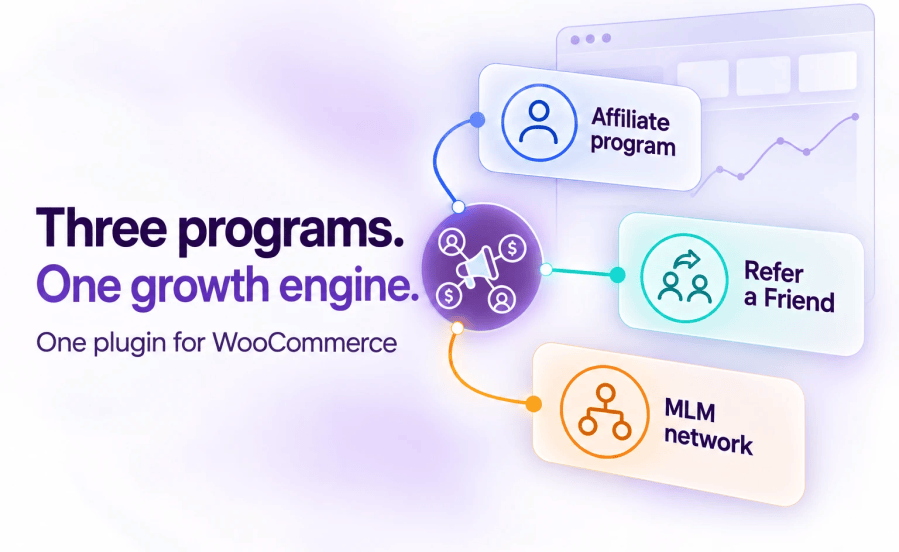
Product Icon

Affiliate and Referral Program for WooCommerce

WooCommerce affiliate plugin with customer referrals, commission rules, multi-tier MLM, affiliate coupons, PayPal, Stripe and bank payouts.
Choose a billing option
$96
Save 20%
$192 $153.60

Das Abonnement beinhaltet

  • Product updates and improvements
  • Kundensupport
  • 30-Tage-Geld-zurück-Garantie

Affiliate and Referral Program for WooCommerce runs three growth programs from one plugin: a complete affiliate program for your WooCommerce store, a customer refer-a-friend program, and multi-tier MLM (multi-level marketing) commissions with Binary, Forced Matrix and Unilevel plans. Set your commission rules once, hand partners their links, coupons and QR codes, and pay everyone from the same dashboard.

It is a WordPress affiliate plugin built specifically for WooCommerce. Commissions are calculated from real WooCommerce orders, affiliate coupons are standard WooCommerce coupons, and every record your program creates stays in your own database. If your storefront runs on WooCommerce, this is the affiliate plugin for WordPress that was written for exactly that stack.

Affiliate and Referral Program for WooCommerce is an all-in-one WooCommerce affiliate plugin that combines affiliate management, customer referrals, MLM commission networks, coupon attribution, and PayPal, Stripe and bank payouts inside your WordPress dashboard.

Version 3.0.0 replaces fixed commission settings with an ordered list of commission rules you can test before an order arrives, adds affiliate groups, Performance-Based Affiliate Levels, performance bonuses and automatic affiliate coupons, handles refunds and return periods for you, and redesigns the affiliate dashboard. A store updating from an earlier version keeps paying commission exactly as before until it runs the one-time conversion.

Excellence verified on the WooCommerce Marketplace, tested against current WordPress and WooCommerce releases, and shipped with nine translations.
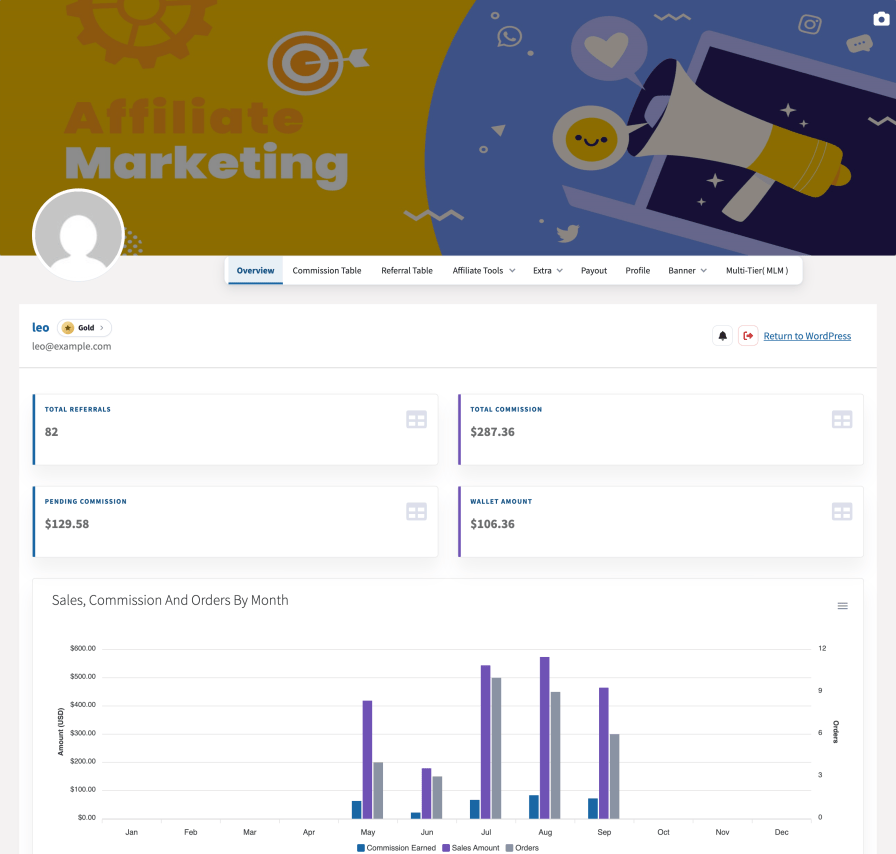
Affiliate dashboard on the redesigned Template 1 with cover image, horizontal menu and overview cards

Three programs in one plugin

Affiliate management, a customer referral program and MLM commissions are usually three separate purchases. Here they are three modules of one plugin:

  • Affiliate program — recruit creators, publishers and partners, pay them through commission rules, groups and performance levels, and track every order they send.
  • Customer referral program — a separate Refer & Earn system for everyday shoppers, with its own rewards, its own wallet and its own tab in My Account. Affiliates never see it; customers never see affiliate tools.
  • MLM networks — Binary, Forced Matrix, Unilevel or Unlimited structures with per-level commission rates and a genealogy tree.

Assembling the same stack from separate products runs $300 or more a year. This is one $96 plugin.
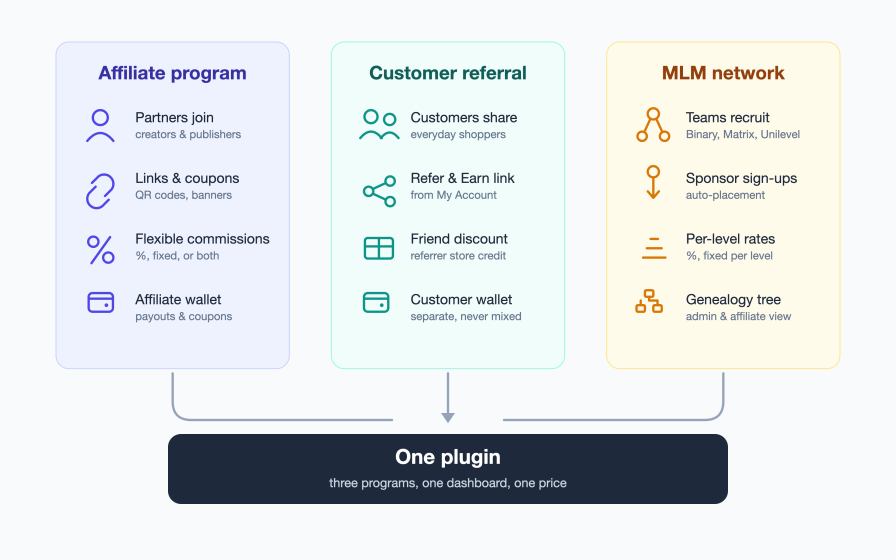
Diagram of the three programs in one plugin: affiliate program, customer referral program, and multi-level marketing

Launch your affiliate program for WooCommerce in three steps

A WooCommerce affiliate program should take minutes to set up, not days:

  1. Install and activate. The plugin creates your affiliate dashboard page and sensible defaults on activation.
  2. Set your rules. Give the Store default rule a rate and you are live; rules for products, categories, tags, chosen affiliates, groups or levels can come whenever you need them.
  3. Invite partners. Affiliates register, pick up their links and coupons, and every tracked order lands in your approval queue.

Every module is a switch. Customer referrals, MLM, bonuses, QR codes — enable them when you need them, ignore them when you don’t. The walkthrough from activation to the first paid commission is Getting Started with Affiliate and Referral Program.
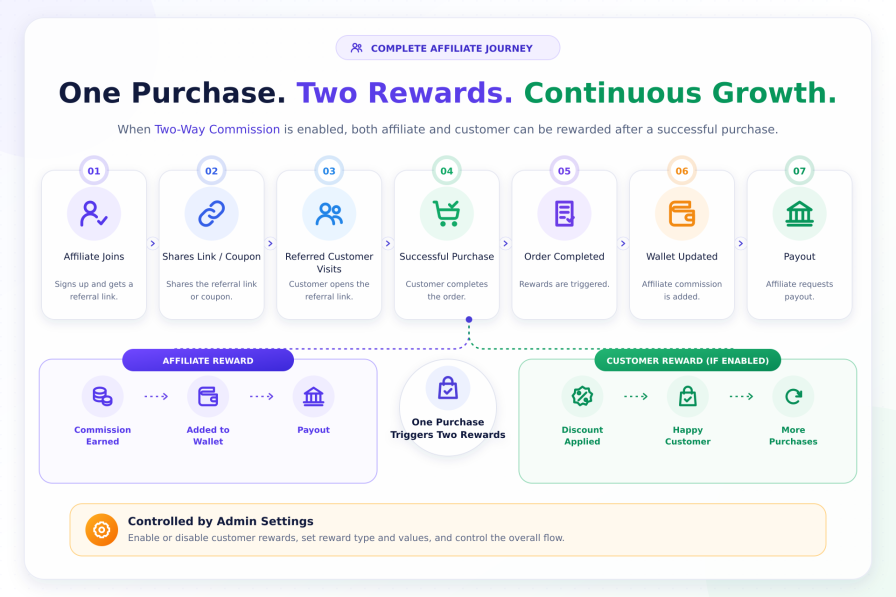
Affiliate journey from signup to payout, with the Affiliate Referral Discount for referred customers

Commission rules: one ordered list, and the first match pays

Direct commission is what the referring affiliate earns on the orders they send. In 3.0.0 it comes from one ordered list of commission rules. For every product in a referred order the rules are checked from the top, the first rule that matches the affiliate and the product decides that product’s commission, and the Store default rule — pinned at the bottom and always on — catches everything else. Rates never stack, so there is never a question of which rate won.
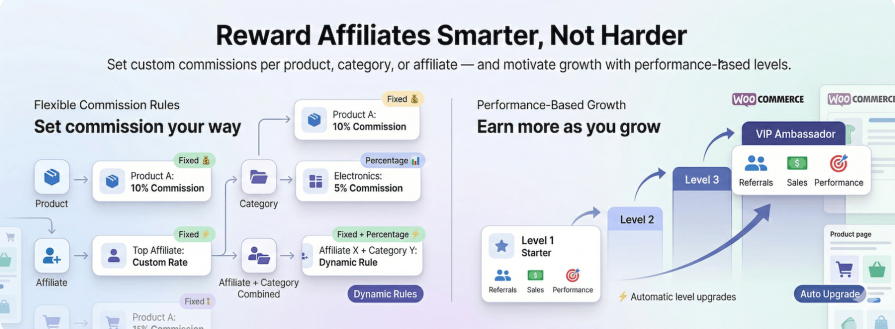
Two ways to pay direct commission: product rules, or affiliate levels whose rate rises with performance

  • Four ways to pay: a percentage of the item total, a fixed amount per unit, a fixed amount per order, or a percentage plus a fixed amount per unit — on any rule.
  • Who earns the rate: all affiliates, specific affiliates, an affiliate group or an affiliate level.
  • Conditions: products, categories (with or without subcategories), tags and sale items; order subtotal, order kind (referred, lifetime repeat or subscription renewal), referral medium (link or coupon), the customer’s first order and the customer’s role; the affiliate’s referred sales, successful referral count and role. Match all of them or any of them.
  • Schedules: a start and an end date turn any rule into a launch or seasonal promotion that switches itself off.
  • Exclusions, caps and restrictions: a rule that pays 0 keeps gift cards or clearance lines out of commission; a monthly cap per affiliate clamps the last commission to fit instead of silently dropping it; sale-item and self-referral restrictions are one switch each.

Commission is worked out per line item on the amount the customer actually paid after discounts, excluding tax and shipping, so a coupon-discounted order never over-pays its affiliate. Rates for individual products, whole categories or tags are plain rules with a product condition (Commission per Product, Category or Tag).
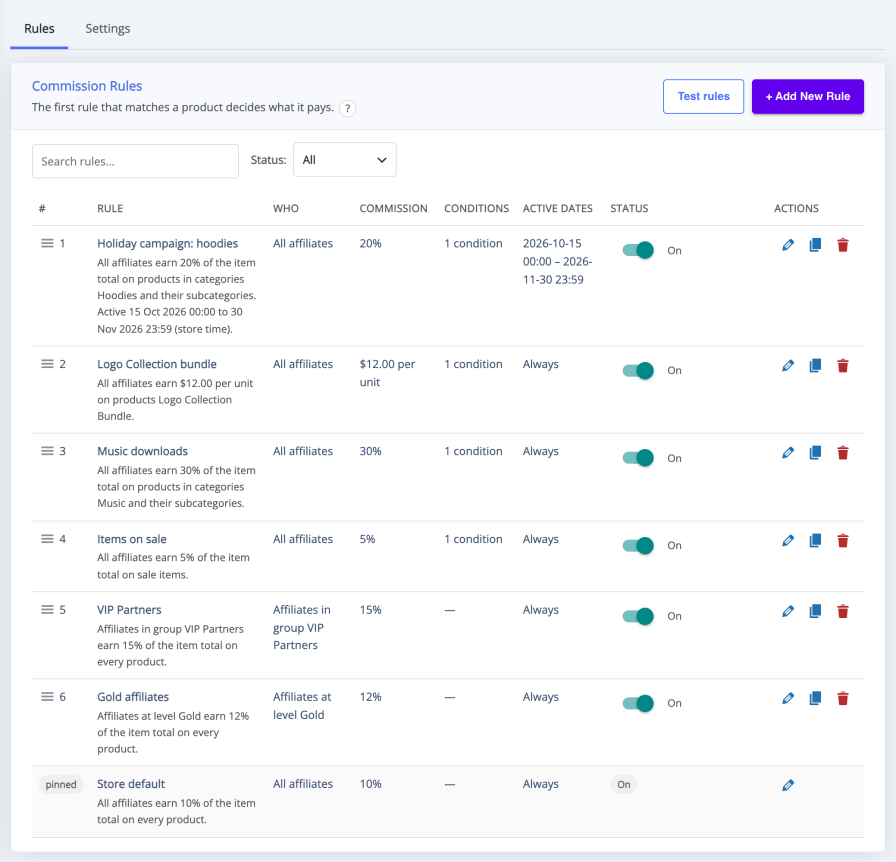
The ordered Commission Rules list, each rule with a status switch, Store default last

Test rules before an order comes in. The Test rules panel on the same screen builds a sample order for any affiliate, date and product mix and shows, product by product, which rule wins and what it pays — and what your monthly limit would do to the total — without saving anything. Move the date to check a promotion before it starts, or recreate an affiliate’s order when they ask why it paid what it did (How to Test Affiliate Commission Rules in WooCommerce).
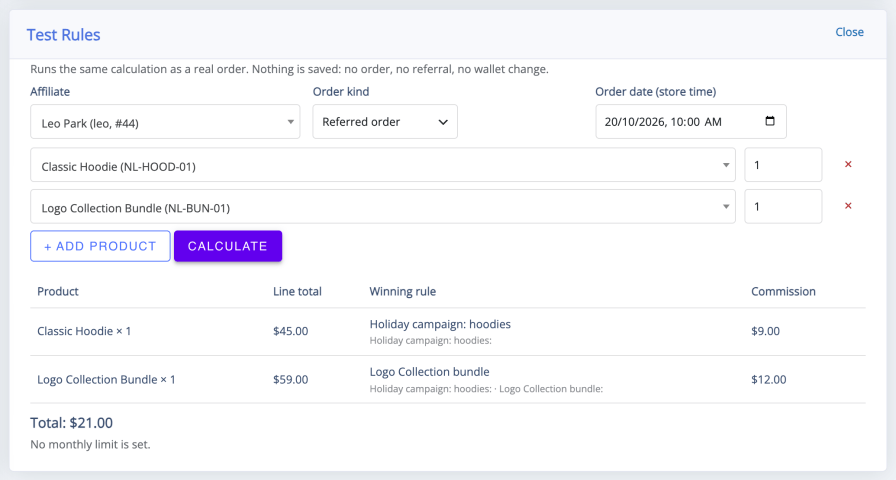
The Test rules panel with an affiliate, two products and the winning rule for each

Already running an earlier version? The update keeps every setting, affiliate, referral and wallet balance, and commission is calculated exactly as before until you choose to convert. The Upgrade to commission rules card previews the rules your current settings would become, converts them in one action, and compares your 200 most recent referred orders under both calculators before switching, so nothing changes by surprise (Upgrading to Version 3.0.0 and Converting to Commission Rules).

Beyond the rule list: Recurring Commissions on Subscription Renewals pay the affiliate again every time a referred WooCommerce Subscriptions order renews, with a rate of their own if you add a renewal rule. How to Set Up Lifetime Commissions for Affiliates ties a referred customer with an account to the affiliate who introduced them, so later orders keep paying that affiliate, cookie or not.

Affiliates always know what a sale is worth to them. Their dashboard’s Commission Table lists their standard rate, product and category rates, special opportunities and offers starting later in plain words, and logged-in affiliates can see the commission amount on product pages while they browse. Commission behavior — rule precedence, monthly caps, refunds and payouts — is covered by a suite of several hundred automated tests run against real WooCommerce orders. When we say a rule works, we can point at the test.

Automatic discounts through affiliate links

A customer who arrives through an affiliate’s referral link can receive an automatic discount at checkout — store-wide or per product — while the affiliate still earns full commission on the order. This is the Affiliate Referral Discount, the feature previously called Two-Way Commission: the link itself becomes an offer the affiliate can promote, with no code for the customer to enter (Affiliate Referral Discount for Referred Customers).

It is different from tracking sales through an affiliate coupon code. A coupon credits the affiliate when the customer types it at checkout; the referral discount is applied because the customer came through the link. When an affiliate coupon is used instead, the coupon’s own discount applies, so a customer never gets both.

Affiliate groups and Performance-Based Affiliate Levels

Two ways to pay people differently without writing a separate rule for every partner:

  • Affiliate groups are labels you assign — Influencers, VIP partners, Creators — and an affiliate can belong to several. A commission rule can pay a whole group its own rate, and you move affiliates into groups from the Affiliates table, one at a time or in bulk with Move to group (How to Approve and Manage Your Affiliates).
  • Performance-Based Affiliate Levels are earned. Each level has conditions — becoming an affiliate, total referred sales, successful referral count, total earned commissions, or team conditions when MLM is on — matched all or any, and an affiliate holds the highest level they meet. A level pays through the commission rule that targets it, so 10% on joining, 12% after ten approved referrals and 15% past $5,000 in referred sales is three levels and three rules. Promotion is automatic on each approved referral, you can set or lock a level by hand, and affiliates see their current and next level on their dashboard (Performance-Based Affiliate Commission with Affiliate Levels).

Levels and product rules live in the same list, so you can pay by level alone, by product alone, or both together — position decides which rule wins when a level rule and a product rule both match. Affiliate Levels are not MLM levels: a level changes what an affiliate earns on their own referred orders, while multi-tier commission is a separate stream paid to sponsors from their recruits’ sales and never changes anyone’s direct rate.
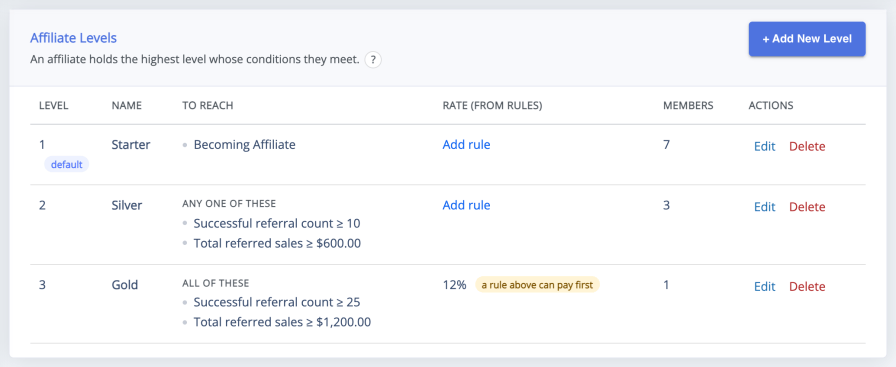
The Affiliate Levels screen with each level’s conditions, rate from rules and member count

Performance bonuses and rewards for effort, not just sales

A performance bonus pays a one-time amount, on top of commission, the first time an affiliate reaches a target: their tenth approved referral, $1,000 in referred sales, a chosen level, or a bonus that follows another to build a sequence. Bonuses are awarded once per affiliate, wait as pending earnings for your approval, and are never taken back by a refund. The ranks and sales-threshold bonuses of earlier versions are transferred into this list automatically, with their awards already made (Performance Bonuses and Rank Rewards for Affiliates).

Recurring rewards for the work that is not a sale sit beside them (Signup, Click, Sharing and Lead Bonuses for Affiliates):

  • Signup bonuses when someone an affiliate sent joins the program — recognized by referral link or by referral code
  • Lead bonuses for Contact Form 7 submissions from referred visitors
  • Pay per click, counting each visitor’s first click only
  • Sharing bonuses on purchases through links shared with the built-in buttons, with daily, weekly or monthly limits

You can pay for traffic and leads, not just orders.
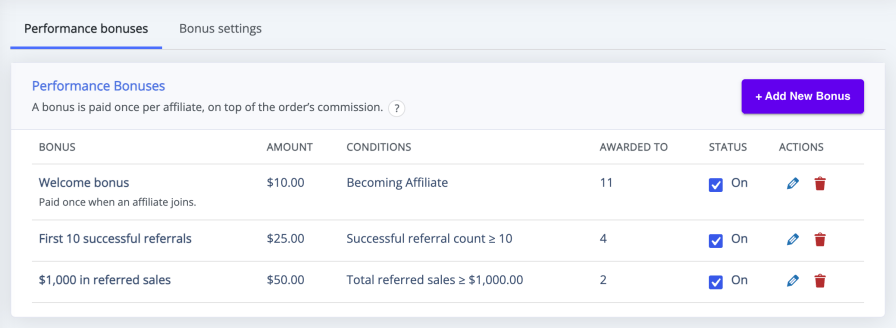
The Performance bonuses list with each bonus’s amount, conditions, awards and status switch

Built-in customer referral program (refer and earn)

A built-in refer and earn program lets ordinary customers bring their friends. The customer referral program for your WooCommerce store is a separate module with its own settings, not the affiliate system under another label, so the two audiences never blur (Set Up a Refer a Friend Program in WooCommerce):

  • A floating Refer & Earn button — or a shortcode, if you prefer placement control — invites shoppers to share their link
  • Their friend gets a percentage or fixed discount at checkout, your call
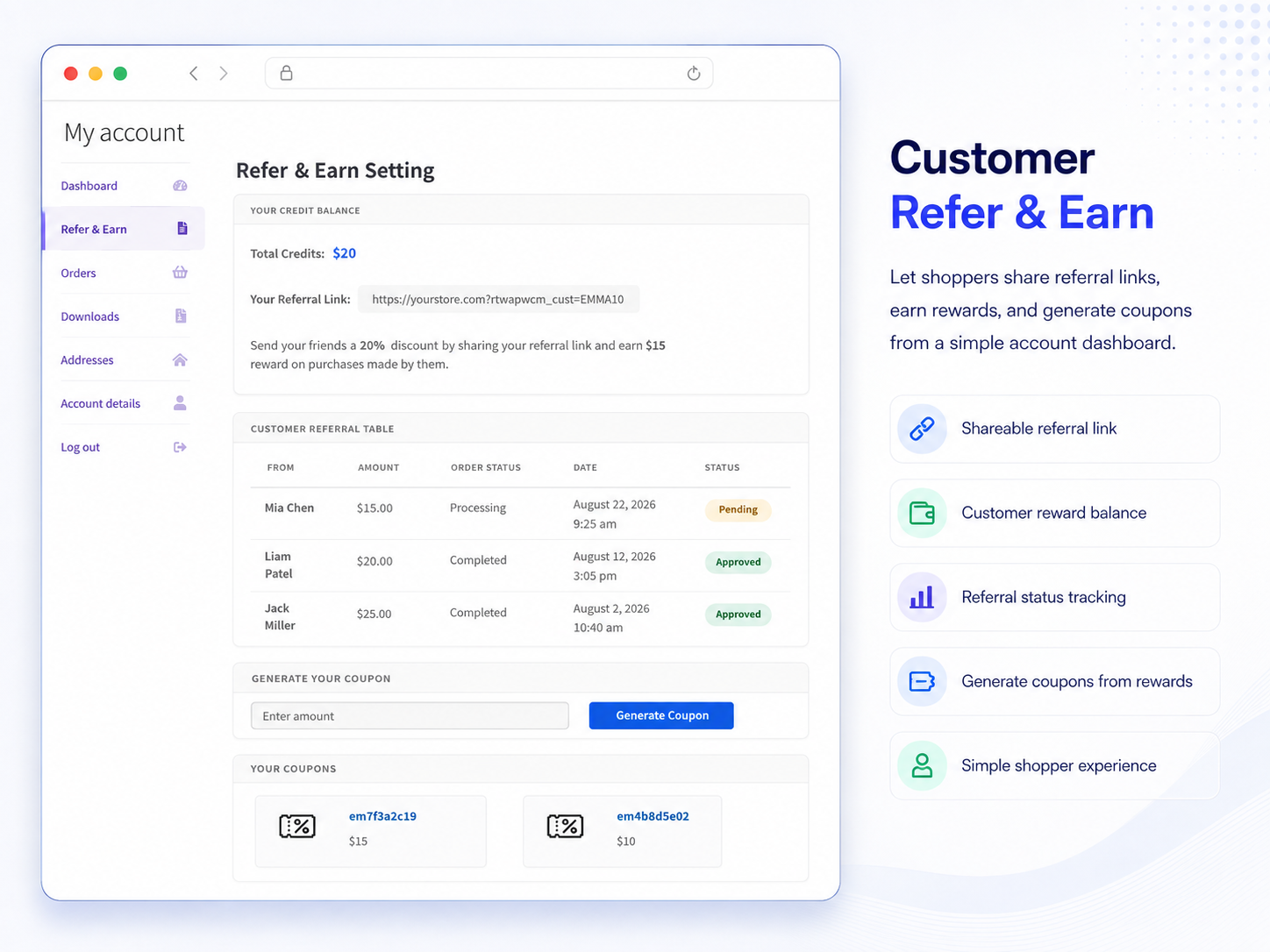
  • The referrer earns store credit in a customer wallet of its own, shown in their My Account tab, and converts it into coupons they spend in your store
  • Referrals auto-approve on completed or processing orders, or wait for your review

The separation is enforced in the code, not just the copy: registered affiliates never see the customer widget, customers never see affiliate tooling, and the two wallets never mix.
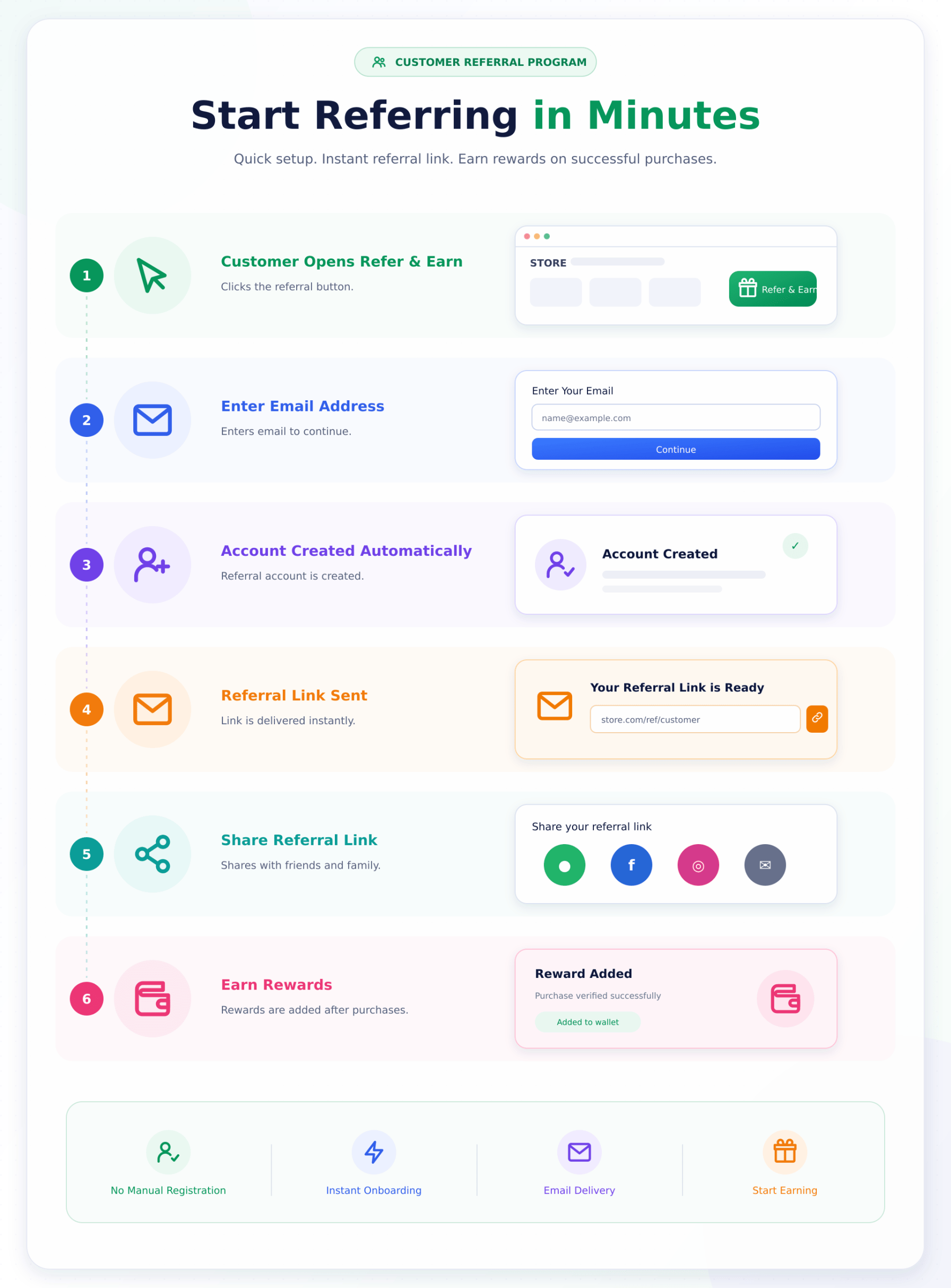
Customer referral flow: Refer and Earn button, personal referral link, and rewards on friends’ purchases

Customer referral dashboard in My Account with store credit, referral link, history and generated coupons

Affiliate coupons that track without clicks

Affiliate coupons are ordinary WooCommerce coupons with an owner, and every order that redeems one credits that affiliate — no referral link, no click, no cookie required (How to Track Affiliate Sales with Coupon Codes):

  • Automatic coupons for every affiliate. Switch it on and each new affiliate gets a coupon built from their referral code, with your prefix, discount type and limits; one click creates them for the affiliates who joined earlier
  • Or assign any coupon by hand from the WooCommerce coupon editor, and keep several codes per affiliate if you like
  • Instagram bios, podcast reads and printed cards become trackable channels
  • When a link and a coupon disagree, the coupon’s owner is credited; one affiliate coupon per order, and only while its owner is an active affiliate
  • A coupon replaces the Affiliate Referral Discount, so a customer never gets both, and a rule with the referral medium set to coupon can pay coupon sales their own rate

Affiliates find every usable coupon they own under Referral Discounts on their dashboard, with its terms and a Copy code button.
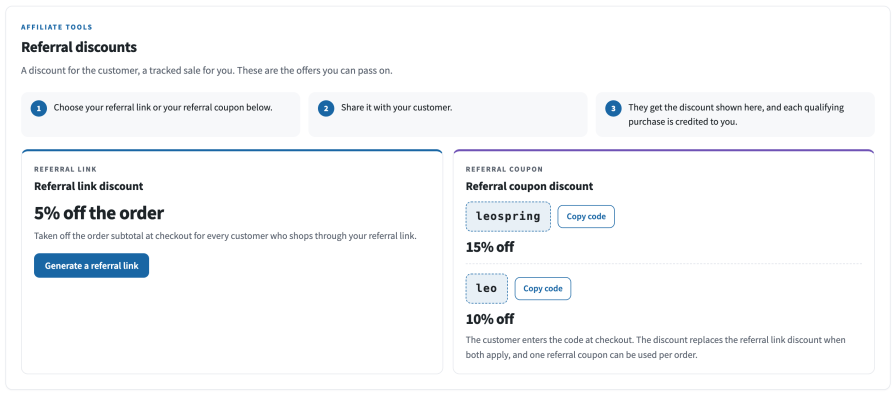
The Referral Discounts section of the affiliate dashboard with the affiliate’s coupon and Copy code

Affiliate management: registration, approval and one-click import

Recruiting starts on a registration page the plugin creates for you, or inside My Account if you prefer:

  • Four registration form templates with your own custom fields, so you can ask for a website, a channel, or an audience size before you approve anyone
  • Approve applicants one at a time or in bulk, turn existing customers into affiliates without a new signup, or register every buyer as an affiliate automatically
  • One Affiliates table for everything: level, groups, recruiter, earnings and status in each row, a Columns button to choose what you see, bulk Move to group, and Export All Affiliates CSV for the complete roster (How to Approve and Manage Your Affiliates)
  • Coming from another affiliate plugin? Import your existing affiliates in one click and keep their referral links working, as described under Switching below

An affiliate dashboard your partners will actually use

Affiliates get a frontend dashboard — on its own page or one click from My Account, in either of two layouts — with everything they need to promote and get paid:

  • Earnings cards and charts, a Commission Table that explains their rates, levels and bonuses in plain words, and a referral log with CSV or PDF export
  • A link generator that deep-links to any product or page on your store, downloadable QR codes, and one-click sharing to X, Facebook, WhatsApp and email
  • A banner library you stock in ten standard ad sizes, plus ready-made product creatives with the affiliate’s link built in
  • Per-link statistics — hits and purchases for every link they generate — day-wise reports, and a product feed download for the categories they promote
  • Referral Discounts, wallet coupons, bank and PayPal details, and their withdrawal history, all in one place

Template 1, redesigned in 3.0.0, keeps affiliates inside your theme with a cover image, a horizontal menu, your own primary and secondary colours, and an announcements bell for the notices you post from the admin. Template 2 is a full-page workspace with a left sidebar. Both take renamed menu items, a custom CSS box and editable email templates for signup, approval and withdrawal notices (Affiliate Dashboard and Affiliate Area Guide).
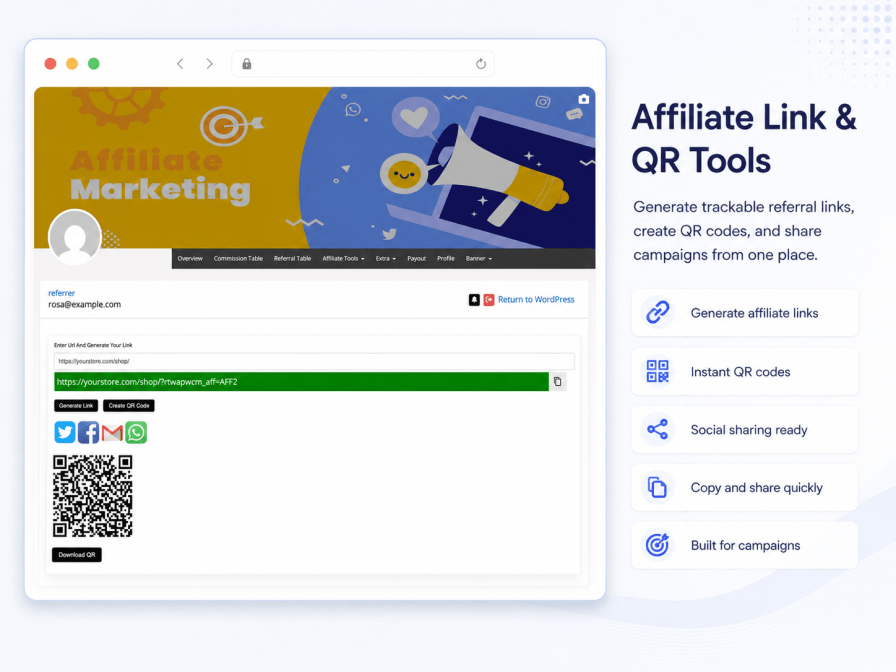
Referral link generator with QR code download for any store URL

Multi-tier MLM commissions with Binary, Forced Matrix, Unilevel and Unlimited plans

Two different streams, kept apart on purpose:

  • Direct commission is what the referring affiliate earns on their own referred order, under your commission rules, groups and levels
  • MLM commission is a separate upline commission from sales inside an affiliate’s downline network, under a Binary, Forced Matrix, Unilevel or Unlimited plan. It never sets anyone’s direct rate

The plugin works as MLM software inside WooCommerce: pick a multi-level marketing plan type, then set how many direct recruits each position holds and how deep the multi-tier commission flows:

  • Every network level gets its own percentage or fixed rate, calculated on product price or on the direct earner’s commission
  • Unlimited has no child-count requirement: a qualifying sale anywhere in a member’s downline pays the upline levels, even when that member has only one recruit
  • Enrollment is automatic: recruits join the network under their sponsor, subject to the width your plan allows, and you can place an affiliate under a sponsor by hand when one is missing
  • Only active, approved members earn from the chain, and you decide whether MLM earnings count toward monthly caps
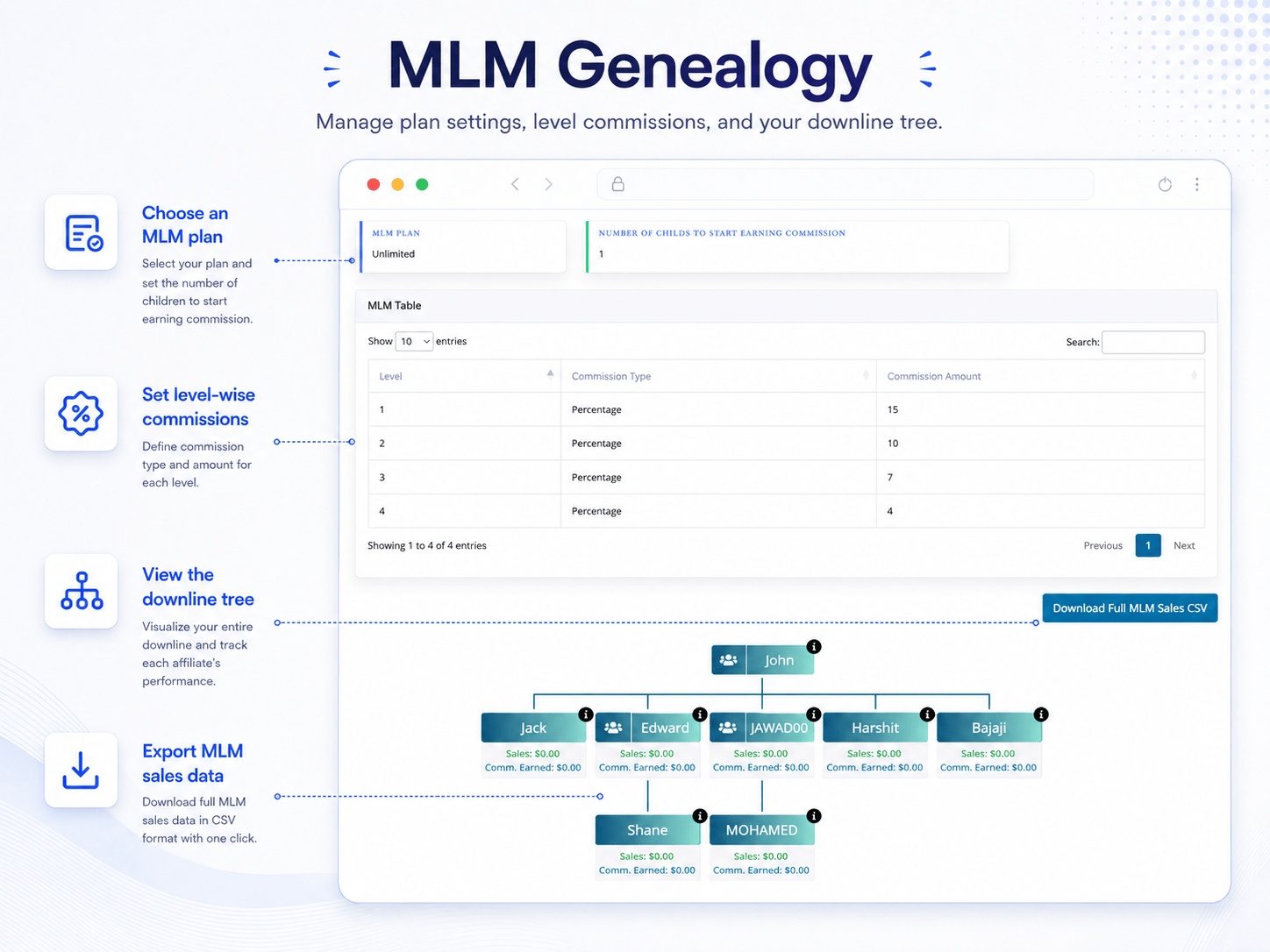
  • Genealogy tree in wp-admin and in every affiliate’s dashboard, plus a downline sales CSV export

Setup is documented step by step, with the four plan types compared. Built for stores and direct-selling teams that run structured networks — the plugin manages structure and commissions; what you promise recruits is your business, and it should be realistic.
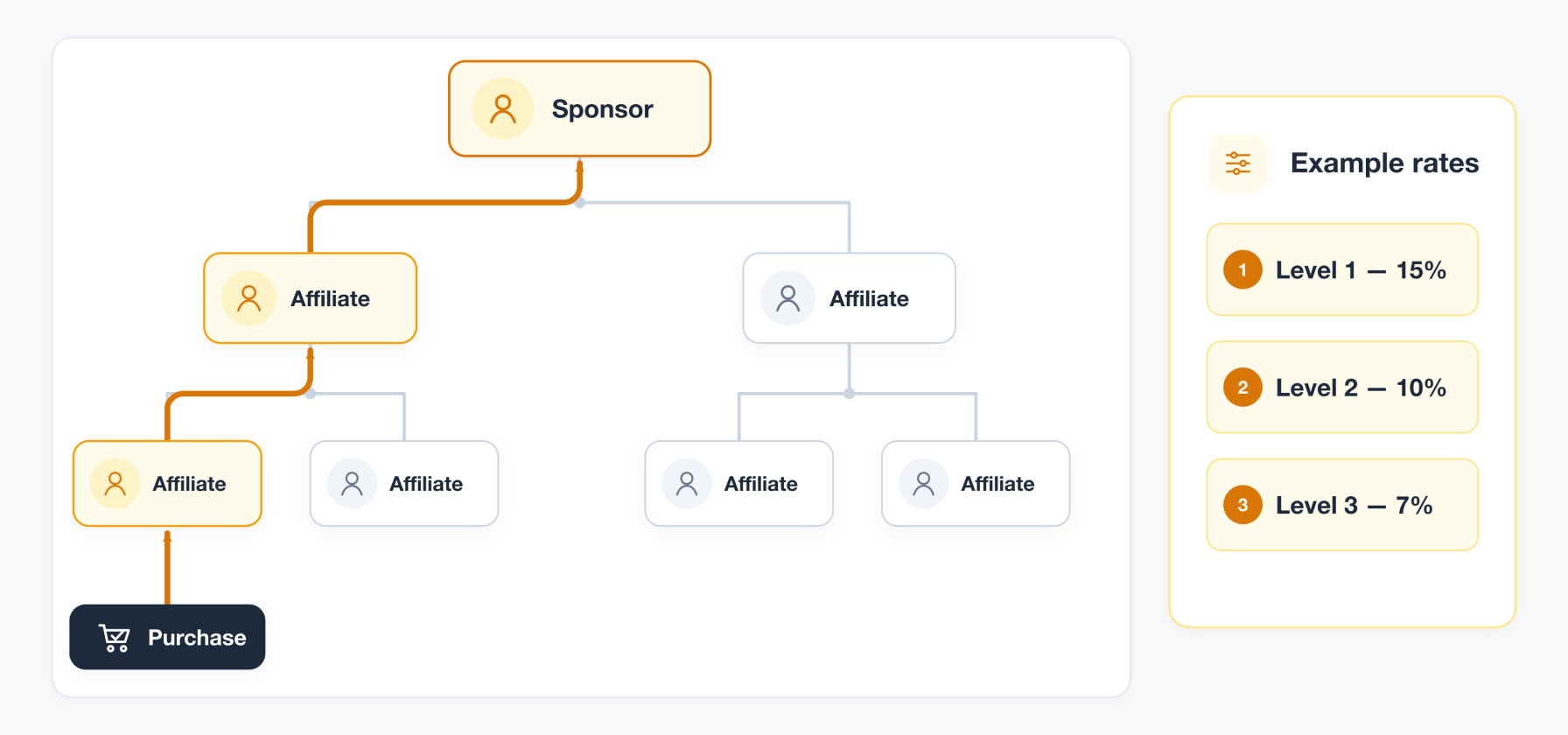
Multi-level commission flow: a recruit’s customer buys and each upline level earns its own configured rate

MLM genealogy tree showing plan settings, per-level commission rates and the downline tree

Affiliate payouts, wallets and store credit, without extra plugins

Approved commission collects in each affiliate’s wallet, the affiliate requests a withdrawal, and you send the money from one Payouts screen (Pay Affiliates via PayPal, Stripe and Bank):

  • PayPal Payouts API — select every pending PayPal request and pay them as one batch, in live or sandbox mode
  • Stripe — through our free Stripe add-on, because the WooCommerce Marketplace does not allow bundling the required SDK in the main package
  • Bank transfer — affiliates save bank details that work in any country (account number or IBAN, SWIFT/BIC, and the national bank code their country uses), you transfer from your own bank, and the plugin records the payout as paid
  • Every request moves through pending, processing, paid or rejected, and a request that is processing or paid offers no action, so nobody can be paid twice
  • Payouts are always started by you, within the minimum, maximum and optional withdrawal fee you set

A real wallet sits between earning and payout: it is credited the moment a commission is approved, and when you allow it, affiliates can turn balance into a single-use store coupon instead of withdrawing — earnings become store revenue instead of leaving. No additional paid plugins are required for wallets, payouts or coupons.
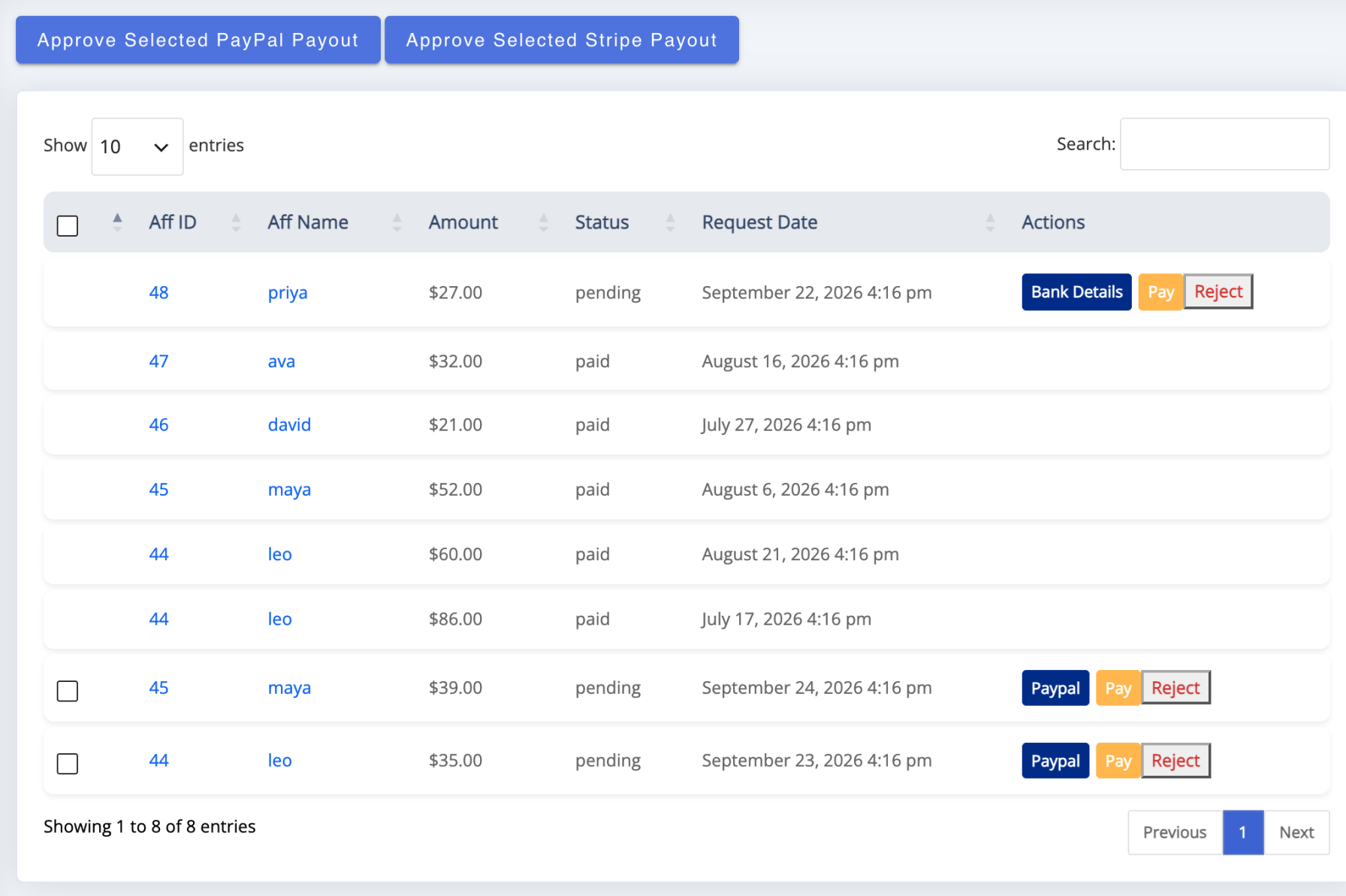
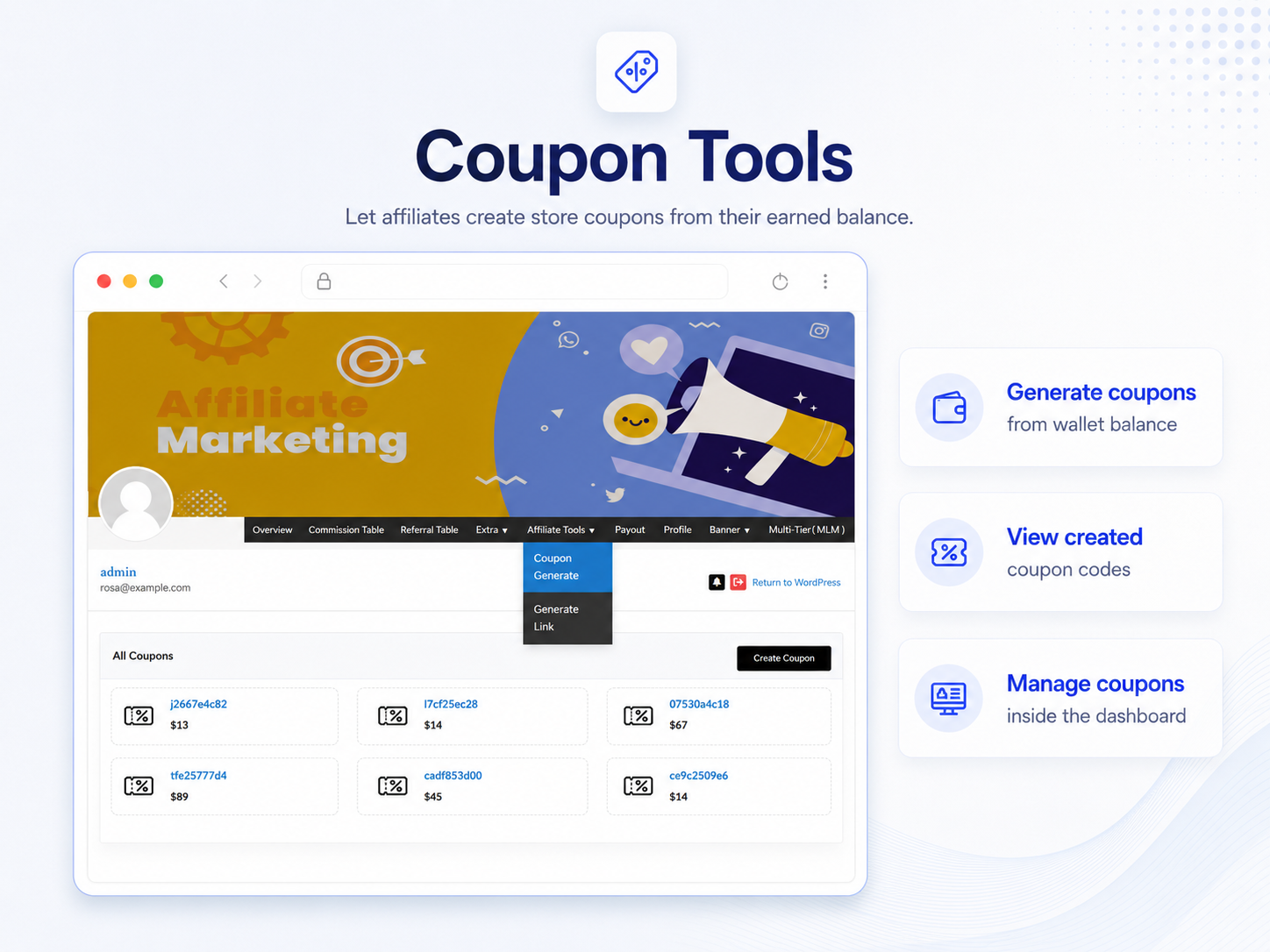
The Payouts screen listing withdrawal requests with their status and per-row payment buttons

Affiliate coupon tools showing store coupons generated from the wallet balance

Refunds, return periods and approval on your terms

Every commission starts as a pending record on Manage Referrals, with a badge that says what happens next — pending, approved, paid, rejected, refunded or capped — and you approve singly, in bulk, or automatically when the order reaches Processing or Completed (Approve, Reject and Manage Referrals). Refunds no longer need a spreadsheet (Refunds, Return Periods and Commission Recovery):

  • Commission handling on refund is your choice: Off leaves commission alone, Automatic recovers the share that belongs to the returned items, and Manual lists every refund in a Refund Reviews tab for your decision
  • Amounts come from the items that actually came back and the rates recorded when the commission was earned; a part refund affects only the part returned
  • A wallet never goes below zero — whatever it cannot cover is recorded as owed and settled from the affiliate’s next commission — and bonuses are never touched
  • Return periods hold approval until an order has stayed in the status you choose for a set number of days, with optional automatic approval once the period has passed

Referral tracking, fraud prevention and program protection

Four ways a sale can be credited cover how partners actually promote, in a fixed order of precedence: a customer’s lifetime affiliate, the affiliate coupon on the order, the referral link cookie (latest click wins; 30 days by default, yours to change), and a referral code typed into the block checkout. Fraud prevention is built into the same tracking, not bolted on afterwards:

  • Every tracked visit is logged with device, platform, browser and IP, and repeat visits from the same IP and device on the same link are counted on one record, so manufactured clicks stand out before you approve anything
  • One commission processing slot per referred order, so a repeated status change cannot create a duplicate commission
  • Optional self-referral restriction that pays nothing on an affiliate’s own purchases and refuses their own coupon at checkout; one affiliate coupon per order, and only while its owner is active
  • Manual approval workflows: every commission starts as pending, and you decide whether it is paid
  • Pay-per-click bonuses count each visitor’s first click only, and refund handling takes back what a returned order should not have paid

When a dispute comes — and in affiliate programs, sooner or later one does — you open the visit log and settle it with data. Who gets credit, and for how long, is spelled out in How Referral Tracking and Attribution Work; the checklist for the sale that earned no commission is Troubleshooting: Referrals Not Tracking.
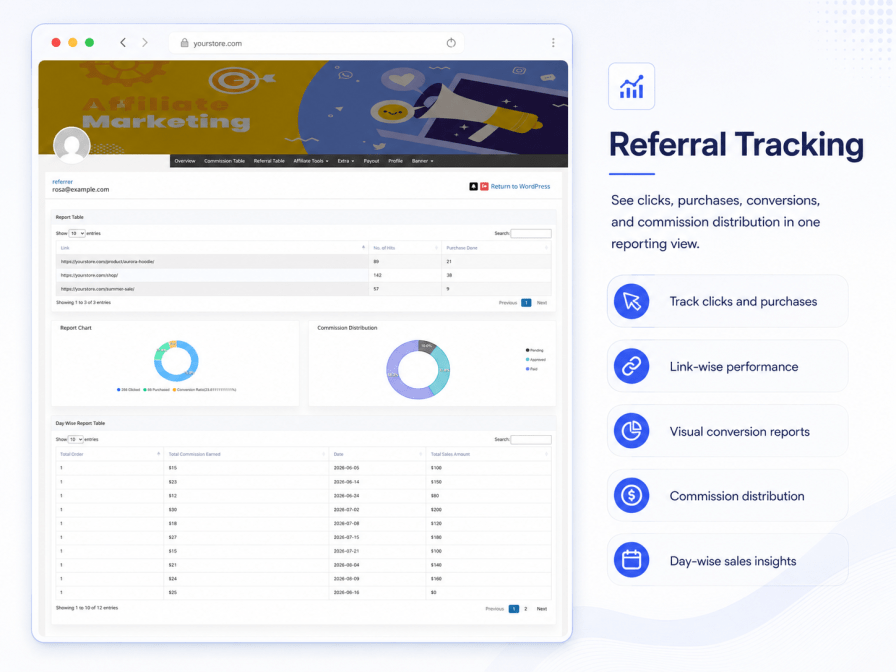
Referral tracking report with per-link hits, purchases, conversion and commission distribution

Reports and analytics for you and your affiliates

Both sides of the program see what is working (Affiliate Reports and CSV Exports):
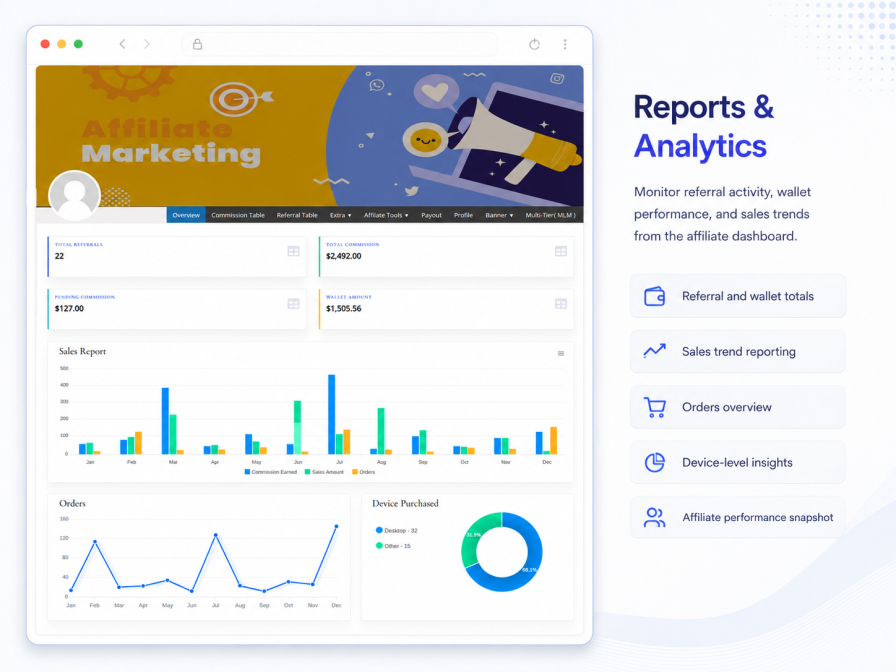
  • Your side: total, approved, pending and rejected commission, payouts paid and pending, earnings broken out by type — per order, MLM, signup, performance — and click-to-purchase conversion
  • A last-five-referrals feed and a top-affiliates board, so you always know who is carrying the program
  • Their side: personal charts including purchases by device, per-link hits and purchases, day-wise tables, and commission status at a glance
  • Date-filtered referral tables export to CSV or PDF; the complete affiliate roster, the table as you have filtered it, and each affiliate’s own downline export to CSV

Admin analytics dashboard with sales overview, earnings by type and top affiliates

Integrations and compatibility with the WooCommerce you run today

  • WooCommerce Subscriptions — recurring commissions on renewals
  • Contact Form 7 — lead bonuses on form submissions
  • PayPal Payments and the free Stripe add-on for payouts, plus bank transfer records
  • Commission tracking on both classic and block checkout, with an affiliate code field on block checkout
  • High-Performance Order Storage (HPOS) declared and tested
  • Nine shipped translations — German, Spanish, French, Italian, Dutch, Portuguese (Brazil), Russian, Indonesian and Chinese — plus a POT file for the rest
  • Developer hooks (WordPress actions and filters) on commission, level, payout and affiliate events, with REST API support planned for an upcoming release
  • Excellence verified, and tested against current WordPress and WooCommerce releases

Who runs their programs on it

  • D2C brands replacing a $99-a-month SaaS with links, coupons and influencer codes they own.
  • Influencer and creator programs tracked through assigned coupons and deep links.
  • Stores whose best salespeople are their customers, running Refer & Earn alongside the affiliate program.
  • Subscription businesses paying partners on renewals, not just first orders.
  • Course creators and digital sellers recruiting the people their audience already trusts.
  • Agencies, resellers and partner sales programs on group rates and performance levels.
  • Direct-selling and distributor networks that need real plan structures, genealogy and per-level rates.
  • Coupon-led promotions that run on discount codes rather than links.

Switching from another affiliate plugin? Import your affiliates in one click

Switching is a short job, because nothing inside WooCommerce has to move:

  • Import your existing affiliates from other WordPress affiliate plugins in one click. Their existing referral links keep working, so promotions already running are not interrupted, and you can restructure links later if you want to
  • Your WooCommerce customers, orders and coupons stay exactly where they are — commissions are calculated from the orders your store already takes
  • Commission rules take minutes to recreate: set the Store default rate to go live, then add rules for products, categories, groups or levels, and check them with Test rules before the first order
  • Our support team helps with the move if you need it. The price difference stays with you every year: $96 here, against selected alternatives that start at around $149.50 a year and run past $300

The step-by-step checklist is Switching from Another Affiliate Plugin.

How it compares

This plugin Typical WooCommerce affiliate plugins
Programs included Affiliate + customer referral + MLM Affiliate only
Commission rules Ordered rules with product, group, level, order and affiliate conditions, schedules and a test panel Product rules only
Performance-based rates Affiliate levels that raise an affiliate’s own rate automatically Varies
Recurring & lifetime commissions Built in Add-on, or absent
Referral discount & coupon attribution Built in, with automatic affiliate coupons Varies
MLM plans Binary, Forced Matrix, Unilevel, Unlimited “Multi-tier” at extra cost, or absent
Wallet & store credit Built in, with coupon conversion Separate paid plugin, or absent
Payouts PayPal Payouts API, free Stripe add-on, bank PayPal only, or manual records
Refund handling Automatic or reviewed commission recovery, plus return periods Varies
Traffic & lead bonuses Pay-per-click and Contact Form 7 lead bonuses Sales commissions only
Fraud prevention IP and device logging, duplicate-commission protection, self-referral block, approval workflow Basic, or none
One-click affiliate import Yes Varies
Price $96/year Selected alternatives from about $149.50/year to $300+/year

Coming soon: two planned additions

Everything described above is available today. The two additions below are planned for a future release and are not part of the plugin yet; this page and the documentation will be updated when they are available.

Coming soon

Loyalty Program: Points & Rewards

Customers earn points when they buy from your store, giving you a simple way to encourage repeat purchases.


Coming soon

Native Affiliate Apps for iOS & Android

Your affiliates will open their dashboard and affiliate tools in dedicated native apps for iOS and Android.

Start your affiliate and referral program today

One plugin, three programs, and commission math you can verify — the affiliate plugin for WooCommerce that covers partners, customers and networks alike. Try the live demo, read the documentation and the Affiliate and Referral Program: FAQ, and launch with a 30-day money-back guarantee behind you. Updating from an earlier version? Start with Upgrading to Version 3.0.0 and Converting to Commission Rules.


Häufig gestellte Fragen

How do I choose the right WooCommerce affiliate plugin?

Decide which programs you need. If link tracking with a flat rate is enough, lighter tools exist. If you want affiliate management with commission rules you can test, a separate customer referral program, MLM structures, wallets, and PayPal, Stripe or bank payouts in one product, that combination is what this plugin was built for.

How do I create an affiliate program for my WooCommerce store?

Install the plugin, give the Store default commission rule a rate, and share the registration page it creates. Affiliates receive their links and coupons immediately, and their orders appear in your approval queue. Rules for products, categories, groups or levels, bonuses and MLM can be added at any point.

Is this plugin built specifically for WooCommerce or does it work with other WordPress setups?

It is a WordPress affiliate plugin built specifically for WooCommerce, and it requires WooCommerce: commissions come from WooCommerce orders and coupons are WooCommerce coupons. It works with simple, variable and downloadable products, classic and block checkout, high-performance order storage, and WooCommerce Subscriptions for renewal commissions.

Can I run a customer refer-a-friend program alongside my affiliate program?

Yes — that is a core feature, not an add-on. The customer referral program is a separate refer and earn module with its own settings, rewards and wallet. Customers share links from My Account, friends get a discount, referrers earn store credit, and affiliates never see any of it.

What payout methods are supported?

PayPal Payouts API, Stripe through the free add-on, and direct bank transfer records, with store-credit wallets and coupon conversion. Bank details work for any country, with an account number or IBAN, SWIFT/BIC and the national bank code. Every payout is started by you, and a request that is processing or paid can never be paid twice.

Does the plugin support recurring commissions?

Yes. With WooCommerce Subscriptions active, affiliates earn commission on subscription renewal orders, not just the first purchase. The option is a single switch, and a commission rule with the order kind set to subscription renewal can pay renewals a rate of their own.

Does the plugin support lifetime commissions?

Yes. With lifetime commissions enabled, a referred customer with an account stays tied to the first affiliate who brought them, who earns on that customer's future purchases even after the referral cookie expires. A rule with the order kind set to lifetime repeat order can pay those orders a different rate.

Can affiliates promote using coupons instead of referral links?

Yes. Every affiliate can get an automatic coupon built from their referral code, or you assign any WooCommerce coupon to them by hand, and orders that redeem it credit the affiliate automatically — no click or cookie needed. This is the reliable way to track Instagram, podcast and offline promotion.

What is the Affiliate Referral Discount?

It is the referred customer's side of a referral, formerly called two-way commission: a customer who arrives through an affiliate link gets an automatic discount at checkout, store-wide or per product, while the affiliate still earns their full commission on the same order. An affiliate coupon on the order replaces it, so a customer never gets both.

How do commission rules decide what an affiliate earns?

Rules sit in one ordered list. For each product in a referred order the first rule that matches the affiliate and the product pays, the Store default rule catches the rest, and rates never stack. A rule can pay a percentage, a fixed amount per unit or per order, or both; it can be limited to products, categories, tags, order kinds, referral medium, customers or affiliate performance; and it can run between two dates. Test rules shows which rule wins before an order comes in.

Are Affiliate Levels the same as MLM levels?

No. An Affiliate Level raises the commission an affiliate earns on their own referred orders as they meet targets such as approved referrals or referred sales, through the commission rule that targets the level. MLM levels are the tiers of a multi-tier network, where sponsors earn from their recruits' sales. The two run independently, and an affiliate can take part in both.

Does this plugin support MLM commission plans?

Yes — Binary, Forced Matrix, Unilevel and Unlimited plan types, with a chosen depth, a percentage or fixed rate per level calculated on product price or on the direct earner's commission, a genealogy tree in both the admin and the affiliate dashboard, and a downline sales CSV export for affiliates.

What happens to a commission when an order is refunded?

You choose: Off leaves commission alone, Automatic recovers the share that belongs to the returned items, and Manual lists each refund in Refund Reviews for your decision. A wallet never goes below zero — anything it cannot cover is settled from later commission — and bonuses are never touched. A return period can also hold approval until an order has stayed in a status for a set number of days.

Does the plugin include fraud prevention?

Yes: device, platform, browser and IP logging on every tracked visit, one commission processing slot per order so a repeated status change cannot pay twice, an optional self-referral restriction that also refuses the affiliate's own coupon, one affiliate coupon per order, manual approval workflows, and refund handling that takes back what a returned order should not have paid.

I already use an earlier version. What changes when I update to 3.0.0?

Your affiliates, referrals, wallet balances and settings are kept, and commission is calculated exactly as before until you run the one-time conversion to commission rules. The Upgrade to commission rules card previews the rules first and compares your recent orders under both calculators before switching. Ranks become performance bonuses automatically, and the old refund switch becomes Commission handling on refund.

Extension information

  • PHP version required: 7.4
  • Tested with WordPress: 7.1
  • Tested with WooCommerce: 11.1.2
  • Requires at least WordPress: 5.3
  • Requires at least WooCommerce: 4.0

Kompatibilität

  • Cart & checkout blocks
  • High performance order storage (HPOS)

Länder

  • Worldwide

Sprachen

English (UK), English (United States)

Kundenbewertungen

Average rating 4.8

21 reviews from verified users

5 stars, 95% of reviews
4 stars, 0% of reviews
3 stars, 0% of reviews
2 stars, 0% of reviews
1 star, 5% of reviews

Click to rate

  • Bewertet mit 5 von 5
    clintvoslooVereinigte Arabische EmirateSep 28, 2026
    As a 30+ year tech professional, I know that what truly sets a great product apart—beyond core functionality—is customer support. The Redefining the Web team went above and beyond during setup, demonstrating a genuine openness to feature requests and practical workarounds when needed. Hands down some of the best support I’ve experienced. Highly recommended!
  • Bewertet mit 5 von 5
    Nicholas LaPollaVereinigte Staaten von Amerika (USA)Sep 27, 2026
    RedefiningTheWeb has provided me with exceptional support. I had numerous problems due to my site's unique configuration and expected the usual short incomplete answers. WOW - Was I surprised when the support reply email was extremely detailed, well though out, honest (they owned one of the issues), and brought up things I didn't think of. We corresponded several times, they took the time to use the temporary login I provided, fix the issues I could not fix, update their code in the one place it was needed, and get me up and running! This kind of support is very unusual in the world today. They've now got a loyal customer; THANK YOU, RTW! PS: The Affiliate plugin is awesome!
  • Bewertet mit 5 von 5
    ganeshhalpatiIndienJul 10, 2026
  • Bewertet mit 5 von 5
    serafinosharmaItalienMar 10, 2026
    Very cool plugin, very good support, I give it 5 stars.
  • Bewertet mit 5 von 5
    Daniel NashaAustralienFeb 25, 2026
    The product is by far the best affiliate and referral system for woocommerce by far! And the support..... these guys logged in and fixed all the small misconfigurations I had and they did it all in less than 24 hours!!

Related Products

Price $79 Jährlich
Rated 3.4 out of 5 stars
Price $279 Jährlich
Rated 3.9 out of 5 stars
Price $59 Jährlich
Rated 3.1 out of 5 stars
Price $109 Jährlich
Rated 2.7 out of 5 stars
Price $49 Jährlich
Rated 4.1 out of 5 stars
Price $109 Jährlich
Rated 2 out of 5 stars
Price $109 Jährlich
Rated 2.3 out of 5 stars
Price $39 Jährlich
Rated 2.8 out of 5 stars
Price $109 Jährlich
Rated 2.6 out of 5 stars
Use of your personal data
We and our partners process your personal data (such as browsing data, IP Addresses, cookie information, and other unique identifiers) based on your consent and/or our legitimate interest to optimize our website, marketing activities, and your user experience.




