
Smart Coupons REST API allows you to auto-generate coupons and Store Credits via REST API.
Requirement
↑ Back to topWooCommerce REST API
↑ Back to topSince the Smart Coupons REST API is based on the WooCommerce REST API, you’ll need the WooCommerce REST API set up on your store. Along with that, the Smart Coupons REST API follows the same syntax and structure as the WooCommerce REST API, with some additional features that we will explore in this documentation.
Create a Store Credit
↑ Back to topThe WooCommerce REST API allows you to create coupons via API, but it requires a coupon code. If you do not pass the coupon code, WooCommerce REST API will not work for you. In this situation, the Smart Coupons REST API provides a solution. It doesn’t require a coupon code to generate a coupon via API.
Let’s see this with an example. In this example, we have used the tool Postman to send the API request.
HTTP Request example
↑ Back to topPOST request:
POST https://smart-coupons.local/wp-json/wc/v3/sc/coupons
Authorization: consumer_key:consumer_secret
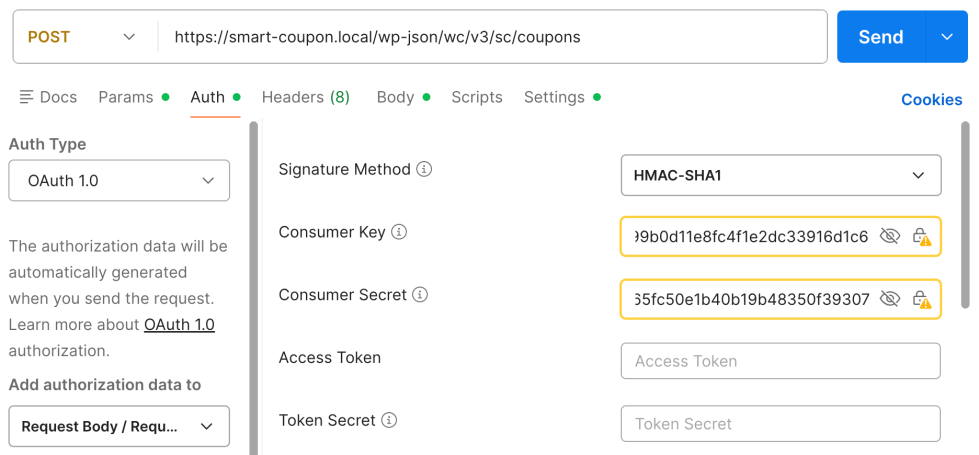
Header: Content-Type: application/json
Body/Data:
{
    "discount_type": "smart_coupon",
    "amount": "100",
    "email_restrictions": "joe.smith@example.com",
}

JSON Response example
↑ Back to top{
"id": 460,
"code": "l2k9qm8wy3pn2",
"amount": "100.00",
"status": "publish",
"date_created": "2025-12-17T07:53:31",
"date_created_gmt": "2025-12-17T02:23:31",
"date_modified": "2025-12-17T07:53:31",
"date_modified_gmt": "2025-12-17T02:23:31",
"discount_type": "smart_coupon",
"description": "",
"date_expires": null,
"date_expires_gmt": null,
"usage_count": 0,
"individual_use": false,
"product_ids": [],
"excluded_product_ids": [],
"usage_limit": null,
"usage_limit_per_user": null,
"limit_usage_to_x_items": null,
"free_shipping": false,
"product_categories": [],
"excluded_product_categories": [],
"exclude_sale_items": false,
"minimum_amount": "0.00",
"maximum_amount": "0.00",
"email_restrictions": [
"joe.smith@example.com"
],
"used_by": [],
"meta_data": [],
"_links": {
"self": [
{
"href": "https://smart-coupon.local/wp-json/wc/v3/sc/coupons/460"
}
],
"collection": [
{
"href": "https://smart-coupon.local/wp-json/wc/v3/sc/coupons"
}
]
}
}
Fetch Store Credit data
↑ Back to topTo retrieve store credit (Smart Coupon) data, use the WooCommerce Coupons GET REST API endpoint:
GET https://smart-coupons.local/wp-json/wc/v3/coupons/{coupon_id}
The response for a store credit coupon includes:
- Current Remaining Amount
- Original Amount
- Issued Date
- All available Smart Coupon meta-data
Sample Request Body
{
  "code": "TEST2CREDIT15",
  "amount": "15.00",
  "discount_type": "smart_coupon",
  "description": "Welcome discount for new customers",
  "date_expires": "2026-12-31T23:59:59",
  "exclude_sale_items": true,
  "minimum_amount": "50.00",
  "maximum_amount": "1000.00",
  "individual_use": true,
  "product_ids": [25, 21],
  "exclude_product_ids": [78, 90],
  "email_restrictions": ["john.smith@example.com"],
  "usage_limit": 5,
  "usage_limit_per_user": 2,
  "limit_usage_to_x_items": 3,
  "auto_generate_coupon": "no",
  "sc_is_visible_storewide": 1,
  "sa_cbl_locations_lookup_in": { "address": "billing" },
  "sc_restrict_to_new_user": "no",
  "wc_sc_auto_apply_coupon": "no",
  "coupon_title_prefix": "",
  "coupon_title_suffix": "",
  "sc_coupon_validity": "",
  "validity_suffix": "days",
  "wc_sc_no_of_selectable_product": 1,
  "wc_sc_add_product_ids": [2659],
  "wc_sc_add_product_details": [
    {
      "product_id": "2659",
      "quantity": "1",
      "discount_amount": "100",
      "discount_type": "percent"
    }
  ],
  "wc_sc_max_discount": "",
  "wc_sc_expiry_time": "29400",
  "wc_sc_original_amount": "100",
  "sa_cbl_billing_locations": {
    "additional_locations": ["AR", "IN"]
  },
  "wc_sc_payment_method_ids": ["cheque", "cod"],
  "wc_sc_shipping_method_ids": ["flat_rate", "free_shipping", "local_pickup"],
  "wc_sc_user_role_ids": ["subscriber", "customer", "all_customers"],
  "wc_sc_exclude_user_role_ids": ["administrator", "shop_manager"],
  "wc_sc_product_attribute_ids": "21|25|23",
  "wc_sc_exclude_product_attribute_ids": "21",
  "wc_sc_taxonomy_restrictions": [
    {
      "tax": "product_type",
      "op": "incl",
      "val": ["bundle", "subscription", "variable"]
    }
  ],
  "wc_sc_excluded_customer_email": [
    "alex@example.com"
  ],
  "wc_coupon_message": "",
  "wc_email_message": "no",
  "wc_sc_product_quantity_restrictions": {
    "values": {
      "product": {
        "2656": { "min": "", "max": "" },
        "2657": { "min": "", "max": "" },
        "2333": { "min": "", "max": "" },
        "1634": { "min": "", "max": "" }
      },
      "product_category": {
        "19": { "min": "", "max": "" },
        "16": { "min": "", "max": "" }
      },
      "cart": { "min": "4", "max": "8" }
    },
    "type": "cart",
    "condition": "any"
  },
  "wc_sc_cheapest_costliest_settings": "1_",
  "wc_sc_combined_coupons_allowed": [],
  "wc_sc_combined_coupons_blocked": [],
  "product_brands": [69],
  "exclude_product_brands": [69],
  "wc_sc_order_count_restriction": {
    "operator": "<",
    "count": 6
  }
}
Coupon Properties
↑ Back to topSmart Coupons REST API supports all the coupon properties of WooCommerce REST API. Additionally, it also provides the following coupon properties.
| Attribute | Type | Description |
|---|---|---|
sc_is_send_email | string | If set to yes the generated coupon will be sent via email to that email address which is set under email_restrictions. Options: yes, no. Default: no |
sc_is_html | string | If set to yes the generated coupon’s HTML will be returned instead of coupon detail in JSON format. Options: yes, no. Default: no |
sc_is_visible_storewide | Boolean | Show coupon storewide. (Value: 0/1) |
sc_restrict_to_new_user | String | Restrict to new users. (Value: yes/no) |
wc_sc_auto_apply_coupon | String | Auto-apply coupon at checkout. (Value: yes/no) |
wc_sc_original_amount | String/Int | The original amount issued for the store credit. |
sa_cbl_billing_locations / sa_cbl_locations_lookup_in | Object | Location-based restrictions. |
wc_sc_payment_method_ids / wc_sc_shipping_method_ids | Array | Restrict to certain payment or shipping methods. |
wc_sc_user_role_ids / wc_sc_exclude_user_role_ids | Array | Restrict or exclude by user roles. |
wc_sc_product_attribute_ids / wc_sc_exclude_product_attribute_ids | String | Restrict by product attributes. (21|25|23) |
wc_sc_taxonomy_restrictions | Array | Restrict by taxonomy (e.g., product type). |
wc_sc_product_quantity_restrictions | Array | Restrict by product/category/cart quantities. |
wc_sc_order_count_restriction | Array | Limit by customer’s order count. |
product_brands / exclude_product_brands | Array | Restrict or exclude by brands. |
How to fetch user specific Store Credits
↑ Back to topA REST API endpoint has been created to allow authenticated users to retrieve detailed information about their store credits and available coupons. This endpoint provides a structured response containing:
- Store credit balance
- Lists of valid and invalid coupons
- Counts for valid and invalid store credits
Endpoint
GET http://smart-coupons.local/john/wp-json/wc/v3/users/me/store-credits
Authentication
- Requirement: User must be authenticated.
- For development/testing,
JWT Authentication (JwtAuth)is used. Adjust to your preferred authentication method as needed.
Filter Hook
Developers can extend the discount logic using the following filter:
sc_rest_extend_discount_type
Response example
↑ Back to top{
"valid": [
{
"id": 3405,
"code": "credit_10",
"amount": "10"
}
],
"invalid": [
{
"id": 4957,
"code": "test2credit15",
"amount": "0"
}
],
"store_credit_balance": "<span class=\"woocommerce-Price-amount amount\"><bdi><span class=\"woocommerce-Price-currencySymbol\">$</span> 10.00</bdi></span>",
"no_of_valid": 1,
"no_of_invalid": 51
}
Usage Notes
- Only logged-in users can access this endpoint.
- The response provides both raw and formatted data for easy integration with frontends.
- The extensible filter allows for custom coupon and discount rules as your store evolves.

