
NOTE
This product is no longer sold on WooCommerce.com. This document has been left available for existing users, but will no longer be updated.
Live Sales Map for WooCommerce displays real-time insights and stats into sales from right within your WooCommerce store.
Installation
↑ Nach oben- Download the .zip file from your WooCommerce account.
- Go to: WordPress Admin > Plugins > Add New > Upload Plugin
- Choose File for the file you downloaded.
- Install Now and Activate Plugin.
More information at: Install and Activate Plugins/Extensions.
Setup
↑ Nach obenLive Sales Map for WooCommerce is a simple plug-and-play extension. After installation, configure Live Sales Map for WooCommerce by following the below instructions:
- Go to WordPress Admin and navigate to WooCommerce > Live Sales Map
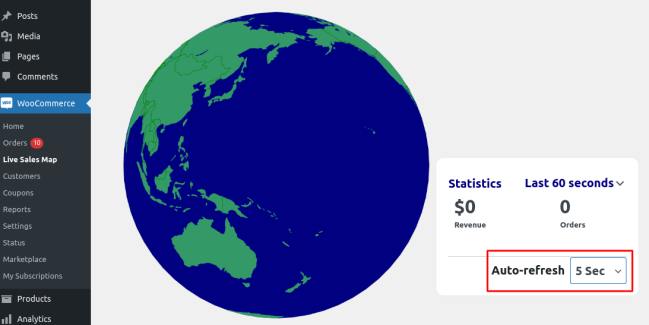
- Set the frequency for auto-refresh (2 sec, 5 sec, 10 sec) and you are all set!

Usage
↑ Nach obenNavigation operations
↑ Nach obenTo zoom into the live sale map, scroll up using mouse scroll, scroll down to zoom out. Hold the right mouse button and move your cursor to navigate to a specific location you are looking for.
Identifying order location on the globe
↑ Nach obenWhen an order is placed from a certain location, a ripple is produced on the globe identifying the location of the order. At the same time, it changes the value of no. of orders and total sales by adding the values to these.
Setting frequency of orders
↑ Nach obenYou can set the frequency that orders are refreshed by setting the frequency from within the auto-refresh dropdown menu. Choose from 2, 5 and 10 seconds only. Note: You can increase or decrease frequency to function optimally based on traffic load and server capacity.
Statistical information duration
↑ Nach obenFrom within the Statistics tab, choose to display orders and total sales received from within the past 60 sec, 60 mins or last 24 hrs.
