
Send an email to customers before a saved card expires, so they have time to add a new payment method before a future payment is due.
Before you begin
↑ Back to topThe workflow requires a compatible payment gateway that saves card tokens in WooCommerce. Check the saved card expiry notifications guide for gateway compatibility and limitations.
Create the workflow
↑ Back to top- Go to AutomateWoo > Workflows > Browse presets.
- Find Credit cards: Expiry reminder and select Create workflow. The workflow opens with a disabled status.
- Under Trigger, confirm Customer Before Saved Card Expiry is selected. Set Days before expiry to the number of days you want to give customers. The preset uses seven days.
- Optionally, set Time of day for the daily check. If you leave it blank, the check runs at midnight in the site’s time zone.
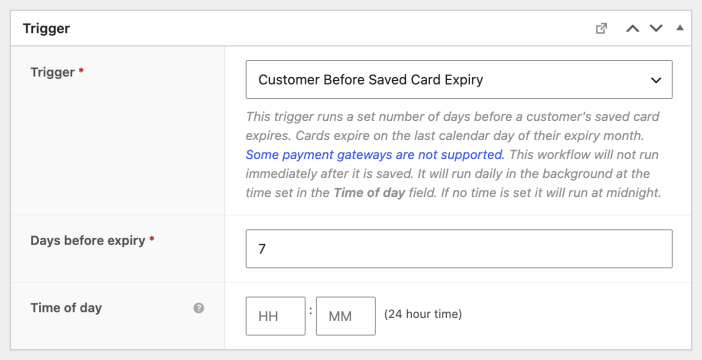
AutomateWoo treats the final day of a card’s expiry month as its expiration date. The trigger checks matching saved cards daily and the workflow runs once per card.
Customize and test the email
↑ Back to top- In the Send Email action, leave the prefilled customer email variable in To so each reminder goes to the matching customer.
- Review the subject, heading, and email content. If you change the reminder interval, update the message so its timing matches your trigger.
- Check the update-account button’s destination. The preset points to your store’s home page; change the link to the page where customers can manage their payment methods if that is where you want to send them.
- Select Preview in the action header and check the message and link. Send a test email to yourself if needed.
- When you’re ready, change Status to Active and select Save.
The trigger runs in the background at the selected time, not immediately when you save. If a customer doesn’t receive a reminder, check that their gateway is compatible and that the card is saved to their account.
Questions and support
↑ Back to topSomething missing from this documentation? Still have questions and need assistance?
- If you have a question about a specific extension or theme you’d like to purchase, contact us to get answers.
- If you already purchased this product and need some assistance, get in touch with a Happiness Engineer via our support page and select this product’s name from the Product dropdown.

