
The Booking and Appointment Plugin for WooCommerce allows you to sell bookable products, manage appointments, and schedule rentals directly from your WooCommerce store. This documentation will guide you through setting up the plugin, managing bookings, integrating with third-party services, and using advanced features.
Installation
↑ Back to topTo start using a product from WooCommerce.com, you can use the “Add to store” functionality on the order confirmation page or the My subscriptions section in your account.
- Navigate to My subscriptions.
- Find the Add to store button next to the product you’re planning to install.
- Follow the instructions on the screen, and the product will be automatically added to your store.
Alternative options and more information at:
Managing WooCommerce.com subscriptions.

Setup and Configuration
↑ Back to topOnce you have installed and activated the Booking and Appointment plugin for WooCommerce, your setup wizard will take you through the basic settings in one quick go.
You may even skip this setup to first understand the different settings and then configure the plugin according to your needs. The Skip Setup option will be available in the bottom left corner as shown below:
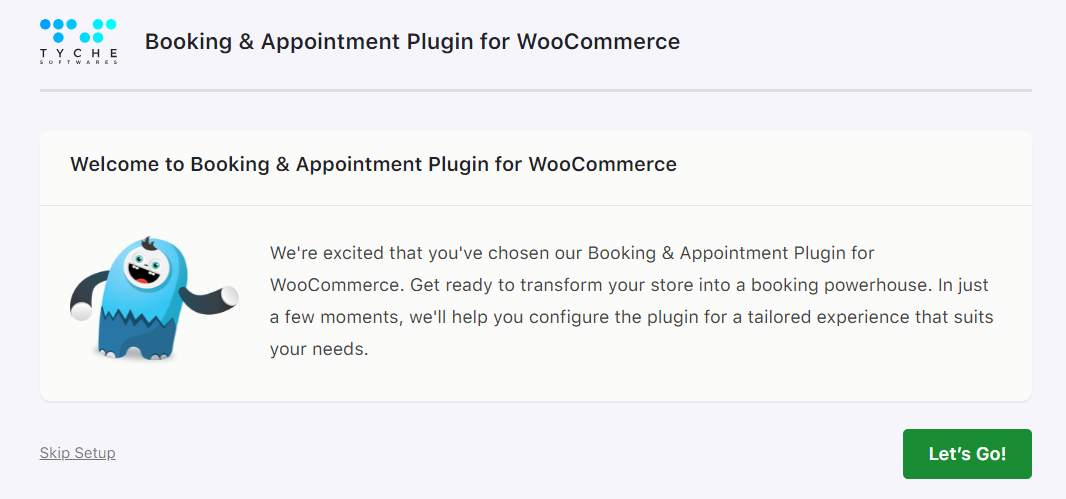
The setup starts off by welcoming you. Click Let’s Go! to proceed forward.
Next, configure the Booking Type settings, which include date and time format or the calendar theme:

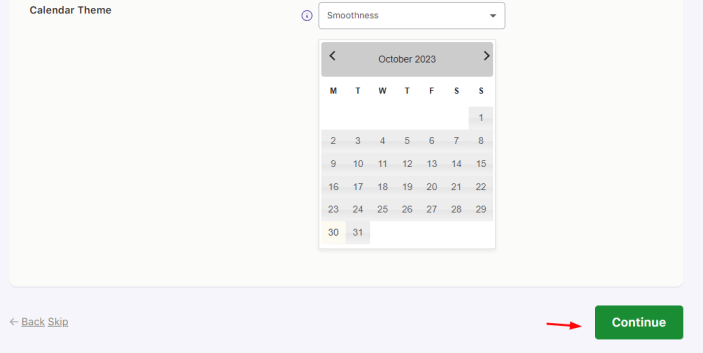
Click Continue and choose the Booking type. You may go with a Single Day booking and choose the enabled booking days as shown below:
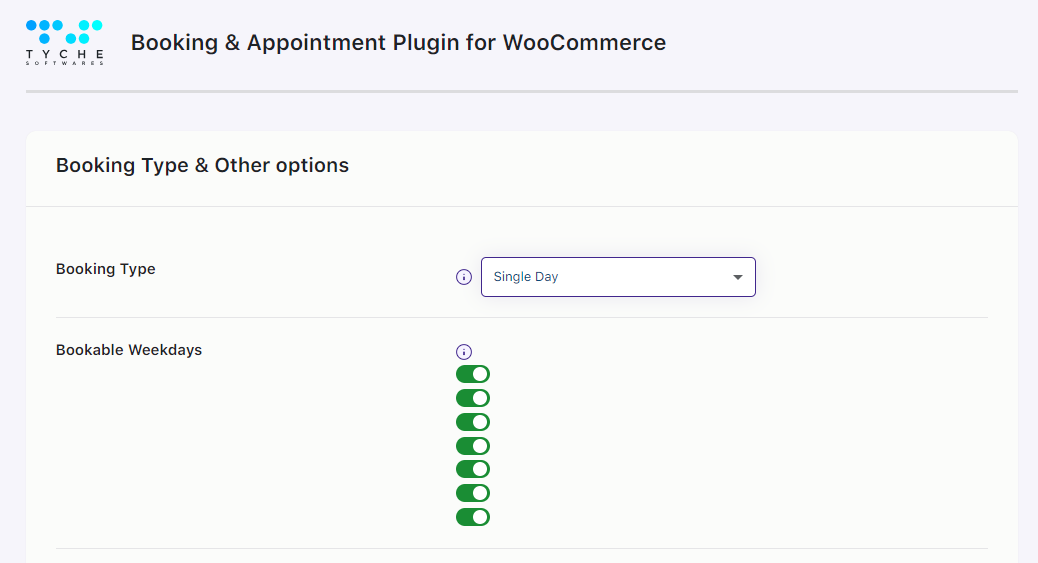
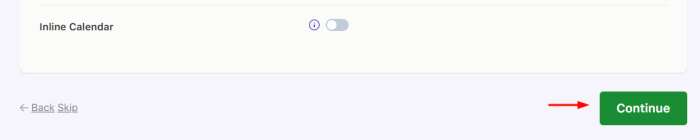
If you want to allow the customers to reschedule and cancel their bookings then enable these two settings next. By default, these will be disabled.


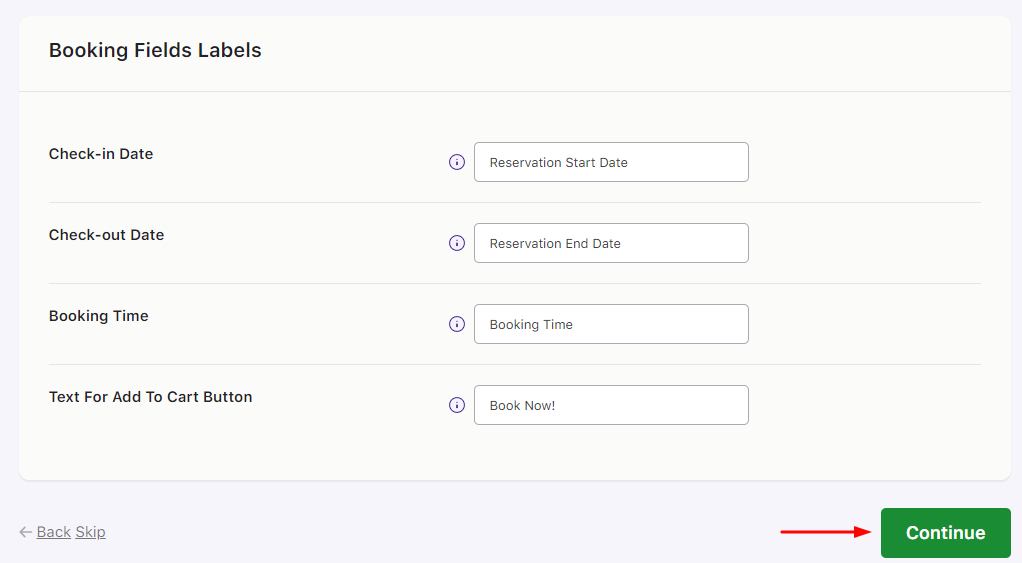
You will then be taken to the Booking Fields Labels section where you can change the text of various booking fields.
Lastly, the plugin will ask your permission to collect non-sensitive diagnostic data and usage information.
You may enable it and then either move on to creating a Bookable Product or Finish the setup.

This is how our setup wizard will help you learn more about our plugin by configuring all the basic and necessary settings!
Types of Bookings
↑ Back to topTypes of Bookings-Learn about the different booking types supported by the plugin and how to set them up for your products. Each booking type has unique settings for flexibility and convenience.
- Recurring Weekdays in Single Day Booking
- Specific Dates Booking
- Specific Dates & Recurring Weekdays Booking
- Multiple Nights Booking for Simple Products
- Multiple Nights Booking for Variable Products
- Minimum & Maximum Nights to Book
- Fixed Time in Date & Time Slot Booking
- Duration-Based Time Booking
- Setup Multiple Dates Booking
Settings
↑ Back to topFlexi Booking Options or Settings lets you configure global options, product availability, bulk booking rules, and vendor permissions.
- Global Settings
- Bulk Booking Settings
- Product Availability
- Vendor Options
Appearance
↑ Back to topAppearance -Customize labels, messages, and calendar views to enhance the booking experience.
- Labels and Messages
- Calendar
Integrations
↑ Back to topIntegrations – Connect your bookings to external services for automated notifications and calendar syncing.
Articles:
- Google Calendar
- Twilio SMS
- FluentCRM
- Zapier
- Outlook Calendar
- Exporting Product-Level Bookings to Google Calendar
Addons
↑ Back to topAddons – Extend the functionality of your plugin with optional add-ons.
Articles:
- Partial Deposits
- Recurring Bookings
- Printable Tickets
- Seasonal Pricing
- Rental System
- Multiple Time Slot Addon
Booking Management
↑ Back to topBooking Management lets you to create, view, and manage bookings in the admin and for customers.
- Create Booking
- Calendar Overview
- View Bookings
- View Bookings for Customers
Reminders
↑ Back to topReminders– Manage automated or manual email/SMS notifications for bookings.
- Create and Send Multiple Email or SMS Reminders Automatically
- Create and Send Reminder Emails Manually
Resources
↑ Back to topBooking Resources-Assign staff, equipment, or venues to bookings and manage availability.
- Adding and Viewing Resources
- Setting Availability of Resources
- Assigning Resources to a Product
- Using Resources for Different Booking Types
- Validation Messages for Resources
- Compatibility with Subscription & Variable Products
Maximum Bookings
↑ Back to topMaximum Bookings-Control how many bookings can be made for a product or time slot.
- Setup Lockout Limit for Variable Products
- Attribute-Based Maximum Booking Limits
- Maximum Bookings for Days, Dates, and Time Slots
Managing Time & Time Slots
↑ Back to topManaging Time Availability and Time Slots-Configure time availability and booking slots for different booking types.
- Manage Time Availability
- Set Up Specific Dates with Time Slot (Fixed Time)
- Set Up Time Slot Prices (Fixed Time)
Pricing & Special Rates
↑ Back to topPricing and Special Rtes for Booking– Set up multiple-day pricing, fixed block rates, and special prices for holidays or weekdays.
- Price by Range for Variable Multiple Nights
- Price by Range for Simple Multiple Nights
- Setup Fixed Blocks for Multiple Day Bookings
- Special Prices for Weekdays or Specific Dates
Advanced Booking Options
↑ Back to topAdvanced Booking Options -Enhance your booking products with features like multiple persons, purchase without date selection, and bookings requiring admin confirmation.
- Persons Feature
- Purchasing a Bookable Product Without Selecting Booking Details
- Set Bookable Products That Require Confirmation
Booking Widget & Blocks
↑ Back to topBooking Widgets and Blocks – Allow customers to search for availability and book directly from your website pages.
- Search Product Availability Using Booking Widget
- Available Bookings Block
Plugin Update & Data Management
↑ Back to topPlugin Update & Data Management – Update your plugin, import/export booking settings, and manage bookings freed up through cancellations.
- Updating the Plugin
- Import and Export Booking Settings
- Opening Booking Slots Through Admin’s Order Cancellations
Compatibility with other plugins
↑ Back to topCompatibility with other plugins – Ensure your bookings work seamlessly with multivendor setups, other WooCommerce extensions, and multiple languages.
Compatibility with Dokan Pro plugin
↑ Back to topCompatibility with Dokan Pro plugin – Understand how the Booking and Appointment plugin integrates with Dokan Pro to enable vendors to manage bookable products from their dashboards.
Compatibility with WooCommerce Multivendor Marketplace plugin
↑ Back to topCompatibility with WooCommerce Multivendor Marketplace plugin – Discover how the Booking and Appointment plugin supports the WooCommerce Multivendor Marketplace, allowing multiple vendors to sell and manage bookable products effortlessly.
What are the different types of bookings I can set up with this plugin?
There are six different bookings types for which products can be set up:
1. Single day bookings 2. Multiple night bookings 3. Single date with fixed time 4. Single date with duration based time bookings 5. Bookings with multiple dates 6. Multiple dates with fixed time
Is your booking plugin compatible with product types like variable, subscription, grouped, and composite and bundled products?
Our Booking plugin is compatible with all default product types that come with WooCommerce. Also, we have made it compatible with Bundle, Composite, bundled and Subscriptions product type. Subscriptions product type.
Does the plugin show availability on the frontend and bookings on the backend?
Yes. Customers can see real-time availability on the product page, while admins can manage all bookings in a calendar or list view from the dashboard.
Will this plugin work with popular WordPress page builders?
Yes, the plugin works seamlessly with major page builders like Elementor, Gutenberg, and others. Your bookable products and booking features will display correctly regardless of the builder used.
Can I restrict the number of bookings for each booking date?
Yes, by setting up the value in ‘Max Bookings’ option you can restrict the number of bookings for each date. For Single Day and Date & Time booking type we have ‘Max Bookings’ option and for multiple nights we have ‘Maximum Bookings On Any Date’ option in the Availability tab of Booking meta box.
Is it possible to change the booking details during the booking process?
Yes, we have Edit Bookings feature which allows editing the booking details on Cart and Checkout page. You can enable option from Booking-> Settings-> Global Booking Settings-> Allow Bookings to be editable.
Is it possible to view all the bookings from a single view?
Yes, we have View Bookings page where one can view, search and sort the bookings.
Can I update booking settings for multiple products in bulk?
Yes. Using the Bulk Booking Settings feature, you can apply the same booking rules to multiple products, categories, or even all products at once. This is ideal when your products share similar booking settings.
Can I set cancellation rules for my bookings?
Yes, customers can cancel their bookings up to a specified number of hours before the booking time.
Can I use the plugin to book physical spaces like meeting rooms, conference halls, or other premises instead of services?
Yes, the plugin can be used to make any product bookable, including physical spaces like meeting rooms, conference halls, or event venues.
Can bookings be automatically synced with Google Calendar?
Yes. By setting up Google API for products, you can import and export the bookings automatically to the Google Calendar. Product-level settings are in ‘Google Calendar Sync’ tab of Booking meta box on Edit Product page.
Can admins add bookings manually for orders received via phone, email, or in person?
You can create manual booking from Booking-> Create Booking page. You can create new order when manually creating the booking or you can add the booking to already existing order.
Is it possible to always display the Booking calendar on the front end product page?
Yes, by enabling ‘Enable Inline Calendar’ option the General tab of Booking meta box, the Booking calendar will be always visible.
Can I create bookable products quickly using pre-built templates?
Yes. The plugin includes pre-built booking templates for common use cases like rentals, appointments, events, and stays. You can use a template to create a bookable product instantly, then customize the settings to match your business needs.
Can customers pay first and choose their booking slots later?
Yes. Customers can complete a purchase without selecting booking details. After payment, they can log in to their account and choose their preferred booking dates and time slots.
Is it possible to allow the customer to make the booking without selecting the booking details?
Yes, we have ‘Purchase without choosing a date’ option in the General tab of Booking meta box which allows the customer to purchase the product without selecting the booking details.
Can I translate the plugin string into my native language? If yes, then how?
You can use .po file of the plugin for translating the plugin strings. Or you can use WPML plugin for translating strings as we have made our plugin compatible with WPML plugin.
Can the site admin approve or decline bookings before the payment is made?
Yes. By enabling the “Requires Confirmation” option in the General tab of the Booking meta box, the site admin can manually approve or decline bookings before the customer makes the payment.
Can I set different prices based on the booking duration?
Yes. You can charge different rates based on how long a customer books — for example, 1 day at one price, 2–5 days at another, and longer stays at discounted rates.
Can I create multi-day booking blocks with custom pricing and skip certain days?
Yes. You can use the Fixed Block Booking feature, which allows you to create booking blocks of a fixed number of days — for example, 1-week (7 days) or 2-week (14 days) blocks. You can assign different pricing for each block and configure which days are available, such as weekdays only.
Can I create bookings for multiple days with fixed time slots (for example, Monday to Thursday, 10 AM to 12 PM)?
Yes. Customers can book multi-day bookings with fixed time slots using its Multiple Dates booking type. This allows customers to select a set number of dates along with predefined time slots in a single booking. This is ideal for classes, training programs, and recurring services.
Can I add buffer days before and after a booking?
Yes. Using the Rental System add-on, you can block a specific number of days before the start date and after the end date of a booking. Once the booking reaches its lockout limit, the selected buffer days are automatically blocked in the booking calendar.
Can I block specific time slots on a particular date while keeping other slots available?
Yes, you can block certain time slots on any given date without affecting the availability of other slots on the same day. This is useful for businesses offering appointments, classes, or rentals that run multiple time slots per day.
Can I exclude the weekends for bookings as we do not take bookings on weekends?
Yes, you can exclude the weekends by disabling Saturday & Sunday (or any weekdays) in the Weekdays table in the Availability tab of our Booking meta box.
Can I charge customers based on the number of hours they book?
Yes. Using the Duration-Based Time booking type, pricing can be set on an hourly basis, and the total cost is calculated automatically based on the selected duration. For example, if the hourly rate is 1000 and a customer selects 3 hours, the total price will be 3000.
Can I offer different prices for adults and children and limit bookings per time slot?
Yes. The Persons feature allows you to set up person types (such as Adults and Children) with different pricing. You can also define fixed time slots and set a maximum capacity for each slot.
Can I set different prices for different booking durations (hourly, half-day, full-day, etc.)?
Yes. Using the Fixed Time booking type, you can create different time slots (such as hourly, half-day, and full-day) and assign separate prices to each slot. This lets you offer flexible pricing based on booking duration.
Is the plugin compatible with multilingual plugins like WPML?
The plugin is made compatible with WPML. We do have a certificate of compatibility from the WPML.
Is your Booking plugin compatible with multi-vendor marketplace plugins such as WCFM and Dokan?
Yes. Our Booking & Appointment plugin is compatible with both WCFM and Dokan multi-vendor marketplaces.
Can customers reschedule their booking after placing an order?
Yes, we have Reschedule Bookings feature which allows to reschedule the bookings from My Account page.
Can I force customers to book a minimum number of nights for a reservation?
You can set it for all the bookable product by setting value to ‘Minimum number of days to choose’ on Booking-> Global Booking Settings page. Also, yo can enable minimum numbers of nights for particular product by setting value to ‘Minimum number of nights to book’ option in the Availability tab of Booking metabox.
Can I set booking prices based on a range of nights (for example, 1–3 nights, 4–7 nights)?
Yes. we have ‘Price By Range Of Nights’ feature which allows store owner to create ranges for the product. Range price can be set per day basis or a fixed price.
Can I prevent double bookings and manage availability for products or services?
Yes. You can configure bookings so that once a customer books a product or service for a specific date or time slot, other overlapping bookings are automatically blocked.
Can I display available bookings for all my products on a single page of my website?
Yes. Using the Available Bookings Block, you can display your products’ availability in a list or calendar view, helping customers easily see what’s available and book directly. You can also filter by products, categories, or resources.
Can admins block specific days for individual products or for all products (for example, holidays)?
Yes. Admins can block specific dates at the global level to apply to all products, or at the product level for individual items. This makes it easy to disable bookings on holidays, festivals, or non-working days.
Can I print or get CSV of all the bookings?
Yes, on View Bookings page, we provide two buttons, one is for Printing the bookings and another is for download the CSV of the bookings.
Questions & Support
↑ Back to topI have another question.Please fill out this pre-sales form.

