
When a customer places an order via the Stripe extension, you may want to send additional details to Stripe as metadata.
To do this, you can use the wc_stripe_intent_metadata filter via some custom PHP code in your theme’s functions.php file or a plugin like Code Snippets.
Here’s an example snippet:
add_filter( 'wc_stripe_intent_metadata', 'add_my_custom_stripe_metadata', 10, 2 );

function add_my_custom_stripe_metadata( $metadata, $order, $prepared_source = null ) {

	// Add name, quantity, and price for each line item.
	$count = 1;
	foreach ( $order->get_items() as $item_id => $line_item ) {
		$product = $line_item->get_product();
		$product_name = $product->get_title();
		$item_quantity = $line_item->get_quantity();
		$item_total = $line_item->get_total();
		$metadata[ 'Line Item ' . $count ] = 'Product name: ' . $product_name . ' | Quantity: ' . $item_quantity . ' | Item total: ' . number_format( $item_total, 2 );
		$count += 1;
	}

	// Add whatever custom key/value pair you want. :)
	$metadata['my_custom_key'] = 'An example custom value.';

	return $metadata;
}
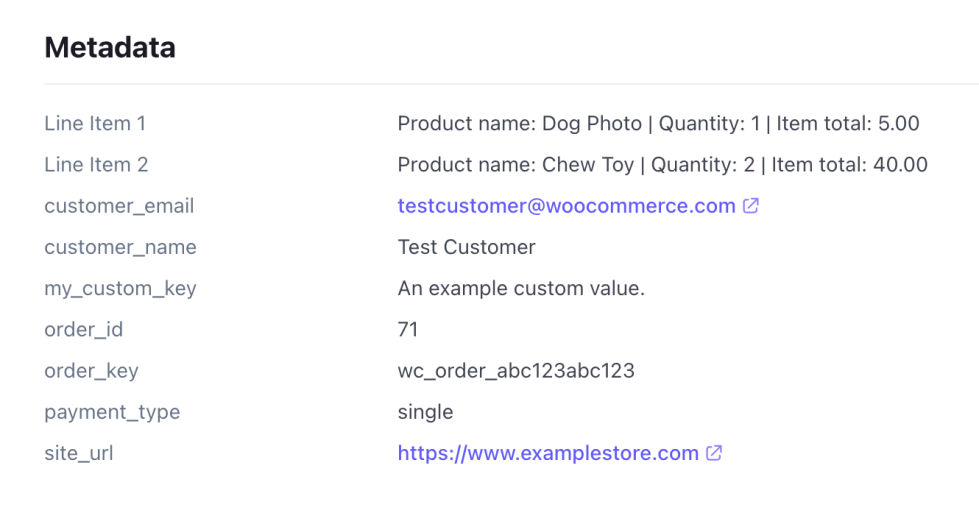
Here’s how the metadata from that snippet appears in the Stripe dashboard:
NOTE: We are unable to provide support for custom code under our Support Policy. If you need to customize a snippet further or extend its functionality, we highly recommend Codeable or a Certified WooExpert.

