
Moving an existing affiliate program to Affiliate and Referral Program for WooCommerce comes down to three steps: bring your affiliates into this plugin, re-create your commission plan, and give affiliates their new links. This page is the checklist that keeps the move orderly. Part of the Affiliate and Referral for WooCommerce documentation.
What carries over — and what does not
↑ Back to top- People – your affiliates join this plugin: they register as affiliates, you add them one by one, or you import the ones who already have an account on your store from a CSV file.
- Rules – your commission plan is re-created as commission rules.
- Assets – the plugin generates its own referral code and link for each affiliate, with QR codes and product banners on their dashboard. Links created by your previous plugin are not guaranteed to keep working.
Every affiliate starts here with an empty wallet and no referral history. Before you shut the old program down, export its records for your files and settle its outstanding balances there.
Step 1: Bring your affiliates into this plugin
↑ Back to topSet up the registration form and send your affiliates the signup link from your own mailing tool; see Affiliate Registration Form Setup in WooCommerce. Customers who already have an account on your store can join from the affiliate page with Become an Affiliate. You can also add an affiliate yourself: tick Become Affiliate when you create the user under Users > Add New User. Two settings make the move smoother:
- Turn on Affiliate Verification under Advanced Features > General, so you approve each returning affiliate and can screen out strangers who find the form during the move. See How to Approve and Manage Your Affiliates.
- Add your own question to the form — for example “your affiliate name in the old program” — so you can match new accounts to old records.
The plugin generates its own referral code and link for each affiliate, and they find it on their affiliate dashboard. Links created by your previous plugin are not guaranteed to keep working, so ask affiliates to share their new links and update any promotions that are running.
Import affiliates who already have an account
↑ Back to topWhen your affiliates already have WordPress accounts on this store, import them instead of asking each one to register. Go to: WooCommerce > Affiliate & Referral > Affiliates and press Import affiliates. Download the sample file, fill one row per user and choose the file; Check file shows what each row will do before anything changes, and Import applies it.
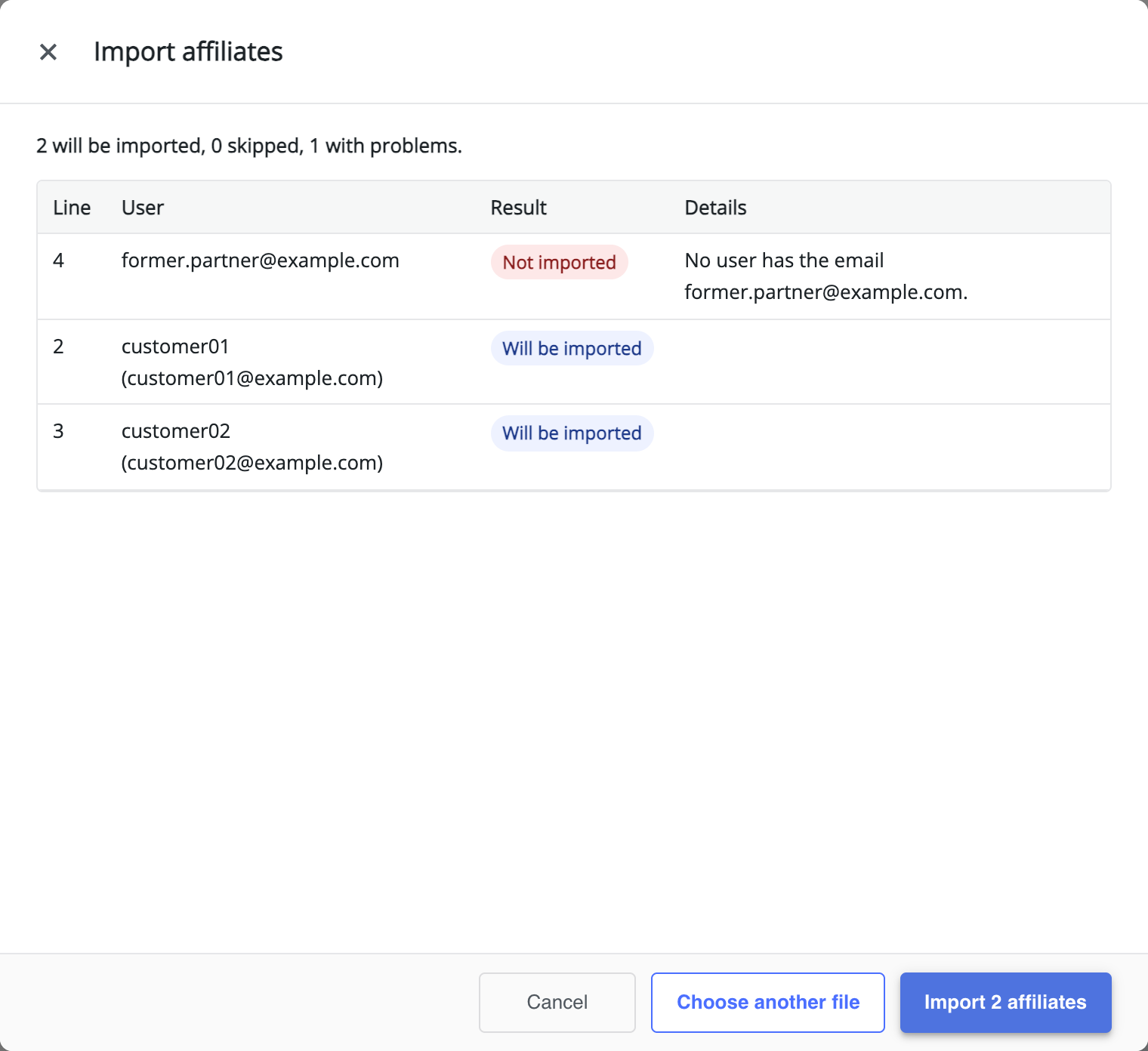
- Who – each row names an existing user by Email, Username or User ID. The importer does not create users; add them in WordPress first.
- Optional columns – Referral Code (letters, digits, – and _, unique on the store), Parent Email (or Parent ID, Parent Name, Parent Referral Code) to place the affiliate in your MLM tree, Level with Level locked, and Groups separated by semicolons. A file exported with Export All Affiliates CSV can be used as it is; columns the importer does not use are listed and ignored.
- Checks – a row is refused with its reason when the user does not exist, the code is taken, the level or group does not exist, the parent is not an affiliate, has no free place under your MLM settings, or would create a loop. Users who are already affiliates are skipped, so importing the same file twice changes nothing.
- Result – imported affiliates are approved straight away. No welcome emails or signup bonuses are sent. If automatic affiliate coupons are on, create the imported affiliates’ coupons afterwards with Create coupons for existing affiliates under Advanced Features > Coupons.
The importer brings in people and their place in your program only: earnings, wallet balances and payout history are not imported, and links created by your previous plugin are not guaranteed to keep working.
Step 2: Re-create your commission plan
↑ Back to topWrite down the rates your old program paid, then map them onto commission rules; see How to Set Up Referral Commission Rules:
- A store-wide rate – set it on the Store default rule.
- Rates for particular products or categories – add rules with product, category or tag conditions; see Commission per Product, Category or Tag.
- Special rates for partner categories – put those affiliates in a group and give the group its own rule; see How to Approve and Manage Your Affiliates.
- Rates that rise with performance – use Performance-Based Affiliate Commission with Affiliate Levels.
- One-off rewards for milestones – use Performance Bonuses and Rank Rewards for Affiliates.
- Commission on recruits’ sales – use How to Set Up MLM in Your Affiliate Program.
Updating from an earlier version of this plugin is different: your affiliates, referrals and settings stay in place. See Upgrading to Version 3.0.0 and Converting to Commission Rules.
Step 3: Give affiliates their new links and creatives
↑ Back to topEach affiliate’s dashboard has everything they need to promote you again: Generate Link for referral links to any page, QR codes, and product banners. See How to Create and Share Referral Links and How to Create Affiliate Banners and Creatives. For affiliates who promote by code, create affiliate coupons; see How to Track Affiliate Sales with Coupon Codes. Ask everyone to replace the old links on their sites and profiles with the new ones.
Give the old program a retirement date and say it in the invitation: “the old dashboard closes on the 30th.” A date moves people; an open-ended request does not.
FAQ
↑ Back to topWill links from my old program keep working?
↑ Back to topNot guaranteed — this plugin creates its own referral code and link for each affiliate. Ask affiliates to share their new links and update the promotions they are running.
Do affiliates keep their balances and history?
↑ Back to topNo. Each affiliate starts here with an empty wallet and no referral history. Settle outstanding balances in the old program, and keep its records for your files.
Can both programs run during the transition?
↑ Back to topYou can keep the old program open while you finish the move, but plan to retire it quickly — running two ledgers side by side prolongs split bookkeeping. More questions are answered in the Affiliate and Referral Program: FAQ.

