
When a customer buys a licensing product, API Manager adds its licenses to the order. You’ll find them in two boxes on the order screen, Licensing and License activations, and the customer sees the same licenses under My Account » License keys.
Licensing
↑ Back to top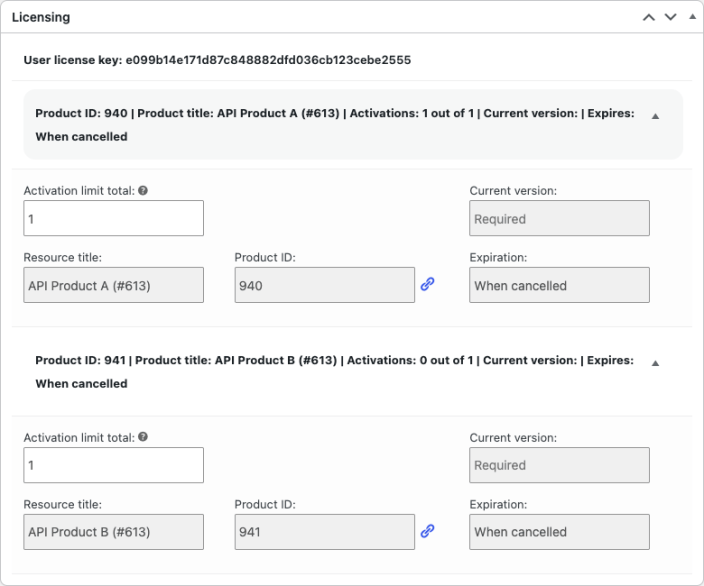
Each licensing product on the order gets its own row, with its license key, activation limit, current version, product ID, and when access expires. To give a customer more activations, raise the activation limit and click Update. For a license that isn’t tied to a subscription, you can extend it by picking a later expiration date. A subscription license follows the subscription’s own dates.
License activations
↑ Back to top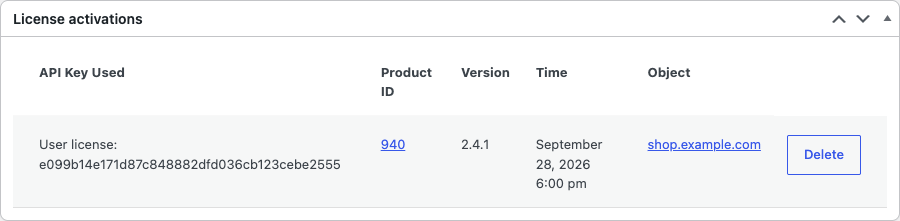
Every site or device the customer has activated, with the key they used and when. Delete an activation to free up its slot. The customer’s software then shows as not activated until they activate it again. Customers can also delete their own activations from My Account » License keys.
For finding licenses across the store, rebuilding an order’s licenses, and what refunds and status changes do to them, see Manage API Manager licenses and activations.

