
Pay Later is a feature that enables customers to pay over time, while you receive payment upfront, without any additional cost. This feature is available in select locations and consists of the Pay Later button and Pay Later messaging to promote the Pay Later option to eligible buyers.
The Pay Later tab provides a configuration interface for the Pay Later option, which is only available to customers in eligible countries. In this section, you can enable or disable the Pay Later button and Pay Later messaging, as well as customize their appearance for individual locations.
Pay Later messaging
↑ Back to topPay Later messaging lets your buyers know they can buy now and pay later when checking out with PayPal. Adding messaging to your website can help improve conversion, attract new customers, and increase order values. Pay Later messages are dynamic, enabling you to display your customers’ specific Pay Later offer based on the contents of their shopping cart.
By default, the following Pay Later messaging locations are available:
- Single product page
- Cart
- Checkout
- Home
- Shop (includes Search and Product Categories pages)
The messaging can be configured to match your website style with the settings available in the new Pay Later messaging configurator:

Pay Later messaging and configurator languages depend on the primary country of the PayPal merchant account.
Pay Later button
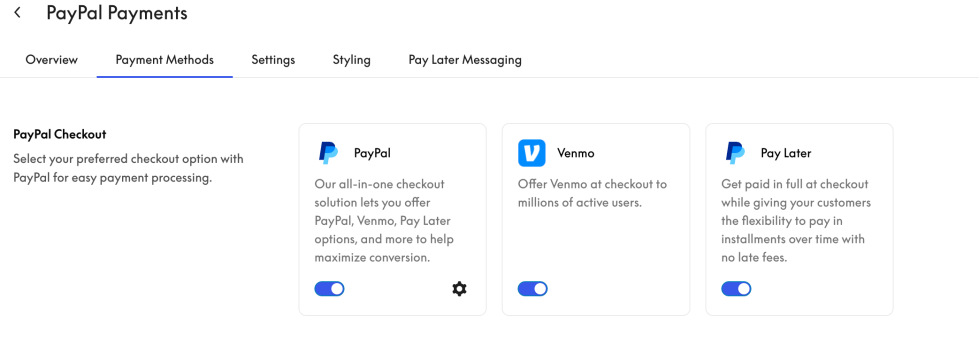
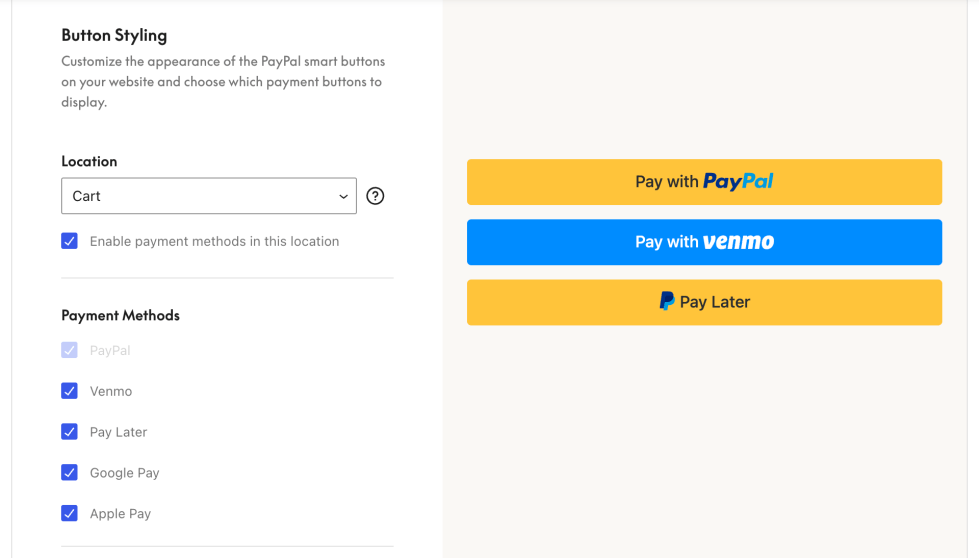
↑ Back to topTo enable the Pay Later button, PayPal Smart Buttons must be enabled. The Pay Later button can only be displayed in conjunction with the PayPal button and cannot be shown independently.
The location of the Individual Pay Later button can be configured, depending on where the PayPal button is enabled. The Pay Later button can be activated via the Payment Methods tab, and its location can be set via the Styling tab.
Pay Later eligibility
↑ Back to topPayPal Pay Later is available in the following regions:
- United States: Pay in 4 and Pay Monthly. For full details, see Pay Later for the US.
- Canada: Pay in 4. For full details, see Pay Later for Canada.
- Australia: Pay in 4. For full details, see Pay Later for Australia.
- Germany: PayPal Ratenzahlung and Pay in 30. For full details, see Pay Later for Germany.
- Spain: Pay in 3 installments. For full details, see Pay Later for Spain.
- France: Pay in 4X. For full details, see Pay Later for France.
- Italy: Pay in 3 installments. For full details, see Pay Later for Italy.
- United Kingdom: Pay in 3 and PayPal Credit. For full details, see Pay Later for the UK.