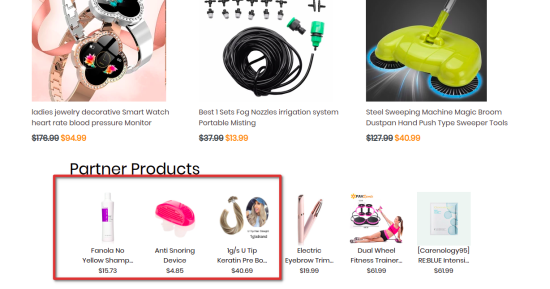
Sixads enables your eCommerce store to exchange user traffic with other stores that have Sixads installed. Select products from your store list, and six random products are advertised on stores with Sixads.
A summary of how the app works
↑ Voltar Para o Topo
- Install “Sixads” plugin.
- Set up your ads.
- Adjust your settings and targeting.
- Review your results.
- Start scaling your ads that work best.
Webhooks
↑ Voltar Para o TopoWooCommerce shop admin page
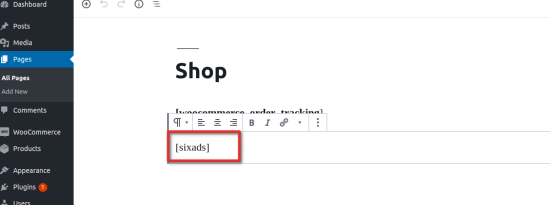
↑ Voltar Para o Topo In order for this extension to work, a user must add a short tag [sixads] to the pages where the advertisements will be shown.
Sixads onboarding procedure
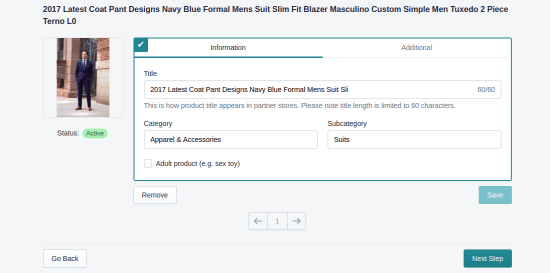
↑ Voltar Para o Topo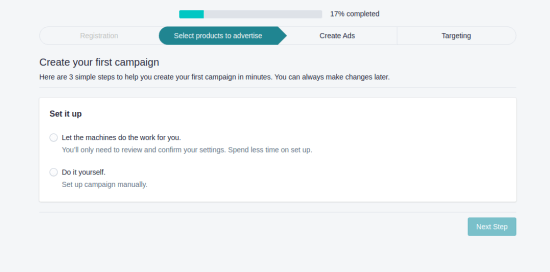 You can change the ads’ title, category and subcategory. This will affect where the ad will be shown. Using machine learning we try to advertise your products in similar categories as the product itself.
 After the onboarding procedure, you will be able to track the performance of the ads in the analytics tab.

Paid features
↑ Voltar Para o Topo