
AI Product Recommendations transforms your WooCommerce store with intelligent AI-powered shopping. Features include personalized product recommendations, an interactive AI shopping assistant that answers customer questions, advanced upsell and cross-sell suggestions, and MCP WooCommerce integration for seamless AI model connectivity.
Installation
↑ Back to topTo start using a product from WooCommerce.com, you can use the “Add to store” functionality on the order confirmation page or the My subscriptions section in your account.
- Navigate to My subscriptions.
- Find the Add to store button next to the product you’re planning to install.
- Follow the instructions on the screen, and the product will be automatically added to your store.
Alternative options and more information at:
Managing WooCommerce.com subscriptions.

Setup and Configuration
↑ Back to topGetting started
↑ Back to topTo set up your store with AI Product Recommendations:
- Go to: AI Product Recommendations > General
- Enter your OpenAI API key and enable Enable OpenAI.
- Enable Enable WooCommerce MCP for advanced AI model integration (optional).
- Go to: AI Product Recommendations > AI Features
- Select which AI features to enable and click Settings for each to configure individually.
- Save changes.
Advanced configuration
↑ Back to topThe plugin has 4 main tabs in the admin interface. Here’s what each tab controls:
1. Dashboard Tab
- Overview of plugin status and quick links.
- Shows enabled AI features and their configuration status.
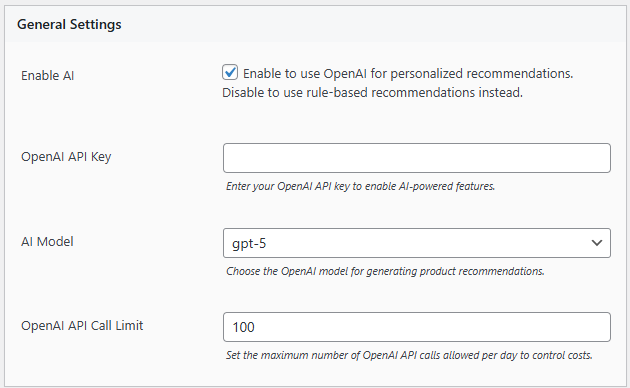
2. General Tab
- Add your OpenAI API key for AI-powered recommendations.
- Enable OpenAI – Toggle to activate/deactivate AI features.
- Enable WooCommerce MCP – Toggle to enable Model Context Protocol support for advanced AI integrations (optional).
3. AI Features Tab
Configure the 4 available AI features. Each feature has individual settings:
- AI Shopping Assistant
Interactive chat widget for customer support. Click Settings to configure welcome message, display position, languages, guest access, and token limits. - AI Product Recommendations
Smart product suggestions based on store data. Click Settings to set display locations, recommendation count, and result filtering. - AI Personalized Recommendations
Customer-specific suggestions based on browsing and purchase history. Click Settings to customize relevance parameters and display options. - AI Upsell & Cross-sell Recommendations
Suggest relevant products to increase order value. Click Settings to configure strategy, triggers, and placement.
4. Languages & Keywords Tab
- Select supported languages (35+ languages available).
- Auto-detect customer language or allow manual selection.
- Configure keywords for improved AI understanding and product matching.
Usage
↑ Back to topAI Product Recommendations offers multiple ways to provide intelligent shopping experiences:
- Automatic Recommendations
Once configured, AI recommendations automatically display on selected pages (shop, product pages, cart, checkout). - AI Shopping Assistant
Interactive chat widget appears on your store, allowing customers to ask questions about products and receive intelligent suggestions in 35+ languages. - Manual Placement
Use shortcodes to display recommendations anywhere on your store:[azentai_ai_assistant],[azentai_product_recommendations],[azentai_personalized_recommendations],[azentai_upcross_recommendations] - Personalized Shopping Experience
Customers see products tailored to their browsing and purchase history. - Upsell & Cross-sell
AI intelligently suggests relevant products to increase average order value. - MCP Integration
Advanced AI models can access store data via Model Context Protocol for deeper insights and custom AI applications.
FAQs
↑ Back to topGet answers to common questions about AI Product Recommendations and the AI Shopping Assistant.
What is the AI Shopping Assistant?
The AI Shopping Assistant is an interactive chat widget that helps customers find products by answering questions about your store’s inventory. It supports 35+ languages and provides personalized product recommendations.
Where do recommendations and the AI assistant appear?
You can choose to display recommendations on product pages, cart, checkout, or anywhere using shortcodes. The AI assistant can be set to appear globally, on shop pages, or on product pages.
Is this plugin compatible with my theme?
The plugin works with most WooCommerce-compatible themes. The AI assistant and recommendations are displayed in a responsive widget compatible with all modern themes.
How do I customize the look of recommendations and the AI assistant?
Go to Settings to adjust colors, styles, layouts, and positions for both recommendations and the AI assistant. The chat widget is fully customizable to match your brand.
What is MCP WooCommerce support?
MCP (Model Context Protocol) allows advanced AI models and LLM applications to securely access your store data for custom AI integrations, analytics, and intelligent automation.
How much does it cost to run the AI features?
Costs depend on your OpenAI API usage. You can set token limits and guest access controls to manage expenses. The plugin provides detailed analytics to track usage and ROI.
Does this support multiple languages?
Yes! The AI Shopping Assistant automatically detects customer language and responds in 35+ languages including English, Chinese, Japanese, Spanish, French, Vietnamese and more.

