
Customers Cleanup helps you maintain a healthy WooCommerce customer database by identifying inactive and unsuccessful checkout accounts.
Installation
↑ Back to topTo start using a product from WooCommerce.com, you can use the “Add to store” functionality on the order confirmation page or the My subscriptions section in your account.
- Navigate to My subscriptions.
- Find the Add to store button next to the product you’re planning to install.
- Follow the instructions on the screen, and the product will be automatically added to your store.
Alternative options and more information at:
Managing WooCommerce.com subscriptions.

Setup and Configuration
↑ Back to topGetting started
↑ Back to top- Go to: WooCommerce > Settings > Customers Cleanup.
Settings
↑ Back to top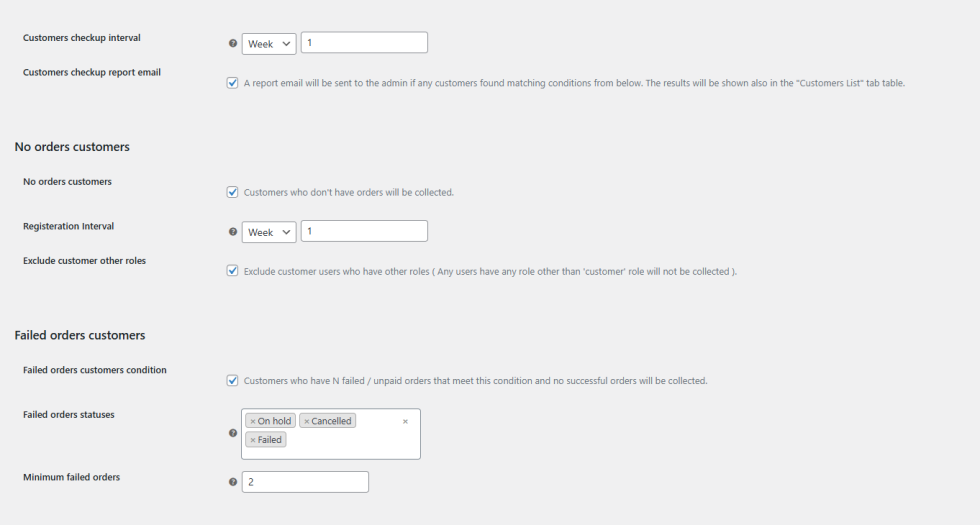
Customers Checkup Interval
This will determine how often the background process will run to check for matching customers to update the collected customers list.
Customers checkup report email
Checking this option will let the plugin send you a report email for the collected customers summary.
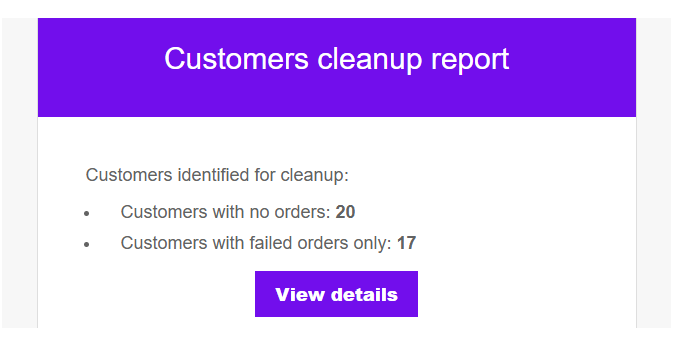
No orders customers
This option will collect customers accounts that older than select registeration interval and don’t have any orders.
Failed orders customers
This option will collect customers accounts that have at least X Failed orders from the selected failed order statuses and don’t have any successful orders.
Customers List
↑ Back to top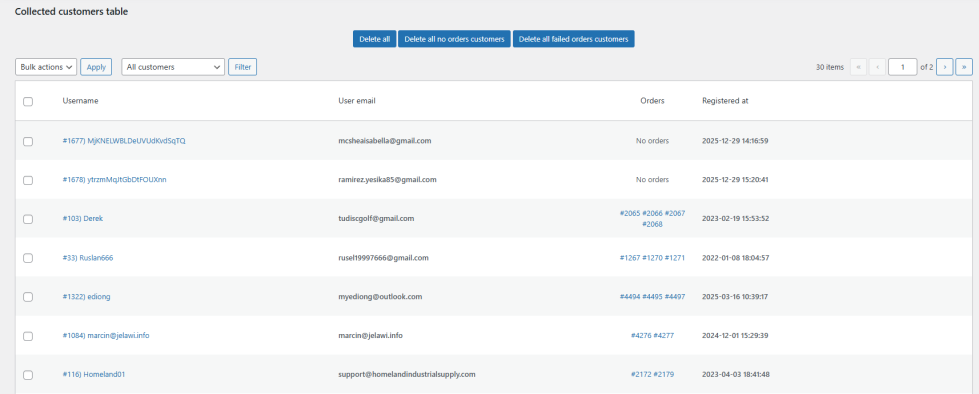
In this tab, you will find the collected customers matching the conditions set in the Settings tab page
from there you can check the customers accounts, Only no-orders customers, Only Failed Orders customers. also you can delete accounts in bulk or individually.
FAQs
↑ Back to topHelp customers by answering commonly asked questions.
How does this help with spam bots?
Spam bots often create customer accounts and failed orders even when checkout protection is enabled.
This plugin finds and reports those bot-generated customers, allowing you to clean up the damage they leave behind.
Will this slow down my store?
No.
All customer analysis runs in background batches, avoiding slow queries, memory issues, or frontend performance impact.
Does this plugin automatically delete customers?
No.
The plugin never deletes customers automatically.
It only collects and displays customers that match the configured conditions so you can review them first.

