Conditional Payment Methods For WooCommerce helps you to show/hide available payment methods based on the customer’s billing or shipping address, or order total. This allows you to increase conversions, reduce abandonment and fraud and payment processing fees.
Installation
↑ Back to top- Download the .zip file from your WooCommerce account.
- Go to: WordPress Admin > Plugins > Add New to upload the file you downloaded.
- Activate the extension.
More information at: Installing and Managing Plugins.
Enable plugin updates
↑ Back to topPlease follow the steps listed here to enable plugin updates for Conditional Payment Methods For WooCommerce.
Setup and Configuration
↑ Back to topTo find the settings, go to WordPress Admin > WooCommerce > Settings > Payments > Conditions.

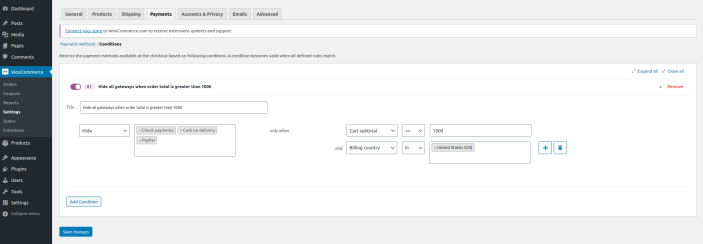
- Name of the condition: Give the condition a name for your reference.
- Show/Hide: Select whether you want to include or exclude payment methods on the checkout page
- Payment Methods: Select payment methods that you want to show/hide on the checkout page
- Rules: Here you can add rules which will determine whether to show/hide payment methods on the checkout page.
Rules
↑ Back to topCurrently, the following rules are available:
- Billing country in/not in
- Billing state/county in/not in
- Billing city in/not in
- Billing postcode in/not in
- Shipping country in/not in
- Shipping state/county in/not in
- Shipping city in/not in
- Shipping postcode in/not in
- Cart subtotal is greater/less than or equal to
How does it work?
↑ Back to topSuppose you have set up exclude all payment methods except Direct Bank Transfer if the cart subtotal is greater than $1000 AND the billing country is the United States (US). This is how you can set it up:
FAQ’s
↑ Back to top1. If a payment method is not shown on the checkout page (since the rules are not met), will it automatically show up if the rules are met?
↑ Back to topYes
Questions and Support
↑ Back to topHave a question before you buy it? Please fill out this pre-sales form.
Already purchased and need some assistance? Get in touch with the developer.