
TIV.NET INC., based in Toronto, Canada, develops and supports the following WooCommerce extensions:
↑ Back to top| TIV Admin Tools | A set of utilities for WooCommerce shop owners, administrators, and developers to secure, tune, and debug their store. |
| TIV Globus | Makes WooCommerce multilingual – translate product descriptions, categories, attributes, and tags. |
| TIV Multi-currency | Lets customers pay in the currency of their choice. |
| TIV Paywall | Enables the monetization of various types of content, including videos, documents, etc., by allowing the sale of access to it. |
| TIV Sales Assistant | Manage store-wide sales from one place – schedule discounts by category, tag, and country instead of editing products one by one. |
When you submit a support request, you will receive a response from a TIV.NET support representative.
When You Contact Technical Support
↑ Back to top- First, make sure you have the latest versions of WordPress, WooCommerce, and all its extensions. It will be very hard for us to assist you with outdated software you might have installed.
- Try to detect which combination of the active plugins causes the problem. Deactivate all the non-essential plugins first, then check the remaining for possible conflicts.
- Pay special attention to plugins dealing with pricing. A notable example is the “Wholesale Pricing” suite, which is not compatible with Multi-currency. Please check the Compatibility document.
- Write down the exact steps to reproduce the problem. Make screenshots showing all the steps.
- Also make screenshots of the settings tab. We’ll need that information to be able to reproduce your environment on our server.
- Submit a support ticket: https://woocommerce.com/my-account/create-a-ticket/.
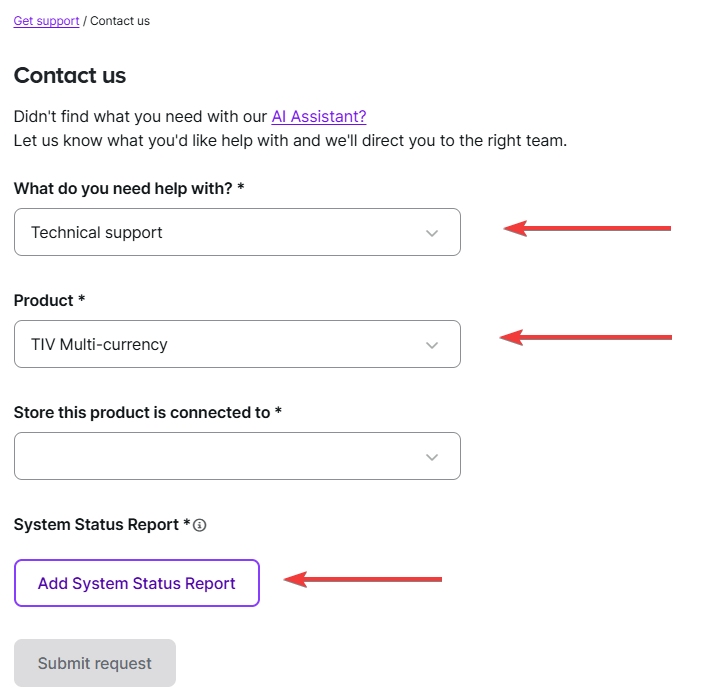
- Choose our extension from the dropdown list. Do not forget to add the System Status Report
- If you are reporting a conflict between our extension and another plugin you have purchased from WooCommerce, please also submit the same ticket again, choosing the other extension from the list. This way, all parties will be aware of the issue.
- Note: if the conflicting plugin is not one of the WooCommerce-sold products, regrettably, we won’t be able to assist you. Their authors, however, can. Ask them to contact us.
- Choose our extension from the dropdown list. Do not forget to add the System Status Report
- When you receive the confirmation from us that we’ve received your request, please reply with all the details and screenshots.
Have a question related to billing or your account?
↑ Back to topPlease choose the “Help with my account” tab when you submit a request or email help@woocommerce.com.
Thank you!
The TIV.NET Team

