
Smart Coupons provide a powerful, “all-in-one” solution for gift cards, store credits, discount coupons, and vouchers extending the core functionality of WooCommerce coupons.
Smart Coupons also provides advanced coupon restrictions based on user roles, product attributes, product taxonomy and others.
This doc article explains how you can restrict the usage of a coupon to the specified user roles.
Restricting coupons by user roles is one of the best tricks to stop the misuse of a coupon. The coupon can only be used by specific people like your customers and subscribers.
How to set up user-role based coupon
↑ Back to top- Navigate to WordPress Admin panel > Marketing > Coupons.
- Create a new coupon or open an existing one. Enter the required details.
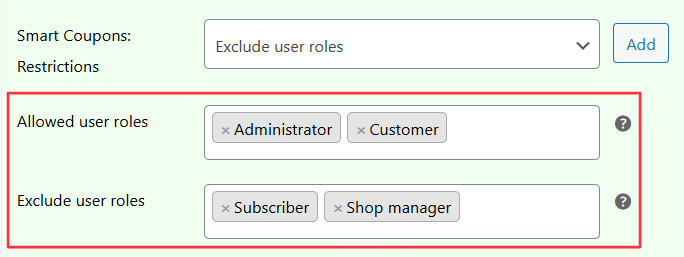
- In the “Usage restriction” tab, under the Smart Coupons Restrictions dropdown field, select “Allowed user roles” and then click on the “Add” button.
- In the Allowed user roles field choose the user role/s on which you want to allow the usage of this coupon. In this example, the coupon will get applied only if the user role is a ‘Administrator’ or ‘Customer’.
- Again, from the Smart Coupons Restrictions dropdown, select “Exclude user roles” and click on the “Add” button.
- In the Exclude user roles field choose the user role/s on which you want to exclude the usage of this coupon. In this example, the coupon will not get applied if the user role is a ‘Subscriber’ or ‘Shop manager’.
- Publish or Save the coupon.
That’s it.
Note – You can also combine other coupon restrictions like location, payment methods in combination with the user role restrictions.

